Experimenting with Photomatix and HDR

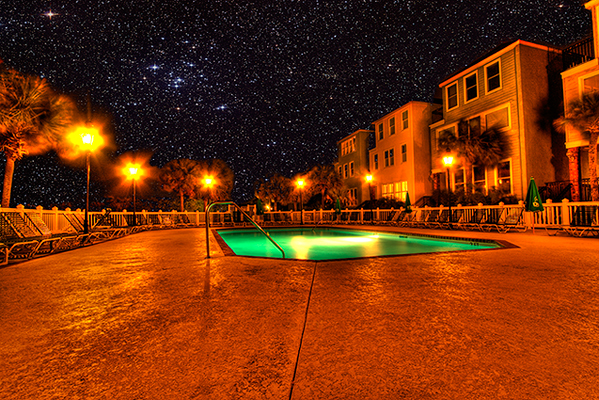
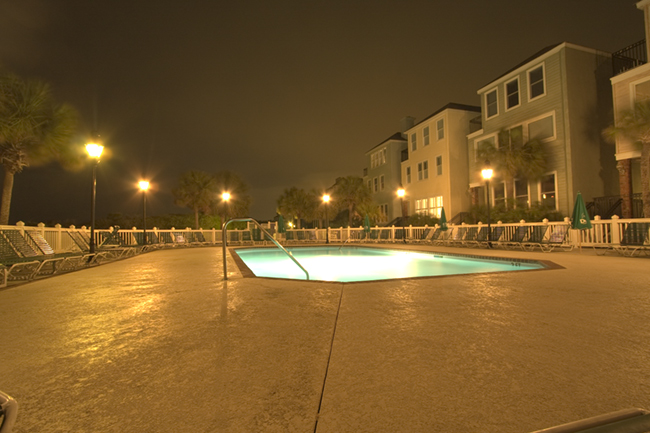
For a while now I’ve been meaning to devote some time to experimenting with HDR – specifically comparing Photomatix and Photoshop in their production of HDR photographs.  The industry preference toward the former is there for a very good reason.  Photomatix produces much better results.  Just look at this final shot (be sure to click the image for a larger view – the blog restrictions on size really don’t do it justice):

final_hdr_blog

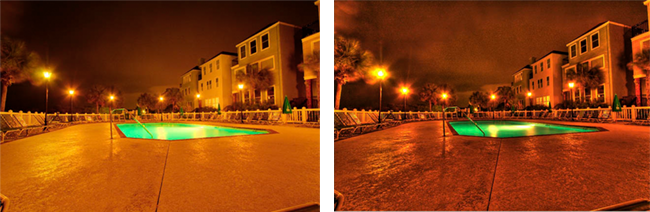
Now, in the interests of full disclosure, I did do some additional post processing work even after the HDR processing to get the above results.  But Photomatix was superior for a number of reasons.    For starters – Photomatix gives you options in what type of output you want.  Here are the two results, side-by-side, that I got from Photomatix:

sidebyside

The first was the result of  processing from the Tone Compressor tab and the latter of Details Enhancer tab processing.  As you can see, the first produced a smoother sky, but left the foreground a little flat, while the latter had more texture and, well… dynamic range to it.  So, I decided to go with the latter in my post processing.  The Photoshop alternative, however, produced something even less desirable than either of the above.  Take a look:

ps_hdr

Not only are the luminosity levels less interesting, but there’s literally no tone curve application.  No color, no tone curve mapping, and decidedly no interest when you consider the options from Photomatix.  I am in the process of putting together a tutorial of how I got the final result, so be on the lookout for that in the next few days.  In the meantime though, I’d like to take a moment to say “Thanks” to fellow NAPP member,  Elizabeth Gast (a.k.a. Firgs,) for the kind thoughts she has over on her blog – Design by Firgs – where she talks up a shot I took a while ago that is premiering on hew new series “Accidentally Awesome” today, so be sure to stop over there and give her a shout-out!  Until tomorrow – Happy Shooting!

Portraits, Promotions, and Planning

This week’s podcast episode should be available shortly over at Personal Life Media.   You’ll want to listen when you really can dedicate the 25 minutes as it’s a pretty rapid fire show this week.  A couple learning opportunities presented themselves to me recently and I wanted to share these before they got too fuzzy.  As a result, I didn’t really get into the news of the last week, or address any listener questions.

So, the show notes will be pretty short and sweet, but here they are:

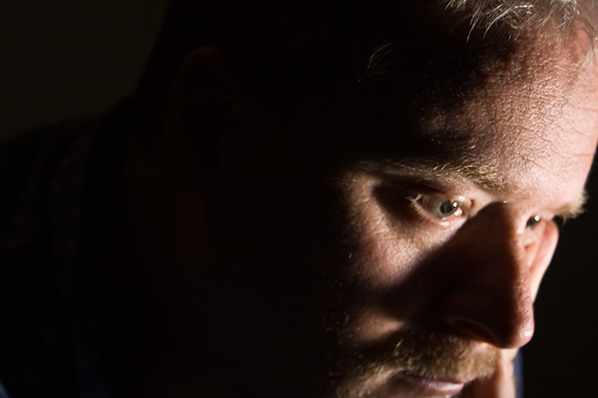
First up, I took a moment to challenge the listening audience to take a whirl at self portraiture.  In the interests of sharing efforts in that vein myself, here was one of the better ones from last night:

selfportrait

I also took a look at the idea of self-promotion, and that the listening audience should not be following my example thus far.  Use your blog to promote your work!  That’s what blogs are for – and never sell yourself short!  For all the details, make sure to catch that segment.

Last but not least, when you are involved or asked to participate in a photo shoot of some sort, take ownership to the extent that you are able in the planning and logistics – it will only help you in the long run.

It’s a busy day, so not much time for the other incidentals – happy shooting and we’ll see you back here again tomorrow!  Diggs, reviews, and such (as always) are appreciated and encouraged!

No Trumpts, No Fanfare, Nada

As I was sorting through the CB archives for some content to update for todays post, it dawned on me that I blew right past post #400 without even a mention of thanks to anyone.  So, at post #411 (see, I really blew right past it), let me take a moment to give some belated thanks to the listening and reading audience for the past two plus years…

Your comments, feedback, emails, insights and thoughtful notes over this time have been very helpful and motivating in keeping the ball rolling, often through some rather tedious times.  I’ve had people share efforts to increase visibility through iTunes reviews, Digg promos, generous donations for offsetting bandwidth, Tweets and Re-tweets, pretty much the whole schmear!  It truly is humbling to see the amount of support I have received in this continuing journey, and today I would just like to say:

THANKS!

Happy shooting and we’ll see you back here tomorrow!

Cactus, Trigger, Zebra, Oh My!

Remember the old game of password where you said a related word to one on your card to get your partner to guess it?  Well, here goes:  What do the words cactus, trigger, and zebra all have in common?  If you answered “flash photography” you’d be right!  As you may have realized, that does mean that the podcast will not come out today – I simply didn’t have time to get all my thoughts and notes together.  So instead, here’s a review of sorts that I did just earlier this evening.

A while back I decided to ditch the Canon ST-E2 wireless trigger for a number of reasons – those being:

  1. It relied on line-of-sight
  2. It didn’t have a very good range
  3. It wouldn’t work with non-Canon gear

I, like many others, have been salivating over the new developments in radio trigger technology.  And, at my last job, I had access to multiple lights, strobes, and such for experimentation.  So, in order to do said experimentation, I decided to invest in some Cactus Triggers that I purchased off an online web vendor (I forget the vendor off the top of my head – search the archives and I am sure it’s there…).  Much to my chagrin though, it would not work with my Canon 550EX flash.  So, when I left my previous job, it was back to the ST-E2.  In order to spur some motivation to invest in some more serious lighting gear on my own, I decided to sell the ST-E2 to fund the purchase of some Cyber Syncs.

Long story short, I ended up with no off-camera method to trigger my one flash unit.  So, I was back on-camera.  Needless to say, ambient light photography was a large focus for that time period.  Well, after the economy stabilized a little for the household with my state job, I decided to invest in the Cyber Syncs – but as a measure of insurance, wanted to make sure the devices would work in my 550EX (the 550EX does not have a sync port).  So, a quick email to them revealed that a neat little device from the folks over at Flash Zebra would make the Cyber Syncs compatible.  A mere $14 later and the device arrived late last week (while I was in SC).  So, next month the Cyber Syncs will be making their way to my doorstep.

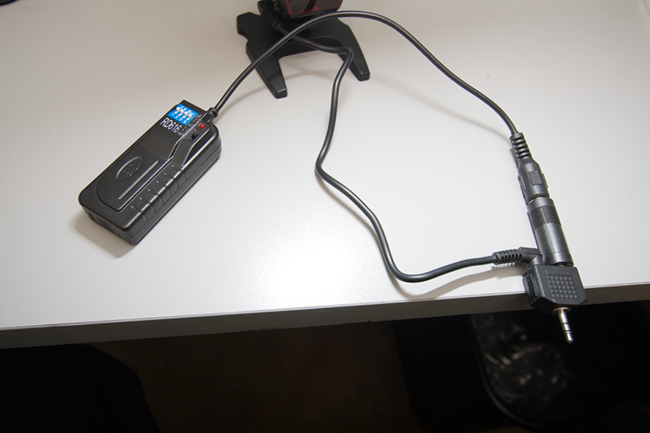
In the meantime, I have these Cactus triggers, and I thought with the inclusion of a sync port, perhaps I could jerry-rig something together.  With the sync port going out to what looks to be an RC-mini, and the receiver also going out to an RC-mini, I needed a way to join two RC-mini’s together.  A quick dig through my various buckets of cables and connectors revealed a dual mini that is normally used to connect to headphones to a single audio.  Worth a shot, since it’s only about $50 total invested.  I connected everything together to get this:

lightcables

On your left is the trigger that came from Cactus, to the RC male.  A reducer on that took it to an RC-mini male.  In the center is the well-hidden PC-sync device that came from Flash Zebra.  (For a better picture, see below…)  A female sync port on that was able to connect to the male sync port that was included with my Cactus gear.  That also went to an RC-mini male.  These are both connected on the right to the y-connector that you would typically see two headsets connect to the same audio source.  The technology is the same, so it’s worth a shot right?  (No pun intended…)

I fired off a test shot from the 40D and it worked!  So, how well would it work?  What kind of reliability would there be?  I took the flash into the next room and fired the trigger from a further distance away…about 20 feet.  Flash!  Then I took the trigger around the corner and fired it.  Flash!  How cool is that?  Another set of tests was needed.  One where radio waves wouldn’t bounce all over the place – outside!  If you recall, I interviewed Scott Eccleston from Weekly Photo Tips a while back, and a recent post of his armed me with a good testing method of the Cactus triggers.  Armed with the inspiration of this video, I enlisted the aid of my wife and took to the great outdoors.

I began with a fresh set of batteries in both the trigger and receiver, as well as the flash.  Starting from ten steps away from the flash, I tripped the shutter – flash!  Twenty paces – flash!  Thirty paces – flash!  Fourty paces – nada.  Hmmm…tried again – nada.  So, I moved back to 35 paces – still nada.  A couple steps closer and it flashed again.  About four more tests at this distance and I had 100% flash rate.  Starting back to my wife, I counted the paces, 1-2-3… all the way to 33 paces.  At an average gait of 3 feet per pace, that’s an outside range of 99 feet!  Considerably better than the ST-E2 and at a third of the price!

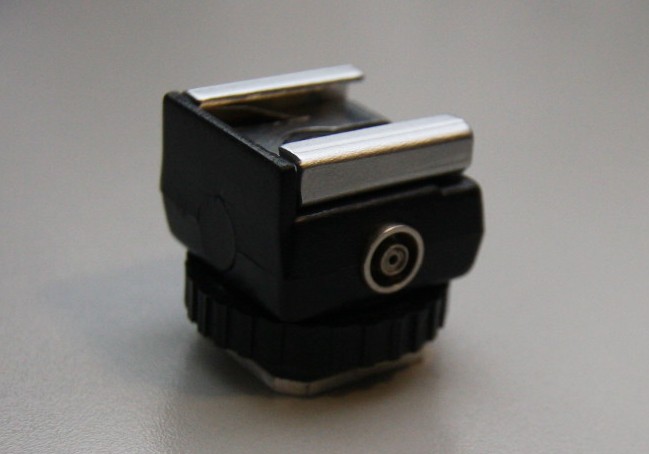
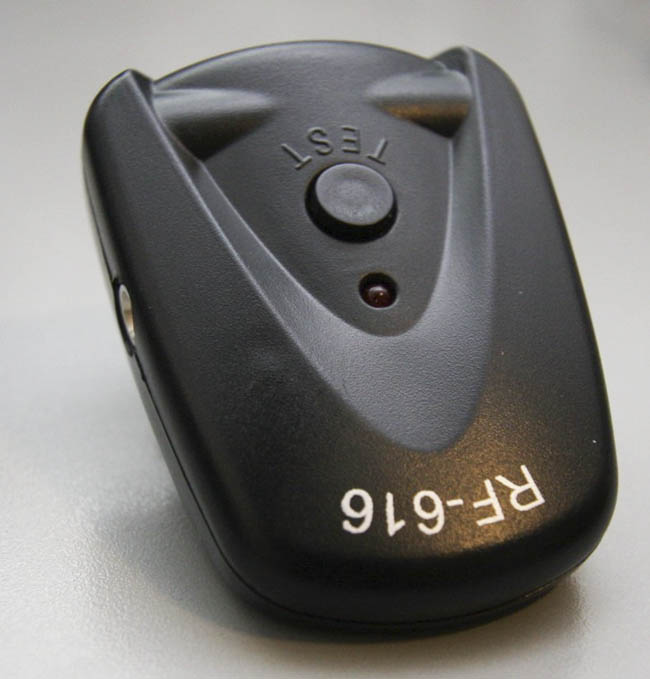
For posterity’ sake, and since I am in a very casual way reviewing the PC-sync adaptor from Flash Zebra, here’s a better shot of just that device.

zebra

Also for posterity sake, here’s a view of the trigger that attached to the hot shoe of the 550EX:

trigger2

Days gone by…

Okay, so it’s lame segue alert day, as our late return last night really didn’t give me time to get my act together for a post today (clearly as it’s already 6:30pm MDT).  Thus, another NBP (no blog post) day is upon us.  Hopefully by tomorrow my act will be together again and we’ll have a new podcast, with loads of photography goodness to share.  Happy shooting and I’ll be back on top of things tomorrow…

On the Coast of Somewhere Beautiful…

A short vacation means that I’ve not had much time to generate any photo-related content, but hopefully the title will be a hint of things to come, so be sure to stop back in Monday for some photo goodness and other news and events.  In the meantime, enjoy the weekend, and have a Happy Easter.  On that note, enjoy a  Friday funny courtesy of What the Duck!

wtd686


Happy Shooting!

Thursday Thoughts with Kevin Mullins

For those of you that visit the blog regularly, you know that Kevin has been a regular supporter through his kind, thoughtful, and well, supportive comments for the last few months.  We all know that reading blogs of others and commenting there is a good way to not only learn but to also generate traffic for your own interests.

Well, this week I am calling Kevin out, because he definitely is worthy of your traffic.  Kevin Mullins is an outstanding photographer, based out of Malmesbury Wiltshire (that’s in England, across the pond, or the UK for the geographically challenged…)  He’s had reviews done by friend-of-the-blog, Jason Moore, and most recently has launched a photography website for his wedding photography.  So, first off, welcome Kevin, and thanks for agreeing to come on the Thursday Thoughts Series.

Thanks’ very much for inviting me on here Jason.  It’s a great privilege.

Q:  I don’t know why people keep saying that, but thanks I guess.  It’s just fun to be learning from everyone thus far that’s been willing to contribute, yourself included.  But anyway, I digress…starting things off, I’d like to talk a little about your Wedding Photography – as you stated on your blog, wedding photography is your passion, and that is evidenced by the work you have put in thus far.  With so many areas to choose from, why did wedding photography stand out for you as a career path?  Well, it kind of “just happened”. 

A:  I have been taking photographs for a long time but around two years ago I knew that I wanted to make a career from photography.  I’ve often looked at wedding photos and thought “I could do that”, or, more often “If I was taking that shot, I would do it like this…”.  The interest continued to grow and I started forming my own style of shots in my head.  Contemporary artists such as Crash Taylor and Jeff Ascough really inspire me and I am in awe of the way they deal with light and composition in a wedding shoot.  Having your own style is key, and whilst those guys inspire, its building my own style that is really important to me.  I really want to give the bride (and groom) some photographic memories that they will cherish and will become a family focus point for years to come, but don’t just look like all the other photographs out there.

Q:  You have a definite journalistic flair in how you create your images, specifically as evidenced by the series from Andrew and Katherine’s photos, as well as those from Marie’s wedding (I love that shot of her under the arched trees).  You’ve mentioned Cartier-Bresson, Crash Taylor and Jeff Ascough as inspirational sources.  Any particular insights you’ve gained from these folks?

A:  Cartier-Bresson’s imagery is just astounding.  His use of geometry and shape in photography is out-of-this-world.  I have read his biography recently and to get an insight into his thought process is intriguing to say the least.  The “modern masters”, such as Crash and Jeff are the people I look to now for inspiration and technique. Both of them run very informative blogs with great great images that people like me can look at, disseminate, and learn from.  They are somewhat different in styles themselves so I look to Jeff’s work more for the documentary and natural-light experiences, and Crash for his awesome signature portrait shots of the bride and groom.  There are so many talented photographers out there and the internet opens up such a huge avenue for learning from them.

Q:   So, how have you adapted techniques from these resources to come up with your own “look”?  Or, better yet, do you have any particular images that you feel uniquely define your approach and/or style?

I aim to develop my own style of wedding photography and the new 5D MK II helps me do that to some extent.  I’m using purely natural light (the high ISO capability of the modern cameras lends to this type of photography.) and I try and use my 85mm lens as much as possible.  This lens is so sharp and the style I am trying to achieve uses a lot of depth of field.  This lens is f1.2 at its widest point and so it really helps in that respect.  Here are a few of my favorites:

portrait

bridge

wedding-3

Q:  As a fellow member of NAPP, how much have you developed your style from the support content and materials in sites like NAPP and other photography communities?

A:  To be honest, whilst I am a member if NAPP, I don’t use their forums as much as I should.  It is a great resource though, and the magazine and techniques online are very useful – especially when new versions of Adobe software come to the market.  I do use Kelby Online Training and I think that is a great resource.  I try and put aside an afternoon a week to “train myself” – although this isn’t always practical as I also run my own web development firm.  I find the POTN (Photography on the net) forum useful when researching gear and also for keeping an eye on other peoples work.  I also find the SWPP forum in the UK extremely useful as there are a lot of very knowledgeable people there too.  I really find most of my inspiration from trawling the net and finding great wedding photography.

Q:  I already know the answer to this, but I would imagine the readers may want to know – what kind of gear do you shoot with?

A:  I was lucky enough to get a Canon EOS 5D MkII back in December last year.  It arrived on the 2nd December just in time for a big family birthday celebration which was great as I got a chance to practice with it.  I have a number of Canon and Sigma lenses too but my favorite lens of them all is the 85mm f/1.2.  It is simply magical.  I also have a 100mm macro, 16-35mm, 24-105mm and 70-200mm which hopefully covers all my bases.  I haven’t really looked at the HD video on Mk II yet, but I am beginning to see some “fusion” wedding photography out there which is a mix of video and stills and this is something I would like to look at in more depth as the technology progresses.  That said, stills will always be my No1. priority.

Q:  Since your style journalistic in nature you obviously will take a large number of photos during any event, whether pre-wedding or the actual wedding day.  What kinds of numbers do you typically return from an event with?  How do you handle your post processing? (Computer/software/etc.?)

A:    I actually did a wedding shoot recently and I took in excess of 1500 shots, of which I will probably sift down to 250-300.  I would expect the Bride and Groom to select anything between 50 and 150 for their package.  I do all my first phase processing in Lightroom now.  It’s such a good tool for cataloguing and doing bulk adjustments.  Anything more detailed such as spot removal I will still do in Photoshop.  I would love to see Adobe integrate Lightroom and Photoshop to truly marry the non-destructive workflow experience.  I am off to a two day seminar with Jeff Ascough at the end of the month and hopefully I will gain an insight into his post-processing workflow as I know he uses Photoshop heavily to create his stylized shots.

Q:  Could you also explain a little more about the idea behind the “pre-wedding” shoot you discuss on your website?

Pre-wedding shoots are quite common here (I’m not sure about in the U.S).  Typically you spend an afternoon or so with the bridge and groom a couple of months before the wedding taking some natural portraiture shots of them.  The idea, really, is to get to know the couple more.  The last thing anybody wants on the big day is for any uncomfortable scenes between the photographer and the bride and groom.  The pre-wedding shoot gives us a chance to get to know each other more and also to go through some ideas of poses and how to work in front of the camera.  It gives me a chance to identify what types of shots I can encourage them to do on the day, and what will be the limits.  Some couples are outgoing and excitable in front of a camera and some simply want to get the process out of the way so it is important to gain that knowledge well before the big day.  If we can, I intend to do the pre-wedding shoots at the venue of the wedding.  That way, we can all scout the area together and look for great places and light at the venue and, essentially, rehearse for the big day!  The pre-wedding shoot is part of the wedding package, but if the bride and groom want to buy any prints or a frame or even a mini-album after, then even better!

Q:  Oh, and since we talked about photo gear and computer/software preferences, I would be remiss if I didn’t ask this:  Chocolate, Vanilla or Strawberry?

A:  Chocolate every time.  My wife bought our nieces some Easter Eggs and they lasted less than 24 hours in our house.  We ate them and will have to buy the kids more now!

Q:  We all know you’re a regular contributor to Canon Blogger – what about other online resources?  Are there any that you find particularly useful that you’d like to share with the blogosphere?

A:  I”ve mentioned a few in the article already, but I think some of the sites that are great are:

I have quite a few blogs in my reader (such as Canon Blogger, Michael Palmer, Jen Rinaldi etc), that I like to visit each day.  I comment when I think it’s appropriate and appreciate it when people comment on my blog too.  All of these blogs are part of the fabric of my learning and I’m always on the lookout for other blogs that inspire and keep me focused.

Q:  Last but not least – any final thoughts you’d like to share on the state of the industry, thoughts on the future of photography, or other “words of wisdom”?

A:  Well, I rely on others to give me wisdom, but if I had to look to the future I would say that we will be seeing a lot more video and still fusion work going on over the next five years or so.  The latest Canon announcement (the EOS 500D) will bring HD video to the consumer level DSLRs which infers that it is here to stay.  Oh, and I definitely recommend moving out of London to the countryside!  It has a great effect on your well being  😉

Excellent advice, thanks Kevin! That about wraps things up here so don’t forget to stop over at Kevin’s blog.to see and enjoy his particular vision and style of work.  In the meantime, tomorrow might be another “no-blog” day because I am doing a little bit of travelling – depends on how soon I can get home.  So, happy shooting all, and if I don’t get home in time for another post, have a great weekend!

No Blog Wednesday

Sorry all – but be sure to stop in tomorrow for a really exciting Thursday Thoughts session – my first interview “across the pond” with Kevin Mullins!

Happy Shooting!

Artist Statement Appeal – the power of the pen

On this weeks show, I take a look at the power of the pen – the artist statement.  For those of us with aspirations of sharing our work with others via art shows, galleries, and contests/competitions, the value of the artist statement can make the difference between getting into a show, gallery or other event and buying a ticket.  So, if you want to learn what the artist statement is, how to write one, and things to consider, this is the show for you.  Here’s the show notes:

Another news item I forgot to mention in the podcast is an upcoming web seminar series for photographers, free, from Adobe.  Here’s the dates:

  • Photoshop: April 23rd
  • Lightroom: April 9th and May 7th
  • Both: May 14th

Link for more info and to register is here

Make sure you stop in and grab the podcast from the good folks over at Personal Life Media, and visit our show sponsor Lensbaby if you are thinking about the Lensbaby Composer.  Diggs from PLM and reviews from iTunes are encouraged, welcomed, and appreciated!  Happy shooting all and we’ll see you back here tomorrow!  🙂

Don’t forget, you can email me from the show link with any questions, comments, feedback or thoughts, as well as share comments here, and reviews on iTunes.  For those without iTunes or Zune, I can provide an mp3 version of the show on request.

Double your laptop storage in ten easy steps!

So, I’ve got the Macbook Pro with the factory default 150GB hard drive.  Sounds like a ton of space, right?  Well, we all know how quickly that amount of storage can get sucked up these days.  So, I considered buying a new laptop drive, buying the latest iteration of the Mac OS and just building one from scratch again.  But then I realized, I have lots of storage being eaten up in the drive already by means of exactly that – the OS, the applications, and everything it needs to run.  Then it dawned on me – why not just add a second drive?

I bet you are asking, “Ok, Ace, where you gonna add a second drive?”

Well, here’s an easy way to add a second drive to your laptop in 10 easy steps:

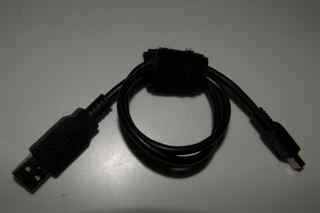
1.  Buy a USB drive (I got mine at Best Buy – they price matched Newegg which was in and of itself a jaw-dropper but I digress)… but the point here is that addtional storage is cheap!  Less than $80 bucks for 320 GB

_mg_9027

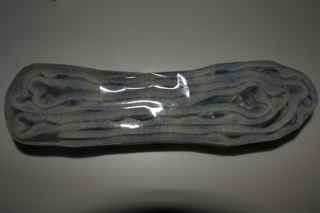
2.  Buy a strip of two-way Velcro tape.  I happen to have some from other projects, but at most it’s $5

_mg_9029

3.  Before messing with the physical setup, plug the drive in and configure as desired.  For mine I re-formatted to a Mac partition (journaled), then created folders for my music library and my working photo library on the Mac.

4.  I then moved all the data over for the above folders from the pre-existing OS drive.

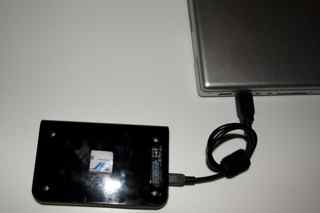
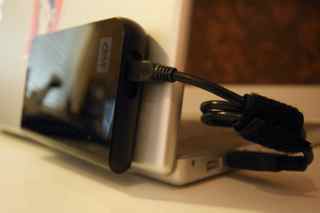
5.  Position new USB drive on back-side of laptop monitor to see where it best fits according to your USB layout – I happened to like mine on the left, as shown:

_mg_9031

6.  Wrap USB (or Firewire) nice and snug – I used another velcro strip to keep it tightly wrapped.

_mg_9028

7.  Cut one or two pieces of two-way Velcro, and place one in the middle, and the other one near the top or bottom.  (I started with one and added the second):

_mg_9033

8.  Peel the backing and affix to the USB drive.  With the other side still stuck, peel the backing off the second two sets and affix to the back of the monitor.

9.  Plug mini-USB (or Firewire) and USB ends of cable back in. (I’d already done it to ensure the slack of the cable was how I liked it, but you can do this afterward too if that makes things easier for you…)

10.  Open monitor top, and voila – you have a laptop with two drives!

_mg_9037

For the record, I saw someone once with a setup like this, so it’s not completely an original idea.  The onyl difference was that he had two of these bad boys connected – a Dymo label printer had identified each as a Time Machine drive and a Files drive.  For the cost/size/weight and portability, it’s really not a bad idea.  When they fill up, just buy a new drive and port the data over, or even just archive and store in a tupperware shoebox if you prefer.

So, there’s a neat little idea for you this Monday.  Happy shooting and we’ll see you back here again tomorrow.