Rocket Man!

Cleaning your gear is a maintenance ritual each of us must develop that suits our own style and behaviors.  For me it’s lists…logical lists that I formulate after thinking about what makes sense to me, so I can do things the same way every time.  For me it’s all about consistency and repeatability.  While this same technique is something I recommend for others, it may not always be the best course of action if you don’t like that kind of rigidity.

However, regardless of what styles or approaches you use to clean your gear (and I’ve talked about my approach to gear maintenance in the past in detail), some of the best recommendations I can make is in reference to the types of utilities and tools you use.  So, today, I’d like to take a look at one of the tools that I have come to rely on more than any other – the Giottos Rocket Blower.

giottos

So, what makes this thing so great?  Funny you should ask, let’s get started with the…

PROS

  1. It’s got an air valve built in to prevent it from taking in dust and dirt on the intake end.  This design (I would venture to say) was a first-of-its-kind in cleaning accessories, because every other blower that I’ve seen prior to this made no such claim, which means that they hadn’t incorporated the idea into their design at all.
  2. It’s air at the ambient temperature.  Too many canned air options use chemicals that can be damaging to your sensor – my recommendation is to stay away from canned air entirely.
  3. It’s not super fast air being directed at your sensor like a missle.  Although it kind of looks like a grenade (these are fun to take through airport security! 🙂 ), the power behind the discharge of air is not like that stinging charge that comes from canned air options.  You have more control over the flow of air too, as you can give it a quick pump or a slower steadier pump depending on what you want to do.
  4. It’s not weak air like from many other pump-style – this thing really can deliver a good blast of air to get the most stubborn dust out of a sensor area, or the surface of a lens.  Just don’t use it around your dog that likes squeak-toys because it does give a little sound like that due to the air valve!
  5. It’s dirt cheap!  This retails at B&H for $15!  Low cost solutions are always a huge pro in my book.  The picture above also includes a link to the B&H page for it.  If you are a NAPP member, you can also get free 3-day shipping.  Just my cup of tea!
  6. It looks like a grenade!  Talk about a cool conversation piece.  I can’t tell you the number of airport security people that have asked me “What the hell is that?” !

CONS

  1. It looks like a grenade.  I can’t tell you the number of airport security people that have asked me “What the hell is that?”!  The cool factor wears off when you are trying to catch a plane, or it’s oh-dark hundred and you’ve not had any coffee because they won’t let that suspicious looking McDonalds or Starbucks cup through the security gate.  (That same cup of coffee that costs $6 on the other side of security has been deemed safe though…go figure!)

There you have it, 6 pros and 1 con means this product gets a thumbs up in my book.  (Surprise surprise since it’s in my cleaning kit!)  As always, if you have any ideas, suggestions, or are interested in products that have not been covered here on the hardware review days, drop your thoughts into the comments area or kick me an email (is it possible to kick something that is all 1’s and 0’s inside a computer?).  Happy shooting and we’ll see you back here again tomorrow!
Grab the feed

Extra Extra, read all about it!

It’s a rare Saturday that I make a blog post, but while waiting on a contractor to install some wireless at work, I had some time to do some writing and in the process, I came across an article I put together back in 2008 titled “5 Ways to improve your Photographs”.

Though the article is dated, the ideas behind it are the essence of timeless content – this will always apply to photography.  So, I’ll throw this back out there, a year after the fact, for everyone to enjoy!

5 Ways to Improve your Photography

Happy shooting and we’ll see you back here on Monday!

Grab the Feed

Friday Fab Five

For something new here on the blog, I thought it might be fun to share some of my favorite keyboard shortcuts in Photoshop.  The idea here is that people will share their top five in the comments area and we can get an idea of many more keyboard shortcuts than we ever could have found out on our own (unless of course you are some Photoshop guru like The Photoshop Guys and the trainers/instructors of the world that do this for a living and already know all the shortcuts.)

So, anyway, here’s my Friday Fab Five Photoshop shortcuts and what they do:

  1. CMD/CTRL+J = duplicates your existing layer
  2. CRTL+ALT+SHIFT+E = Stamp Visible  This takes all your visible layers and merges them onto a new layer.  Increases file size, but very cool
  3. CMD/CTRL+’ = (yes, that’s apostrophe) – it activates the grid in your preferences.  Since my grid is set to every 33.33% and one subdivision, it basically shows a Rule of Thirds grid overlay on my images – very handy for compositional cropping
  4. Left and right brackets – decrease and increase your active brush, whether it’s for clone stamp, healing brush, eraser, history brush – whatever
  5. Alt+Eyedropper = you can drag the eyedropper outside of Photoshop to sample a color in another application (great for color matching)

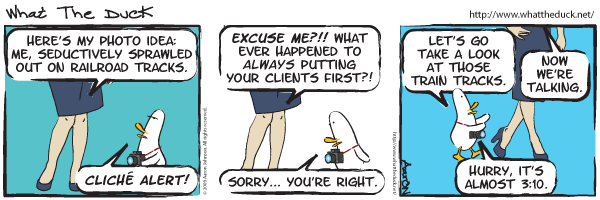
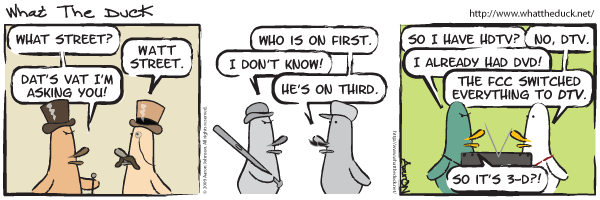
So, those are my five for this friday – what are yours?  Sound off in the comments!  In the meantime, have a great weekend and happy shooting! I’ll leave you with my favorite What the Duck cartoon of the week:

wtd732

Grab the Feed

Seven Super Summer Tips

Since the podcast went live yesterday, the compositional theme was kind of put on the back burner, so I’d like to bring that back to the forefront today with something everybody likes…a list!

For some reason lists of bullet points seem to generate a lot of feedback, and garner the most interest, so here we go with a set of what I am calling “Seven Summer Super Photo Tips”

  1. Shoot early, shoot late – it’s the “Golden Rule” – and I think we all know about it, so this is just a reminder.
  2. Shoot often – seriously, the eye does not improve creatively without practice, so get out as often as you can
  3. Shoot outside your comfort zone – Like landscapes eh?  Shoot some portraiture, macros, or event work.  Nothing gets creative juices flowing better than a challenge.
  4. Shoot lower than you stand – or higher, whatever – take a different vantage point as that can make all the difference.
  5. Shoot with one lens – Preferably with a prime as this will force you to zoom in or out with your feet, changing your perspective and getting your skills down really rote on the focal length you chose.
  6. Shoot with a friend – nothing makes the post shoot high more gratifying than chimping your shots with a photo buddy.
  7. Shoot for yourself – often photographers are thinking of what clients want, what an editor would like to see, or what may sell well on a stock site.  While it’s true that money puts bread on the table, it’s often liberating to shoot without the pressure of a paycheck.  Your results may surprise you!

So, there they are – seven super summer shooting photo tips!  There’s got to be more thoughts out there though on how to get the most of your imaging eforts, so let’s here from everyone – what are your best tips and tricks for capturing the world around you?  Sound off in the comments.  As always, happy shooting and we’ll see you back here tomorrow.

Grab the feed

Reviews, Interviews and Vista Views

The latest episode of the Learning Digital Photography podcast is now live and for those of you picking this up in your feeds, make sure you stop over to iTunes or the via PLM to download the show.  This week, I go into a little more depth on how I conduct reviews of hardware and software as there have been quite a few listener questions about that particular subject matter.  Thanks to everyone who wrote in to share their thoughts and feedback!

In the second segment, an interview with fellow photog and NAPP member, Erik Bernskiold where we talk about not only what we like about NAPP, but about how we are gearing up for the summer fun of photography, with tips, tricks and suggestions from Erik on everything from Floral Photography to Landscapes.  We also get a little insight into Eriks’ blogging and web design background as he’s become quite the expert on the subject matter!  Not too bad for someone who’s not even out of school yet!  For more details on Erik, follow these show note links:

Many thanks to Erik for taking the time out of his schedule to sit down and talk with me on the show.  It was a lot of fun!  For the remainder of the show, I throw out some additional tips on landscape photography, and tackle a few listener questions.  Lots to listen to, so be sure to tune in, either from the download over at PLM or via iTunes.

A final little asterisk on the show:  I mistakenly recorded the intro as episode #25, when it’s episode #24.  Also given that I forgot to add the theme music to the entire compliation – it might as well be called the “blunder” show…but rather than spend time on a few minor nits trying to fix it, I’d rather just get the show and respective notes out to y’all for your listening enjoyment.  So, on that note, happy shooting, enjoy the show, and we’ll see you back here tomorrow!

The Un-review Software

This week I am going to talk about the lack of software in the weekly software review.  That’s right – the lack of it! You may be sitting there wondering which software item I am going to talk about, promote, or diss in some way shape or form, but instead of that, I actually want to talk about the general trending of software, hardware, and system resources.  Why?  Because we demand a lot from our computers these days.  Think about it – we want our computers to do many things from surfing the internet, to designing graphics, office functions, building websites, and yes, processing ever-increasing image file sizes.  At what point do we say we are asking enough of our computers?

Lately my main desktop computer had been getting slower and slower and slower, and it seemed no matter what I did whether it was beefing up the RAM, adding a faster hard drive, processor, or the like, and even re-installing the OS every 6 months – it was just getting pathetic.  At one point, I clocked abut 5 minutes for Firefox to start – on a fresh boot!  The culprit?  I am asking my computer to do too much.  I finally said enough is enough – and am re-purposing the computers in the house.  We have a grand total of five computers and each has a unique function:  from Office to web, to image processing, and podcasting.  And that’s just it – each computer has a task.  Yet I have not been disciplined about asking the computer to only perform its assigned task.  I revert to the one desktop and the one laptop.  The end result:  the systems s……l……o……w…… d……o……w……n…….

With a grand total of 78 programs at last count, it’s no wonder my cmputer was screaming “Mercy!”.  So, enough is enough.  I vowed to make each computer perform only one set of tasks, as explained above.  The end result:  removing about 50 applications from the main computer.  It took the better part of an evening (4 or 5 hours) but at the end, the computer is now screamingly fast again – and Firefox loads in seconds, not minutes.  The reason – purposing your computer for a specific software function.

So, instead of looking at adding new software all the time to your computers, you may want to take a look at the computer itself – is it doing the job you want, or are you asking too much?  Think about purposing your resources more efficiently.  Do you really need that HP 3600 printer driver on there from 4 years ago?  What about that trial version of Elements you downloaded a few months ago?  And the 4 instances of Tweetdeck you have there?  Really?  Clean out your software and watch your computer performance increase a notch or two as a result.  It’s just like us humans – we can get more done when we’re asked to do less all the time!  We’re faster, more productive, and yes, more focused on the task at hand.

So, check that installed software list and try cleaning things out from time to time – your computer will thank you!

Happy shooting and we’ll see you back here again tomorrow!

Hardware review: Sigma 10-20mm

The review you’ve all been waiting for – the one to compete with my Canon 10-22mm review from a few weeks back!  Well, there is no clear and decisive winner, so the wind is probably taken out of all the sails of those who were waiting for some smack-down talk.  The reason?  Some aspects I like better on the Sigma, and some on the Canon version of this lens.  So, I’ll refrain from declaring a “winner”, and just give you the lowdown on this lens, what I like, and what I don’t.  So, without further ado: Continue reading “Hardware review: Sigma 10-20mm”

Finally some good news – it’s Friday!

Well, there’s some other good news too.  Wacom delivered the something to me door yesterday to review here on the blog.  I’ll be doing a more detailed write-up for both Windows and Mac in the near future, but thought y’all might be interested in the unboxing – seeing what you get from the good folks at Wacom when you order a:

BAMBOO FUN!

So, here’s a little teaser video for those that are interested:

This might be fodder for an upcoming contest or giveaway, but only time will tell, so keep your fingers crossed.   In the meantime, here’s the rest of the Friday news:

Okay all, that’s it – been a crazy busy week, and I am tired, but also geared up for the weekend.  Happy shooting and we’ll see you back here next week for hopefully a little more of an uplifting series of content!

Grab the Feed

Write it down!

Sorry for the lack of a post yesterday folks – for those of you that Twitter and have me on follow, you’ll know that we had our cars taken out from under our noses (literally while we slept) early Tuesday morning.  By the time I woke up and got dressed for work (at 6) they were gone…

Suffice to say, the wind has kind of been taken out of my sails here, and after an entire day of dealing with police reports, insurance claims, DNA testing (yes, they took DNA from us), finger printing, and pretty much feeling like our private living space was totally disrespected and violated, I didn’t have much of a mood to put anything together for Wednesday.  With another weekend looming large and trying to resurrect some excitement for Tracy’s pending birthday, I am afraid today’s post will be no picnic either, as this is more of a lecture on security.  To make it photo-related, let’s look at it form an inventory perspective.

Say you were the victim of a crime – all your photo gear was taken from you.  Could you produce the records needed to replace everything?  With cars it’s easy, as insurance is in place, titles are held, and banks have documents as well that you can fall back on – but what about other items?  It took some digging through the Mac, but I was able to find the serial number for my iPod.  Do you know your serial numbers?  What about that expensive zoom lens?  What about your SLR serial number?  When was it purchased?  What was the purchase price?  What about the computers?  Software licenses?  Think about it – you’ve invested some serious money into this, whether it’s a hobby or a profession.  Do you have the records to produce in that worse case scenario?  If not, take my experience with the cars and apply it to your gear – write info down!  Update your inventories, and keep records of everything!  Finally, don’t tempt fate – lock things up.  Get a lock box or some kind of safe – and don’t leave things out in the open – it’s just an invitation waiting to be seen and responded to, so take precautions now to avoid lots of heartache and headaches later.  Here’s a sample spreadsheet to get you started:

Inventory Spreadsheet (right-click, and select download or Save as and the file name is “inventory.xls”)

That’s it for today folks – so, sorry for the “downer” of a post, but felt there was something there that could be learned by all of us – so enough of the doldrums now – forget the past and move into the future with positivity – so get out shooting, and be careful out there!  (Hello Hill Street Blues! 🙂 )  We’ll see you back here tomorrow, and hopefully the podcast that I’ve been meaning to finish will go up early next week.  Until then, keep on shootin’ (photos)!

The Business of Selling Your Photos

As economic belts are cinched, and we start spending our dollars more carefully than ever before, I am getting email a lot from photographers asking “What should I be charging for this event?”, or “A client wants a digital negative, what’s a fair rate?”, and even, “How much is my work worth?”

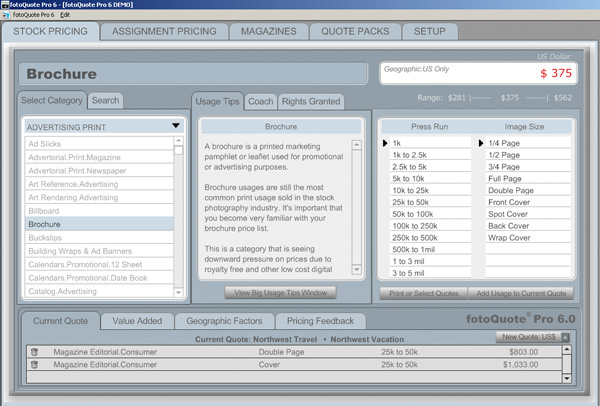
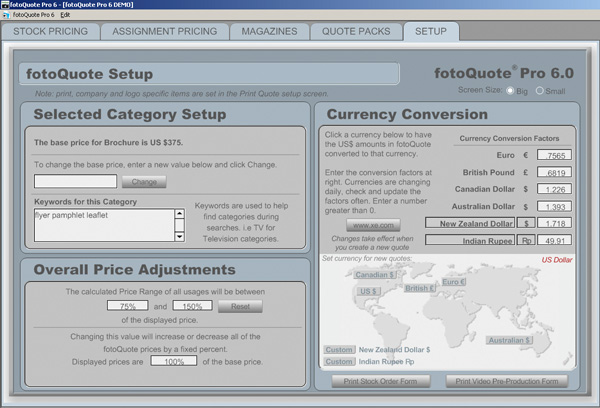
Truth be told, the economics of photography sales are just as much a mystery to me, and I don’t have all the answers.  But I know a few things about where to start, and how to research.  First and foremost, is to know your market.  Are you working in NYC, or in Duluth MN?  Have you looked at other photographers’ websites?  What are they charging?  Are they start-ups or established companies?  What kinds of services do they offer?  What kinds of services do you offer?  Do you provide print fulfillment or is that out-sourced?  What is your overhead?  Cost of equipment?  Cost of training?  The whole 9 yards – it’s a lot to filter.  Well, here’s some software that can give you a leg up in that regard – FotoQuotePro.

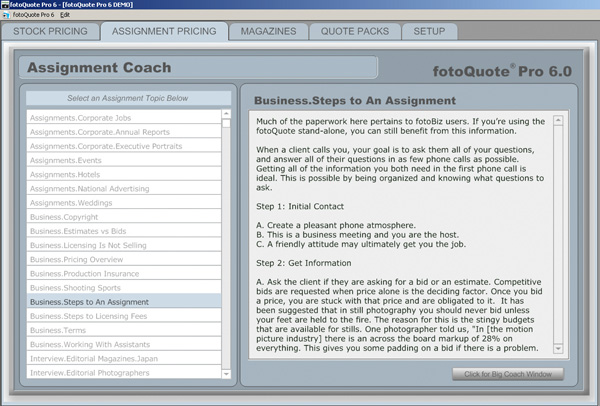
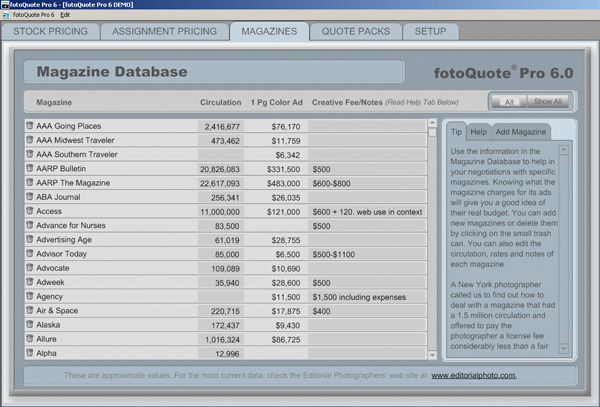
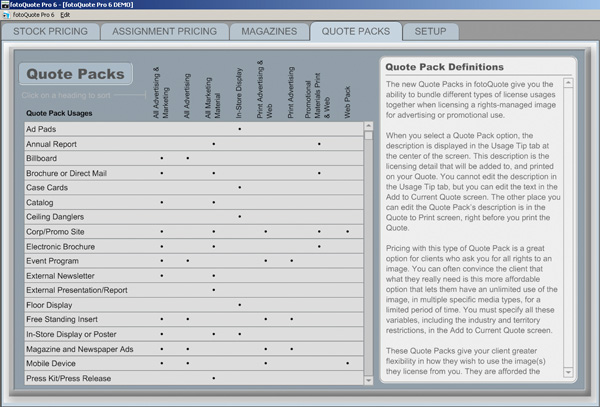
This software is very well designed and offers you rates for a wide variety of publications, ranging from magazines, to journals, brochures, quarterly reports, and a plethora of other variations.  Quarter page prints, half page, full page, distribution of media, and many other factors are tallied in to help Fotoquote determine your rate.  Granted this may not help the startup in portrait work, but if you are looking to market your work toward commercial and stock sites – this is definitely the software for you.  And now, in a special offer here at the blog – I’ve been able to garner a 33% discount for some lucky listener.  That’s right…33%!!  It regularly goes for a price of $150, and the good folks over at Cradoc Foto Software have generously donated a discount code.  Rather than buy and install it myself, I would like to pass this savings on to some lucky reader of the blog.

So, here’s how the winner of the discount code will be chosen – post a comment here at the blog.  Say what you like about the software, why you could use it, or simply introduce yourself to the rest of the readership.  This particular post will take comments through the end of June, so you have about two and a half weeks to get something out there and get a chance to win the discount code.  In the meantime, head on over to Cradoc Foto Software and download a trial to see what the program is all about.  In the meantime, here’s a few screen shots from the demo version to show you what they have to offer…

Tab 1 of FotoQuote Pro
Tab 2 of FotoQuote Pro
Tab 3 of FotoQuote Pro
Tab 4 of FotoQuote Pro
Tab 5 of FotoQuote Pro

Happy shooting, and we’ll see you back here again tomorrow!  (Oh yeah, and don’t forget, you can also share your thoughts and suggestions for future hardware and software reviews that take place right here on the blog!  Let me know what you think as it’s the contributions of readers that make this such a fulfilling blog – who knows, there might be a giveaway in that too!)
Grab the Feed