Busted – guilty as charged…

For the second week in a row, there will be no software review this Tuesday.  The 2nd Annual Scott Kelby Worldwide Photowalk is the reason for eschewing the format again this week, so for those that miss the software reviews – go bug Mr. Kelby, it’s all his fault! 🙂  (Just kidding, don’t go bugging him, but if you don’t have his site in your RSS feed for daily reading, then you are missing out…)

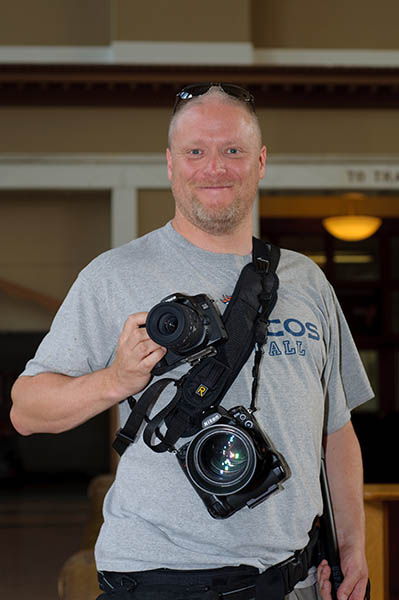
Truth be told, the reason for the deferment again is to admit to the charges – and I may as well come clean, since my “friend” Gregg Lowrimore was kind enough to capture me with the evidence in hand.  So, before the rumor mill starts blowing things out of proportion, let me just post the evidence myself and be done with it:

Busted with a Nikon!

So, there it is – the “Canon Blogger” – holding a Nikon!

*****

The back story:  I was holding the gear for a friend who had to use the facilities during the photo walk, when Greg happened to make note of the fact that “The Canon Blogger is holding a Nikon!”  He snapped a picture of me (smiling happily for fellow photogs – and now you see why I prefer the other side of the lens than being the subject of the lens), and now is holding me ransom until I come clean.

He is, of course, kidding, but let me tell you that Gregg’s photography is far from a joke – you simply must visit his site as he’s got an incredible portfolio of work there, and is someone that I could definitely learn a thing or two from (including his skullduggery)!  Please take a moment to visit his site here:  http://www.lowrimore.com and get a taste of what I am talking about.

The other photo walk news I have is a short video of some of the results from the Worldwide Photowalk.  Most of you have probably seen this by now, but I would be remiss if I did not share it here on the blog.  Rather cool too that Scott also generously shared some of his blog space yesterday to the video as well.  Regardless, here it is, and please, feel free to stop over to YouTube and share your own comments:

Since this was totally a “fun” post and not much depth or deep meaningful content here today, I promise to be back tomorrow with something that everyone enjoys – another podcast!  (Episode #27 if my counting is correct…)  Happy Shooting all, and we’ll see you back here again tomorrow!

Full Review: Apple iPod Touch 2G


Mac Madness (Mac Systems)

Having had the Touch now for about a week, I’ve had a fair amount of time to look at all the features, bells, whistles, and nuances of it to give a more thorough review.  As this review begins, you surely must be asking, “How does this relate to photography?”  An excellent question, so let me begin with the benefits relating to photography:

photo_icon

Photo Albums – this is a great way to take a portable portfolio with you where ever you go.  Say you are in a grocery store, restaurant, or somewhere and a discussion starts about any good photographers.   “Funny you should ask – I am a photographer…would you like to see a little bit of my portfolio?”  Then whip out that Touch and pick an album to show them – the ooohs and ahhs could make the difference between landing the gig and having them respond with “We’ll let you know…”  Having the extra advantage of being able to show at least a pocket-sized portfolio could make the difference between getting a gig or not.  Interesting food for though…

networking

Networking – the Touch has built in wi-fi, so you can stay up to date as long as you are connected to a wifi network.  Here in Denver there is a free wifi network downtown so as long as you are within range, you can check email, update status on Facebook, and network the latest developments on Twitter or Friendfeed.

Applications – bar none, the best feature in my opinion.  From here I was able to download an FTP client, a photo editor (very light in function, i.e. cropping brighten, darken, saturate, desaturate, etc.) and voice recorder.  Other utilities include sunrise/sunset calculators, light meters, word/excel editing apps, etc.  As the saying goes, if there’s something you want to do, there’s an app for that.  With these utilities I can do things like record audio snippets for the blog, upload said content to the blog or other website, do quick photo edits, or even review documents on the fly.  The built in email service is also very handy.

podcast

Music/Podcasts – Just like other ipods, you can listen to music, podcasts, and because of the nice glossy screen, watch videos, including TV shows and movies (pretty much anything the Apple Store offers).  As a blogger and podcaster, for me it is particularly useful because I can listen to what others are doing, and either ensure that I am keeping up, or ensure that I am producing original content that is enjoyable to my viewers and listeners.  If you are a fan of podcasts and other such learning resources to increase your experience and knowledge base, this can also be useful as there are many good podcast resources out there for aspiring and learning photographers.  What I am not a fan of in this regard though, is the fact that with the ability to install “applications”, the Touch still requires connection to a computer in order to manage your content.  You have to delete apps, music, podcasts, pics and such from the iTunes application on your computer and not from your ipod.  What’s up with that?  You’d think Apple would build their own applications into something this robust…but more on the cons in a moment…

Having started with the negatives a little bit, let me go into some of the drawbacks.

Software I – the iPhone user is very fortunate because when the software update from 2.0 to 3.0 came out, the upgrade was free.  Touch users saw no such benefit.  I bought this a week ago, and had to pay for the privilege of getting the OS update to 3.0.  Because of the benefits of it though, as well as the low cost (it was only $10), I went ahead and bit the bullet, but seeing as I had just spent over $200 for something brand new, in principle it seems that it should have shipped with OS 3.0 already on it.

Software II – A couple of the built in applications seem quirky, like the iTunes music.  There is a neat feature called Shuffle where you shake the Touch and it creates a random playlist for you from your library of music.  The problem is that it will keep generating new playlists randomly any time there is a little bit of shake unless you turn it off manually (say for your morning jog).  There must be a better way to toggle this on and off – but I am not a software designer, so not sure how to even go about doing this.

Photo Albums – One of the advantages of the Apple setup over Windows (I had always thought this anyway) is that you don’t have the same pyramid of files and folder structures where things can get lost.   Not really.  If you want to create multiple albums within your Touch (or any other iPod for that matter), the best method is to create a sync folder on your computer, then sub-folders within there and then connect the iPod and let it sync to that folder.

Deleting stuff – As mentioned above, I don’t like that you have to sync the iPod to the computer, then un-check the apps in iTunes on the computer to remove from the iPod.  Lastly, you have to then remove the applications from iTunes before they will be gone completely.  Give me an option to remove from the iPod directly.  The same goes for podcasts, music, photos, and the like – give me a way to delete (triple tap or something) from the iPod without having to resync.  Reason:  If I am on the go and a new podcast for Photoshop User TV comes out, I’ve got to have a fair amount of disc space available to download that from the wi-fi.  If I don’t have an iTunes instance on an available laptop or PC to connect up and delete manually, I am S.O.L.

Music – It’s similar to, but tangential enough from the delete/sync issue above that I thought the music portion warranted its own discussion.  This is not so much that I want to be able to delete music files, but I would like the ability to create playlists depending on what’s going on.  On the photo walk over the weekend, I actually did have about 20 minutes where there was no one in my immediate vicinity to talk to, so I was shooting around and decided to listen to some music to help with inspiration.  If the music isn’t right for the mood though, it can be distracting, so let me do that w/out having to re-sync back to iTunes to create another playlist – that’s just silly.

Camera – This is the only hardware element I have a complaint with – why did you not include a camera with the iTouch?  It seems rather odd that given the preponderance of built in cameras in things like phones, PDA’s, and Blackberries, Apple would say “no, just for the iPhone folks”.  Come on now…the TOuch seems like the more appropriate device for the camera than the iPhone.  After all, the phone has a utilitarian function, why would you bundle a camera into that and not the more accessory nature of the Touch?  Just seems like backward logic to me.

Accessories – The headphones for the iPhone have a built in microphone, and I can understand why they have always been included by default, but with the Touch 2G, and the new OS 3.0, the ability to record audio seems to becoming more and more standard as a way to make notes, deliver content to others.  Wit that, I think Apple should have included the headphones with built in mic wit the Touch.  It was a $30 investment, which I reluctantly paid, and am now glad I have, but really think Apple just wanted their extra little bit of my wallet in that scenario.  *sigh*

Of course I would be remiss if I didn’t at least mention the gaming and entertainment aspect of the device as many people do find the diversions an enjoyable activity.  For me though, I have other venues for distraction and don’t find as much benefit in them, but if you are of that particular ilk, then by all means, check out the App Store part of iTunes for whatever strikes your fancy.

Overall though, the nits I have with the Touch are minor.  It’s a great device that can give me content to listen to, the ability to create my own content, and stay connected with family, friends, and colleagues.  The ability to listen to music while surfing the internet, catch up on Twitter, check email, and even record some audio content for the blog makes the Touch a valuable addition to my belt.

Well, that’s about it for today, as I can’t think of any additional feedback to give on the Touch – I’d give it one and a half thumbs up.  Until tomorrow, keep the energy going from the Worldwide Photowalk and keep on shooting!  We’ll see you back here again tomorrow!

Fifteen Freebies for Photowalking Fun

On the eve of the 2nd Annual Scott Kelby Worldwide Photowalk, it seems appropriate to include a checklist of things you should be doing today and tonight (if you’ve not done them already).  I’d done a post like this before so this is somewhat repetitive but since it’s been a year, probably the content could use a little of a dusting.  So, here’s my photo walk checklist Round Two!

  1. Charge your batteries, and the spares!
  2. Clean your lenses, wipe them down and use lens cleaner to get everything spiffy.
  3. Decide what items you will be taking with you and what you’ll be leaving behind.
  4. Pack your gear and make a list on a 3×5 card of everything you will have.  That way you can check against that at the end of the day to make sure you return home with everything you took in.
  5. If you have a garage or other secured area for your car, try packing your car the night before, so that way you know you won’t forget anything.
  6. Speaking of cards, if you have any business cards or calling cards, take a stack of them to stuff into your pack or pocket – it’s all a part of networking, and learning from like-minded people.
  7. Since we’re on the subject of networking, with the digital world we live in, it’s often just as easy to make a few notes when you’re sitting around the coffee shop chimping your shots, so take your Blackberry, Ipod, or cell phone with you – every phone I’ve ever seen has a notepad feature.  If someone suggests a site to go to (like Canon Blogger!), you have a way to jot it down right there.
  8. A pen and paper or real notepad is a good idea.  What if you take a shot of someone and they don’t have a card or anything to write with and want a copy?  Have ’em write it down for you.
  9. Check the weather beforehand and plan your clothing accordingly.  This also means perhaps including some protective elements like towels and such for your camera gear in case there is a chance of rain.
  10. Get a good nights sleep.
  11. Verify the starting time and place for the shoot.
  12. Print out a map of how to get there, especially if the location is unfamiliar to you.
  13. Plan to arrive at least 10 minutes before the departure time.  This allows for traffic, and other unforeseeable circumstances.  No one wants to be the last to arrive either.
  14. Pack a few munchies (granola bars, pretzels, etc.) and maybe a bottle of water or two if you will be out away from stores and things like that – nothing ruins an otherwise fun photo walk like hunger or thirst.
  15. Have fun!

So, I’ve added a few things to the checklist – last year it was at 10, this year it’s 15.  Next year, yup, there will probably be 20!  It never hurts to plan ahead.  Here’s to a successful photo walk for everyone.  Happy shooting and we’ll see you back here on Monday!

The iPod Touch Unboxing!

That’s right, my replacement podcast resources is finally here, and I share the unboxing with the viewers here tonight via YouTube:

Initial thoughts?  It’s pretty sweet – love the App Store, the WiFi, email access, twitter access, youtube, and so much more!  A few downsides though – no built in camera, and no microphone – I know it’s not for phone, but recording audio snippets would be ideal.  There are apps you can download but need a mic and with just the audio jack, not sure I am gonna be able to do one of the things I had been dying to do after getting this.  There may still be a way so Googling and researching to see.  In the meantime, we shall wait and see!  Look for a more detailed review of this in upcoming weeks!  Until then, just a couple reminders for everyone:

The Scott Kelby Worldwide Photowalk is this Saturday in cities all over the world.  There are still openings and it’s free to join.  You could win prizes too, so check for a city near you at www.worldwidephotowalk.com to see.  You can still join the fun if the group leader is okay with it, but if you are not registered, then you can’t contribute images or be eligible to win!

The OnOne Software Plugin Suite 4.5 Giveaway is going on for the entire month of July, but time is starting to tick against you as we are halfway through the month.  This is a $500 retail value and some lucky winner will walk away with this package for free!  Details and rules for participation are at the Flickr thread. If you own the software already, tell a friend as it’s an NFR copy.  If not, then chime in as the deadline will be here before you know it!

Photo News, Interviews, and Contest News

As you may have guessed, the podcast that was delayed Friday is now compiled and ready for your listening pleasure.  I would like to take another moment to thank Terry Reinert of TKR Photo for taking the time to participate in the interview series – not only is he full of useful information, but a great guy to boot.  We literally could have B.S.ed on Skype for another couple hours if time permitted.

This does mean the hardware review was supplanted for this week, due to the dentail fiasco from Friday.  On that note, I would also like to clarify that it ended up not being the crown, rather a filling next to it (my mouth is a mess – surprise surprise), that was hitting a nerve.  So, it looks like another root canal is headed my way.  Fun stuff!

So, without delay, here’s the show notes for this weeks episode of LDP, which you can listen or subscribe to from the PLM site here (it’s also linked in the header up top):

Photo News

Contest News

  • OnOne Software Contest currently underway (make sure you submit your images in the next couple weeks – time’s a’wastin’!)
  • Congrats to Fred for winning the discount coupon for Fotoquote Pro
  • Wacom Contest is coming up next month – details TBD

Interview with Terry Reinert

Listener Questions and Answers:  Exposure Triangles, Filters, and Hair Lights

Thanks for subscribing, and have a great day all.  Happy shooting and we’ll see you back here tomorrow!

Grab the Feed

Stop crowning around

The best laid plans always seem destined to fail…or something like that, right?  Well, such was the case for todays scheduled blog post.  Today was supposed to be the day where I release the latest podcast for everyone’s listening pleasure.  I’ve got all the prep content outlined and had a great conversation with Terry Reinert of TKR Photo all smoothed out and ready for insertion when…

A temporary crown came loose.  This crown had been in place for going on a year now and the new dentist in Colorado had seemed more or less unconcerned about (but will be later today).  She had me coming in for cleanings, x-rays, evaluations, and pretty much everything except the crown for 3 or 4 visits now.  On my last visit I actually brought it up and mentioned some mild discomfort – asking when that procedure would be completed.  The response “there’s other things we’d like to take care of first.”

I am now getting the distinct impression that these visits were purely for the purposes of collecting a co-pay.   While the initial auspices of being proactive on dental hygiene sounded good, more and more this is seeming like a thinly veiled excuse for collecting as much as they can.  So, now that this almost 12-month old temporary crown has come loose, in my mind it is time to “stop crowning around”.  (Collective groan from the audience, I know….but couldn’t resist it.)

So, what all this means is that the dull throbbing in my jaw has prevented me from being able to focus on getting the quality content out that I would like.  I doused the side of my mouth in a toothache OTC med and it certainly numbed my mouth enough to prevent me from talking without a “theriouth lithp”.  So, the podcast wil have to wait until Monday.  Have a good weekend all and we’ see you back here then.  Until then, Happy Shooting!

Contest Updates

Today I thought it would be appropriate to take a moment and give some contest update announcements.

  1. First off, don’t forgot the OnOne Software Plugin Suite contest that is going on all month.  Share your images over in the Flickr thread (with a theme of “Numbers”) to be eligible.
  2. Second, the winer of the Fotoquote Pro discount is contributing commenter Fred from the comments posted in June.  Fred won the discount code for a copy of Fotoquote Pro – congrats to Fred.
  3. Third, the next contest is also going to be an exciting one because the folks at Wacom have generously offered to let me give away the Bamboo Fun I reviewed a couple weeks ago.  That will be going live next month though, so definitely something to look forward to there!

Last but not least, if there are products you would like to see reviewed, given away as prizes in photo contests and such, just share your product ideas with me here in the comments or via email (you all know it by now – jason AT canonblogger DOT com).

I know, it’s a lame way to self-promote things, but the lucky listeners and readers also ultimately benefit from these types of giveaways, so please let me know what types of things you would like to see in future giveaways.  (Still working on a few ideas myself, but hearing from readers and listeners is the best way to generate content you like, so let’s hear from the audience!)

Happy shooting out there, and we’ll see you back here tomorrow.  I should have the next podcast up and ready for your weekend listening enjoyment too!

The Rule of Thirds Revisited

We’ve all seen the term used, and the approach should not be a novel one to most of us at this point.  Heck, I’ve even talked about it here before to a certain degree.  But today, I’d like to take the Rule of Thirds and look at it from two distinct approaches:  landscape and portrait photography.  The reason is because the rule can be applied in different ways and these two genres illustrate well how the same rule can be applied completely differently.

To start, let’s just review real quick…

The Principle

The Rule of Thirds is a general rule of composition that suggests we divide our image up mentally into horizontal and vertical thirds to try and compose things interestingly.  In general, the rule suggests that you can make things more interesting by placing the subject either on a hotspot or on one of the imaginary lines.  I’d written on this in the past, so even have a demo grid to illustrate it:

Rule of Thirds Grid
Rule of Thirds Grid

The problem comes in defining what is interesting.  Do we place our subject on a hotspot or on one of the lines?  It also is a matter of which hotspot or line to place your subject on.  Think about it, we can put a subject on the lower third or upper third, but which looks better?  One person may look at the picture and say the upper third looks better, while another may say the lower does, and yet another may say that the image calls for breaking the Rule of Thirds and centering the subject!  Clearly, there are many different interpretations.  Today though, we’re focusing on the two distinct approaches of using the hotspots versus the lines.

The Results

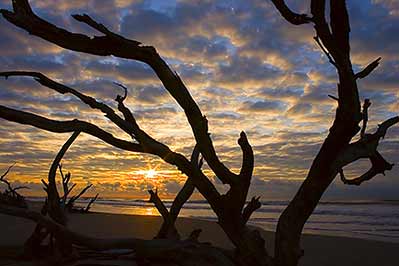
The upshot here is that it seems the hot-spot approach works well with portraiture while the linear approach seems to work well with landscapes.  If you look back in your own image libraries, I bet your favorite landscapes have the horizon on one of the horizontal “thirds” lines.  If the horizon is on a bottom third, then the emphasis is likely on the sky, while if the horizon is on an upper third, the emphasis is more focused (pardon the pun) on the foreground.  Here’s a few examples of landscapes that incorporate the Rule of Thirds to illustrate what I am talking about…

folly_sunset
Folly Beach, SC
bull_island
Bull Island, SC

Can you see the “thirds” lines?  I could do the overlays, but think you can probably get the gist.  But now, try to visualize the hot spots in these images.  A little trickier isn’t it?  I think it’s because hot spots as subject points in landscapes are scarcer.  This is not to say they do not exist because they do, and there is sufficient evidence to support that, but overall a landscape image is more about the entire scene, and the best way to convey that scene is by composing to accent the best elements, which are often the lines – whether it’s lines of water rippling, lines of trees, or lines of mountains and such, the best way to position these is with lines rather than hotspots.

Likewise, if you are shooting portraiture, some of the best results I’ve seen have been where the subjects face (and particularly, the eyes) land on a hotspot.  Take a look at these examples here:

JoAnne
JoAnne
Armani
Armani

Can you see the hot spots and where their eyes are?  I could do the overlays but again, think you probably get the gist here.  Where are the imaginary “thirds” lines though?  Not as easy to imagine here either, and for similar reasons.  Because it seems as though portraits tend to lend themselves toward what I am calling “hot spot composition”, while landscapes seem to tend toward “thirds line composition”.

Then again, I could be completely off my rocker – so what do you think?  Is there merit in the idea?  Should I patent this, write my first book and become insanely wealthy?  Or, is this a farce?  Should I give up trying to come up with new ways of looking at classic approaches to composition?    Okay, obviously I am probably somewhere in between these two extremes, not completely off in Bizzaro world, but also not poised to make a mint either!  Regardless, I’d really like to hear the reader thoughts on this approach – do you notice certain types of photography lend themselves toward particular rules of composition?  If so, which ones go best with which rules?  What about the “why”?  Why do you think some rules seem to work better for some images and others not at all?  Or, do you tend to avoid the rules of composition and make things up as you go along?  Chime in with your thoughts in the comments or via email.

Happy Shooting and we’ll see you back here again tomorrow!
Mask Pro 4.1

Okay, I know the folks from onOne have been very generous with their contribution of a copy of the OnOne Plugin Suite for the latest giveaway here at Canon Blogger/Learning Digital Photography, but I have to say that I am literally blown away by this offer even more.  As I delve into each tool more and more, I am totally amazed at the functionality and how easily it really makes things.  For those of you that watch Photoshop User TV, you’ve seen what I’ve seen – ads from OnOne claiming that masking is made so super easy that you can swap backgrounds and composite images together in a snap – it’s a breeze, right?

Well, we all know that ads only show you the quick and flashy parts of things, not the nitty gritty.  Let me tell you here and now – the Mask Pro really has no nitty gritty – it really is that easy.  Take a look at these sequences:

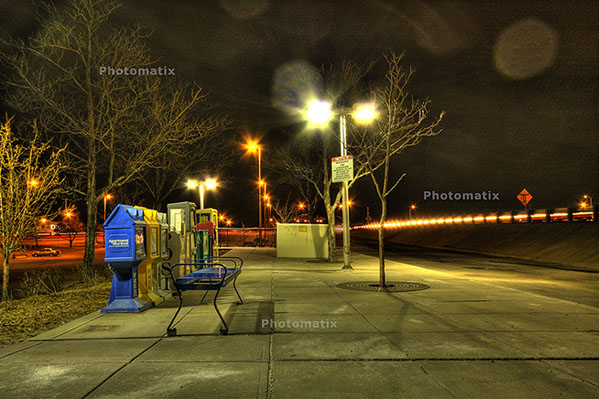
First off, an image I merged together during a trip to SC last summer.  It looked like it could make for a nice HDR, so I did some tone mapping and got this result:

originalhdr

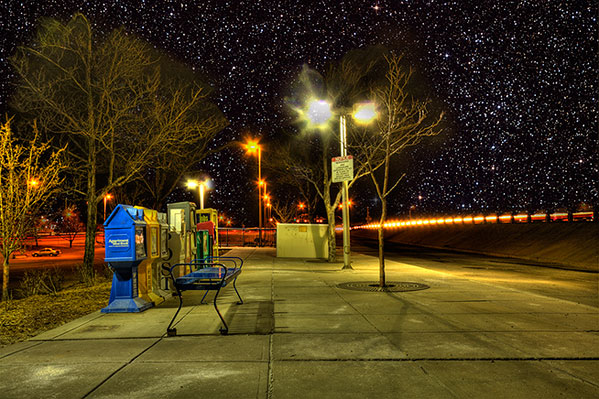
Needless to say, it didn’t really have the “wow” factor I was looking for.  (I should also throw a mention in for the folks at HDRsoft that produce Photomatix, the HDR software utility that I was testing at the time I originally put this HDR together – still working on a review of that – I lost the trial version after re-installing XP, but will get that back shortly.)  Anyway,  given the success I’d had with some other images in HDR and the background I tried, figured it was worth the effort to blend in a different background.  Here’s the results.

hackjob

Keep in mind, this was after literally hours and hours of painstakingly selecting branches, twigs, and  what not literally zoomed in to almost the pixel level.  Still, not that flattering a result and clearly a less than “stellar” job.  I relegated that to the “learn from your mistakes” folder and had not really touched it since.

So, this was my test for the Mask pro – could it do what I couldn’t after at least ten hours of agonizing masking selections and duping to repeated layers to start up the following day?  Well, let’s see, here’s what happened.

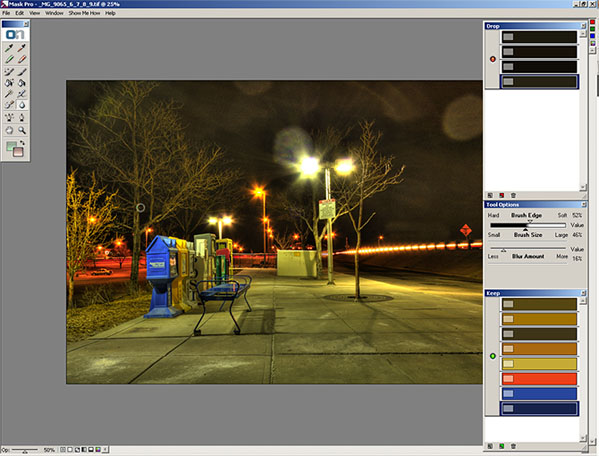
After installing Mask Pro, I loaded the tone-mapped HDR image into Photoshop.  Then, rather than taking any time to tweak, I went straight to Mask Pro (after all, it should do the work for me, right?).  After a short 7-slide presentation on the tools, my first screen looked like this:

maskpro1a

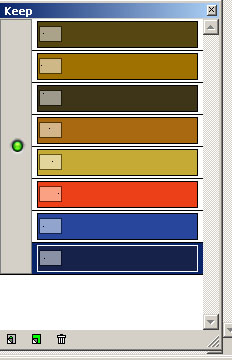
Before I go on, let me explain how the tools on the right ended up how they were.  You see, Mask pro gives you eye dropper tools to select the colors you want to keep and the ones you want to subtract.    So, I went and selected the green eye dropper to define the colors to keep.  I clicked a few parts of the branches and signage, which took the better part of 5 seconds.  The end result was this color set:

keep

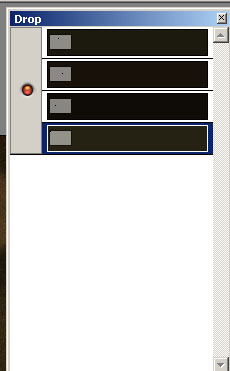
Then I switched to the red eye dropper to define the colors to drop.  I clicked a few parts of the sky.  This took another 5 seconds or so.    The end result was this color set:

drop Lastly, I clicked the Magic Brush tool, from the Mask Pro tool panel maskpro_palette
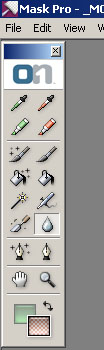
and just started painting around the sky.  I certainly did not take my time, as I was running on my Windows desktop which has a single core 2.3 Ghz celeron processor (it chugs when I load my browser fer Pete’s sake).  So, I dealt with about 5 minutes of a magic brush tool as it calculated the mask to apply as I painted impatiently across the image.  (After all, I wrote these blog posts after dinner, so time = sleep here.)

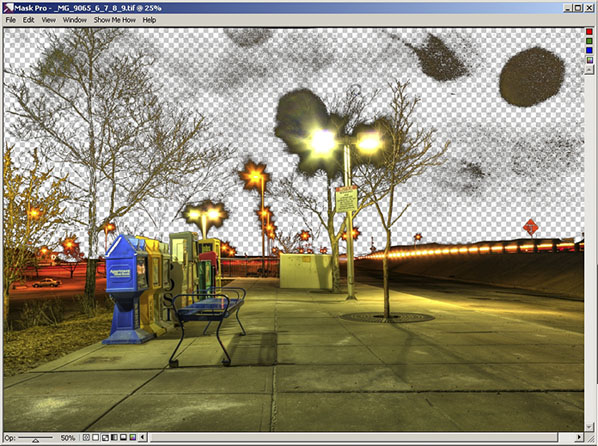
So, after about 5 minutes and 10 seconds, I have a mask that looks like this:

maskpro2

Yes, that was after 5 minutes!  I could already tell this was a wickedly intuitive and powerful tool (and I mean that in the best of ways), so I just stopped there and decided to take it back to PS for final cleanup and adding the new background.  To do that, I simply clicked the File menu, then “Save/apply” (another 2 seconds)…

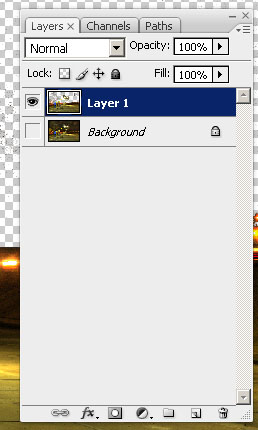
Now back in Photoshop with the original image.  It looks the same, but take a look at the layers palette:

layers2

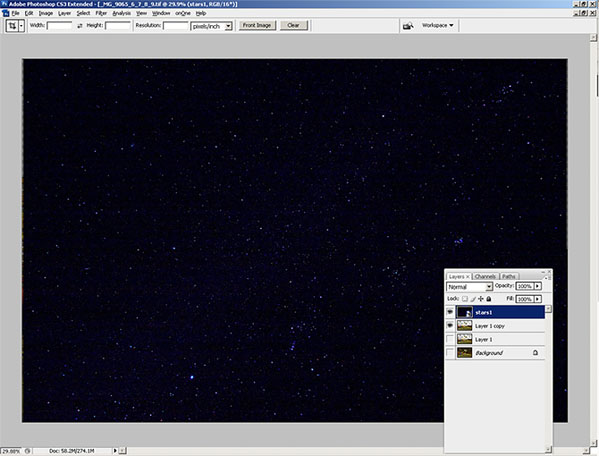
I know the low-res and smallness of captures for the blog make this hard to tell, but at this point I am pretty much ready to bring in the new background.  My only last step in PS is to duplicate the layer I just created from mask Pro to clean up the big blotch in the upper right, and a few specks in the rest of the sky on the third layer.   So, now I am ready to bring in my starry background again.  I place the object in the PS document to get this (for the record, I went with a different starry background to go for a more realistic effect rather than the Harry potter look of my swimming pool shots):

layers3

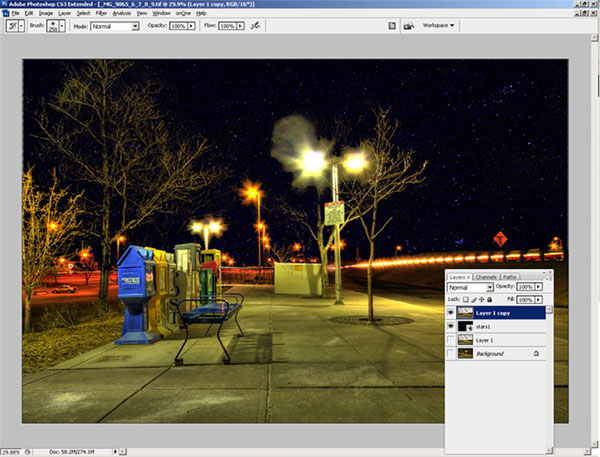
Finally, I just pulled the stars layer to sit below the Mask Pro layer and here’s the resulting layout in Photoshop:

layers4

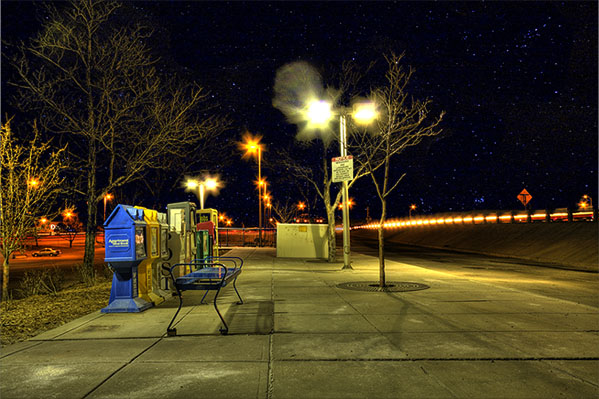
The last bit took all of another minute, tops (remember, I am working off a slow processor.  The final result, which took literally less than 10 minutes (the first took over 10 hours):

finalhdr

Such is the power of the OnOne mask Pro – just one of the multiple plugins that are available in this Suite.  If you want this kind of power and malleability in minutes, then enter the giveaway today.  it can literally save you hours, if not days, of post processing!  Here’s the Flickr page for photo entries and here’s the link to the rules.

What can I say – OnOne rocks!  Just to give you a true frame of reference – it took me about an hour and a half to write this post – and that includes getting the screen captures, then sizing them for the blog.  I also interspersed some Twitter time and surf time as well, so it’s not like I was really in any kind of “zone” or anything.  It was just another task in an evening of multi-tasking.  The original one took me over ten hours of processing and that was with no other apps running, seriously.  I was restarting the computer just to free up the RAM for usage only by PS every evening.

This feature alone can save you days of time in the digital darkroom.  Don’t delay and enter to win today! Happy shooting and we’ll see you back here again tomorrow.

Grab the Feed