Five Elements of Control: #1 Luminance

This week I am doing something special here on the blog – starting a week long series on the subject of Control.  We can control our photography in several different ways, and I’ve seen different outlets talk about each of these (and others) to a certain degree, but I’ve not seen many that address all of these elements collectively.  Since a discussion of all the elements that go into a photograph would be both exhaustive and likely impossible to touch on everything, it would probably be better to narrow that focus (pardon the pun) on some of the more salient elements to consider.  Today, the element of control that I’ll be looking to in more depth is:

Contrast/Luminance

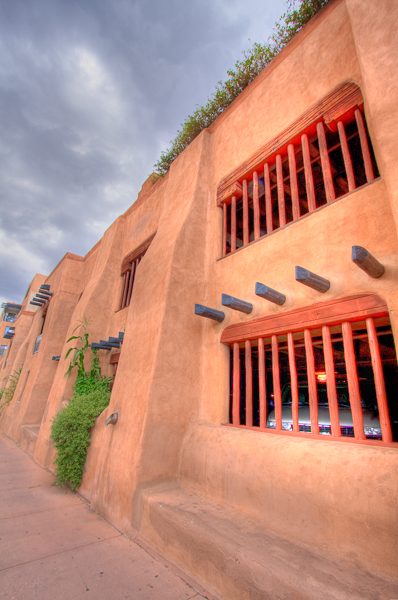
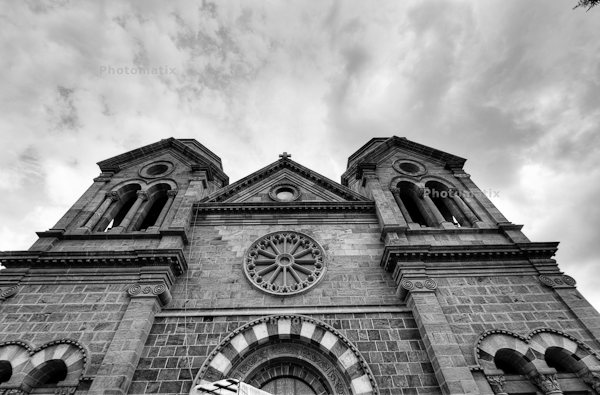
Contrast, or luminance, can be described as the tonal range of light within a photo.  If the tonal range is broad, then that means we have an extensive range of tonality from the lightest point to the darkest point in the photo.  Likewise, a narrow tonal range will mean that we have a limited range of tonality from the lightest point to the darkest point in your photo.  Take a look at the following two photos and see if you can determine which one has a broader and a more narrow tonal range.
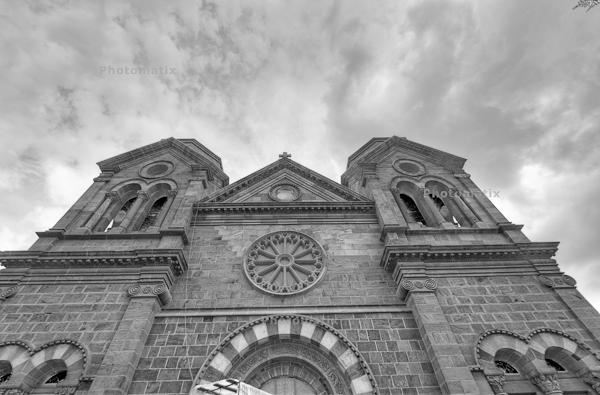
Santa Fe Church #1
Santa Fe Church #1
Santa Fe Church #2
Santa Fe Church #2

It should be pretty clear that one has a wider range of luminance to it than the other.  What’s exciting to learn here though is that this is the same photograph! That’s right!  I simply changed the exposure settings in ACR to output a different result.  Different tastes will look at each of these differently, and like one over the other for a variety of reasons.  What’s important to understand here though, more than anything else, is that all I’ve changed is the luminance.  The tonal range or contrast of luminance can have a powerful impact on a photo, either by how it limits and defines focus or by its range and extent of difference between high and low luminance points as we change from white to black.

So, why am I talking about luminance first?  Because it is probably the most important element to control.  After all, luminance (or contrast) deals with the principle of light!  Photography by definition means to paint with light ((look up the Greek roots photo and graphos)  Without understanding how to control for the element of luminance (a.k.a. contrast or light), the rest won’t really matter too much.  Rather than say more or less luminance is better or worse than the other, (because it really is a matter of subjectivity) I’ll simply leave you to ponder a few things between now and tomorrow:

  1. Which one do you like better?
  2. Why?
  3. What other elements of control can you think of?
  4. Finally, what other examples of the effect of luminance can you think of?  Got any you’d like to share?

Feel free to share your thoughts and sound off in the comments or with me directly via email.  Until tomorrow and the Second Element of Control, Happy Shooting!
MPix Pro: Review

LIke many other serious hobbyists and enthusiasts, I had heard a great deal about Mpix and their new featured printing options for professional and serious photographers under the umbrella of Mpix Pro.  I recently had a chance to sit down and go through the application process.  it was pretty painless, and as long as you have a website for photography, and a decent stable of work, you can opt for the Mpix Pro option.

After submitting your name and website for review, you will receive an email with a link to upload 5 images for print.  These 5 images are then printed as 8×10 photos and sent back to you – free! That’s right, you get 5 8×10 photos for free.  Basically though, these are intended to be used to check your monitor and color work flow for accuracy because they do not do color correction on them.  All 5 of the photos I got back printed very well, and I am happy with my color work flow at this point.

So, now the Mpix Pro printing options are available to me which includes many additional printing options for things like calendars, tickets, sports cards, mugs, and pretty much anything else you can think of – at some pretty impressive prices too.  This work flow for printing is also excellent if you tend to batch print a lot of photos at once (say for wedding photographers, portrait photograpers, etc.)  You can order multiple quantities of any size print you want and any specialty prints all through their downloaded Rhoes printing services.

Another cool part of this is that you no longer have to go through the website – it’s all done through this software download.  Think of it kind of like the Flickr Uploader service, as it works on the same principles, but instead of uploading for publishing on a website – it’s uploading for printing.  No fuss, no muss, done in record time and you are right back in the studio or on the road, doing your work, and not waiting on websites, and sitting behind a computer when not needed.  It was pretty slick – I literally did just what their catch phrase says:  upload one night, they shipped the next day, and I received it the following day!  (It helps that I am in Colorado and their facilities are in Kansas – right next door!)

Finally, the last neat little feature about the Mpix Pro service is that they send you basically what I would call a swatch wheel of their various paper types, with photos printed on them so you can see what each looks like to get the exact results you want, how you want and when you want.  Great products, great pricing, and great service!  What else could you ask for in a printer?  Check them out today!

On a more blog-centric note, the next week or so I may not be on as much as I do have a few things coming up, but will check in and post when I can (the whole quality over quantity thing…)  In the meantime, I’ll drp a few not-so-subtle hints about helping to get the word out about both the blog and the podcast – completing a Digg review at PLM site is always appreciated, as are iTunes reviews.  Other ways to help the show including making your B&H purchases through the link on the sidebar and donating through the Paypal link further down.  The cool thing about the B&H link is that your price is the same regardless, but a few pennies come back here to help offset the cost of overhead, hosting, and all that goes into putting the CB/LDP content together.

Last but not least, the September contest is underway, and you can win BIG – a thinktank Bag system and a Topaz Labs Plugin bundle all for participating in the Flickr thread, so don’t delay, and join today!

Have a great weekend everyone and we’ll see you back here on Monday!

Grab the Feed

Follow me on Twitter

Covering the Photo Beat

In the latest release of the LDP podcast, a shorter show this week as I prep for some other ventures, but there’s still enough material to really sink your teeth into.  To start things off, Leica released two new cameras in a synchronized announcement including a full frame ranger finder camera for $6995 and a crop factor camera with 12 MP for just under $2K which will release around the holidays.  More info on both cameras here

The other big photo news of the week comes to us courtesy of Apple, with the latest updates to iPods not only by adding features, but also by decreasing cost.  Find out how this all relates to photography (very cool ways) on the podcast today!  You can get Apple-specific details on their main page.

Second up on the show, the contest news which regular readers mostly know about except for the October announcement of two new sponsors!  Find out who the new sponsors are and what will be the giveaway for October in this episode.

Finally, I also let you know about the latest project to be looking for from CB and LDP – a monthly newsletter, and let you know how to become a featured artist in a monthly newsletter.  Details in the podcast so be sure to tune in and catch all the details today!

We cover the usual spate of listener Questions and Answers, so here’s the links to help answer the issues in this weeks show:

I’d also like to give some special cross-promo props to Kerry Garrison of Camera Dojo last week to talk about the Canon 7D!  It was a lot of fun, and I would encourage anyone looking to add photography-related podcasts to their listening libraries to visit Camera Dojo and pick that up today!  (Also, while you are there, don’t forget to say hey in his community too as he’s got a lot of great resources available.  His website is linked here.)

That’s enough news and excitement for one day, so make sure to stop back in tomorrow for more photography news and info as we head into the tail end of summer weekend photography fun.  Happy shooting all!  Don’t forget to visit the Podcast site here and Digg it!  (Or download through iTunes) and we’ll see you back here tomorrow!

Grab the Feed

Follow me on Twitter

Super Santa Fe

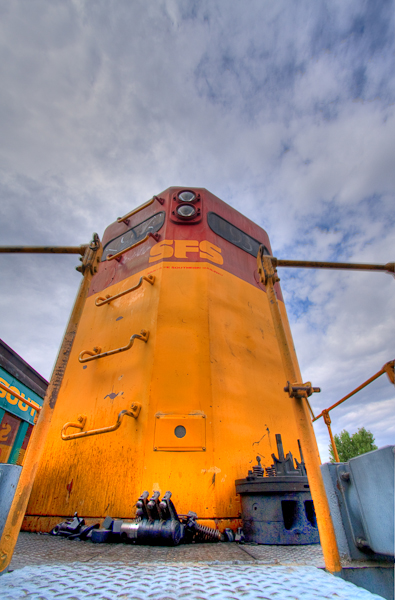
As a kind of salute to the Santa Fe trip from this last weekend, I thought it might be fun to do just a photo-sharing day here on the blog so you can see some of the fun stuff from down in Santa Fe.  We did a lot of walking around both days, so it was definitely a photo-walk type of atmosphere.  The opportunity to take a solo vist over to the historic rail yard in Santa Fe also presented itself so I took advantage of that too.  Here’s a sampling from the trip:

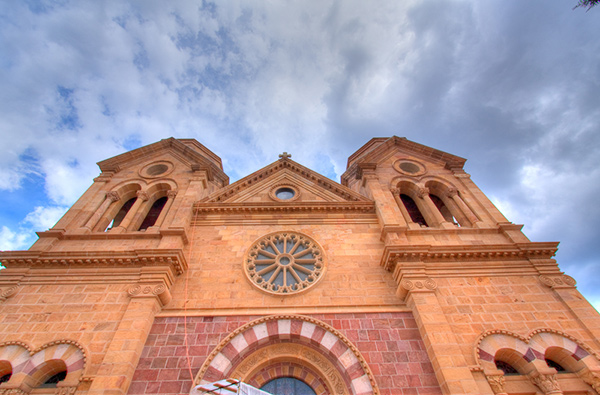
Santa Fe Church
Santa Fe Church
At the Rail Yard
At the Rail Yard

Santa Fe Parking Garage

As you can see, we had a good time.  I wasn’t exactly “focused” on photography as these shots are works in progress, but regardless, I did get the chance to practice a little.  As the old saying goes though, we are always our own worst critic, so I’ll throw the critique doors open to the reading audience too.  Do you like the processing?  Composition?  Technique?  Etc.?  Since some will likely ask, all of these HDR composites were done by pulling into Lightroom, then using the new Photomatix software from HDR Soft.  (Be on the lookout for a review coming up on this latest incarnation too as it’s got some nice advancements and feature additions.)

In other news, keep in mind the latest Giveaway is underway over at the Flickr Group.  You can win the Thinktank Photo Multimedia bag system and a Topaz Labs Photoshop Plugin bundle with a combined retail value of $500 just by submitting your favorite “Think in Color” photo to the Flickr thread!  Until tomorrow, hope all your shots are fun ones!  Happy Shooting!

Wacom Winner!

For those of you that don’t follow the twitter news and stuff, you may not know that I cut a finger pretty badly late last week.  A visit to the doctor on Thursday pretty much confirmed that I needed to keep from using that hand for at least 24-48 hours.  This meant no keyboard or computer use.  SO Friday, when I started to disobey the doctor (shame on me!), the spousal unit found out and intervened.

Since then, we had a nice little weekend trip to Santa Fe (only about 6 hours away from Denver) with some friends.  We took in the sights, had some nice meals and just a good time all around.  I was without computer/internet most of the time so only was able to tweet briefly over the 3 day weekend.  So, you also did not get that yesterday would be a “no blog” day.  Much like the rest of the blog-o-sphere here in the U.S., a lot of people had similar announcements though, so the lack of a post saying there would be no post was kind of…well, not really needed.

Today, however, things are back in full swing!  To start off, we have a winner in the “Win a Wacom” contest!  As you likely recall, the August theme was “Fun” and the winner would receive a Bamboo Fun courtesy of the good folks over at Wacom.  They have left the decision to yours truly, so, after bringing all the photos into Lightroom for review, I picked what I thought were the top five for a gallery to share here on the blog, and picked a winner from that set.  The winner is:

Win a Wacom Giveaway Winner

As many will likely ask “Why”, here’s the rationale as to how this image stood out above the rest.  First off, the colors and leading lines of the slide were very creative, and showing a keen grasp of image composition, so these were all really good qualities.  Also, the laughing family coming down the slide definitely showed that they were having fun, which was the theme of the contest, so that was another point in the favor of the image.  Last, but not least, the image met all the other qualifying criteria from the announcement post and over on Flickr, including size specifications, time frame, and all that jazz.  Congrats go out to Michael Whalen (a.k.a. Whalenmdw on Flickr)!  For those of you interested in seeing his entry and more of his work, be sure to follow the link to his Flickr thread here.  Thanks to everyone for participating, and to Wacom for contributing the prize for the August Giveaway.  You can also see all the entries over on the Flickr thread here.  Finally, here’s the gallery of finalists.

In other photo news, Kerry Garrison of Camera Dojo had me on his show last week.  We talked up the Canon 7D pretty good, so to hear that show be sure to stop over to his site and pick up his podcast.  (That show aired on Friday).  As for the missing podcast here at CB, trust me, one is coming out this week!  For the time being though, be sure to stop over to the Camera Dojo website, and grab that feed for your reading and podcast enjoyment!  Thanks to Kerry for having me on the show!

That’s it for today folks.  More news and photo goodness tomorrow.  It’s good to be back, so keep on shooting (we have the September contest underway as we speak, with $500 in retail prizes from Topaz Labs and Thinktank Photo, so be sure to share your images here!).

Access Denied

Hey all, gotta a lot of great stuff to get to, so let’s jump right in

Sorry everybody, but Jason has been cut off from computer access per doctor’s (and spousal) orders.  He will be back on Monday.  In the meantime, he says to wish everyone “Happy Shooting” and “Have a great weekend!”

The Benefits of the Back Story

We all know that our photography at its best can stand on its own – no jazzy or snazzy music, no cheesy frames or doohicky slideshows.  However, some of our best (and worst) photos also come with some pretty incredible stories.  Just one read through Joe McNally’s “The Moment It Clicks” will give you unique insight into how setting the stage or giving some insider perspective on a photo or body of work can both add value and meaning.

A while back, I posted a photo with the title “The Boneyard and the Back Story”.  In that post, the story was in the obstacles that had to be overcome to achieve the photo.  For a nostalgic look back, you can read that entire post here.  Since it’s been a while, I’d like to revisit this idea of sharing more photos along with their back story with everyone.

The Road to Folly Beach

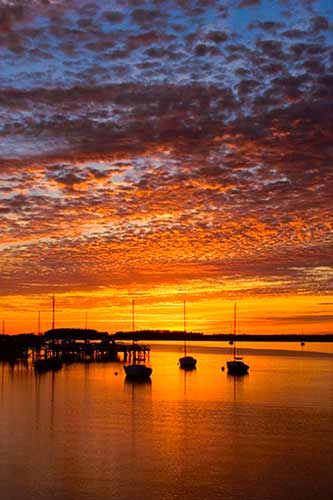
The back story isn’t nearly as glamorous as my previous one, but telling nonetheless.  While this may seem to be a pretty cool shot of a sunset in a marina area, what makes it more meaningful to me is that this was taken in South Carolina.  The dichotomy?  Sunset – on the east coast!  Usually sunrises are associated with facing east and sunsets are facing west, so catching a shot like this at sunset in SC was particularly pleasurable.

How did it happen?  Through networking of course!  When I used to live in SC, a few friends and I started a photo club in the area.  It became relatively successful with a peak membership of 40-50 members.  It still exists today but I do not participate to the same extent that I used to.  Well, a young guy joined the club as he started learning and studying landscape photography.  He lived in the area near this scene and knew of it.  After tracking the sunsets for some time (at least a year or so, which is impressive enough), he knew the time of year to visit and capture images much like the ne above.  Not only did he share this knowledge willingly, but he also invited me to go capture the scene with him one evening.

From my perspective, it was a successful shoot!  But, what about the rest of the audience?  Does it work for you?  What about your own photos and back stories?  Feel free to share links to images and your own stories with the blog either in the comments or with me via email.    Don’t have any yet?  Then make that your next assignment – go in search of a photo and journal the back story!  In the meantime, happy shooting (and story making!)!  We’ll see you again tomorrow.  Don’t forget the September Giveaway with that huge prize package of the Thinktank Photo bag System and Topaz Labs Plugin Collection.  The Flickr thread is open and ready for business!

Grab the Feed

The Topaz Labs Plugins: Details

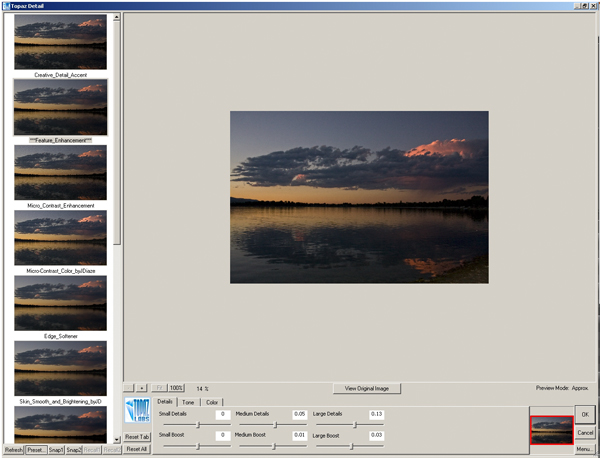
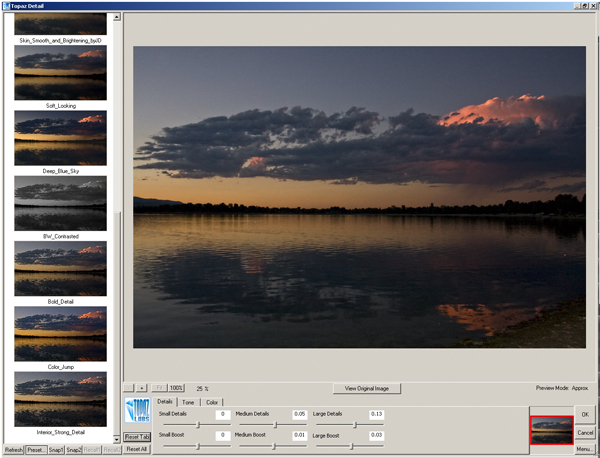
Another exciting plugin from the folks over at Topaz is the Details plugin.  This smart little plugin is, well…not so little.  A simple click from the Filters Menu chugs at your processing speed for a good while as it scans, reads, and takes your image through several unique variations of detail adjustments.  With 12 variations in this single plugin, you can take your image from bland to beautiful in just five minutes or so (depending on computer specs)!

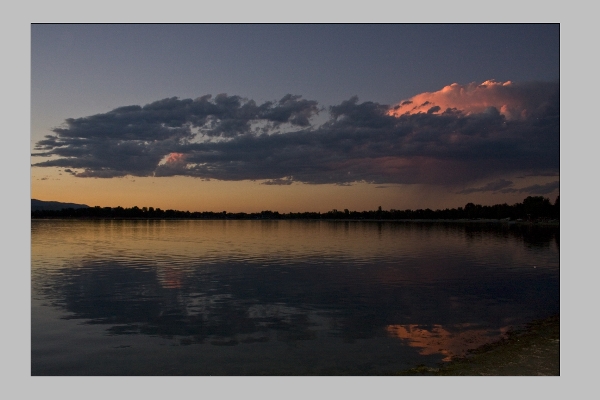
Check this out.  I took a sunset picture from here in Colorado a few months ago, and ran it through the entire collection.  Here’s the original image:

original_blog
Original Sunset Straight out of Camera

Sure, it’s an okay shot, but could it be better? I sure don’t remember it being that plain looking when I pressed the shutter, so let’s take a look at some of the options available in Topaz Labs Details Plugin:

Topaz Details
Topaz Details
Tobaz Labs Details panel - Set 2

With twelve total options, I was stunned.  A slight difference between this plugin and the Adjustment plugin is that this one does appear to chug a little slower – each time it had to re-scan the entire image and the scratch disk filled up further, so by the end of the 3rd edit, I had given up on an action for PS.  Just find your favorite initially based off previews (they are pretty close) and run with that for your output.

What I did like is that the sliders at the bottom were still adjustable for further image customization from the default “out of the box” adjustments that Topaz Labs gives you.  I also liked the number of options too.  In the Adjustment plugin the options were just a little too overwhelming for me – but 12 is just about enough.

My last note though, would be that once you have the plugin loaded, it shouldn’t have to reload again with the same photo still open.  A quick scan of the exif data should be able to say “same image” and scan no further.  That would allow for actions, and quick galleries of the various options for viewing full size images of the various options rather than the smaller previews.

What about the CB Crew?  What are your thoughts on this short review?  Have you used the Details plugin yet?  If so, thoughts on the usefulness?   Got a favorite details adjustment?  From here (I know it’s small), which ones hold the most appeal for you?  Oh yeah, the last thing – do you want this plugin free?  Then get your photo in the LDP contest today!

Anyway, happy shooting and we’ll see you back here tomorrow!  Don’t forget to enter the contest… here’s the link to the Flickr thread!

Grab the Feed

Taking it to the next level!

Writing, writing everywhere

We all have aspirations of taking our work to “the next level”.  How we define our “levels” of success is largely a personal matter.  Here I am always happy to share my aspirations and goals with the larger community.  It is likely no secret that as a blogger, the written word is an enjoyable “tool” for me.  In writing both blog posts here, and articles for the PhotographyBB magazine (and special shout outs and thanks to Dave Seeram, editor-in-chief of said magazine), it has become pretty clear that writing for blogs and writing for magazines requires different approaches.  To that end, there is some content on the blog that has never been incorporated into any magazine.  Likewise, some magazine content has never seen the light of the blogosphere.  Well, that convergence begins today, courtesy of my good friend, Eizabeth Gast (a.k.a. “Firgs” of Design by Firgs).

In looking at her work online with her own blog, and her social presence as well, I thought she might enjoy reading an article I wrote for the magazine.  Well, she has helped with editing, and it now also has a great blog form to it as well.  Since she was so instrumental in its transition from magazine to blog, I offered it up to her for use if she liked – needless to say, I think she liked it enough because it’s on her blog today!  Thanks Firgs!  You are the best!  If you want to read more about the importance of how social networking can play into photography – stop over and read her blog.  Heck, stop over anyway and tell her thanks for me! 🙂

The Comment Contest Winner

In other news, the Comments Contest was a huge success!  With only one repeat and one tweeted link, the count totaled 15, matching the highest total ever received for a single post!  After taking out the repeat and the tweet, lucky #13 is the number I plugged in over at www.Random.org (another link I picked up from Firgs!).  Wit the Random Number Generator (drumroll please…) the winner in the Comments Contest is – believe it or not, lucky #13!  That winner is is andie! So, Andie, if you could drop me an email, you are the lucky winner of a $25 gift card to B&H Photo!

The “Win a Wacom” Giveaway

Submissions for this giveaway are now closed.  Over the next few days I will be going through all the entries and winnowing out the best of the best and choosing a winner!  Be sure to tune in as we move toward Friday!

The Super September Giveaway

Remember the Topaz Labs software I mentioned yesterday?  And the Thinktank Photo Multimedia Bag System? Yup, it’s now time and they are up for grabs in the latest and greatest giveaway over on the Flickr page.  A new thread has been created (yes, a little ahead of schedule), so feel free to start putting your work in there.  The direct link to that thread is here.  The theme is Think in Color, so I am sure a rainbow will appear in short order, with lots of creativity!

I was going to do a write-up of some more plugins from the Topaz Suite, but time and space just got away from me, so if you wanna see more about this great plugin set, be sure to stop back in tomorrow as I promise to have that review together for your reading enjoyment.  On that note, have a rockin’ day and happy shooting!

The Rumored 7D is finally announced! Specs and photos!

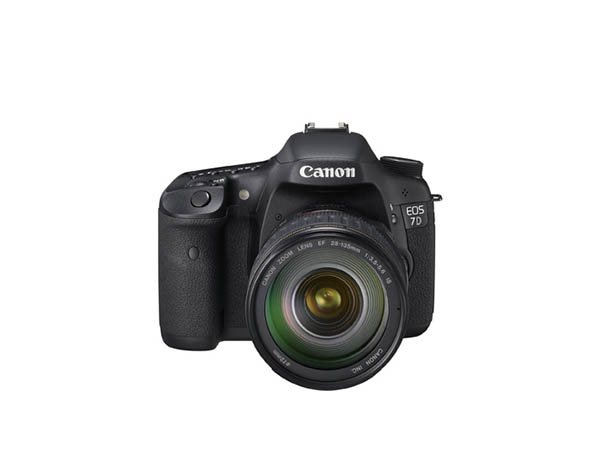
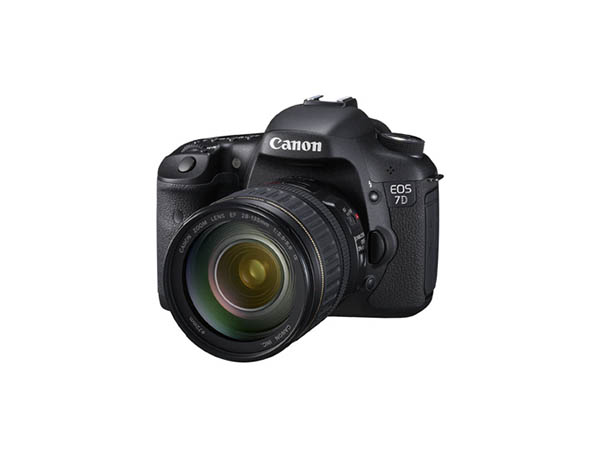
That’s right – Canon has announced the 7D along with a couple other new lenses.  Amazing specs on it are here

Here’s a few shots from the Press Room:

Canon 7D front View
Canon 7D front View
Canon 7D Side View
Canon 7D Side View
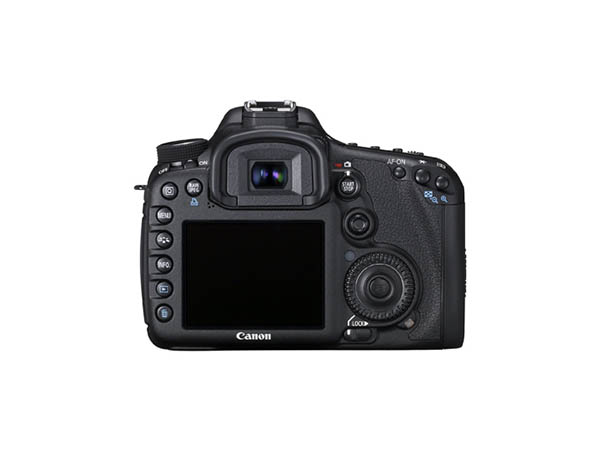
Canon 7D Back
Canon 7D Back

Lots of specs, but most impressive to me:

  • Spot AF mode reduces the size of a single AF point to focus on small subjects like an animal in a cage.
  • AF Point Expansion mode uses a cluster of AF points adjacent to the selected AF point to automatically assist focusing on moving subjects, such as an athlete on the run.
  • Zone AF divides the 19 AF points into five selectable focusing zones and makes it easier to achieve focus with subjects that are difficult to track with Single Point AF or AF point expansion, such as birds in flight.
  • Fully manual exposure control on the video
  • The built in flash has a speedlight transmitter for controlling EOS flashes like the 580 EX II that I just bought!
  • Live view for both video and still frame work (per request in comments)
  • AND THE PRICE:  $1700 RETAIL!  OH MY GOD!  Definitely counting pennies now!
  • You can also get it with a kit lens (the 28-135 is hardly “kit”) for only $200 more at $1900

CONS:

  • Retains the full frame sensor of its predecessor 5D series (per request in comments)
  • Correction:  This has TWO crop sensors:  THIS IS NOT FULL FRAME

So, what do you think?  Lots of pros, but is it a real step forward when the sensors are the APS-C sized ones?  What do you think?  Would you pay this price for another crop sensor camera?  Sound off in the comments…