November News

Another month goes into the archives as we enter November for 2009.  Here at the CB/LDP headquarters though, that means it’s announcement time for a couple of things, not the least of which is the latest contest news, the October newsletter, and something new for blog readers only!  Let’s start with the contest news:

Fellow blogger, NAPP member, and active LDP participant, Karen Stansel was the winner of the October giveaway.  She walked away with a Pro license of Noise Ninja from the folks over at Picture Code.  Congrats to Karen (a.k.a. Mitzs), and thanks to Picture Code.  With that contest closed, we are now into the November Giveaway.  This month a pretty cool bundle is being offered up.  The winner this go around will go home with the following prizes (yes, that’s plural!):

  • A free copy of one of Matthew Bamberg’s books on photography (don’t know who he is, listen to the latest podcast! 🙂 )
  • A DVD from Photoshop User TV – the best of the 11th year!
  • A $25 gift card to B&H Photo (just in time for the holidays)

The theme for the November contest is:  Winter (surprise surprise, since Fall was last month!)  The usual spate of guidelines applies, but to be sure you are getting all the latest, stop by the Flickr thread and read the first post.  Then, get ready and shoot because there’s only about 3 weeks again for getting your shots in.  Good luck to all!

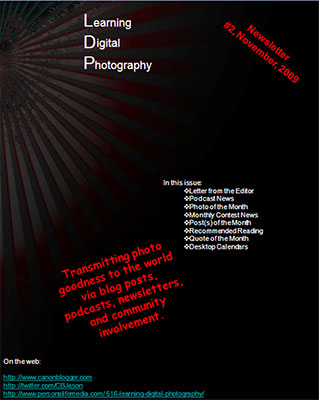
Next up, the latest news from the podcast and blog is the October newsletter.  Painstakingly assembled over the last month after some really useful feedback, it’s now ready for download by clicking on the image below:
ldp02
Learning Digital Photography, Issue #2

In one final bit of photo goodness, and in keeping with what many others are doing, I am happy to announce that CB/LDP is also joining the fray of photogs that shares their images in the form of a monthly desktop calendar!  Download the November Newsletter for the links to the images, or follow these links here (only temporarily linked here in the blog – going to become a newsletter-only feature starting with the December issue!  I am offering up 3 sizes based on the analytics of monthly traffic.  If your desktop dimensions are not featured, let me know either in the comments or via email and I can customize one for you…otherwise, here’s the 3 dimensions:

Another little nugget I just was reminded of (this is why participating in forums is a good thing):  Don’t forget to adjust your in-camera settings on the date/time for the change in daylight savings in U.S.  (unless of course you never changed it forward in the Spring…)!  Doing so will keep your EXIF data accurate!  (Thanks to Dave from the NAPP forums for the reminder!)

Last, but not least, I would be remiss if I didn’t drop a hint to read the latest issue of the PhotographyBB Online Magazine.  Not only is it free, but it’s just chock full of great and useful resources.  Also on the site is an active community forum of fellow photogs, full of great shots, creativity, and useful advice.  All of it is worth your time, so be sure to stop in there and see everything Dave and crew has to offer…(oh yeah, I wrote an article for the October issue too!)

Tomorrow, don’t forget to tune in for a combo hardware/software review, the likes of which you’ll never believe until you read it!  (Okay, nothing that fancy, but worth keeping in your feed reader, right? 🙂 )  Happy shooting all, and we’ll see you back here tomorrow for the latest!

Don’t Touch that Dial

This week we take a look at the dial on your DSLR – what do they do and is it worth it taking it off the Auto Mode?  Or even putting it into the auto mode?  What are the benefits?  Pros? Cons?  There’s thoughts both ways and I’ll look into each and give a few answers on this weeks show.  Also on this weeks show, I had the opportunity to talk with Matthew Bamberg, a well-known and respected photographer and author of digital photography books.  We had a great chat that you definitely are going to want to tune in to to get some tips tricks and places to go for great photography.  Check out the links in the sidebar for his books at Amazon and his website too, over at the hosted version of the podcast with the folks at Personal Life Media.

Lastly, the listener questions and answers, and some contest news rounds out the show too!

  • Daguerreotype
  • Best Scanners for photography
  • Windows 7 – is it for photographers?

Lots to talk about, and a great time all around, including the theme and announcement for the November giveaway!  Thanks for tuning in, and don’t forget to “Digg” the podcast over at PLM, or offer a review in iTunes, or even share your comments here on the blog.  Where do you put your dial?  What do you think of a DSLR in auto mode?  Is it good or bad?  Did I call it right?  Share your thoughts…the listening world wants to know! 🙂  Here’s the web links for stuff we talked about on the show:

Happy shooting everyone and we’ll see you back here tomorrow!

[display_podcast]

Let’s Make some NOISE

Or not…since Noise Ninja is designed to remove it from your images!  Regardless, give it up for our latest contest winner!  I gotta tell you, this month was very difficult, as there were some incredible images in the Flickr thread.  Stop in there and take a look for yourself and you’ll see how tough it was to judge this one.

I know – everyone says that, but seriously – there were some images in this one that were just stunning.  But, when push comes to shove, the one I kept going back to was one that evoked three key things to me:

  1. The essence of the theme – nothing says fall more than leaves, and while many captured the colors amazingly, this one really hit the nail on the head!
  2. I’m not sure if the blur was done in camera with a shallow depth of field or if it was done afterward in post production, but either way, it forces the eye to dead center – with nowhere else to go – beautiful bokeh!
  3. Last but not least, when push comes to shove, the principle of “K.I.S.S.” applies (keep it simple, silly!) in composition, and was definitely the case here.

So, without further ado, here is the winning shot:

October Giveaway Winner

The best part (for me) is that after I culled through the images (I literally don’t even look at whose shots are associated with a participant until I’ve downloaded them all, imported into Lightroom, decided on the finalists, and then picked a winner), I found out that this shot was taken by a fellow blogger, a fellow NAPPer, and Twitterer!  So, please join me in sending out a huge “Congratulations!” to Karen Stansel (a.k.a. Mitzs)!  You can catch up with her at her blog, at NAPP, and on Twitter.  This one really did stand out from a packed field of autumn foliage in its simplicity, singularity, and creativity!  Shoot me an email when you read this and I’ll get the folks at PictureCode to send you a Pro license of Noise Ninja!

For the gallery of the rest of the finalists, enjoy the slideshow here!

Thanks to everyone for participating, and to the folks at PictureCode for their sponsorship of the giveaway.  Stay tuned to find out the theme and prize for the November giveaway, as this may be one you weren’t expecting (but should be fun and challenging at the same time)!

In some other news that I was remiss on reporting last week, PhotographyBB also has come out with their latest issue of the popular monthly online Photo Magazine.  You can download your copy for free at the link here.  Thanks to Dave Seeram as well for giving me an opportunity to write for the magazine so regularly…it really has been (and will continue to be) an honor for me to participate with such amazing writers!

Don’t let the short delay keep you from shooting though – so keep on clickin’ and we’ll see you back here again tomorrow!

That’s why they call it a “Beta” (or RTFM)

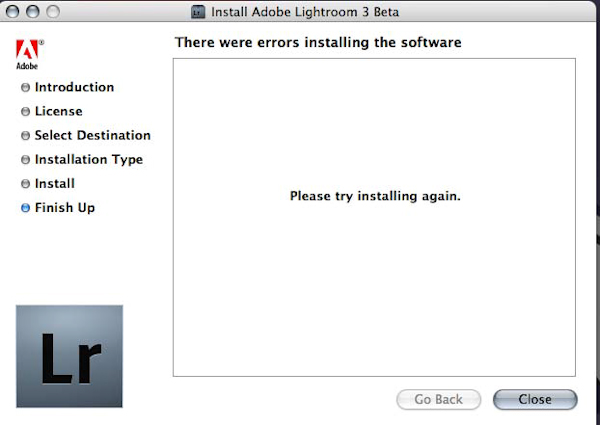
The latest buzz to hit the photography world has been a trinity of buzz and hype.  First, Canon announced the 1D Mark IV, then, on the heels of that, Adobe announced the release of Lightroom 3 in Beta form.  To round things out, Lensbaby came out with a couple new optical shift lenses to appeal to the creatively inclined.  I mentioned the 1D Mark IV last week, and today I was going to give a rundown of what the buzz is all about with Lightroom.  We all know about the new features including exporting video (musical slideshows), and I was going to show you screenshots and share a few here on the blog.  But, rather than join the fray in a rush to point out the “cool” factor, an interesting experience illustrated exactly why you must tread carefully with betas.

See, it installed and worked perfectly well with Windows XP, but when I went to load it on my trustworthy Mac running OSX 10.4 (Tiger), got an odd error:

Lightroom 3.0 Beta Error

As those of us in IT say when we see cryptic errors like this:  “That’s not so good…”

But here, it just serves as a reminder to those of you early adopters out there – keep your existing workflow as you experiment with Lightroom 3, because after all, that’s why they call it a “Beta”!  So, any thoughts on why this would happen?  Feel free to sound off in the comments or with me via email or Twitter.  I’m not too worried about it as I’ve got my LR2 and iPhoto to work with, so am happy just acting as a tester in the Windows world.

Last but not least, I know I promised to have a winner for the October contest announced today, but time just ran away from me with several projects coming to a culmination over the past few days. (Good news for the blog and podcast though as tons of content is about to pour through the siphon here!)  That announcement will come tomorrow…and until then, keep on shooting!

ETA:  Based on the initial comments and my actually taking the time to read the docmentation, it does appear my version of OSX (Tiger, or 10.4) is not supported with Lightroom 3.0 Beta, so until I upgrade the OS, my Beta experience will be restricted to Windows XP.

The 1D Mark Huh?

You knew it was gonna happen.  A new camera body has hit the market from Canon.  It was only a matter of  time.  The latest?  The Canon 1D Mark IV!  (That’s four in Roman numerals…)  What’s it got going for it?  Lots of features and functions.  Everything is being discussed ad infinitum from Megapixels to frame rates, to video, to shutter speeds to ISO’s, and everything in between.  In the end, I’ve come to one conclusion:  the camera market is always changing, always advancing, and new gear is coming out all the time – from all the vendors.  Want some proof?  The Canon line-up of Digital SLR’s in its entirety is little more than 2 years old – with the oldest being the 1D Mark III which was introduced in early 2007.  Take a look at the current active line-up of Canon DSLR’s and their dates of introduction (from Wikipedia):

  • EOS 1Ds mark III – Mid 2007
  • EOS 1D Mark IV – Two days ago
  • EOS 1D Mark III – Early 2007
  • EOS 5D Mark II – Mid 2008
  • EOS 7D – 2009
  • EOS 50D – Mid 2008
  • EOS Rebel T1i – 2009
  • EOS Rebel XSi – 2008
  • EOS Rebel XS – 2008

That’s a lot of cameras!  And that’s only their active lineup!  Others that have been “deprecated” (taken out of production) include the 40D, 30D, 20D, 10D, Rebel XT and probably more.  It’s funny actually that the two SLR’s I have owned are the XT and the 40D – neither of which is in production anymore.  And both of these cameras were absolute cutting edge on their release roughly 2 years ago and 5 years ago respectively.  The XT marked a new era of consumer grade SLR’s and the 40D marked a significant advancement to the 20D which was the most popular camera for serious enthusiast shooters for many years.  (Apparently, the 30D was only an incremental upgrade…)

A lot of people have been asking me:  “Are you going to upgrade?” What does the new MP count mean?  What about the video?  Do we need to be concerned about this?  Is it priced fairly?  What about this?  What about that?”  Lots of techno-babble is going around, and to be honest, I can’t keep up anymore.  For me it’s about one thing and one thing only:  Does it take good pictures?  In both the active and the deprecated line-up, the answer is a solid yes!

For what it’s worth, for me, I will continue to use my current camera until one of two things happens:

  1. It breaks
  2. My needs exceed its ability

Having said that, I am always interested in hearing what others think about the latest developments in the camera and photography industry.  It’s always fun to talk gear talk, and prognosticate, and “oooh” and “ahhh” over the latest gagedtry.  If I had a million bucks, then sure, I might look at all the stuff and buy every time a new one comes out, but until then…the above criteria fit the bill for me just fine.  What about everyone else though?  Does this make sense?  Am I being curmudgeonly?  Am I burying my head in the sand?  Is there something I am missing?  What are your thoughts on the “latest and greatest” in the camera world?  I’d love to hear, so sound off in the comments and via email – who knows, you may get your name featured on a podcast!  LOL

In the meantime, as always, Happy Shooting! 🙂  (We’ll see you back here on Friday with hopefully the latest podcast and some weekend nuggets (like a winner for the Flickr Monthly Giveaway!)

It’s all fun and games until…

It’s all fun and games until you actually are working with photography – after a family photo shoot on Friday evening, Saturday morning, then two more on Sunday (Christmas/holiday seasonal portrait work is underway), on top of the regular full time IT job, I got my first taste of a 7 day work week in quite some time.  While the thrill and passion for photography is there, putting yourself out there as worthy of getting paid for the skills you have is another thing altogether. Continue reading “It’s all fun and games until…”

Software Review: Noise Ninja

With the October Contest underway where the winner will walk away with a fully licensed copy of Noise Ninja, courtesy of the folks at PictureCode, today is a great day to give everyone an idea of what makes this program one of the industry leaders.  Since I have talked about the presence of noise in your images before (read that post here), re-hashing the principles of what introduces noise and the artistic benefits and image quality downsides of it in your images isn’t really needed.

Instead, here I will simply share some of the interface, and a few before and after shots here so you can get an idea of how well this software handles noise in your images.  So, enjoy!

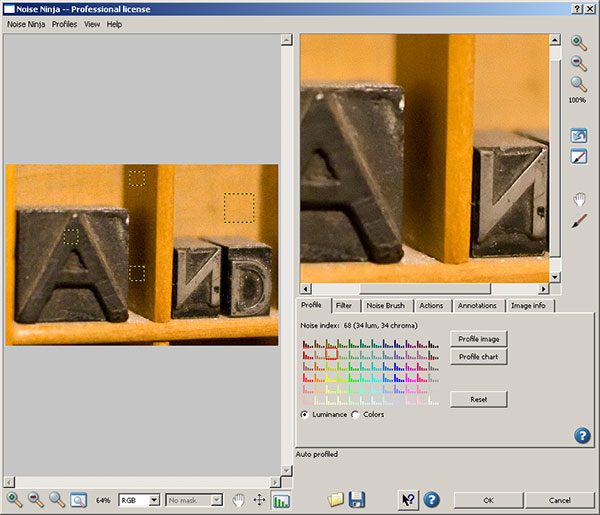
First up (after entering your license code), you’ll have a screen that looks like this:

Noise Ninja
Noise Ninja

You can see the yellow squares in the image on the right that shows the sections scanned to determine the noise profile for the image selected.  On the right, a closer view of what the image will look like (or at least a close approximation) after the noise reduction is run.  You see how you can make certain adjustments on one of several tabs.  On this main tab, you can see the options for Image Profile, Profile Chart and radio buttons for luminance and color values, along with the reset option.  I actually leave these alone most of the time.

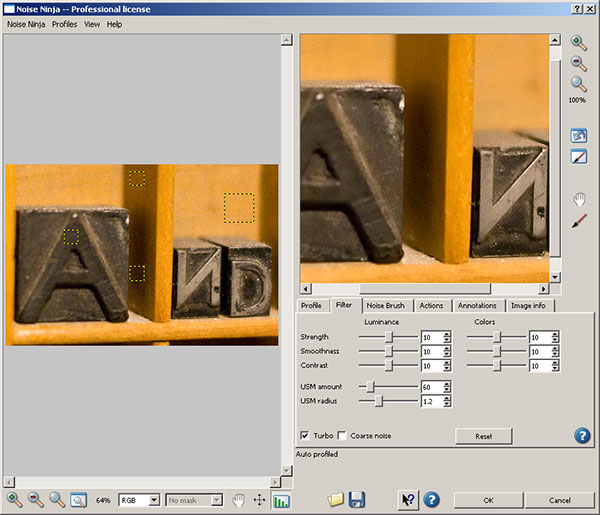
On the second tab is where I vary my noise reduction adjustments (and I would venture to guess most people make their valuation adjustments based on the image used).  Here’s the options available to you:

Noise Ninja
Noise Ninja

You can see here that many more detailed adjustments can be made to the strength, smoothness, contrast, USM amount, radius, color noise, and then checking whether you want the processing done quickly (turbo) and applying the settings to coarse noise situations.  I made my adjustments to 12 for the strength, smoothness and contrast (and typically use these ones for most images with noise).

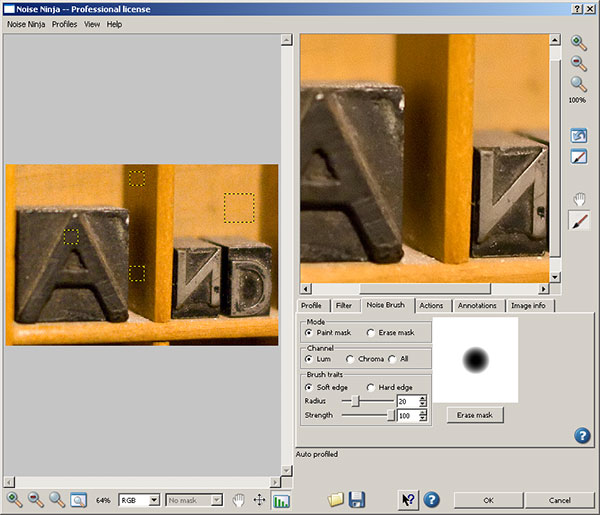
In the next tab, as shown below, you can see the noise brush, where you can apply the noise on a paint mask or an erase mask, specify the channel (luminance, chroma, or all) ad the quality of the brush trail by not only the type of edge, but also by radius and strength.  (This is very handy if you want the noise reduction faded across the image so as to leave some noise behind for artistic effect!  Normally I don’t make adjustments here either – but it is fun to play!)  Take a look at the interface:

Noise Brush
Noise Brush

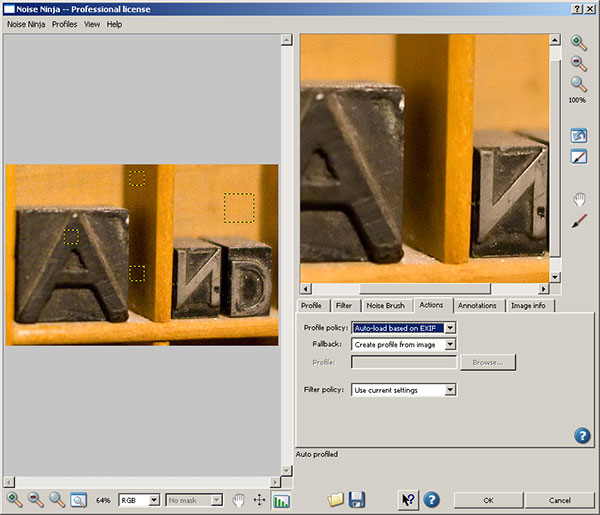
The Actions tab, as shown next, defines how Noise Ninja operates when it’s loaded.  Specifically, here is where you can tell NN wither the profile is by default configured based on EXIF data or to create a profile from the image, or to use a specific profile. This can be very handy as well if you are batch processing a lot of photos that were shot under the same or similar circumstances so that a profile doesn’t have to be loaded each and every time.  The fallback, and filter policies can also be defined here as well.  Here typically I leave the default settings alone as I prefer not to batch profess since my type of work is more geared toward fine art and individual edits rather than massive quantities.  To each their own I guess – take a look at the interface:

Noise Ninja Actions
Noise Ninja Actions

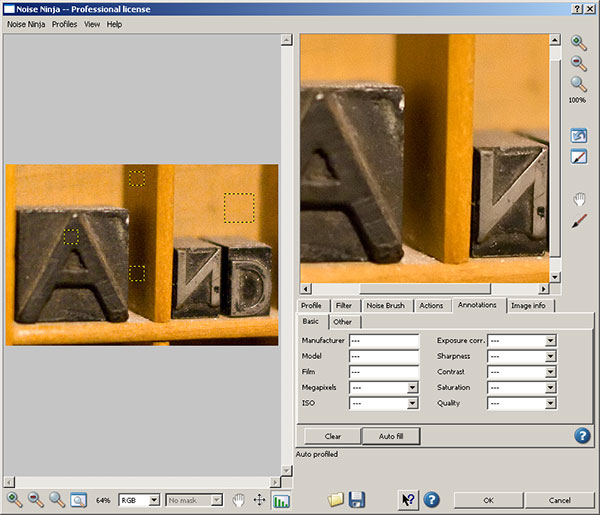
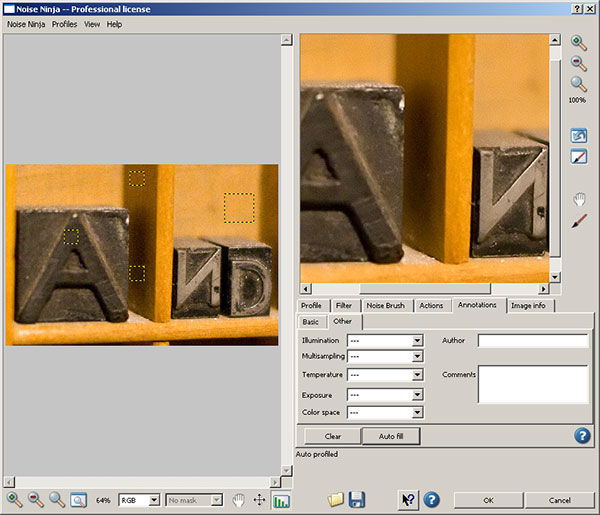
The next tab is the annotations tab.  I almost never use this, as this is a place where you can add additional EXIF and metadata.  Since I prefer to take the values from camera rather than adding my own specific notations, this tab doesn’t get any use from me – but it can be handy if you want to vary settings based on things like manufacturer, Model, FIlm type Megapixel count, ISO level, etc.  A second tab lets you add even more…see the interface captures below for reference.   Noise Ninja to me is isn’t about editing exif data though – it’s about noise reduction, so I skip these tabs.  Take your pick:

Noise Ninja Annotations Tab
Noise Ninja Annotations Tab 2

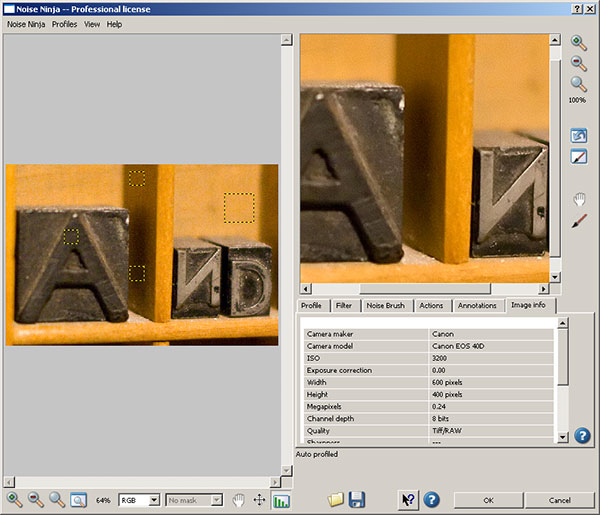
I do occasionally reference the Image Info tab though, because some useful information can be obtained there as well.  Things like the manufacturer, model, and more specifically, the ISO setting at which the image was taken.  ISO settings can be an indication on the amount of noise that was introduced due to camera settings and thus, how much can be reasonably applied.

Noise Ninja Image Info

You can see that my first image, shot at ISO 3200, was subject to some pretty intense noise on the 40D.  So, I ran the process, and take a look at the before and after results:

Before

Before Noise Ninja processing

Some pretty heavy noise, as expected, so let’s just look at the image after processing:

After

After Noise Ninja processing

See the difference in grain?  Yeah, I was impressed too.  But is it always the case?  I ran another couple images through NN and got the same or similar results on other objects in my print box.  (Which, by the way, is a great resource for test shots when looking into lens and gear performance on a wide variety of things like noise, white balance, macro, depth of field, and much more.)  Here’s another sample crop just to show you for comparison sake:

Before NN Processing 2

and after…

After NN Processing 2

Again, some impressive results.  When push comes to shove, results is where it counts in my book and PictureCode delivers at a superb value.

Now granted, there are other noise handling programs out there, and if you ask a dozen people what they use, 5 will say one, 5 will say another, and 2 will offer up another alternative.  When push comes to shove, it really is up to personal preference on which one “works best”.  For me, it doesn’t really matter as long as you are aware of what noise is, what it can do to an image, and how to fix it.  The tool you use is up to you.  I think Noise Ninja is probably recognized well enough for a reason, and the results here seem to suggest why.

The rest I’ll leave up to personal preferences, and if you would like to contribute your own thoughts, by all means, share them here in the comments or with me via email.  If you want to try it – you can download a free copy from the folks at PictureCode here –  or simply participate in the October Contest over at Flickr and win a copy from them for free!

That’s it for today – happy shooting all, and we’ll see you back here again tomorrow!

Got an App for That?

Since the next hardware review item as not arrived yet, today’s post is something of a blog announcement about a new feature I’ll be rolling out here shortly.  As you can tell from the title, it’s about applications on the iTunes store.  For users of the iPhone and iTouch, applications can be pretty handy tools (and diversionary too if you’re not careful!)

Well, as you may recall, a while back during the “Comment Contest” I asked people to contribute their favorite iPhone/iPod photography-related applications.  While the iTouch has not been fully capable of testing each of these, I’ve tried most of them and am putting together a new set of posts (don’t ask me where it’s going to go, because I am starting to run out of days in the week!) to cover the latest in Photography applications for those on the go.  So, for today, I am going to do the first application review:

Photoshop.com Mobile Application

In doing so, I figured it would be best to start at home – and by that I don’t mean here at the blog (although it would be kinda cool to develop an application where you could submit photos to the Canon Blogger critique threads and contest threads straight from your iPhone!).  No, I mean starting with the source – the editor we all know and either love or hate – Photoshop!  Believe it or not, the folks at Adobe have come out with a cool little application that you can connect to via your iPod or iTouch through a web interface at www.Photoshop.com

Here’s what it does – it allows you to store your photos online, edit, and share them with family and friends, create photo albums, and galleries.   Now before someone chimes in and says “Flickr already does that”, I will concur that Flickr is probably not going to be de-throned in the online photo sharing space any time soon.  But here’s a couple cool things that you get on Photoshop.com’s site that you don’t get on Flickr.

  • You can customize your background
  • You get more storage (2GB free)
  • More scalable service (it’s not just free and pro, there are different scales of services for whatever needs you may have)
  • You can link Photoshop.com to your Flickr account (but not vice versa)

So, it’s kind of a cool little service.  What I like about it is that the interface is much more conducive to sharing photos on the go.  For those of us with limited storage on our mobiles, it’s nice to be able to just log in to a web interface and share 2 GB worth of photos and have it look both classy and professional (sorry Flickr, but your interface needs an update…).

It’s free to join (you do need an Adobe Account though – also free), and can register a personal web space as well.  I’ve already done so, and you are welcome to view my account thus far at http://canonblogger.photoshop.com as I explore this some more to see what else is there to do.  You can create your own account at the main page of www.photoshop.com, and upload/share photos and videos in as little as five minutes too.  Some other applications I am taking a look at include HDR for Free, iHandy Level, and of course, the uploader applications for things like Flickr and Twitpic.  Some games have made their way into my iTouch (don’t know how that happened! 🙂 ), I’ll try to keep those out of the blog and keep things photo-centered.

If this topic takes traction, and people express enough interest in it, then be sure to stay tuned for future reviews and write-ups on iPhone and iTouch applications.  In the meantime – if you’ve got an application that you think is the bee’s knees, then feel free to share it here.  Suggestions for applications?  Share those too – I’d love to hear everyone’s thoughts.  As Apple is prone to say, I am prone to ask – “Got an App for that?”  Ask here and I will do what I can to find out and review for you!  Happy shooting all, and don’t forget to upload your photos for the October contest over on Flickr. The theme is FALL and it’s sure to be a good one – 3 pics a piece, and it’s underway right now.  Happy shooting and we’ll see you back here again tomorrow!