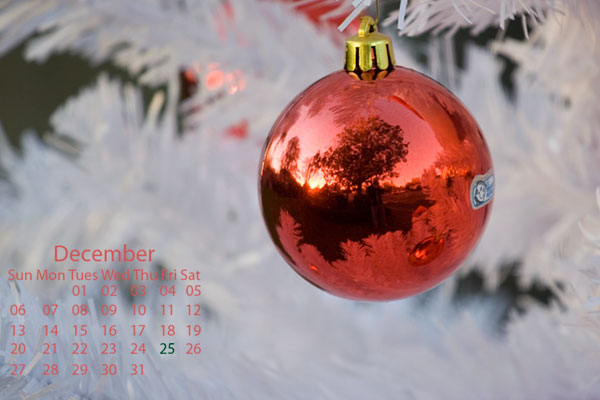
Happy Tuesday folks! A few curve balls have been thrown my way recently, so the content may shift a little and be more sporadic as I make some adjustments both professionally and personally. However, in the interests of keeping things positive, the December Calendar is ready for download! Enjoy the Christmas-themed desktop:
And for those of you that know the specifics of the curve ball – there’s a donation button on the sidebar! If you like the desktop calendar download, feel free to help off-set the curveballs from there directly!
[wp_cart:Calendar:price:2:end]
More content is coming soon for all too, so be sure to stop back regularly! Enjoy the rest of the week and keep on shooting! 🙂
Can capture detail as far away as 300 feet in most cases.
Can adjust to extreme low light scenarios in an instant
Can adjust to extreme bright light scenarios in an instant
Can capture HDR imagery with no post processing
Can capture 3-D in the truest sense of the word
Can capture images with no pixelation
Can capture the widest tonal range available in the visible light spectrum.
How much would you spend on these lenses? How much would you protect, treasure, and cherish them? We all love our high quality optical glass whether we be Canonites, Nikonians, Pentaxians, Olympians or whatever. Across all brands, we know the value of high quality optics, and also know that such optics do not come cheaply.
We also know that owning such gear requires regular maintenance. I know people who take a lens out of it’s case, place it on a camera, take a picture, and when done, replace it right back in the case. When the lens costs upwards of $5000 or even $10,000 for the super zooms, it’s understandable. Many would say that even the most expensive lenses in the market today do not meet all of the above 9 criteria. So, it’s kind of hard to put a price on such a hypothetical lens.
However, we are all given two of these lenses by default – even before we got into photography. What are these two lenses that are priceless? OUR EYES!
Think of all the time we spend cleaning our lenses, wiping them down, avoiding scuffs, chips, and keeping away from dust and dirt as much as possible. Then compare that to the amount of time we spend maintaining our optical health. It’s kind of ironic, eh?. So many of us take our eyes for granted. The moral of the story?
GET YOUR EYES CHECKED REGULARLY!!!
I just got back from my annual eye exam the other day, with some good and bad news. The good news is that the glaucoma and macular degeneration which runs in the family (both sides) has not reared its ugly head yet. The bad news is that apparently I am getting to an age in my eye health where I need a little assistance at both the near and far end of vision – in other words: bifocals! *shudder*
While it’s not the end of the world, and I certainly can swallow my pride, accept the fact that my eyes will see better and get the glasses, it is just another anecdote where a little education can come from it – to take care of your own lenses (your eyes). After all, without your own lenses, the rest of the lenses in the world won’t make a difference! On that note, let’s get out and use our eyes to capture the world around us! Happy shooting, have a great weekend, and we’ll see you back here on Monday!
While the rest of the world thinks of this as Thursday, here in the USA today is called “Thanksgiving”, and it’s a day where Americans far and wide take some time to stop and take a moment of pause to consider everything they are thankful for. While most bloggers in the U.S. are taking the day off, I am actually bucking that trend with a few brief thoughts, specifically of what I am thankful for:
My health – I know it sounds corny, but when you consider how many people are fighting off diseases and life-threatening circumstances, I am very lucky to be in fairly good health. Granted I am a little over-weight, and a little under-exercised, but for the most part, am feeling in pretty good health considering.
My wife – For those of you that read the blog regularly, you know that Tracy is my ever-supportive wife, who not only tolerates my obsession with photography and technology, but also encourages me to do things better, who constantly says she is proud of me, and will always be there for me when I need her most. She is literally the best thing that has ever happened to me and I am a lucky guy to have her.
My Freedom – I rarely get political on the blog, but we Americans take so much for granted when it comes to freedom. We have freedom of speech, expression, the right to bear arms, the right to vote, and so much more that others across the world only dream of. That freedom came at a price – and that is the lives of many of our servicemen and women. So, I also would like to tangentially give some thanks to our troops both domestically and abroad.
My Family – Again, it sounds corny, but there are so many homeless folks, orphans, and people who live alone in the world – to have the benefits of having a family (even when they drive you bonkers) is to have it all.
The viewers and readers – That’s right – without the readers, listeners, and friends I’ve made through all of this time online, this blog would be just another voice in the wind of the internet. It’s the encouragement and participation from readers and listeners of the blog and podcast that has often kept me motivated to keep on going, and the success the blog and podcast have seen is due mostly to the inspiration, encouragement, and feedback I’ve received from each and every listener out there.
With the November giveaway deadline behind us, it was time to look at all the submissions and pick a winner from the set of entries. Without further ado, the winner of the November Contest/Giveaway is:
Winter Wonderland
The theme for the contest was “Winter” and though it was a little early for this, Yvonne took her creativity to new levels by doing some rather unique post processing on an image and it worked! It looks like she converted this to black and white or added an infrared filter of some kind. Not sure what exactly she did, but it sure gave me shivers when I looked at it, so, congratulations to Yvonne for your creative vision, and for winning the November giveaway. If you see this before I get a chance to find you, send me an email to claim your prizes. I’ll be sending Yvonne a $25 gift card to B&H Photo, a DVD for the Best of Photoshop User TV, Season 11, and a book from Matthew Bamberg. Be sure to stop by Yvonne’s photo stream on Flickr, and her website for more wonderful photos and to congratulate her.
Thanks to the folks at NAPP for the DVD, to Matthew Bamberg for contributing a copy of his book, and for everyone who participated. I know it was challenging as many people noted that it wasn’t very “wintery” in their area yet. Hopefully though, Yvonne’s creativity showed us that you can create wonderful winter-like scenes any time of year – you just need to post process a little.
Stay tuned for the announcement of the December giveaway this Friday, while recovering from your turkey-induced tryptophan slumbers! Believe it or not, tomorrow is not going to ne a no-blog day – something special is scheduled for your reading enjoyment. Regardless, have a Happy Thanksgiving, and we’ll see you back here tomorrow! Don’t forget those cameras, and keep on shooting!
Before getting to the new video from Mpix, just once question: Did you see what they are doing at Photoshop User TV? To kick off the new season, new format, and new set, they are giving away a super cool kick %^&&* prize from FJWescott (those folks that make great lighting products). I gotta say, the new format was needed – fast paced, lots of info and no fluff no muss, all tips and tricks! That set looks super cool too guys – job well done!
Also, some major shout outs to friend-of-the-blog, Jason D Moore for his honorable mention in the NAPP sponsored contest “So You Think You Can Teach Photoshop“. I know Jason had his heights set higher than an honorable mention, but believe me – Jason really can teach the you-know-what out of Photoshop. So, if the software is what you want to get up to speed on – go check out his site and sign up for a workshop, because I’ve learned a lot from him. Major shout outs dude – congrats!
Finally, to finally break the ice once and for all on the Canon vs. Nikon debate, I came across this video from Joey L – absolutely hysterical. Thanks to the NAPP forums for the link, and if you want to know more about JoeyL, check out his recent interview on TWIP – great stuff there too. (He’s also on Twitter and worth the follow).
You’ve probably heard of Mpix before, at least because I’ve talked about them on the blog, and even shown some of the results in using their metallic inks to get some amazing prints. Well, I got three new products from them recently while prepping for an art show that is coming up the first weekend in December. To change things up a little, and give more of a “multimedia” aspect to things, I did a video on this to show you each product, as well as show you what to expect in terms of wrapping, packaging, and delivery time frames. It’s available on YouTube, but also embedded here for viewing convenience.
Have you had similar experiences with Mpix? Better? Worse? What are your thoughts on the quality of their service? Feel free to sound off in the comments, or over on YouTube. For the time being, keep on shooting, and we’ll see you back here tomorrow!
In episode #34 of Learning Digital Photography, we look at the subject of low light photography. In these shooting circumstances, you often need to drop your shutter speed pretty low, while shooting with apertures that are relatively open, and high ISO’s in order to get the scene with enough light. Whether you are shooting night photography, concert photography, or foggy weather, these are all things to look at and think about.
To help shed some light on the subject (get it? 🙂 ), we talked to Becky Thomas (aka BecThomasPhoto on Twitter) on the show. A great conversation, and lots was covered so be sure you give it a listen. Thanks to Bec for her time – it was a lot of fun. Make sure you stop over to her site as well for a great dose of inspiration.
Photo News
Panasonic Sound System NW-10
Facebook Automated Photo Tagging (Face Detection)
Price Cuts on Photo Storage from Google ($4096 for 16 TB)
Photo Technical Tips
Pros and cons of increasing ISO
Pros and cons of opening your aperture
Pros and cons of slowing the shutter
Listener Questions and Answers
Camera Prices/Lines – What camera should you get?
Difference between a Lightroom catalog versus photo backups
In keeping with the impending Giftmas (yes, I am spelling that right, and thanks to Yankeefoxtrot on Twitter for the name), and hopefully in time for your holiday shopping, I have assembled a cornucopia of items to share with you either as the photographer, or as the one with a photographer in the family. The best thing about this list though – all the items are $25 or less. After all, the economy is tight – we all know it and everyone is cutting back, but there’s no reason to feel denied simply because photography is known as an expensive hobby! This way, there’s also no need to feel like you are asking for someone’s first born, or that the guy/gal is just in a hobby that is too expensive to give something photo-related. Actually, that’s just one of the best things about this list. The other is that these are all items that I either own, or want for my own gear bag. So, take note, link this post, and enjoy!
Battery Caddy – this is probably my most appreciated item. Ranging in price from $5 to $14, I absolutely love mine and have been meaning to get more. (Thanks go out to Scott over at Weekly Photo Tips who sent me mine as a prize for a photo contest last year – I literally love this item!)
Eneloop Batteries – Since you have a battery caddy now, you may as well stock it with batteries. Yeah yeah, I know, batteries for flashes are so mundane, but get yourself a set of Eneloops and you may re-think this. These guys are not only super powerful but they retain their charge much longer than traditional rechargeables. Plus, they really do seem to have the staying power of traditional alkalines. A set of 4 of these can be had from any store, whether it’s B&H, Radioshack, or Newegg. The link above takes you to Sanyo’s page (the folks who make them), and it includes a whole laundry list, which includes Costco!
Stickey Filters – Okay, I am cheating here for two reasons. First, because I discovered these from another list (Scott Kelby’s Gonzo Gear Guide), and second, because the price is actually $49.95. But here’s how I justify it – you get two sets of these stickey filters, so it’s really like they are $25 each. Lame? Kinda, but these are so cool, you’re gonna want a set anyway. These guys are basically gels that have a sticky side that slaps to the front of your flash and act as a filter. Boom. Done. Stickey Filters look to be so cool! No more cutting and using Velcro on your flash, no more buying sheets of gels and finding a place to store them. Stickey Filters seem to be the answer to what the gellin’ photog needs in their gear bag. Plus, they offer a lifetime replacement! That’s impressive…
Camera Bubble Level – These little doohickeys are awesome. My bubble level on my tripod cracked about two years ago and the liquid drained out, rendering it useless. I’ve been meaning to replace it until someone (I forget who) pointed these guys out to me. It slides in your hot shoe mount too, so you know the camera is level. Amazon is the linked place, but these can be found many places for $10 or less!
Remote cable release – Okay, okay, I also stole this from Scott Kelby’s list, but truth be told, I also love mine (got it at the local camera store for like $39, but that was only because I didn’t want to wait the week for Amazon to ship me one. YOu can get them for any brand, but I have to go with Canon given the blog name. It’s linked above, and can be had for $24.95 at the time of this post.
Joby Gorillapod – I can’t tell you the number of times I’ve found myself out and about with my P&S only to wish I had my tripod with me for some stability just for a few seconds. I’d heard about the Gorilla pod but never really thought about it for my P&S because I didn’t have a small portable until fairly recently. When my brother showed up for the holidays with the Gorilla Pod and his P&S, not only was he more portable, but also more stable. (Don’t you hate it when your brother beats you at your own hobby!) I had to get one, and you should too! For the P&S original, it’s $21.95!
Earbud Microphone set – When I first got my iPod Touch, it was disappointing to learn that the included headphones did not include a microphone. The tech in me should have known, but I rushed back out to get the Apple-compatible headset. When I didn’t have it with me one day, I tried the set for my Blackberry and sure enough, it worked just fine. (Why wouldn’t it, it’s the same technology in headsets – all with the same adapter.) Now that my “Apple-certified” headset has developed a short, the replacement set will be the one from Plantronics for $5 from Amazon. Shoulda gone there first! For those out there without iPhones, Touches, or Blackberries – most phones these days come with a headset plug, and the mini-RCA should work in all of them. If not, you’re only out $5. Small price to pay for the ease with which these operate (and I think they sound better too!)
Microfiber Cloths – I know, it sounds crazy, but these do get dirty themselves and you must throw them out. No biggie though when a10-pack costs a mere $17.99 you can’t go wrong! You can get different sized cloths from camera vendors like B&H, and I think even Wal-Mart Visioncare has a 3-pack for like $10 bucks, but I like the ones from Simply Good Stuff (linked) simply because the price is right, they are designed for lenses, and it’s just a cool name for a website.
Gaffers Tape – anyone who’s been around photography for any amount of time has heard of gaffers tape. It’s low tack so the sticky stuff won’t adhere to your gear, but man can it save your $%^& in a pinch. For a mere $5 you can get 12 yards of the stuff from B&H, so the question isn’t “Why?”, it’s “Why not?”
Flickr Pro – there’s so much more you can do with a Flickr Pro account over the standard free account. At only $24.95, it meets the criteria, and the photog will fully enjoy the added features, including statistics, unlimited uploads, and so much more. Plus, you can give it to them online, so it saves all that added expense of tape and wrapping paper!
There you have it, 1o things under $25 (well, 9 since I kinda cheated on one). Have any ideas of your own? Products or items you prefer? Something blatant I missed? I’m sure there are lots of other ideas out there, so sound off in the comments and let others know about your “gotta have it gadgets”.! Just in time for the holidays too! Happy shooting all, have a great weekend, and we’ll see you back here on Monday!
No, this isn’t spam, the blog has not been hacked, and I am not speaking in tongues here. DALPUG refers to the Denver Adobe Lightroom & Photoshop Users Group. Started relatively recently by a guy I know named Brian Reyman, it’s a great local resource for photographers to not only learn from one another, but also to network and get an opportunity to see some of the latest developments in the industry.
I had a chance to attend the meeting last night, and the mini-workshop that Brian ran on plugins included quick looks at things like OnOne Software, Topaz Labs, Nik, and a bunch of others. Not only were they showing you how to use the plugins, they were offering up giveaways too! It’s a great group, offering people opportunities to learn, share, and network with others in the field in the area. Definitely worthy of a diversion from the regular blog schedule to give some shout outs here today.
I’ve also learned that these sorts of groups are all over the place – Adobe sponsors user groups across the globe! So, here’s a chance to sprad the word about your area groups. Got one you know about? Attend any regularly? Let me know here in the comments and link to your website or user group site so people can find you!
Short but sweet, so keep on shooting and we’ll see you back here again tomorrow!
As much as we glow and sing the praises of Photoshop and Lightroom, native photo editors that are included in Operating Systems are often overlooked as alternatives for photo editing and management. This is primarily because… well, let’s face it, because they are not very good at photo editing…or management. But think about what we are comparing them to…comparing Windows Picture and Fax viewer to Photoshop Lightroom? Is that really fair? What about comparing Photoshop Creative Suite 4 to iPhoto? Is that a good apples to apples comparison? If you think about it – not really. We’re talking full-fledged dedicated programs that have years of programming and design and development put into them versus an add-on component for an operating system. It’s really an apples to oranges comparison, and as a result, the programs themsevles suffer a bad beat.
So, I decided to take a look at the native photo editors for Windows and Macintosh – those being the Windows Picture and Fax viewer and iPhoto. Well, because Apple computers were really designed with the designer and graphics guy/gal in mind, it’s no surprise that iPhoto is more robust than its Windows counterpart. This is not to bash the Windows Picture and Fax viewer, because it does serve a need, especially when I need to preview an image in a pinch and make some very very minor edit like a teensy crop or something. It’s not great, but it’ll do.
For that reason, today the focus (if you’ll pardon the pun) is more on iPhoto. Now, keep in mind, I am operating off Snow Leopard with the ’08 version of iLife here, so my iPhoto is not the latest and greatest, but the nuts and bolts are pretty much the same from what I can gather, so this review while not complete, can give a good synopsis of what works and doesn’t in iPhoto. Let’s begin:
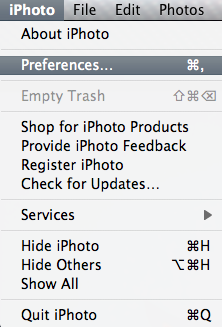
iPhoto Preferences Option
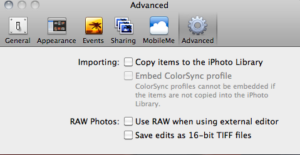
File Management: B+ Let’s face it, we are making more and more images these days and applications need to be able to keep up. If you don’t have some sort of back end database that can quickly render previews, without copying photos over as duplicates in low res formats that waste drive space, it’s gonna get ugly quickly. iPhoto has the unfortunate option of copying files over on import. While this may seem to be good for redundancy sake, since we’re all aware of the need for backups these days, but I would not recommend copying everything into iPhoto. First off, the “copy” of your image is embedded in the iPhoto library and can only be opened in iPhoto. If the library crashes for any reason, then those copies are gone. I would rather have two copies accessible from any application. Second, as your library expands, the longer it will take to load iPhoto and the more susceptible it will be to crashing. Since this is, by design, supposed to be a “light” photo editor, you want to avoid making the footprint of the application larger than necessary. For these reasons (and others) I would advise against copying your images into iPhoto. To avoid this, when creating your first (or a new) library, simple click on the Preferences, then Advanced Menu options, where you can de-select the option to copy images over.
Uncheck the Copy Option
Albums and Sideshows
When it comes to managing your photos though, iPhoto rocks. Much like Lightroom, you can build the equivalent of collections (as albums), and create slideshows from those albums. You can also export slideshows with music which until Lightroom beta 3 was unavailable in any advanced photo editor – you needed a separate application! Score one for the folks at Apple here!
Music in Slideshows is a Plus
Image Editing: A- Most of the basic functions are there, cropping, red-eye, image rotation, and even horizon correction. Not much to improve upon here without entering the realm of serious photo editors, which I wouldn’t hold an OS program to…at least for now.
Editing options in iPhoto
Support: B If your Apple product (your Macbook, iMac, or MacPro is under warranty, no problems – they got you covered. It can include long wait times occasionally, but that’s to be expected from a company of Apple’s size. (I know, I’ve vented about this before, but in this case, it has nothing to to with the program, because the support is there…when you can get through.) What happens when your computer warranty ends? So does support – it’s the nature of the beast, and support has to end eventually. For the time being though, there is enough documentation out there on iPhoto to the point that most of us can get by with asking questions in various forums and Google research. So, while support is not the best – it’s about an industry average, nothing to write home about, but also nothing that really garners complaints either.
There you have it, my take on the iPhoto editor. I don’t really use it for major edits, or much more than occasional snapshots that I share on Twitter, forums, and other such venues. Having offered up my two cents, it’s time to serve things up for the listening and reading audience. What’s your collective take on iPhoto? Do you like it, love it, or hate it? Anyone using iPhoto ’08 or ’09 for managing and/or editing their photos? What are your thoughts? Sound off in the comments, or let me know via email.
In the meantime, that’s it for today…make sure you take a moment to get your photos into the November contest giveaway thread – there’s now less than two weeks left and the prize package is pretty cool! The link is in the header, but here it is again for convenience: Flickr Contest Thread Happy shooting all, and we’ll see you back here again tomorrow!
For those of you on Twitter (and following me), you know that over the weekend, my iPhoto library on the Mac was either corrupted, or somehow compromised in its integrity, because when I went to add in a few snapshots to it for sharing with the Twitter-verse, it crashed on me. Believe it or not, I was not worried, because I had a back-up copy of all my snapshots on my Western Digital Hard Drive. I blogged about this puppy before, in showing you how to add a second drive to your laptop in 10 easy steps.
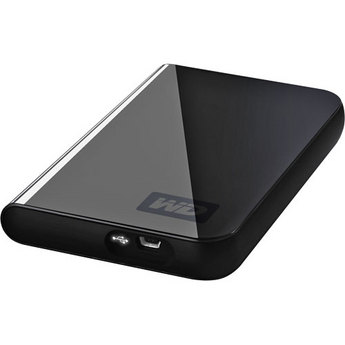
Western Digital Passport Drive
Well, not only is the second hard drive a great way to increase the capacity of your laptop, but it also saved my bacon this weekend, because when the library was corrupted (I use the method of not importing a copy to my library and save the library on the main OS drive), it was simply a matter of creating a new library when opening iPhoto, changing the option in Preferences to not copy images in, and then sitting back and waiting the hour or so for the import to complete.
What I like about this Passport Drive though is the fact that I have dedicated storage for my photos, music, and documents independent of the OS drive. I also can easily remove it from the laptop if needed. Lastly, I also like it because I can expand this fairly easily. To do that, I would just get another drive, plug it into another USB port, and simply drag-and-drop to copy to the new location. The old primary can now be easily disconnected, become a back-up, and the new one becomes the primary. Another great feature of these is that you can easily copy data to and from it, and with surprising ease. I cannot verify this, but suspect that these Passport drives are solid state drives because they don’t get very hot, and it’s just been so awesome for letting my photos and music libraries expand without me thinking much about them.
The downside? They are a little pricier than their larger drive equivalents. With the ever-decreasing cost of storage these days though, it’s well worth the additional 20 cents per gigabyte in my opinion! (My 320 GB was like $80 – it goes for $71 now at B&H.) You can get these pretty much anywhere from your local Wal-Mart, to Best Buy, Newegg, B&H, and other retailers/e-tailers.
Oh, and there’s a moral to this story too: always, always, always…back up your data! For more reviews and other information on this drive, feel free to find your favorite review resource online. I like the ones over at TestFreaks myself (although this is a rating of the 500Gb unit), but as with any review resource, your mileage may vary.
In other blog notes of interest:
The Flickr contest is in its final two weeks starting today – it’s a prize package of three pretty sweet items, so be sure to get your entry(ies) in soon. At stake is a $25 gift card to B&H, the 11th Season of Photoshop User TV, and a book from Photographer/Author, and Friend-of-the-Blog, Matthew Bamberg. The Flickr thread is linked up at the top of the blog, but here’s a quick link for easy reference.
Speaking of the links at the top of the blog – you may notice that more content is being added. The Navigation Bar is being reorganized to include more “About” pages, Archives, My Gear, and much more. Feel free to peruse those at your leisure. More content is coming soon too, so don’t just be checking things out in your RSS feeds – lots of content is available directly from the blog!
Congrats to Mary Angelini as well for her witty comment from the Scott Kelby book giveaway – stop by her site for a good set of photo galleries to peruse too (and to congratulate her).
That’s it for today…happy shooting and we’ll see you back here again tomorrow.