Suddenly silent…

Hello to the possibly dozens of viewers of Canon Blogger. I must first apologize for the suddenly silent turn the blog took these past four or five days – after Saturday’s shoot, I had a few days of rather nasty flue-like symptoms. Hopefully no one was waiting on baited breath to hear the next words I utter online or in video podcasts. Anyway, I think I am in the clear now though, so have ventured out of my cave and back to the microphone. Yup, my Tuesday tutorial got pushed back to Wednesdays. I know…it’s not like I’ve been too consistent in publications thus far, but that is something I would like to change. Ideally, I would have a scheduled theme to each of my weekly posts. One that has been buzzing my head as been along these lines:

Monday – Minutiae – trivia relating to photography

Tuesday – Tutorial – video podcast released showing the latest tip/trick in Photoshop

Wednesday

Thursday – Thoughts – My chance to wax philosophic on whatever photography discussions have been on the hot plate for the past week. I bet y’all are standing in line to hear that one, eh? 🙂

Friday – Follies – Fun silly stuff to wrap up the week…perhaps a joke or two, maybe a reference to a particularly funny comic (What the Duck comes to mind, as does Dilbert).

Anyway…just a new format/schedule I am toying with. If anyone has ideas, suggestions, or thoughts on tweaking that based on what you would like to hear/read/listen to, feel free to email me. My address (as always) is jason <AT> canonblogger <DOT> com.

But, enough of all this logistical stuff, what you want is tutorials, right? Alrighty then – here’s this weeks installment:

Saturday’s scenery

Normally I take the weekends off from posting while I go out shooting and recording podcasts and such, but the fun of todays outing was such a high that I wanted to put a few shots out after processing just because I thought they were something anyone could enjoy.

peoples_office_bldg21.JPG

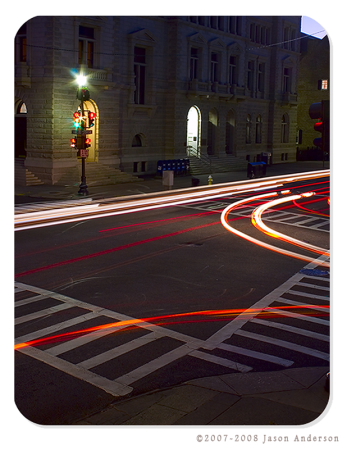
citylights2.JPG

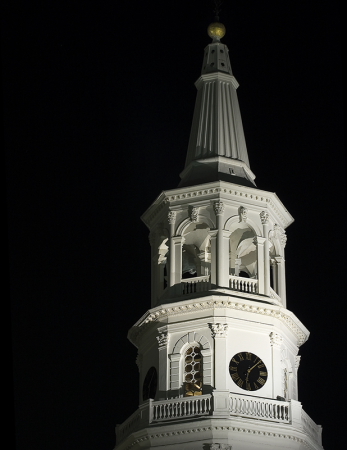
church-steeple.JPG

Not sure the low-res will work, but I thought these were good examples of how an entry level SLR is still quite capable of taking some great shots! Feel free to critique and share your thoughts in the comments section of the blog! 🙂

Finally Friday…!

Well, it was quite a long work week, but unfortunately, I cannot vent here as I have signed an NDA, so it will suffice to say TGIF!!!  Some long hours this week, especially in the latter half, so the video tutorial I wanted to work on anad post today will not be up like I intended.  In my last tutorial, I mentioned a new page of content that is coming to Canon Blogger.  That is still in progress, but since I have not gotten all the links in place yet, I shall keep the URL mum for the time being as well.   I was supposed to go out shooting with some Flickr friends today, and got my head so turned around, thought the shoot was for tomorrow.  My apologies to that group for no-showing…it would have been fun to meet y’all!

Hopefully next time though…but since I did clear my schedule for shooting tomorrow…I’ll be out and about then to make up for it.  Will post pics here if anything good turns up.  Until next post then…happy shooting all!

Rounded Corners (a.k.a. Web 2.0 graphics)

Rounded corners on graphics are really the mainstay of the “Web 2.0” movement, so I figured it might be helpful to show a nice and easy way to apply a rounded corners effect to your images. It’s a little bit longer of a tutorial today, going upwards toward 5 minutes, as there’s some other news that I’ve shared in there as well. Rather than spoil the surprise, it’ll suffice to say here in this context to be on the lookout for a new link soon with just tons of content, with videos, PDF support documentation, and relevant attachments like actions and lots of other fun stuff.

Anyway, without further ado, here’s the Rounded Corners video, first in Flash, then in Quicktime format! 🙂

No video or photo post today…

With the holidays now on our heels, my better half wants some time spent compiling images into holiday calendars, portraits, and other suc gifts. While flattering (and cost effective), it has taken a day away from my current photography-related pursuits. Aside from that, Baltimore is ahead of New England in the 4th quarter of MNF with less than 9 minutes to go and is about to get the ball back…they were 20 point underdogs! ANd I am hoping against hope that NE will get handed the loss here. Go ahead and win the Super Bowl if you want NE, just stop the swaggering – it’s not becoming of professional athletes. While I am at it, the ’72 Dolphins need to get over it….they got lucky as they had the cheesiest schedule that year, and it was before free agency, media hype, and all the rest of the intensity associated with the game now. The ’72 Dolphins would never have gone undefeated in the last 15 years.

Back to photography subjects though, I am looking at both Cafe Press and Mpix for the calendars. Both seem adequate, but the latter seems to have a little more polish to it. I will be doing two different layouts, one of family and the other of various landscapes, with the portraits going to Mpix and the landscapes going to Cafe Press. We’ll see how the results are…

A tutorial should be forthcoming tomorrow…I’ll attempt a little suspense by not revealing the subject prematurely (primarily because it’s not recorded yet, so I don’t know the subject! I have a pretty good idea, and it should be an enjoyable one. Until tomorrow then…happy shooting!

Notes in Pictures

Good morning all – fast breaking news as I have an extra tutorial this week. I was working on my portion of a collaborative project last night and saw a note pasted into the picture for me as a reminder of some rather important settings for the layer masks. It reminded me of the usefulness of making notes and saving those with the pictures! You can make text notes or audio notes with this feature, so check it out at your leisure. I’ll link to the dedicated page for now, and upload a flash version when I get home later today. In the meantime, enjoy!

Notes in Pictures

Welcome to the Land of Confusion

Well…I am torn now. After administering both this blog and two other ones (granted the first was very half heartedly), I am finding that Wordpres, while apparently becoming the de facto standard for blogging, is not without it’s problems. It seems themes are not universally cognizant of several features that I would have thought would be common to many bloggers – first and foremost, being multimedia. Sorry, but the plugin and configuration settings for getting basic videos to play right in a blog is just damn confusing for me. Now I grant that I am no web designer extraordinaire, but I know the basics of html, CSS, php, etc., and am (hopefully) developing my multimedia skills by virtue of this blog, but this is rediculous.

The other problem that I am noticing about WordPress is documentation. Or should I say the quality of documentation. Nothing is very easy beyond adding a plugin. Once it’s added, then you must activate it. Beyond that, configuration. God forbid you want to publish multimedia in different formats (flash for the blog and Quicktime for iTunes). The whole thing requires practically a full-time job. Blogging I thought was a venue for hobbyists who wish to share their thoughts and experiences on a more visible level. Sorry, but the requirements for blogging and podcasting are WAY beyond a “hobbyist” level.

And now, here’s the kicker….say you want to customize your blog!!! Either I am making it too difficult, or my expectations for customization are too high, but I rather do not care for the default headers others choose. I get that everyone has different takes on things, and that’s the whole purpose behind themes, but if you are going to design a theme and make it WordPress-friendly, I would ask three minimal things:

  1. Write your documentation well…don’t assume I know what php stands for, nor expect me to have read all the ins and outs of how to adjust CSS styles and scripting. I would wager that many who would be otherwise inclined to share their thoughts regularly via blogs and such toss the idea either after investigating or trying a few things and getting wrapped in a confusing set of circular logic.
  2. Consider that your “theme” is just that…a theme, which means it should be customizable, and done so easily. If you want people to use your theme, then let us change the background color easily. Let us change the header image easily…and most importantly: tell us how!
  3. Finally, in recognition of your web skills at creating themes, help those less fortunate by ensuring your theme is widget friendly, multimedia friendly, and validates. Also, if you want people to sing your praises, and continue to use your theme beyond a few months, when releasing updates and fixes, see if you can’t deliver them in a way that doesn’t re-set everything back to default values. It’s a roya pain to re-load every customization (especially when you’re not a designer by trade that instantly knows the header image is stored in the wp-content/header.php file, and that the sidebar widgets you’ve configured need to be re-installed and activated (and sometimes reconfigured afterwards). Seriously…how the hell am I supposed to remember all that crap – if I knew all that I’d design my own theme!

I would actually pay good money for a blog that did that. Any takers?

Whitening Teeth

While it’s not the most glamorous thing in the world, when we do portrait work, a lot of the post process focuses on minimizing flaws and maximizing peoples assets. Part of this process can include giving a little more polished look to people’s teeth. Today, I walk you through the process of how to do this in Photoshop. It’s pretty straightforward, but a very useful skill to have regardless. Anyway, give it a try after watching the tutorial, and in the meantime, feel free to share your thoughts on the podcasts thus far either via email or the comments section. I’ve also published an article in m previous post that explains various settings for apertures and shutters to achieve the best composition in your photography, so check that out too.

Fair warning on the tutorial this go around – I think I have the format issue figured out for those on Macs and to increase the portability factor, but these files are pretty big (.mov format), so it may take a while for you to get these downloaded. I will still have the flash as an option for web viewing, so feel free to view online and download for playback later at your convenience. Since iTunes picks up the first uploaded attachment, the Quicktime version will appear first. The flash-based version is right below that though, so pick your poison. Let me know if either of these doesn’t work for you. Thanks and looking forward to the feedback on this one! Have a good night and happy shooting!

Link to Quicktime format for downloading: Whitening Teeth

Video tutorial delayed

As the Thanksgiving holiday recedes into the past, a few lingering tasks remained so the tutorial that I had planned for production tonight is not complete yet.  But, never fear, fellow photogs, I have something to share.  It seems recently that there has been a lot of focusing (bad pun) on photoshop techniques, yet we have these amazing devices that can really do wonders if we know how to use them – called cameras.  As a service for those that could use some additional explanation, and as a refresher for the rest of us, I’ve put together a paper on determining the best apertures and shutter speeds for various compositions.  Check it out below.  In the meantime, happy shooting, and I promise a tutorial will be available for viewing tomorrow.  Until then…enjoy the written word!  

apertures-and-shutters.pdf

Postscript:  As an additional thought – I keep a cheat sheet of this info in my camera bag as a reference chart for what different apertures and shutters accomplish at each stop’s setting.  If anyone would like a copy (it’s laminated and easy to fit in a side pocket), email me and I’ll get you a hard copy.

HAPPY THANKSGIVING – and thanks to all the viewership!

Thanks to the good folks over at www.good-tutorials.com, I’ve hit a new personal record with Canon Blogger and in the last 24 hours got almost 500 hits – 451 to be exact… beating the previous high mark of 421 back on October 29th. Quite exciting for a blog that’s only been around for 2 months. Thanks to all that have found interest in the blog and the tutorials to take the time to visit.

How appropriate to be giving thanks to all that have enjoyed the blog thus far – on THANKSGIVING! Happy Thanksgiving everyone, and we’ll see about getting a few holiday-themed tutorials up in the next week or so. Until Monday though – it’s holiday time for me! 🙂