Maintenance Post

Tonight around midnight, the blog may go offline briefly or look a little funny as I go through some maintenance updates on the blog, both from the WordPress side, as well as some of the plugins.  For those who have been following the blog for a while now, you may have noticed that the “Feed Me” graphic I created for the feed link is no longer showing.  I suspect that is due in part to an outdated plugin.  In addition, the atom feed seems to have a <rel link=’self’> tag that is not formatted correctly, and that is native to WordPress.  There’s a few other “behind-the-scenes” things I’m going to try and get done tonight as well, so if the content suddenly disappears, don’t worry (I’ll be the one worrying!  LOL), it should be back up before Sunday morning.

Happy Shooting all!  Be careful out there and watch your apertures! 🙂

Friday Photo Fun

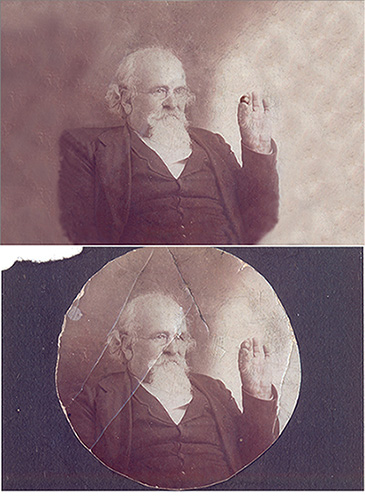
Well, the funnies take a back seat today as I wanted to share some thoughts on image restoring with those who are tuning in. My father gave me a shot of my great-great grandfather holding a slug he was shot with during the Civil War. I had it scanned, and then took the digital version into Photoshop for some work. It’s okay, but his right arm looks a little “off” to me. I’ll give it some more work, but think it should work to give him a nice 8×10 back.

If anyone has thoughts on this, or would like to share their own photo restorative efforts, feel free to share in the comments or email and I can append this post with those. Thanks for tuning in, have a good weekend, and Happy Shooting!

before_after21.jpg

Thursday Thoughts 2.0

Recently I made a post on the blog sharing my seven favorite blogger resources from 2007.  I titled the post “The Best 7 of ’07”, and published on Monday (or thereabouts.)  After making the post, I’ve seen quite a few trackbacks to it from the sites I referred to.  I’d like to first say thanks to all those that took the time to both notice, and reply in kind.  In following the trackbacks, I’ve also found a few new resources and fellow blogger and photography-related websites that have some appeal.  I also noticed amidst all this fun surfing a few surfacing eddies that have prompted my mind to wander.  It’s these wandering musings that I am sharing today.

Chief among my musings is the association with Canon.  In order to quell any intial thoughts to the contrary – the idea behind the web address (and blog) was to share my thoughts and ideas as a photographer – who happens to use Canon gear.  I do enjoy the Canon brand.  However, I am not blind to the fact that there are other gear options out there that provide alternative choices for photographers of all ilks.  In fact, while my body and direct acoutrements are Canon-branded, outside of a shutter release, the body, and 2 or three lenses, nothing else in my gear bag has the Canon stamp on it (or even the bag for that matter.)  It also bears mentioning that I am not getting paid to endorse any one particular brand or another on this blog – I simply share my thoughts on photography, tips, tricks, tutorials, and other tangential subject matter.  I have no affiliation with Canon and they have none with me.  As the blog continues to develop and mature, the look and feel may change a little bit, my gear choices may change, but I suspect the Canon line will continue to be my choice, simply because it’s what I’ve learned on and am most comfortable with.  Additionally, as we all know, when making an initial camera purchase, you are not just buying the camera, you are also buying into a camera-system.  To this end, I suspect that I will always maintain some times to Canon gear (simply because much of my admittedly limited equipment now centers around that system).  While I can obviously never be completely neutral since I am somewhat biased toward Canon gear, the gear selections of others is a matter of personal choice, and I hold no negative associations with anyone for using Nikon, Sony, Olympus or any other brand.

In order to demonstrate my complete lack of allegiance to any brand beyond the basic ones (for example, I couldn’t easily use a Nikon flash on a Canon camera), I thought it might be useful to share my entire gear lineup with the blogging community, and my thoughts on each component.  So, I will be putting together a web page “My Gear”, and linking that to the Tutorials/Resources area.  Once up, people are welcome to peruse my array of gear and equipment, as well as read my thoughts on each component.  For the time being though, here is a short list of what I own:

  • Canon EOS 350D (Rebel XT)
  • Canon 18-55mm f3.5 – 5.6 (kit lens)
  • Canon 70-200 f4.0 – 5.6 (zoom)
  • Sigma 70mm f2.8 Macro
  • Canon 550EX II Flash
  • Canon Wireless Remote Shutter Release
  • Bogen 3021BPro Tripod
  • Bogen 488 RC Ball Head
  • Desktop:  Dell Dimension 2400 2.4 Ghz Celeron Processor 2.0 GB RAM
  • Laptop:  Macbook Pro 15″ 2.4 Ghz Core 2 Duo Processor, 2.0 GB RAM

I am in the market for a wide angle lens, but as of yet have not settled on a lens that will complement both my current gear list and my photography goals.  If others have a gear list they’d like to share or suggestions/ideas on wide angle lenses for this gear setup that would be good for landscape photography, by all means, add it to the comments section.

Thursday Thoughts – Part 1

I was catching up on the video recording today and realized that I had downloaded the last two Photoshop User TV shows from the end of December and this week but had not listened to either. So, I remedied the situation and watched both. Man! That last show had just tons of info in it. I couldn’t keep up they went so fast through stuff (especially at the end). Then, I thought – how can ANYONE keep up with that? I bet it’d be neat to have a condensed text version of all those shortcuts! Well, guess what, I am a little tired, but here’s a condensed version (PDF). Thanks and major shout outs to the guys at Photoshop User TV – always ahead of the curve and the rest of us (me anyway) are just watching in amazement at the prodigious amount of material y’all put out. For those of us with less time though, here’s a lite version. if you’re handy with PS – it helps. if you still are learning the ropes, better watch the video over at Photoshop User TV .

Shiny Web 2.0 Text Effects Tutorial

As promised, the Tuesday tutorial is up today for viewing. The web version will be linked first, with the iPod/iTunes version for download listed second. A brief note on this – I’ve made some adjustments to the video quality, and am trying to keep the sizing consistent, so these are set to display now at 1024×768 which is the standard resolution for a 15″ LCD monitor. If you are at 15″ or higher, you shouldn’t have any problems. I’ve also added a graphic to the web flash, and cleaned it up a little more in my production software. The effect is a little more polished, but I may tweak the html a little as time permits. The PDF version of this will also be up shortly too, as the video moves pretty fast (I cover a lot of ground in this one…)

For the Wednesday Web links, since I am talking about text effects in the tutorial, it seems only fitting to mention a few resources for fonts on the internet. Here’s a couple I know of…if anyone has their own suggestions or resources, feel free to share them in the comments section. So, here’s the font sites I’ve used and heard good things about:

www.dafonts.com – Great resource for tons of free fonts online.

www.myfonts.com -If you need a professional set of fonts with a little more polish and visual appeal, some really well done ones are available here.

www.minifonts.com – This should be self-explanatory, but this site specializes in mini fonts. Tiny ones used in avatars for example, or in favicon images for websites (note the new one used for Canon Blogger – refresh your cookies if it’s a fuzzy CB logo)

Now, on with the tutorial materials:

Web Flash Version

PDF Download

[display_podcast]

Tuesday Tutorials Temptation…Trashed

Well, I came home from work today, set up the tutorial for recording (with my new preamp in place for truly the best audio recording thus far), and after a few dry runs, recorded everything with no interruption. When I went to review it, I realized that the “microphone” option in my recording software was not checked. I never recorded the audio! So, the hype and setup for the Tuesday tutorial has thus been a tease, as I had to trash it. (Doncha just love my alliteration? It literally rolls off my fingertips! 🙂 )

I will re-record it tomorrow (with audio) and finish production on it tomorrow, so it’ll be a day late this week. For the time being though, I got this question in an email from Dave in California:

Hey Jason,

Can you do a video demo on how to set up and use the ST-E2 with multiple
flashes and different light ratios?
That would really helpful.

-Michael

This is a great idea Michael, and I would love to do one – but alas, I do not have multiple flashes, nor the ST-E2. Additionally, my recording capabilities are limited to on-screen subject matter, as I do not have a video camera. I could tell you how it’s done according to some stuff I’ve run into on other sites, but that kind of defeats the purpose of preparing tips, tricks, and tutorials for you to read on Canon Blogger directly. So, I’d love to see if anyone else has the means to do so! That’s right – open audition night for CB – submit a video clip (in AVI or MOV format please) of the set up, and I can port that into the format. Naturally, the original recorder would retain all copyright, and I would be more than happy to help promote your work if you have a website.

The terrible truth about me and lighting is that I tend to prefer ambient light. I do have a 550 EX, and have used it on occasion, but am not very well-versed in off-shoe lighting techniques. I’ve read all about it and know it’s the way to go, but I’ve just not pulled the trigger (or should I say “tripped the shutter”? ) on doing much of that yet. A great resource for learning about this is one of my favorites too: Strobist, a site run by David Hobby that truly is the mecca for anyone with lighting questions. If you have a question, post it in the comments and believe it or not, you will likely get an accurate answer, usually within about an hour or so. His site is just hoppin’! Not meaning to leave you in the dark Michael, but lighting suggestions and recommendations are really out of my league. I did find something within the vicinity of an answer on SportsShooter, so check this out along with Strobist for more details.

Feel free to throw me audition tapes! 🙂 Thanks to Michael for the great idea, and I’ll be sending you an email shortly. In the interests of full disclosure, I would also like to help Michael out by offering a link up to his website – he’s got some really cool photography set up at Sage Photography. My one recommendation would be to add title tags to your header info. Each page comes up with a title in my browser of “Untitled Document.” Does not help with Google crawling…

In lieu of a tutorial, I would like to point out a key factor in the behind-the-scenes of the tutorial – stamp visible! This is a great utility in Photoshop that lets you create a new layer out of all existing visible layers that is fully editable. This is great if you want to have multiple versions of a base workup, you can create multiples with this function. The keyboard combo is Command + Option + Shift + E. (In Windows it’s Control + Alt + Shift + E). Quite a large keystroke set to remember, but it sure provides the ability to take things to the next level! I’ll show it to you in action tomorrow – I promise! In the meantime, Happy Shooting!

Best Blog Sites of 2007

Rather than regale the CB audience with some trivia for the Monday Minutia, I thought it might be fun to start off 2008 with the list of MUST SEE blogs for the year. These are blogs that I have come to know and love for very different and varied reasons, ranging in purpose and perspective from tips and tricks, to the nitty gritty of lighting, along with casual conversation and the occasional in-depth reading jaunt. Without further ado, I give you: THE SEVEN OF ’07!

1. Photoshop Insider – Daily posts from Scott Kelby, who is very well-known as both an author and an instructor. Scotts contributions to Photography include the formation of NAPP, the implementation of the highly regarded (and highly expensive) annual Photoshop Expo, and now the Kelby Training online learning website where you can subscribe either monthly or annually to get all the education and learning you want. With heavyweights like Adobe, iStock, CDW and a host of others offering discounts to NAPP members, Scott and his gang pretty rule the roost and have the enviable position of setting the standard by which all others are measured. From a blog perspective, Scott’s site is a great info-mercial for keeping up to date on the latest learning strategies and materials that the NAPP team has to offer, as well as occasional insights on various tips and tricks. For me, PI is a great place to go to get some light reading in and pick up some tips or tricks along the way. A great learning resource to have in your toolkit. Given his instructional methods and techniques, the only thing missing here would be a weekly podcast or vlog posting, but that’s mitigated by Photoshop User TV, so it’s a very minor nit. Otherwise, I do not go a day without reading the musings and postings of Scott.

2. Strobist – If you want to learn about lighting, this is THE place to go. Everything from demonstrations, to techniques, and even instructional guidelines (See Lighting 101, and its sequel, Lighting 102). I am still something of a lighting virgin as I admittedly have not taken my flash off the camera yet, but this is a great place to go to learn the nitty gritty, see sample shots, and pretty much get all the info you could ever want on lighting.

3. The Digital Photography Show – Hosted by Scott Sherman and Michael Stein (but it’s really more Scott with a dash of Michael), this is a great resource to keep current on industry news, participate in contests, and hear from top people in the industry on everything from camera and photoshop techniques to file management and printing. One of the nice things about TDPS is that they do a brief text-based version on the blog, and then a more detailed version in a podcast – great for downloading and listening to while on the go.

4. Photoshop User TV – This is the insanely popular weekly vlog of the Photoshop Guys – Scott Kelby, Dave Cross, and Matt Kloskowski where they demonstrate and share techniques, tips and tricks on how to get the most out of Photoshop. If memory serves, this regularly gets premiere billing in iTunes.

5. Tips from the Top Floor – Chris Marquardt has made this show very popular both in his homeland of Germany and across the pond to the U.S. This is in no small part due to his regular workshops he conducts to share his knowledge with others. From his last trip to the states, I think he hit close to a dozen cities for workshops, and these were spread all over the country. Videos and online training is one thing, but Chris brings his knowledge to you, and at a very wallet-friendly rate.

6. Photojojo – This is a very kitschy kind of site but also very handy. Regular informative posts show how to do unique things with your photos, ranging from making a photo cube to photo mobiles, and even making useable stamps from your photos. Some of the tips and ideas that come out of here are better than others, but by and large, it’s a very outside-the-box kind of delivery, and makes for a great RSS feed.

7. The Online Photographer – From the mind of Michael Johnston comes a daily dose of photography-related news and information. The Online Photographer really raises the bar in terms of the quality of the writing material. This is not to say that other resources are not well-written, just that TOP writes better than most. The range of subject matter is also quite extensive – and has educated me on more occasions than I would care to admit. The one caveat is that I do sometimes have to pay attention to what I am reading – much of TOP’s content would go beyond a brief scan or skim which is what I usually do on web sites. TOP is also not a place to go if you’re looking for a quick tip or trick on how to do something. Rather, TOP is a collection of very well-written articles and commentaries on the state of the photography industry. The best analogy I can think of is a newspaper…where most blogs are like the comic section, TOP would be the equivalent of the New York Times. Overall, TOP is a highly recommended source for reading material related to, but fair warning – come ready to read!

So, that’s it. The best seven from ’07! I could have done five, or ten, or some other common multiple, but the the alliterative potential would have been lost. Ya know I just can’t let that happen. Have a good day, and tomorrow is Tutorial Tuesday!

A Friday Fix and some Funnies

Made a few minor updates to the Canon Battery Lithium Content page. First, I added some additional information that was initially lacking (it seems some of the Canon EOS series batteries have multiple cells, so the numbers needed another factor entered in the formula.) The other part was that I updated the location of the page – it’s now in the tutorials/education section where it belongs.

Apologies for the missing Thursday post. I am sure it won’t be the last time I don’t have time for a post this year…just disappointed the first missed post day came so soon (day 2 – I didn’t count the 1st)!). The funnies come today via WTD and FBorFW:

What the Duck:

What the Duck Cartoon Strip

For Better or For Worse:

For Better or For Worse

And last but not least, a written one:

Once upon a time there was a photographer in one of the most remote parts of the African continent on assignment. He came across a primitive village where the residents were living in thatched huts and wearing colorful primitive garments. He approached a man who appeared to be the chief who was wearing a large headdress made of woven hemp and colorful feathers. Not knowing how to speak to him, he pointed to his camera then to the chief inquiringly. The chief nodded his approval. As the photographer was taking a meter reading the chief said “today use f/8 at 1/125 for ISO 100 film”.

Got any good jokes? First person to post an original photo-related joke wins a free action from me!

Web gem for Wednesday – go buy some baggies!

Starting the new year off with a bang, the Wall Street Journal reported this morning that the Transportation Safety Administration has implemented new policies regarding what battery types can be brought on airplanes. The new rule speaks to the Lithium batteries we’ve all come to know and love that charges everything from our cell phones to watches, cameras and laptops. That’s right, your Li-ion batteries are now a restricted item. What are the rules?

Well, it turns out you can have one in your device, so your camera, laptop, cell phone, and other such equipment is safe. You can also carry two spares, provided each is stored in its own sealed plastic bag or the original packaging. Loose batteries, whether in carry-on or checked baggage, are no longer permitted. Lithium content is also restricted now to less than 25 grams. For now, it’s safe to say that virtually all cell phone, laptop, camera, and watch batteries fall well under the limit, including standard AA and AAA batteries. Whether this is per battery or a total of all batteries is somewhat unclear, but from what I have been able to gather, the aggregate total is in reference to the total Lithium content per battery. This is not a definitive piece of information but is the best I can determine from the travel sites (referenced at the end of this post) and other resources.

For those that are curious, I have been able to determine that Lithium content is based on a factor of 0.3 per cell multiplied by the rated capacity in ampere hours. If you look at the back of your batteries, it will tell you certain key information that can be used to determine your total Lithium content. For example, on my Canon XT, the back panel shows that it has a rating of 7.4 volts, with 720 Milliamp Hours. It’s the mAh that we need to use for determining how much Lithium we have. So, if I take the rating of 720 mAh and convert that to regular Ampere Hours (remember your metric system?) I get a value of 0.72 (720/1000). Now, I would use that 0.72 and multiply it by 0.3 to get my total lithium content. So, the XT/XTi batteries have about 0.21 grams of Lithium. Here’s a chart of common Canon cameras, their battery models, and the total Lithium content:

Camera Model

Battery Model mAh value Ah value Total Lithium content
Rebel XT (350d) NB-2LH 720 0.72 0.216 grams
Rebel XTi NB-2LH 720 0.72 0.216 grams
20D BP-511A 1390 1.39 0.417 grams
30D BP-511A 1390 1.39 0.417 grams
40D BP-511A 1390 1.39 0.417 grams
5D BP-511A 1390 1.39 0.417 grams
1D Mark II NP-E3 1650 1.65 0.495 grams
1D Mark III LP-E4 2300 2.3 0.69 grams
1Ds Mark III LP-E4 2300 2.3 0.69 grams

It should be noted here that the 1D Mark II series of the EOS family did not appear to be a Lithium battery, rather a Nicad battery, so it should be exempt from the new restriction. Regardless, at most, any EOS battery will yield considerably less than 1 gram, so with a total of 3 (one in the body and 2 spares), you are just a hair over 2 grams of Lithium (2.1 to be exact). When coupled with your laptop Lithium content, and cellular phone content, you should still be well within the parameters. As for other devices, I just checked my cell phone and laptop. The former (a Motorola v325i), and that has 880 mAh, so comes in at 0.264 grams ( 0.88×0.3). The laptop comes in a little closer as my Macbook Pro (15”) has an Li-ion battery that comes in at 60 Wh (no milliWatt hours here…), so the yield there is 18 grams of Lithium. I’d read elsewhere that the 17” MBP has a Wh capacity of 68 (or 20.4 grams of Lithium).

What it basically comes down to, is that you now must put your spare batteries in a plastic baggie, and can only tote those in your carry-on. (You cannot transport them in checked luggage.) Here’s my theoretical total Lithium content if I travelled with everything and the maximum number of spares:

Camera: 0.63 grams (0.21×3)

Cell phone: 0.78 grams (0.26×3)

Laptop: 54 grams (18×3)

For a grand total of 55.41

As a means of reference, here’s the links I visited in compiling this post:

Wall Street Journal Article

http://online.wsj.com/article/SB119911051123859361.html?mod=googlenews_wsj

Mac Owner’s Blog (for MBP 17” numbers):

http://stevenfettig.com/mythoughts/archives/000728.php

Safe Travel (note the <dot> GOV distinction)

http://safetravel.dot.gov/whats_new_batteries.html

Calculating Lithium Content

http://www.rosebatteries.com/pdfs/DOTshipping.pdf


When I get home this afternoon, I will set this up as a dedicated page so it won’t be archived and add it to the “blogroll” links on the side panel for easy reference. Happy Wednesday all, and go buy some baggies!


ETA: The dedicated page is now up and can be found here: Battery Lithium Content