Wednesday Weblinks

As I corrected the missing links from yesterday’s podcast, I started surfing my usual photo sites, and I came across this neat site sponsored by Kingston, called Icons Of Photography (IOP). Four well-known photographers offer up their professional albeit short critiques of user-submitted images. I read through a few and all seemed very well-meaning and kind in their deliveries. What a great resource for the budding photographer: Icons of Photography Thanks to the contributors, Harry Benson, Colin Findlay, Gerd Ludwig, and Peter Read Miller for their generosity in sharing views and perspectives on their contributions to the field.

For those of you equestrian aficionados, there’s a new photo contest for 2008 tailored to your interests from the folks over at Equestrian Magazine. (I personally have tried to take a few photographs of some horses and they make for challenging subjects sometimes, so good luck!) Here’s the contest link for those that are interested. Good luck!

Another little tidbit for photo news of the week – as a former graduate student in Political Science – I watch political news fairly regularly. While I try to stay away from divisive content and hotly debated subjects, I do have reason to share a political story here: New Photos from Lincoln’s second inauguration have been discovered and added to the repository for the Library of Congress. Truly amazing shots and in great detail considering the era: 22MG tiff files are available with no constraints on usage (in other words, they’re in the public domain!). Rather than try to reproduce smaller thumbnails here that simply will not do them justice, here’s links to the Library of Congress Announcement and the 4 images:

Image 1 Image 2 Image 3 Image 4

Last but not least – my last hobby before photography was scuba diving (I can never seem to take up something cheap like writing poems or anything along those lines), so I try to peruse news about scuba from time to time. While underwater housings have been around for a while, a company named Aquatica has confirmed they are making an underwater housing for the Canon Mark III. I went to the company’s website, and they have quite the variety of housings that are guaranteed to protect your gear underwater. Like all high quality gear though – it has a price. On the order of $2 G’s US. (That’s two thousand dollars…) Very cool website though and makes me think about mirroring the two hobbies together once again. (I am sure my wife would divorce me though…)

That’s it for today. What photo news have you heard today? Sound off in the comments or to me via email.

Thanks, and as always, happy shooting and watch those apertures!
Links lost in translation

The perils of posting early in the morning were evident today…apparently the links that I had inserted prior to publishing the tutorial post were not saved.  So…the entire day a post has been sitting there with references to all this great stuff, but no way to get there.  Well, the problem is solved and the links are there.  Sorry for the confusion on my end *yawn*…

Blue Skies…

Tutorial Tuesday looks at recovering the blue tonal range in your photography. I can’t tell you the number of times I’ve been out shooting landscapes with some really great colors, but due to limitations, the camera sensor just can’t handle the tonal range. With that limitation in mind, I’ve always focused more on getting the richer reds and oranges, than the amazingly blue skies. Well, today I am going to share a tip on how to restore that blue sky in your photos.

I picked this tip up from the most recent issue of Popular Photography, which gave an abbreviated pictorial and text version of the trick so if you prefer that, I would encourage you to get that issue – it’s the February 2008 issue. Also on todays docket – don’t forget to vote in the latest poll – what gear do you shoot with? – it’s over on the right hand panel.

Just a few other things to mention today:

  1. Since I am always talking up B&H, I figured it may be helpful to have a link or two to their site so I’ve added that both to the sidebar and the footer.
  2. Tips From The top Floor has a page set up for their 2008 workshops. Nothing on there yet, but it’s up and ready for bookmarking. I’ve put a link to it from the blog roll as well – hoping y’all come near Charleston in 2008! 🙂
  3. Last but not least, Photoshop User TV has their latest episode ready for viewing/download, so if you have iTunes, subscribe today, otherwise, check out the website here:

Happy Shooting and watch your apertures! 🙂

Blue Skies Tutorial

BRRRRR!!!!

Here’s what’s going on as I enjoy MLK day off…first, the Sunday football yielded Super Bowl berths for New England and the Giants. The frozen tundra of Lambeau Field (as Chris Berman says), was quite cold at 0 and the wind chill at -20! Makes the teens of SC seem timid. Nevertheless, it’s cold here in South Carolina too. At times like this, it makes me wonder whether or not Global Warming really is a problem.

The South Carolina Photography Guild had their monthly shoot yesterday at Middleton Plantation, and while it wasn’t in the teens, it was still very chilly, as we bundled up against the wind and elements. I came away from the trip with several decent shots – enough to put into my galleries as a dedicated album! I’ll share a few shots at the end of this post.

Today I am going to purchase Photoshop CS3 Extended edition. I have been toying around with the trial version for long enough, so figured it’s time to bite the bullet. Lightroom may also become a purchase option too, depending on funds. That will likely take place this afternoon. I am also going to try and get the tutorial through production today for publication tomorrow morning, so that may be out early too (doncha love Monday’s off?) 🙂

Scott Kelby’s blog, Photoshop Insider, got a fair amount of traffic last week as he produced a “wish list” of sorts for Lightroom where people could sound of in the comments. This was one of those rare opportunities to let developers know what you think, because my guess is he’s got their ear as one of the leading trainers for the Adobe platforms in the country! I added my two cents for multiple paper profile support (on or around #120 I think). See if you can find me! 🙂

Last but not least, I saw a few posts around the web for the SoPoBoMo – if you ever wanted to put a book of your imagery together, now’s your chance!  Check them out and sign up today (I couldn’t commit to the time frame because of some other pending things during that same period.  Neat stuff though…

Not much else going on for Monday yet (it’s only 9am), so I’ll leave with a few photos from our outing yesterday:

floral_macro1.jpg

branches.jpg

Friday Filter Fretting (and a funny)

Well, I’ve decided to go ahead and pull the trigger on two purchases… first on an ultra wide angle lens that has been noticably missing from my bag thus far. The winner of my internal mental anguish is the Sigma 10-20mm lens. With the free shipping thanks to my NAPP membership, I’ll be picking this up from B&H Photo (which I would probably use even w/out the bonus of free shipping – B&H rocks!). Canon just did not make a wide angle that would fill my needs (nor fit my budget), so this Canon Blogger could theoretically be called a Canon/Sigma Blogger as I have an equal number of both vendor lenses in my gear bag.

The other is an accessory item – a graduated Neutral Density filter. Knowing how expensive they are, I figured it might be a good idea to make this purchase all at once since I know the wide angle will be most most for landscape photography. I am still torn here though between a B+W one or the Tiffen one. I’ll freely admit to not knowing my head from a hole in the ground when it comes to filters, so thought I would make the Friday post a user-driven one. Which filter would be better suited for use with this lens? Both B+W and Tiffen make the 77mm filter in the graduated ND variety, and both are non-coated filters, with a 2 stop loss of light overall and a glass rating of .6 With only a $20 price difference between these I am wondering if there is a certain element (pardon the pun) of distinction between brand names that I am missing. So….what do you think? Share your thoughts in the comments or with me via email (jason [at] canonblogger [dot] com).

Last, but not least, as many photo-types do, here’s the weekly funny from WTD:

Happy Friday, Happy Shooting, and don’t forget to watch your apertures! 🙂

Thursday’s Thoughts, Take Two – Courtesy of Scott Kelby

I’ve been catching up on some work from shoots over the past few weeks and came across a set of shots that was prompted on my way home from work.  In looking at the shot some time later now, I realized this would make a perfect candidate for the “Scott Kelby 7 Points System”.  After spending some time with the image, I thought it might be fun to share the before and after with the blogging community.

Here’s the before:

clouds_before.jpg

And here’s the after:

clouds.jpg

Thursday’s Thoughts

Today is decidedly a non-photography thoughts kind of day.  I am taking the morning off of work to supervise the installation of some new kitchen counters!  That’s right – we pulled the trigger on some new counter tops back in November, and the fruits of the effort are being completed today.  The crew does seem competent enough, but let’s just say it’s a good thing I am keeping a close eye on things.  I suspect that (like most outsourced jobs), corners would be cut to save time and materials if I wasn’t in there asking if this detail or that detail would be completed before they left.

The back carport is on hold today as it’s a steady drizzle and they can’t paint with it as wet as it is.   (Oh, did I mention that we’re converting the carport into a 3-season screened in patio?).  The lead guy came out to collect some unused materials and let me know he had to wait for it to stop raining to pick back up, and we discussed a few minor details t be addressed.  Fun stuff.  I feel like a general contractor today – conducting the logistics and such of all these various subs.  I could see another career path calling! (kidding – IT will always be my bread and butter..)

I did do some before, during and will take some after shots to share later on (probably tomorrow)…

I the meantime, from this experience my thoughts are to always keep a close eye on outside labor – they stay on track and keep consistent quality throughout the project.  Until tomorrow, happy shooting and watch your apertures! 🙂

Weekly Web Gems

Usually I will put some stuff together while at work for posting when I get home, but today was rather busy, so this is going to be off the cuff. I just sat down and hit my blog list (see the “Top 7 of ’07”) and busted a gut at Scott Kelby’s blog. He posted a clip of Dan Margulis doing his kelby Training tutorial, where Dan really gets his dander up acting out a Shakespearean scene. The final segue into the LAB color space is where I just lost it. This guy is wicked smart and making me realize I still have years to go before I know even half as much as he does in LAB. Anyway, check out Photoshop Insider for a very “heady” intro to the LAB color space – if you’re into color, you’ll get a kick out of this.

The other web gem for today is the iTunes listing. Canon Blogger is now on iTunes! I know I mentioned this yesterday, but a link has been set up in the sidebar with a very “Web 2.0” style graphic that links there. Stop in and download/review some episodes today. (You might be one of the first ever to review Cannon Blogger! 🙂 )

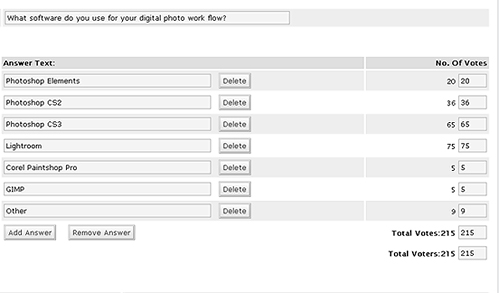
The poll for software preferences was closed yesterday. The winner was LR, followed by CS3, and CS2, taking 35%, 30%, and 17% respectively of the total of 215 votes. Here’s the vote totals:

poll1.jpg

Having looked at the software, the new poll now looks at the hardware (or gear) selections. Clearly there are other options out there besides Canon, and we often will choose multiple vendors for our choices. We’ll go with this one for a month too, so make sure you vote on the sidebar.
Last but not least, I need some help! I’ve been perusing some Flash tutorials and unfortunately, Flash animation is just not something I can dedicate the amount of time needed to get a good handle on things and create a dynamite intro for the vidcasts. So…any Flash gurus out there? Throw a link up to your flash movie proposals into the comments section, and the winning flash suggestion…well, wins! (I’ll think of something cool to throw to the winner…)

That’s it for Wednesday – off to watch the Apple Expo! Until tomorrow – happy shooting and watch your apertures!

Web 2.0 Style Graphics

In keeping with the theme of last weeks tutorial, I’d like to round out the discussion of Web 2.0 styles. Last week we took a look at using Photoshop to create Web 2.0 style text and type, while this week we turn the focus to Web 2.0 style graphics. With the emphasis on Web 2.0 style effects lately, one may ask what this has to do with photography. Well, in creating our photographs, we often like to use the web as a means of displaying them. With the myriad of cookie cutter templates out there, creating a customized and personalized web site is becoming more and more crucial if you want your images to stand out.

If it helps, think of the web as your framing process. Sure, you could hire it out. There are web designers out there that would be fully capable of creating a custom web site for you. But, if you are limited in your budget, and are like many of us, you can create a nicely polished website that will enhance your images nicely. The website in this sense represents the mat and the frame through which your clients and customers view your products.

This is not to say that a photographer should dedicate serious amounts of time to web and graphic design. Au contraire! Rather, take a default template from the likes of the Photoshop and Lightroom options you already have, and customize them with your own graphics. It’s not that difficult and can serve to take you to the next level of quality image presentations. Now, having said all that, it should also be noted that next week, I will be returning to more photography-specific tips and tricks for the weekly tutorials, so we’re not going to be stuck in web graphic design forever.

I also wanted to offer a brief explanation for the late posting of the tutorial… someone had emailed saying that the intro was producing a white line on the left side of the video. As it turns out the intro was recorded at a different resolution so I took some time tonight to correct that. The timings were a little off afterward so I had to adjust for that as well. But, it is now fixed. The reason I am saying this? The animated text has gotten a little boring. I would like to move toward a flash-based intro (the original was recorded in Powerpoint *shudder*). But, I really don’t know much about Flash. I am on day 7 of the trial version and have miles and miles to go before even grasping some of the basics. So…if any Flash gurus out there would like to do a charity case, feel free to email me – you’ll see your name up in lights, (I’ll set up a contributor tag in all future videos) and I’ll be more than happy to provide a link to your website. (Hey, it’s all about helping one another out, right?) 🙂

One final note is that Canon Blogger is now in iTunes! After some initial testing of graphics, audio, and determining what feeds best for iTunes from the blog, there’s a good working feed where you can subscribe to the shows from there. Stop in and check it out. Feel free to share your ideas on the value (or lack thereof) by offering a review. It looks like a few have found it already, but no reviews as of yet. Be the first and review the show on iTunes today! I’ll likely be adding an iTunes feed button to the sidebar tomorrow too, but in the meantime, just search for “Canon”, and I’ll be the second podcast under the “Software: How To” section, right beneath Rick Sammon’s show… it’s getting late, but I’ll try to get a link feed generated for the sidebar tomorrow. In the meantime, you can view the show directly in iTunes from here: iTunes Feed

Okay…enough of me blathering – on to the tutorial!

Web 2.o styled Graphics

Monday Minutia – Top 5 B/W Conversion Techniques

Given the activity and response I received from the “Top 7 of 2007”, it seems the blogging world really enjoys lists. It makes sense if you think about it too. Lists are nice, simple, bullet points that don’t require more than a few seconds to take in. There’s not a lot of prose or bloated paragraphs of meaningless text to scan through. In fact, creating lists does seem to be a common practice bloggers use to attract attention to their sites.

The internet is inundated with lists, whether they provide value or not and on as many topics as you can shake a stick at. The gamut is pretty well covered from A to Z, including The Best Academic Institutions to The Best Zoos of the U.S. Naturally, photography and it’s many sub-fields also pepper the list. So the question becomes one of “How do you filter out the good lists from the bad lists?” My answer to that is to try and raise the bar in terms of the value behind the lists. To that end, the Monday Minutia proposes 5 of the best ways to convert images from color to black-and-white. So…without further ado, here are my Top Five Black and White Conversion Techniques

  1. In Camera – most cameras these days have a B/W mode in their list of menu options and settings. Selecting this as your starting point gives you a true black and white baseline to start with. This approach will probably strike a chord with the “purists” in the crowd.
  2. Camera Raw Conversion – If you aren’t working in camera raw, here is a big reason to think about it – converting images to black and white in camera raw allows you to make a conversion while retaining access and malleability to all image data. The camera raw dialogs that you should use to make conversions here include the saturation slider, then exposure and shadow sliders, followed by the Brightness slider. Don’t forget to play with the contrast slider a little to enhance the effect as desired. Last but not least, for advanced adjustments, the calibration tab can have effects similar to the Channel Mixer.
  3. Channel Mixer – with your image open in Photoshop (7.0 or higher), you can select a specific color set you want to remove from or add emphasis to in an image. The traditional color sets or red, green and blue are available, as well as a constant (think brightness), and a check box for monochrome.
  4. Hue/Saturation Adjustment – whether as a dedicated layer, or directly to an image, the Hue/Saturation allows you to account for different intensity levels of a wide range of colors, from Red, Yellow, Green, Cyan, Blue, and Magenta. You can also adjust the range of color within one of the default ranges for each set by adjusting the left and right limiters of the color wheel at the bottom of the dialog window.
  5. Grayscale Conversions – most black-and-white images aren’t true black and whites, because a little color from a specific range is added back in for emphasis. To make an image truly a b/w, it would only have a range of black and white. This can be done using the grayscale option in Photoshop. Often, this is used as the last step in a digital approach to black and white photography so that saturation and brightness level loss is minimized.

So, that’s it for today – my Top Five B/W Conversion techniques. What techniques do you use? Feel free to use the comments or my email to share your methods. Naturally, being the multimedia-oriented blog, I will have a PDF version of this post available for download later this evening. Until then, happy shooting and watch your apertures! 🙂

As promised, here’s the PDF version…although I noticed some of the characters (dashes and quotes) didn’t convert as nicely as I’d hoped…