Thursday Throwbacks

Okay…let’s throw things back two days and pretend it’s Tuesday again. Why, you ask? Because I finished the tutorial I had started. It’s just a quickie, but does explore some often missed elements from the Tools Palette – particularly with the Options bar for each tool. While there clearly wasn’t enough time to go into great detail on all tools – I did give the crop tool and the Lasso tool a run for their money. Watch me screw up too and blithely ignore it while powering through! Rather funny stuff – but hey, if we take ourselves too seriously, then we’ve stopped having fun, right?

Anyway , here’s the links to the Flash and Download versions of the tutorial.

The Options Bar

Enjoy the weekly shenanigans, happy shooting and keep watching d’em apertures! 😉

Wednesday Withdrawl

Wow – time flies when you’re away from the computer – my hands have been literally tied up with a pinched nerve in one hand and a few cuts and bruises on the other from my voracious weekend.  As a result, I have not been able to spend nearly enough time either behind a camera or in front of the computer.    So, today is an “official” no blog Wednesday.  Tutorial will have to wait another day as I am doing things very piecemeal at this juncture.  Hopefully Friday will be full of news enough to carry everyone through the weekend.  Stop back and look for the tutorial of the week, some web links, and my weekly thought segment – until then, happy shooting and watch those apertures!

Top Ten Tuesday

Sorry folks, not much to do today.  My busy weekend and a rather odd chain of events from Monday night has set me back a we bit in the sleep department.  I spent last night catching up a bit – will try to piece together a tutorial after work today, but no promises.  It may be a day or two before I can get things together again.  In the meantime, here’s another of the “Top Ten Things” for Tuesday to add to your daily hit list.  This week I take a look at online print labs.  Remember, these are not in any rank order,  they’re just the most popular and ones that get the best reviews from what I’ve read and heard.  No links today on each, so Google to your hearts content!  Without further ado:

Top Ten Online Photo Labs

  1. Whitehouse Color
  2. MPix
  3. Shutterfly
  4. Sam’s Club
  5. Adorama
  6. Dot Photo
  7. Costco
  8. Kodak Gallery
  9. EZPrints
  10. Snapfish

For the photo fiends, I’ve added a few images to my Red Bubble account, so stop over there to get a larger view of the ones for sale.

Muscle Failure Monday – and the “sweetness” factor

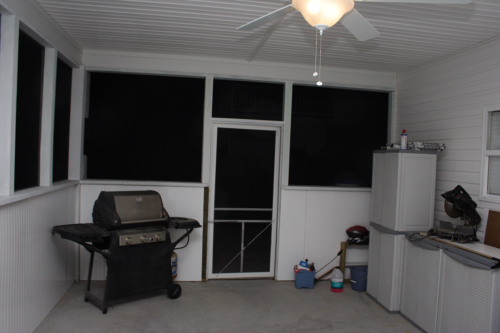
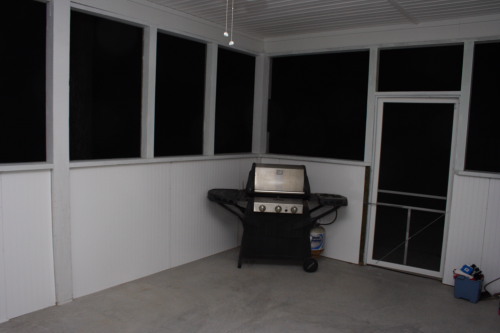
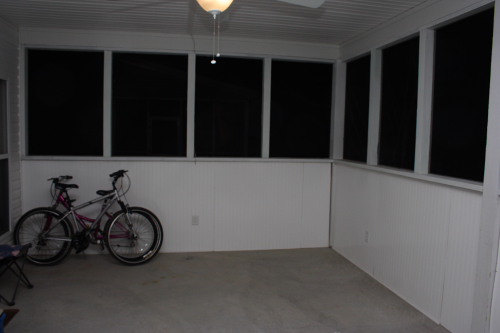
As the weekend fades into the recesses of time, it leaves a reminder with me in the form of muscle failure from the screened in porch project. For regular readers (the half dozen or so)…you may recall me having posted in passing about the porch before. Well, enough was enough for me and I went full bore to finish the dang thing this weekend. I did (for the most part), but am paying the price today. The remaining false studs were put in place, and the panel trimming began in earnest. I never realized how tiring it can be to bend over a miter saw, hammer away (manually) at paneling with chincey nails that bend with the slightest off-center tap of a hammer, manually cut metal rebar for shelf hanging, finishing painting trim work around a counter, re-paint a contractor f***-up, rip paneling boards to exacting measurements, hang paneling boards with one hand while holding the paneling in place with shims and another hand all while running back and forth to Lowe’s every three or four hours. Starbucks saw almost as much money from me as Lowes did on this project!

It’s done though (for the most part – still a little trim work to do, and some cosmetic work here and there), and I’ve got a few shots to share of it.

_mg_7679.JPG

_mg_7680.JPG

_mg_7681.JPG

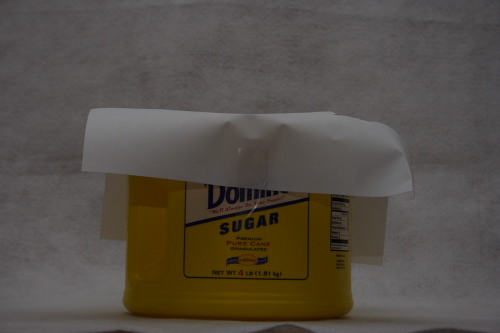
After all was said and done, I retired to the couch for about half the day to surf, watch HGTv (that channel is addictive), and catch up on my photo reading materials. It was a pretty sweet feeling to get all of that completed. Speaking of sweet, check out the new softbox I made this evening from the DIY’er perspective. Should be interesting to see if it works when I get back in my “studio”. Here’s a shot of that too:

_mg_7683.JPG

Not the most professional of softboxes, but it should do the job well enough, once I get the inside spray painted with white. (Without it the can itself cast a nasty yellow glare on shots.) For anyone who is thinking of doing this, all you need is an empty container, a piece of paper, a utility knife and a little spray paint. If you want to forgo the spray paint, you could always use something like a Clorox jug (empty and rinsed of course…) cut in half. Ultimately, I’ll likely put some cloth on there and rubber band it around to act as the softbox rather than a sheet of paper but you get the idea.

For more lighting ideas, try getting an empty cardboard roll from a carpet store – you can get them dirt cheap (as in free) and cut to size. Spray paint a little white paint on the inside and you’ve got yourself a neat little snoot! What’s a “snoot” you ask? Go find out at Strobist – where you will find everything you ever needed to know about lighting but were afraid to ask!

Friday Freebie – Top Ten Forums on the Internet

One of the most dynamic ways to share photos in real time is via photography forums. There are literally hundreds upon thousands to choose from. So…how do you know which ones to visit? Well, find a Forum Ranking post from bloggers like myself – usually you can find a few good ones from blog posts. So, on that note, here’s the Friday Folly – A Free Top Ten list of Photo Forum communities! Naturally, this list is highly subjective, and indicative of the ones that I have found useful for my own purposes over the last two or three years, but it is a good starting point. Keep in mind, these are not rank ordered by any means – just forums I’ve perused and found useful. Enjoy!

  1. Fred Miranda
  2. Digital Photography Review
  3. Photography on the Net
  4. Nikonians
  5. Photo.net
  6. Naturescapes
  7. NAPP Forums
  8. South Carolina Photography Guild
  9. Popular Photography Forums
  10. Shutterbug Forums

It wouldn’t be a Friday without a funny, so here’s my weekly reference to What the Duck:

What the Duck Cartoon

Until Monday then, Happy Shooting and watch those apertures!

Tips for Photo Walks

Hey all, sorry for the late posting today – in the middle of the week I don’t have as much time to put material together. However, a few weeks ago Scot Sherman and Michael Stein took a photo walk with some listeners from their Digital Photography Show while in Vegas. That, in conjunction with a new site developed specifically for photo walks, made me start thinking about the keys for success to photo walks, and what our local group (The South Carolina Photography Guild) does on a regular basis. Since I had already offered to share those thoughts with Scott and Michael, I figured it’d be an interesting subject for a “Thursday Thoughts.” So, I starting putting pen and ink together for a PDF supplemental post this week, and that’s been completed. In the interests of keeping the post short so everyone can enjoy the two-page diatribe on “Keys to Successful Photo Walks”, I’ll bid you all a thoughtful Thursday. Happy Shooting and remember to watch those apertures!

ETA:  Jeff Revell was interviewed on the DPS which was released yesterday. He does a write-up on the subject today (3/20), so I am going back into this post to add this link to that post.  Congrats Jeff!

Woot! Another Wisdom-filled Wednesday of Web Wonder!

As promised, here’s another set of things to inspire, amaze, and tantalize your senses from what I’ve been reading and seeing online in the last week or so. In the interests of keeping things from rounding out to increments of fives and tens (Sports Night reference – anyone know it, or am I alone in my vagaries?), here’s 6 links for Wednesday:

  1. Joe McNally’s Video on creating a shot of the Empire State Building (Although I think I posted this before – but worth a second watch anyway…)
  2. Earthbound Light – Very good site – particularly the photo tips archives
  3. Action Central – probably one of the best resources for Photoshop actions (and they’re all free!)
  4. A History of Photography – everything you could want to know (from an historical perspective that is…)
  5. NAPP Member Portfolios – some of these will take your breath away!
  6. Happy Belated Birthday to Photoshop (yesterday)! The first version ever shipped on Feb 19th, 1990!

Well I’ve wasted enough of your Wednesday, so happy shooting – just remember to…(wait for it)…watch those apertures!

Tuesday Tricks and Treats (and a tutorial)

This Tuesday, I’d like to share some neat tricks I came across online. First, How to Light a Shot on Two Planes – this came courtesy of The Strobist (one of my regular reads) – plus it includes a really cool-looking shot of some Turkish Delight! Apparently he (David Hobby, Strobist author) did this workshop in Florida last weekend with industry folks like Scott Kelby and others from NAPP in the room – no, that wouldn’t be at all intimidating!

Another neat treat I read about through PhotoJoJo was a blog where two friends who live a fair distance (3191 miles to be exact) from each other and they each share an image a day on their blog, one from each region. A definite cornucopia of inspiration as sometimes it’s the regular snapshot-types while others it’s truly breathtaking scenes…and when the two complement each other, it’s just too cool (February 7th is my favorite day so far)! Stop over when you get a minute and comment on their work – they deserve the accolades. The blog name, coincidentally, is titled 3191!

And last, but not least, the tutorial for the week – my inspiration for this came from (surprise surprise), NAPP contributor Matt Kloskowski. He had done this trick on the show (and in the NAPP member space) for Macs, with a little verbal instruction set at the trailer for Windows users. After sharing a few msgs with him – I decided to do the counterpart tutorial this week for Canon Blogger – the Windows version of creating a Desktop Calendar. So…to Matt, thanks for the creative idea, and to the rest of the world, here’s how to create a desktop calendar for Windows. Enjoy!

Windows Desktop Calendar

A long weekend…

President’s Day has afforded many of us the pleasures of a long weekend.  I took advantage of the opportunity by catching up on some over-needed Z’s, visiting with family, and making strides on the back car-port-turned-screened-in-porch.   So, it’s now Monday afternoon and I am just now sitting down at the computer for some meaningful minutia to share.

One fun little tidbit I got came from the Red Bubble community where a lot of fine art photography can be found.  It seems many there are familiar with another community called EyeFetch.  I know, there’s tons of communities out there, but these seem to be different in that they are full of really positive energies, contests, and great sources of inspiration that is sometimes lacking in the more technical communities.  So, stop over at EyeFetch and see if it’s to your liking.  I could get hooked on these fine art communities.

The other is a couple videos from Joe McNally, who apparently has a dedicated channel on YouTube for some of his videography.  Pretty cool stuff – if you’re afraid of heights, then don’t watch the one on the Empire State Building.

That’s it for today – tutorial Tuesday is only 24 hours away, so stay tuned!

Friday Free-for-all

So, last night after the sappiness ended, I came back to the trusty glow of my monitor and started knocking out a few more photos for my display book (more on that later). During a break, I stopped into the NAPP forums (highly recommend a membership with NAPP btw, at only $99 it’s a steal!) and was reading through some of the stuff, just to try and catch up a little more on my own knowledge base. Boy what a humbling experience that was! I did come away with some great web gems though, so every Wednesday for about the next milenium, I’ll dole out a few of them each week to the dirty dozen or so that read CB regularly! 🙂

In the meantime, here’s a couple to start things off – think of them as “Friday Freebies”:

The Graphic Reporter : Not only does her voice sound better than mine, she’s got an amazingly look and feel to her site.

Photoshop Cafe: A little heavy on the ads for me, but a great source of info, articles, and gateway to lots of things to do with photography.

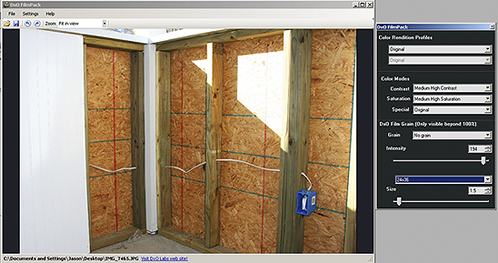
DXO Labs: I recently installed the Film Pack demo after hearing about it on DPS, and have been playing with it for a few days now. This is a very cool plugin, and the coolest part about it is that you can launch the Film Pack w/out photoshop! Make your adjustments quick and easy and on the fly – very intuitive. Here’s a capture of an image you may recognize that I posted earlier this week with some tweaks done to it:
dxo-capture.jpg

The types of effects you can run are quiet myriad, and well worth it. Stop over at DXO and check it out!

Finally, in the most recent issue of Photoshop User Magazine, I saw an add for a PS plugin called SiteGrinder2, from a company called MediaLab. I’ve not heard of them before, but I must admit, the ad makes me want to buy it. It does seem like a costly one though at almost$200 for the thing, but worth the trial which I downloaded last night and will try over the weekend.

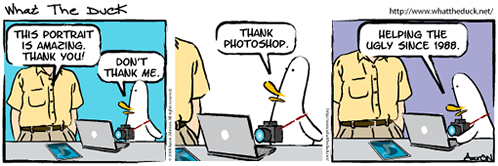
And, as many photo-blogger types do, I’ll leave you with a laugh from What The Duck:
wtd413.jpg

Have a good weekend! Happy shooting, and watch d’em apertures! 🙂