Backpacks, and Belts and Bags: Oh My!

For this week (and the foreseeable future), I am continuing the “live video talks” where I share a little insight into things I use and do to with photography, and the gear that’s involved.  This week, I recall that some others have done a “What’s in Your Bag?” type of theme, and rather than just show you my gear (which is what the question basically is a lead-in for), I also share some different bags and bag systems I have used, and that I continue to use.  Bag types range from small shoulder bags, to belt systems, backpacks, and equipment bags.  One bag I did not include is one for your tripod and/or light stand.


Anyway, it’s kind of a bandwidth intensive episode this week at over 100 MB of download in Quicktime ® format.  Sorry, again, no flash-based version.  Until Camtasia can import .mov files and render as Flash, when I record in QT, the .mov format is all I can do.


With that in mind, I’d like to also open it up to the readers/viewers out there.  What kinds of bags or bag systems do you use?  Backpacks?  Belts?  Shoulder bags?  What works best for you?  Sound off in the comments!


Monday Muscle Failure

Muscles

This was quite the weekend!  Two of three bedrooms have been cleaned up, packaged, and taken to an off-site storage so we can “stage” the house.  Apparently staging a house is very important when selling.  It helps “define the space” for the prospective buyer.  Anyway, as a result of all the lifting, bending, pushing, pulling, hauling, and shoving (oh yeah, we packed some boxes too!), we are very much in a state of “muscle failure”.  For the more athletically inclined, you know what I am talking about.  For the rest, when you push your muscles to the brink of not being able to work, they quiver visibly, and that is called muscle failure.  Suffice to say, our normally light-hearted fare transitioned very quickly to a Whopper with fries and an ice cold beer afterwards.

Anyway, no glory shots from the new 40D to share…sorry.  Although I am stopping by the storage unit later on today, so will likely have the camera with me.  Whilst organizing that, I did notice a few “photo opportunities” (whenever I hear that phrase, I think of Ron White and a  bit he did – see reference link from the 4:30 mark to 6:00 mark) , so may have some better post material tomorrow or later on today.  Tomorrow will be another fun video too…so a little teaser there just to keep you interested.  Until then though, take a moment and stop over at ProPhotoLife.  They put out a great video on how to light tabletop stills wit just one light and mirrors as your other light sources.  Very cool – especially for the DIYer (I am going to go retrieve a mirror I was going to throw out in the move now!)

Happy shooting, watch those apertures, and we’ll see you tomorrow!

Friday Feel-goods

Canon 40D

Found a couple neat resources around the web over the last few days. But, I am not gonna share them today. That’s right, the old bait-and-switch! I say something then switch gears once you’re hooked and talk about something else entirely. But, rest assured weary reader, I am not selling anything…yet! Quite simply – I got my 40D!!! That’s right, pulled the trigger, but the bullet, took the plunge, and every other metaphor you can think of. So, now with not one but 2 SLR’s in hand, I feel a little better knowing I have a backup.

That means my trusty Canon XT is now a backup camera! The funniest thing about it is that when I got my XT about 3 years ago, I paid more for that than I just paid for the Canon 40D (body only)! Back in 2005, the XT was hot off the presses and I was chomping at the bit to get it. The market started with it around $1000, and when I found one at Beach Camera for $850, I thought – “This is a good deal!” So I took the plunge.

Fast forward to 2007, the Canon 40D debuts for $1140 retail for the body. Within a year, rebates start kicking in – the struggling economy starts impacting camera manufacturers, so the rebates are big. The Canon 40D now has a $200 rebate, and it’s not the mail in kind! That’s right, an instant in-store rebate knocks the 40D down to $940 bones. This is a pretty darn good deal considering where the 40D stands in the Canon lineup. (3rd in line as I see it: 1D Mark II, 5D, and then the 40D)

But wait, hold the phones, that deal gets sweeter! If you are a current XT, XTi, or XSi owner, an additional $50 mail in rebate is offered too. So, now after all rebates, you can get the pristine new 40D for under $900…a mere $890! What a steal! But, here’s the thing – that means the aftermarket is starting to feel a pinch. This means the 40D that many bought a mere 6 months ago for $1200 could concievably drop to half that in the aftermarket since the XS is coming out, and a likely successor to the 5D which will push it down further. No one wants to see their gear depreciate to the tune of 50% in a mere 12 months. Heck, the XT new was around $100, and it still can be found for $450-$500 after being in the market place for about 4 years! (Although I suspect not for much longer – it’s not even in the current lineup anymore…)

So, anyway, the aftermarket starts picking up. By keeping up with the market via 1001 Noisy Cameras I can see that Canon is taking the majority of the top ten deals for a good 3 months. Now, with the standard for after market stuff typically running around 10-15% less than retail, 40D owners start pushing their bodies for $900, then $875, and most recently I saw one for $850. Well, last week I posted in the Buy/Sell forums of one particular community that I wanted to buy (WTB) a 40D at the 10% off retail rate…after rebates! That meant $800. Within an hour I had a taker, so – for less than the price of my XT, I upgraded to the 40D a year after its release.

Ironic, because it was about a year after the XT was released that I got it for about just as the retail price dropped 10%. In the aftermath, I learned a valuable lesson about camera gear: bodies depreciate, lenses retain value. If you want to spend money wisely, don’t upgrade your body every year, upgrade your glass. Hopefully this upgrade will have been worthwhile – 3 years in the making, and for $100 less than my previous body – I think it was probably a good investment. The only reason I did it was because I really did feel as though I was starting to bump up against the limitations of the XT body. Frame rate was not where I wanted it, the image counter was becoming more of a hindrance as I take more, the images were harder to see, and it was just starting to show signs of wear and tear. A bit of the plastic casing had peeled off in my sweaty mitts. It was just time to upgrade. To the forum guy (you know who you are) that hooked me up…thanks so much!

In looking at the counter, it seems the actuations are even lower than I thought with the count in the 500’s! I simply just re-set it back to 0 and I am rockin’ and rollin’! So, in case you hadn’t guessed it – this is just a “Feel Good” post today – nothing insightful, informational, or even useful – just a gleeful post of what was formerly an adult and what is now a 5-year old kid at Christmas! Have fun all, go out and shoot some (I know I will be…)

Oh yeah, here’s your WTD for the week:

What the Duck - June 26th 2008

Browser Bewilderment

I normally don’t post twice on the same date, but something came up yesterday over at Scott Kelby’s blog that I felt compelled to let people know about it (in case you for some reason stopped here <strong>before</strong> stopping over there…).  So, read this about FF3, but keep going down as there’s some buzz going on about his guest author yesterday – none other than Matt kloskowski.  Enough of a buzz to even get lazy ole me off my arse!  🙂  Anyway, two posts for the price of one today.  First off, some browser bewilderment over Firefox3:

Well,it’s not really bewilderment over which browsers to use, because I use browsers for a number of reasons. Yes, a good portion of it is spent solely for surfing different websites. I do occasionally spend some time on web design. While I know that the latest release from Firefox is going to be a boon for photographers due to its support for color profiles – I can’t help but wonder about designing with FF3 in mind. How does one incorporate this into their array of considerations?

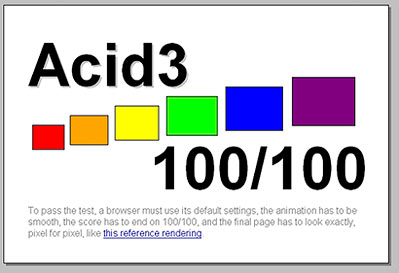
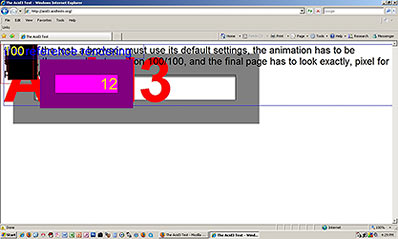
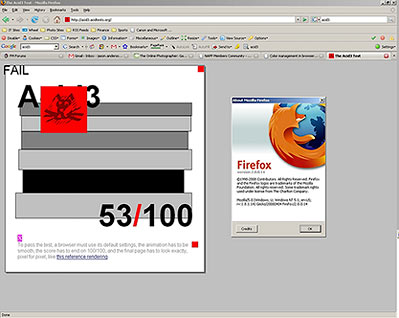
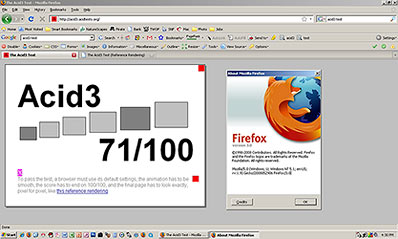
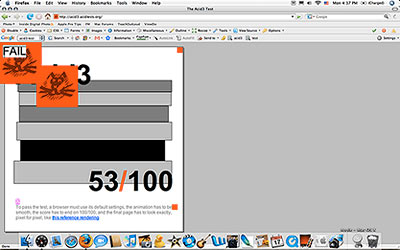
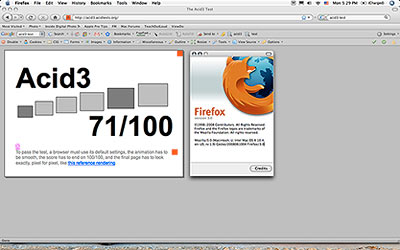
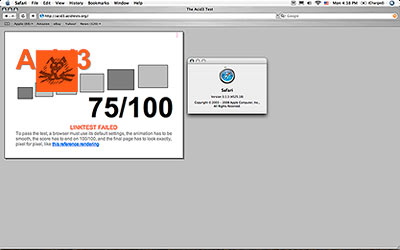
Clearly, you have to design for whoever your audience is, and for me, that means FF2, IE, and then Safari are where I devote my time. But, it would be nice to move toward a browser base that is W3C compliant. However, FF3 makes no impressive strides toward those ends anyway. I did some testing of the three main browsers (IE, FF, and Safari) against the Acid3 test, and found that while none of them pass, most certainly IE performed the worst, and the FF update is no great leap forward. See the screenshots below of each browser and it’s performance on Windows and Mac (Tiger). First, here’s the reference image that each browser rendering effort should result in:

Reference Image

And here’s the actual results for each browser/OS setup:

WINDOWS

Internet Explorer 7 on Windows XP

Firefox 2 on Windows XP

Firefox 3 on Windows XP

Macintosh

Firefox 2 on Mac

Safari 3 on Mac

Safari 3 on Mac

Does anyone have any thoughts on what the probable trends would be? I’ve heard lots of glowing things about Safari, and lately it has been growing in percentage of people that visit either CB or my photo site, so I’ll have to take that into more consideration. What about others out there? What browsers do you use? Are you a “surfer” or a “designer”, or both? Some feedback ehre would be very instructive.

For those that don’t know what I am talking about, feel free to skip to Friday for your next read. In the meantime, for those that do know, or are interested in learning more, here’s the resources I’ve read thus far:

Rob Galbraith’s page: http://www.robgalbraith.com/bins/content_page.asp?cid=7-9311-9478

ICC Test Page: http://www.color.org/version4html.xalter

Mostly Lisa: http://www.mostlylisa.com/2008/06/20/convince-me-to-use-firefox-i-dare-you/#comments

Write your own PS panels!

You know the Photoshop Guys are pretty well regarded by Adobe. When they stop to say something or make suggestions for future product features, the folks at Adobe do stop and listen. Scott K. did a few blog posts about this, and there is ample evidence that Adobe does in fact consider their suggestions in product design, development, and testing.

Well, today, as a guest blogger for Scott…Matt Kloskowski brought some Super Genius ideas out, and had some “skeleton” drawings for possible consideration. The beauty of this was that not only did he give his thoughts, but he gave US a voice!

He started a Flickr thread, and gave us a PSD to work with in designing our own suggested PS panels! I actually took a few minutes to put a small idea together. It doesn’t have the same polish that Matt’s work does, and I blame Matt for being the consummate professional and devoting as much time and energy as I am sure he did in producing all these other wonderful ideas and such.

Anyway, go download the PSD from Scott’s blog here, then tweak it to your idea, and upload to the Flickr thread here. Take some time to look at the other ideas out there – lots of creativity abounds! Such dynamism and synergism and a bunch of other -isms! This is what totally rocks about photography, being able to contribute ideas in such a positive and forward-thinking manner. Oh, and here’s my idea: a Compositional Grid Panel where you can choose a grid pattern to overlay (or create a custom one…). Thoughts on this?

Compositional Grid

Thoughts on others? Share them over in the Flickr group! (or here if you prefer, but this idea is really Matt’s brainchild, so give the group [or his blog] some love!)  Until tomorrow – happy shooting and watch those apertures! 🙂

What’s This: Week 4

Now in it’s last installment for the month of June, “What’s This?” has become the most popular subject for the blog. Gary correctly guessed that last week’s What’s This was a shower head, so props, kudos, and congrats to Gary! Let’s see if someone else can mount a challenge this week. Here we go (and no more hints)…this week’s What’s This is:

What's This? - Week 4

Good luck to everyone!  If the fun continues, I may be able to start offering prizes too (depends on whether any vendor would be interested in sponsoring the “What’s This Weekly”…so, Canon, Adobe, USRobotics, Apple, Microsoft, Joe’s Tire Shop…anyone interested? 🙂

Just kidding – this is all just for fun, so there’s not any prizes, just bragging rights, and hopefully a way to provide creative spark and motivation to look at things differently! 🙂

In the web news this week, just a couple things that may be of interest:

  • ProPhotoLife has another video out on studio product lighting – 10 minutes well spent!
  • TWIP does a video podcast on lighting a model in studio – also about 10 minutes…
  • Digital Photography School has a 6-tip session on reducing camera shake – about a 3 minute read if you include the comments
  • Tim’s Digital Darkroom via  a connection over at Hyperphocal has some very cool shots of a light bulb shattering (scroll down)…1-2 minutes depending on what else you may find of interest
  • Naturally, Hyperphocal gets a nod too, not only because of the great articles they have there, but also because I have the “Cleaning your Gear” posted as an article there from yesterday – stop over and read their other articles – the one for today on Inkjets versus Dye Sub printers was very educational for me!

Altogether, about 30 minutes of stuff, so if you have half an hour to spare – take some time and visit these resources as they all have some really good content.  In the meantime, feel free to share other links to resources in the comments (as well as guess at this week’s edition of What’s This”).  Happy shooting, watch those apertures, and we’ll see you back here on Thursday!

Tuesday Tech Talk: Canon ST-E2

This week, the Tuesday Tip is more of a Tech Talk. I got an email from someone inquiring about the Canon ST-E2 asking about how to use it, and what it is compatible with. Taking a cue from this, I decided to make it a video tip from the MacbookPro,and set things up to give a basic primer on what the ST-E2 looks like, how it mounts to your camera, and how it triggers off-camera flashes electronically. Hopefully this will help demonstrate the purpose of the ST-E2 in a better light (bad pun, sorry)! Because it was recorded from the Mac this go around, there will not be a Flash-based version of the Tip this week.Sorry in advance for any that might prefer the Flash version.

One note on the video content: I said in the video that the ST-E2 supports the entire Speedlight flash family.While that is true, I did get the nomenclature wrong.As it turns out, the 400 series Speedlights are the 420 EX and the 430 EX, with the 500 series ones numbering at 550 EX and 580 EX.The ST-E2 will work with them all, albeit with some limitations on the earlier versions.For detailed specs, there is good information at Canon and the product sheet maintained by BH Photo.Those direct links are provided here for anyone who is interested.

So, that is the tip for this Tuesday: an ST-E2 Tech Talk.If anyone would like to see more gear in action, or has a question about how to use gear, feel free to email me or post in the comments section.Happy shooting, watch those apertures, and we will see you tomorrow!

Canon Product Sheet for the ST-E2

B and H Photo Product Sheet for the ST-E2

PlayPlay

Monday Minutia: Memory Management

CF Cards

A post over on This Week in Photography got me thinking about my memory cards and the rituals or practices I take to conserve my image data. As they suggested over at TWIP, I do format my cards in camera prior to using. This in-camera formatting optimizes the data sectors and creates folders to organize image data. However, I also occasionally format my cards on the computer for that exact reason. Since the XT only has an image counter that goes to 100, whenever I pass that 100 mark, it creates a new folder.  If I were to never format the card outside of the camera, those folders would always remain there – and I would wonder if there were images in there not being copied out to my hard drive for backup.

So, I do format my memory cards in the computer. About once a month I’ll insert my cards into the card reader, plug ‘er up, and format away. On the PC, that would be: format E: /fat32 (With “E” being whatever drive letter is assigned to media once you connect it. Having said that though, once the PC format is complete, I will do another format in camera to optimize sectors for the camera prior to shooting.

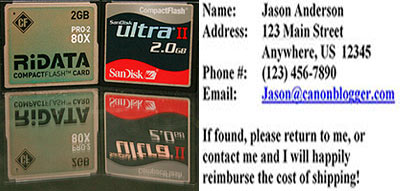
The last step I take in the format process is to take a picture. My very first picture on each card is a screen shot picture from my monitor. On my monitor, I put together a Word document that gives my contact information (Name, mailing address, phone, and email address), along with a request to return the card to me (see above – naturally, the info there is more accurate, but you get the idea). That way, if I ever lose the card, hopefully some benevolent person will find it and put it in their computer or camera and find that content there. I took the shot with PrintKey (Windows only- if you are on a Mac, use CTRL+SHIFT+4 to grab the area manually yourself), and then opened in PS and saved for web settings to minimize the space it takes up on the CF card (32K). This may seem rather a p.i.t.a., but the step for me is worthwhile just as a safeguard against the possible loss of my CF cards.

One final note, in case anyone is interested, I do have a few suggestions for vendors to use: I like Sandisk and Ridata. Both have been very good to me, and with three 2 Gig cards, I am probably safe with those. Although, I do know of others (like Scott Kelby) that recommend Hoodman. For those of you that are technically inclined, and want to know all the nitty gritty details of write speeds, failure rates, etc., Rob Galbraith also has an excellent page on all that stuff if it is up your alley.

This may be a rather unique approach to memory card maintenance, but it works for me. Maybe this will give others ideas for procedures to use in their own approach to memory card management. What about everyone else though? Any other tips or tricks to suggest for managing your media? Feel free to share those in the comments.

The week in review

globe

I know web links are typically done on Wednesdays, but a little schedule change was in order given the recent news from this corner of the internet.  So, for this Friday, here’s some stuff I read around the web recently:

Brian Reyman of Professional Snapshots has released a beta version of a neat Flash program for schematics of lighting setups.  It’s a very helpful in documenting studio work and other such photo utilities.  Best of all, it’s Flash-based so it will work on Mac and PC!  Many thanks to Brian for all the time and energy he’s put into this program.

Being very much a fan of DIY photography, I have to give shout outs to the guys over at This Week in Photography for their post on making your own reflectors from cardboard, styrofoam, or plywood and either paiting white or covering with aluminum foil.  Very clever, and a great tip!  Thanks to Scott Bourne for this…oh yeah, check out their weekly podcast too.  Lots of info and always fun to listen to!

Scott Kelby needs no introduction, as he’s pretty well recognized throughout the industry.  He also most certainly needs no help from me for publicity, but his post this week about the “School of Hard Knocks” really hit home as I forgot a CF card for my camera just the other day.  So, sometimes I really am just like Scott Kelby!

David Hobby also gave a little nod to this over on Strobist, and while it’s a little late to be saying it here, there was a Shoot! the Day scheduled for today – photogs the world over will be sharing their shots taken from today over at Photoshelter in the coming week or so.  I signed up, but because I forgot my CF card, was not able to participate.  Still, stop over there to see a day in the life of photographers the world over!

Michael Johnston of The Online Photographer anounced his newist list of Top Ten Cameras, and Canon gear made it in twice (three times if you count them in with the “any entry-level DSLR” listing.)  The top Canon recommendations are the 5D and the SD870 IS.

Finally, in Canon-specific news, we’ all have likely heard about the upcoming release of the Canon XS.  Scheduled for release in July, it’s gotten a few reviews trickling out from various resources.  The best review I’ve read is over at the Photokina site.

Last, but not least, don’t forget to take a break, and laugh a little over at What the Duck!  My favorite one from this week:

What the Duck

Hot and Cold Lighting

We all know that tungsten light is a warmer light (think regular light bulbs) and fluorescents and flash produce cooler lighting. While it makes sense, until I read an article by Peter Kolonia in Popular Photography, I have never thought of combining warm and cool light to produce different effects in a photograph. Since I’ve not tried this yet, I don’t have any sample pictures, but they should be viewable over at www.popphoto.com so stop over there to see samples in action.

Basically, the article says that by lighting your subject with one tone and the background with another, you can produce some really interesting results. For simplicity purposes, here’s a chart of what combinations produce what types of results:

Subject Light

Background Light

White Balance

Results

Tungsten lights (like a lamp)

Flash or cool window light

Tungsten

Electric Blue Background

Cool daylight or Flash

Tungsten lights (like a lamp)

Daylight

Orange Glow

Tungsten (like a lamp)

Tungsten (like a lamp)

Auto

White (or grey1)

All light

No light

Auto

Black

1For a high key (all white) effect on the background, throw more light on the background. The more light you direct to the background, the brighter the resulting background will be for your photos. Conversely, as background lights get dimmer, the background itself will be more of a gray.

Just a few reminders Peter gives us:

Use a large space so foreground light won’t spoil the background light

  • Experiment with exposure to get the right glow from the background (typically longer speeds thus necessitating a tripod)
  • Using an old-fashioned fluorescent light can result in the “grunge” look of cross-processed photos