Be careful with Adobe updates!

I was just in the NAPP forums (a great place to learn by the way), and learned about the ACR update.  Since I already am good on the gear compatibility side, I went to the readme.txt file to see if there were any other updates to the programs that I should be aware of (Podpress has made me very cautious about updating too soon…)

Turns out there are some LR issues with a few tools and with XMP sidecar files versus database entries.  If this is all gibberish to you, then don’t worry you are probably fine.  For the more technically inclined though, their readme file is something to look at before you upgrade ACR this go-around.

Linked here

Proof positive that the old adage of “If it ain’t broke don’t fix it” can still apply in a modern world.  If you don’t have a specific need for the update (a very recent camera purchase), I’d hold off until the next update ships as this could break Lightroom to a degree, as well as prevent respecting of previous edits if you use the database option for XMP data.

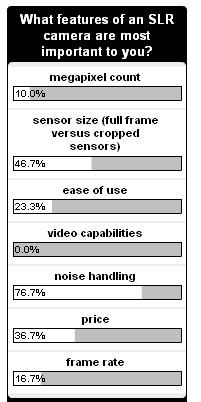
In more CB-specific news, the last poll finally wrapped up today.  With 30 responses, here was the final tally:

The newest poll is now up on the sidebar.  2 weeks does seem to return more meaningful information as that gives people enough time to respond.  Feel free to chime in at your leisure.  The question is:  Does the current economic downturn had an impact on new photography-related purchases?  For those reading in feed readers, stop in to see the options and vote!  Let’s try to crack the 50-count this go around! 🙂

On a lighter note, the WTD series this week was really pretty darn funny.  Here’s my favorite:

Have a great weekend everyone, Happy Shooting, and we’ll see you back here Monday morning!

Three Thoughtful Tips

As the day starts to fade into the last few hours, I realized nothing had been prepared for posting today.  At times like this, I either decide to make it a “no blog” day, or put together a few brief thoughts, that are tied to photography.  The latter won over today, so for the readers who continue to visit on a regular basis, you are in for a treat (or a trick, since we are getting kind of close to Halloween!).  So, here’s my three thoughtful tips for the day:

  1. If you’ve got some blown highlights or high contrast pictures that just aren’t working – try a black and white conversion.  Add a vignette and you may actually have a shot worth keeping.
  2. In a pinch, your on camera flash is still a flash…granted not the best one, but with even a piece of regular copy paper in front of it, you can diffuse it and spread the light a little more.  It may not be ideal, but better than the glaring brightness of direct flash light.
  3. In tough lighting and no gray card?  Stick your hand out.  Yup, it may not be the best metering source, but your skin can be used to neutrally balance a shot.  From there you can find the rest in post process…

Got any other ideas off the cuff?  Share them in the comments!  Happy shooting and we’ll see you back here tomorrow!

What’s This? – Week 14

If you post it, they will guess…that’s the theory I’m going with this week.  Anyone have any ideas?  I took a different approach to it this go around, hopefully a little more abstract…  Good luck, and Happy Shooting!

Take your camera with you!

I was driving home from work yesterday with my camera bag in the seat next to me when I saw this on the opposite side of the road.  So, I swung around, popped out of the car, set up and used the roof of the car for stability and snapped off a few shots wide open and about 800 ISO.  As a full-size image it is a bit noisy, but here it looks pretty good.  To me, that’s proof positive that it always pays to have your camera with you.  That’s the “Tuesday Tip” for this week.  Enjoy and Happy Shooting!  We’ll see you back here again tomorrow.

Printing, matting, and framing your pictures

As I’ve recently moved to outsourcing my printing to Mpix, I’ve had to adjust my work flow accordingly.  Prior to the Mpix migration, I had a set of sizes that I would print to, that allowed for matting and framing while not cutting into the picture itself.  That set of procedures has been to print on the next largest paper size, which allows me to apply a mat to a photo before framing it.  So, I had the following defined printing outputs:

Print Sizes
Print Sizes

So, what does this mean when using an online resource like Mpix? Well, since they usually print borderless pictures, it means you have to build in that border to your print. It also means paying a little more for your pcitures to be printed.  Using the same principle as above, it simply means to increase the canvas size on your print so that it will fit in the next sized up frame.  Then, just make sure your ID (inner dimension) size for the mat matches your actual image size, and your OD (outer dimension) size for the mat, matches the size of the frame you want to put your picture in.

There is also the alternative where you can just use the borderless print without any built in border if you want to use those glass or acrylic enclosures that have no frame border to them that would hide the edges of your print.

Keep in mind that there is a growing trend to adding a digital frame to your shots, to give a title and or copyright notice in that area.  If you do that to your prints, the added dimension for the digital frame needs to be included in the “image size” when you go to print, mat, and frame your pictures.

Well, that’s it for today.  If you’ve got any ideas, comments, suggestions, tips or tricks when it comes to printing, matting, and framing your shots, feel free to share those in the comments.  Thanks for tuning in and we’ll see you back here tomorrow.  Happy shooting!

Five Friday Freebies

It’s fun to share resources that can really help you save time and money in pursuing your photography goals, and because there’s not a lot of really high quality resources out there, posts like these are few and far between.  However, I do have a few resources that may prove useful to wrap up the week:

  1. Online Price Calculator – So many people ask “How much should I charge for…”  Well, here is a good starting point.  For something more serious look FotoQuote
  2. Free Stock Photos – So many stock photo sites out there, yet none seem to offer up imagery completely for free.  You do have to register, but well worth the 10 seconds…
  3. Free CS Tutorials – Yeah, I know, there’s tons of sites out there that do this stuff, but Erik stands above the crowd in his technique and approach.  Well worth the time to peruse his library of Adobe tips and tricks
  4. B&H Photo has a handy resource that shows compatibility for some TC’s.  The one linked is for the Canon 2x TC
  5. The Online Photography Test – hosted by yours truly, and with the Beginner and Intermediate tests completed, is an great resource for evaluating and improving your knowledge base across many areas of photography

And, to close out the week, be sure to stop over at What The Duck!  My favorite one this week:

Happy shooting, have a good weekend, and we’ll catch you back here on Monday!

Lucky 13!

Here we are into week 13 of “What’s This?”  I know, it typically goes up on Wednesdays, but been having a few other issues going on so yesterday was a no-post day for me…anyway, here’s the latest edition for the watchful eyes of the readership.  What’s This?

Whats This - Week 13
What's This - Week 13

As always, the winner…wins! Happy shooting and we’ll see you back here again tomorrow!

Tuesday Tricks

Orange
Orange

Jason Moore has his bi-monthly Photographic Compostion posted today, so be sure to stop over there and see the others (I am sure they were more creative than the one I came up with at the last minute yesterday…)

Rather than record a tip or trick for this Tuesday, I thought I’d share a few ideas and suggestions I’ve picked up from various magazines, forums, and photo communities for managing and handling your gear in the field.  These things have become almost second nature to me now and I can’t tell you how helpful these tips and tricks have become in helping me keep everything organized.  So without further ado, here’s my Tuesday tricks:

  1. Pack a large plastic ziploc or other sealable bag in with your camera gear.  When it’s windy or there’s lots of dust around, you can change your lenses from inside these bags to minimize dust.  Additionally, it serves as an additional layer of protection should mother nature decide to dump a deluge of water on you with little warning.  (I keep several sandwich bags in my pack for protecting things like CF cards, wide angle lenses, TC’s and other items.
  2. If you must change lenses in the field, keep the body of the camera pointed down so as to prevent dust from falling into the opening (dust won’t wall up…).
  3. Keep a notepad and pen in your pack, in case you find a location that you want to remember, meet someone and want an email or phone number, or to get an address to send prints or perhaps a resume to!  On the same note, having some business cards and model releases handy for handing out and in case you have a willing model…
  4. Turn your CF cards around backwards when full, so you always know which ones are used versus unused.
  5. Buy a car converter for AC to DC.  This way you can charge your batteries while en route to a shoot.  They’re only like $20 at Wal-Mart or Radio Shack and can add a certain peace of mind that you are going into your shoot with as much of a charge on your portables as you can get.  (Just make sure you add the battery chargers to your packing list…)
  6. Speaking of packing lists – make one!  This can help ensure you leave with everything you brought to a shoot.  I’ve blogged about this before, but it’s been a while, so bears mentioning again.
  7. Pack a micro fiber cloth for wiping off lenses in a pinch.  (Better a microfiber cloth than your shirt!)  These can be begged off any eyeglasses store (try Wal-Mart, they are pretty liberal with handing these things out..)
  8. Need a better way to store your gear at home?  Try shoe boxes.  You can get them for a buck a piece from a dolalr store – makes a great way to compartmentalize short lenses from long lenses, accessories, flash equipment, battery chargers, CD media, gray cards, lens cloths, etc.  A few labels from a Dymo label maker and everything is neat, and easy to find in your bedroom closet!
  9. Dress in layers – weather can change, especially if you are shooting at sunrise or sunet.  It can change from cool to warm or warm to cool very quickly and having a layer to take off (or put on) can extend your shoot time before you start getting uncomfortably warm (or cold).
  10. Take a bottle of water and a granola bar in your pack!  You’d be surprised how quickly you can dehydrate and how hungry you can get while shooting.  I’ve been on shoots where there is so much creativity and so many shooting opportunities, I can often forget to eat or drink.  When things finally end you can be very hungry and or dehydrated where even a bottle of water or a granola bar (or both) can give you the needed boost until you can get to Starbucks or the house for more healthy refreshments!

So, that’s my ten tips/tricks for the day.  Got any of your own to share?  Sound off in the comments – I’d love to hear what others have to say about shooting preparations.  In the meantime, happy shooting, watch those apertures and we’ll see you back here again tomorrow for the Week 13 episode of “What’s This?”

Photo Galleries Galore

I’ve been playing around with the SImpleviewer Flash concept a little lately.  In looking at how others are implementing it on their blogs, I was thinking that CB could use a dedicated photo gallery to share and exhibit some photos.

Well, as a temporary release, I’ve put a few together using the Auto-viewer format.  It has naturally been customized a little, but is up and viewable right now!  Check out the images I’ve included here:  CB Photo Galleries They are mostly images of colors and textures thus far with a few other test images thrown in to determine sizing.  Hopefully I’ll get all the full versions from “What’s This?” incorporated soon too.  Feedback, comments, and suggestions on this are not only welcome, but encouraged.  Ideally I will be setting up a dedicated website for this material at some point too (provided there’s enough interest).  So, what do you think?  Don’t quit my day job?  Good idea?  Yawner?  Sound off in the comments!  Here’s a few sneak previews of what’s in the gallery right now:

CB Photo Gallery

CB Photo Gallery

CB Photo Gallery

CB Photo Gallery

In other news, I got word from Michael Johnston over at The Online Photographer that his final post on “Must Have Photography Books” has been published.  Like an oracle, when he suggests a book, it quickly sells out, so be sure to stop over to his blog to see what photography goodness is available.  It can be read here.

Last but not least, there’s only a few more days to participate in the “SLR features” poll – I think it’s set to expire this Friday, so be sure to jump in and share your thoughts on what the most important features are.

Happy shooting, watch those apertures, and we’ll see you back here again tomorrow!

The Weekender – Web stuff and some thoughts on CS4

The last few days have been insanely busy with work and home obligations, so out of necessity I have not had time to devote to content for the blog.  My apologies for abandoning the readership temporarily, and without warning.  I’ll endeavor to give advance notice before that happens again.  So, with that out of the way, I thought today it might be useful to get a wrap-up of what I have been seeing and reading around the forums, blogs, and internet that’s photography-related.

  • Jeff Revell, who has become quite well-known for his photowalking blog made a few interesting posts recently.  In one of them, he did a reminder on updating your firmware.  Great idea Jeff – if you’re interested, I actually put together a post with all the Canon firmware updates as of a few weeks ago.  The other one was ab out the Epson Print Academy season for 2009 has been published.  I had been meaning to go to one of these for a while, and for a mere $150 think it is definitely worth the cost.  They’re coming to Denver and it’s a mere block or two from where I work so I will most assuredly be in attendance this go around.
  • Scott Kelby, master instructor of Photoshop, Lightroom and author of more books than I can count, is also bringing his tour through Denver some time in December.  Check out the schedule here if you want to see him live and in action at what he does best!
  • David Ziser has offered up a Digital Wakeup Call DVD worht $75 to some lucky participant if he gets 20 ideas on how to incorporate video into your selling packages for photography businesses.  Not a bad deal for 5 minutes of your time!
  • Don’t forget, I’ve expanded the poll here at CanonBlogger to go longer than the 1 week, so the numbers are a more accurate representation.  What features do you like about the curreng generation of camera bodies on the market?  What motivates you to buy?  Share your thoughts on the poll to the right.

Last, but not least, the hubub on most forums lately has been surrounding the release of CS4 and LR2’s latest updates.  The reason for all the hoopla comes every time there is a new release to the software, and it’s a cycle that likely will not end.  Rather than just pile on and vent, I thought for the second half of this double-feature wrap-up, I’d share some thoughts on why people are frustrated rather than just saying “people are frustrated”.  So, here’s a different perspective.

Software is not a tangible asset

Software is not like a camera body, or a car, or a television, it’s something that lives on your computer.  Thus, the value of it is not as easy to see.  We are very much a society that thrives on all our toys, and software just isn’t the same as having the latest body, or flash or television or car.  It’s not something we can touch and feel and show off to our friends.  It’s only on our computer.

Necessity

With software, we are sometimes obligated to upgrade.  I personally had to upgrade because CS2 did not offer a raw converter for the Canon 40D.  Sure, there’s the Adobe DNG converter for free, and I actually have incorporated that into my work flow for the Mac where I don’t have CS3, but that does present another step in the process of a work flow that I was previously happy to not have to deal with.  Anyway, the point here is that if you don’t upgrade your software, you will find yourself unable to maintain a stable and consistent work flow (since you re upgrading other gear all the time too).

Competitive Pricing

With other technologies, competition keeps prices under control.  Camera vendors like Canon, Nikon, Sony, and the rest all have to compete with one another for your business.  Adobe really has no competition in the market place.  Okay, sure, there’s Corel, and the GIMP, but come on, who are we kidding?  Adobe is the market when it comes to photo editing software.  All the others are simply “alternative programs”.  Without a competitor, Adobe can price things however they want, knowing that those of us who have already invested are pretty much committed to maintaining our work flow by keeping the software interface as consistent as we can.  To their credit, upgrades are cheaper than the full blown versions of the software, and there are often promotions and suc (educational pricing is the best way to go imho – take a community college class once every two years and you will save anywhere fro $300 to $700 on pricing for the CS products).

Release Schedule

Do we really need to upgrade our software and work flow every 18 months?  With cameras, (which are released on the same schedules for most SLRs), most people I know wait at least 2 generations before upgrading.  Another analogy that has been made here is to cars – anyone upgrade their car every two years?  What about televisions?  Do we really upgrade our televisions every 18 months?  Unlikely…and even if we do, is the old television still usable?  Often times, the older version is relegated to the basement or a childs bedroom, or even sold second hand.  Who buys outdated software?  No one that I know of…

So, there’s the second half of the weekend post.  What do you think?  Am I off base?  Is the software market competitive?  Do you think the pricing is fair and equitable?  What about the upgrade schedule?  Does 18 months sound about right?  Sound off in the comments!

Again, sorry for the lack of material over the last two days.  Hopefully this will make up for the lack of content on Thursday and Friday.  Now, since you’ve finished this, take that last sip of coffee, pack up your gear and go have fun shooting!  (In other words, Happy Shooting!)  We’ll see you back here again on Monday.