Exposure Denver Presentation

Tomorrow I will be speaking at a local photo club’s monthly meeting – Exposure Denver.  It’s quite an honor and my first time presenting in any way so we’ll see how it goes.  I’m sure the photogs there will have tons of questions I have absolutely no clue on what the answers are, but I am going to try to talk a bit about work flow – from capture to print.

I’ll be sharing the process I use to import my photos from the camera to the computer and then my file management system, both for redundancy and output to various outlets including web galleries and to print.  Talking points will include:

* Card Readers
* File/Asset management
* Lightroom
* Web Galleries
* Blogging and sharing images online

Anyone in the area is welcome to stop by and meet the the group.  Exposure Denver can be found online at http://www.blog.exposuredenver.com

The meeting starts at 7pm at the Breckenridge Brewery located at: 471 Kalamath Street | Denver, CO 80204  Hope to see you there!

In contest news, the finalists for the OnOne Software giveaway should be announced in a few days – judging begins today.  The August contest kicks off today – with the prize at the end of the tunnel to be the Wacom Bamboo Fun (small)!  Thanks to the good folks at Wacom for donating this great tablet for a lucky reader.

As always, post your images to the Flickr thread, and make sure your image is sized between 800 and 600px on the longest side.  The theme:  FUN!

Here’s the link to the Flickr Thread:  Bamboo Fun Giveaway

That should be enough news for one day, so happy shooting all!  We’ll see you back here tomorrow!

Grab the Feed

Galleries Addendum

Yesterdays post on how to get into galleries generated some great questions and comments both via email and on the blog, so in the interests of keeping that interest and momentum going, here’s a few more tips on Getting Into Galleries, courtesy of Dave Warner from LensFlare 35 and Rich Charpentier (who I’ve interviewed here on the podcast).  Thanks guys for chiming in and offering your assistance!  Onto the 5 additional tips:

  1. Make sure the gallery shows photography – if gallery owners deal primarily with paintings, sculptures, metal work, and such, the odds of being accepted are much less.  This involves actually doing a little research into the gallery.  Perhaps a visit or two during different showings could help determine whether the venue is appropriate for your work.
  2. Make sure the gallery shows your type of work – if you are primarily a landscape artist and the gallery primarily shows urban gritty work, portraiture, or architectural types f work, then again, reconsider the venue.
  3. Contact the gallery – let them know you are interested in being considered, and give a few small samples via email.  Ask if you can schedule a time to visit with them.  Like Dave and Rich said, nothing can be a bigger turnoff than showing up unannounced and possibly interfering with a scheduled appointment or client sale.
  4. Be professional – treat a prospective gallery showing like a job interview.  Just like you wouldn’t want to show up with 4×6 photos in a binder album, also don’t show up on site wearing cut-off shorts or be un-groomed.  It’s not just your work that is being considered, it’s YOU.  If you are accepted into the gallery, in all likelihood, they will want you there for the opening day, so people can meet you, learn about you and interact with you.  If you don’t present yourself with your best foot forward, then clients and gallery owners will probably be less interested.  Once you are big and famous, sure, being unkempt can be part of your “flair” or quirks, but until then, you are just messy!
  5. Be prepared to be told no.  It’s tough to hear, but don’t take it personally if at all possible.  Running galleries is a business, and when it comes to running a business, it’s not personal – it’s just a business decision.  Consider also that gallery owners get many many requests from aspiring artists, and simply do not have room or space all the time.  In the most recent podcast, Matt Timmons mentioned this briefly.  Just because someone says no, doesn’t mean a lifetime of “no”.  It just means “No” today.  Ask again in a few months.  Sometimes people like to see persistence, especially if your craft is getting better.

So, there you go, two days of tips on getting into galleries!  Ten tips total, so go forth and good luck!

Speaking of luck, best of luck to everyone who has been submitting their “Numbers” themed photo contest running right now over in the Flickr forums.  I took a quick glance this morning, and there are just shy of 50 entries.  Amazing given that only one entry is allowed per person!  And there’s still time – you have until midnight tonight to get your picture in.  The winner will walk away with a free copy of the OnOne software Plugin Suite (valued at over $500 retail)!  If you are thinking of getting in the game, now’s the do-or-die moment.  Like they say in lotteries – you can’t win if you don’t play!  Here’s the link to get in the game:  Numbers Contest

Have a great weekend everyone – Happy shooting and we’l see you back here next week for the latest and greatest in photography news, nuggets, interviews, reviews, and all that goes into Canon Blogger.  We’re closing in on some pretty fun dates, including the 500th post, the 2 year anniversary of CB, 1000 Twitter followers, and much more, so be sure to pick up the feed.  I know I had mentioned the next contest on the podcast as well, so be sure to stop back in Monday for the news on what the theme is, and to pick up the tag on Flickr for the thread.

Grab the Feed

Getting into Galleries

For many photographers, the Mecca of accomplishments is to have your work displayed on a wall – and in many cases that means a wall other than your own home. In other words, gallery displays.  There are lots of ways you can go about accomplishing this, and for the record, I have not had my work featured in any galleries to speak of.  However, in talking with people who manage galleries, and in hearing nuggets and useful tidbits of information from those who have had work featured, it seems there are commonalities that can be seen no matter where you want to have your work shown.

So, here are 5 tips for getting your work into galleries:

  1. Have a theme to your work – while we all enjoy showing off “Best of” works, that doesn’t really work in galleries, so make sure the work you want to have shown has a theme to it – whether the theme is urban architecture, natural landscapes, gritty portraiture, or fruit baskets, gallery owners will be sold better on displaying your work if there is a flow to it.
  2. Follow the submission guidelines – Galleries get people from all walks of life and submissions all the time.  To make their process flow easier, they establish parameteres to make the process easier.  If you want to get into a gallery, respect their time by following their guidelines.  As a corollary, a quick way to get rejected is to think their guidelines don’t apply to you.
  3. Be consistent – besides the theme of your work, make sure all your images are printed to the same dimensions, matted the same, and framed the same.  You want the gallery owner to see your work, not a mish-mash of geometric shapes and colors that will only serve to distract them from your work.
  4. Deliver prints loosely – in the event they don’t want matted work, framed work, or shrink-wrapped work (many don’t), deliver your prints loosely.  This allows the reviewer to lay all your images out on a table, move them around (seeing how things might flow best on the walls), and awkward mats or heavy framing can be a detraction.
  5. Let them know who you are – this doesn’t mean just walking in, saying your name and dumping the prints on their hands.  It means having an Artist Statement that talks about your background, your creative vision and artistic goals, or even a little about the body of work.  Title it how you want, whether it be an “Artist Statement”, “About the Artist”, or even “Fruit Montage” – give the reviewer more information.  Include your name, address, phone, email, and even a website if you have more work featured there.  How sad it would be if an owner wanted to give you a show, but couldn’t find you!

SO, there’s the quick tips for today on how to get your work featured in galleries.  I’ll be back tomorrow with a Friday wrap-up, and some more useful photography information as we head into August!   Don’t forget, tomorrow is the last day to enter your best “Numbers” themed photo in the OnOne Software giveaway.  Check out the details on the Flickr Thread.

Until tomorrow then, happy shooting!

Show Notes for Episode #28

No cheeky title today, just a straight up informational one because the podcast was a super long one with all the news, interview time, and listener Q&A so I’ll stick to the meat and potatoes.

  1. On the Photo News Beat
    1. Canon Announces Hybrid IS technology
    2. Stock Exchange joins Getty Images
    3. Think Tank Photo Announces a New Bag System
    4. OnOne Software expecting to release a Remote Capture update soon
  2. LDP/CB Notes
    1. The OnOne Software Plugin Suite Ends Friday – last chance to get your best image in the Numbers Contest
    2. The August Prize is announced:  A Bamboo Fun, courtesy from the folks at Wacom
    3. Exposure Denver Photo Club
  3. Interview With Matt Timmons – MTM Studios
  4. Listener Q&A
    1. The Sony A100 DO Range Optimizer – Bog Segrell from NJ
    2. Martini Memory Lighting Setup? – Alistair M from New Zealand
    3. Where do you get the EOS Digital Capture from Canon? – George Maskaly from Nevada

Here’s links, as promised for the show notes to for those coming over from either PLM or iTunes.  Please let me know if I missed any (it’s getting late here)…

A last little bit of blog news – closing in on 2 yrs, 500 posts, and 1000 feeds – I don’t know how this ever happened, but there’s definitely going to be some prizes coming soon in celebration and to say thanks to all the loyal, faithful readers and listeners!  I teased the date a few days ago on Twitter so if you’re not on Twitter, get there for extra added value too! Happy Shooting All, and we’ll see you back here again tomorrow!

Grab the Feed

Martini Memory

Have you ever had some crazy idea for a photo and then realized it might not be as difficult to pull off as you thought?  Something just off the wall, not really something that would ever grow into anything other than “just for fun of it”?  No project, no marketing, no commercialization, no selling, no limited prints, nothing like that at all…

In case you couldn’t tell, I had one of those moments a while back, and finally decided to pull the trigger trip the shutter!  Here’s the small version of my Martini Memory!  There are, of course, a few versions, of it, but this one was probably the one that first jumped off the screen at me.

memory_martini
Martini Memory

It’s certainly not going to win any awards, but sure was fun to put it together and just see how it came out!  This is the kind of creativity that makes photography so awesome!  So, what about your own zany crazy ideas?  Anyone else have any they’d like to share?  Feel free to link your own images in the comments.  Who knows… this could turn into a contest if there’s enough participation.  Wanna win something?  Share your ideas!  Spread the word – because we all learn best from a community of sharing!

Speaking of sharing, winning, and contests, don’t forget the OnOne Software Plugin Suite 4.5 giveaway.  There are officially 7 days left to enter, so if you’ve been laying in wait to get those images in for consideration, now is the time to start posting them.  I’ll be collating the 10-12 best ones off the Flickr thread to post into a dedicated gallery here on the blog, then passing things over to the folks at OnOne for their thoughts on a winner.  If you want to be considered, time’s a-wasting!  Link to the contest thread on Flickr is here:  Numbers Contest

Happy Friday and Happy Shooting all – this is the last weekend to get a shot for contributing to the contest, so get out there and good luck to everyone!

Grab the Feed

The Moment of Oops

Ever have a moment of “oops”?  You know the moments, right?  We’ve all had them:

  • That moment when you realized you said the wrong name..
  • That moment when you realized your ISO was set too high all day…
  • That moment when you realized you forgot your battery…
  • That moment when you realized you forgot your memory card…

Yes, these happen all the time – in the military they were referred to as “brain farts”.  Your brain stops thinking, or thinks wrong, and it’s just embarrassing!  Well, this happened to me on the photo walk last Saturday.  Remember the photo walk?  It was the one after I wrote a post about making a check list noting what to remember?  Well, it happened anyway – I forgot my battery – left it charging in the charger in the kitchen!  Well, with roughly 50 photogs around, there were enough Canon shooters, I figured I had a 50-50 shot.  So, when our leader asked if there were any questions, I swallowed my pride, shamelessly raised my hand and called out:

“Any Canon 30D, 40D, or 50D shooters that have a spare battery?  Mine is in the charger on the kitchen counter at home…”

Fortunately, there was someone with a spare.  So, I was able to resurrect the day after all.  I did have a back-up point and shoot camera, but it just wouldn’t have been the same for me – I had rented some glass for the day (a 28-135mm IS – review coming soon!), had my macro and wide angle, a monopod and all, so I was very grateful.

Well, today another “oops” moment happened – the blog post scheduled for Thursday, July 30th, not the 23rd!  So, for the readers that are wondering if their feeds are broken – nope, it was my brain today.  So, what was the point of all this?  That we are all human, and thus, not perfect.  This concept holds whether it’s a blog, a photo, or anything else you care to apply to the situation.  In other words, to put things in photographic terms – you could find fault anywhere if you look hard enough for it.  When looking at photos, whether it’s your work or others – don’t forget that a human being took that picture – it is that persons’ creative vision.  It’s okay to critique things, but never expect perfection, because sometimes it’s the imperfections that make things so enjoyable!

Happy shooting and we’ll see you back here tomorrow for the regularly scheduled blog posting (which I actually have pushed back a few hours so the feed isn’t double whammy’d)!

Grab the feed

Walk, listen, and ask…

Lame blog post title segue alert – too late!  This week’s podcast is completed and available from the always generous hosting of the folks over at Personal Life Media, and over on iTunes, so download from your favorite option and enjoy!  Here’s the show notes:

I give a roundup review of the Scott Kelby Worldwide photowalk, along with a more detailed back story on the Canon Confession, which was outed yesterday here on the blog.

Rich Charpentier of The Airstream Chronicles also stops in for a really great interview with me – we probably could have talked for quite a while longer, but tried to keep things managable.  On our discussion we learn about his HDR work, his printing work, and his travels from within an Airstream.  He’s got some great stories including mountain lions, sock puppets, and much more.

A couple administrative notes and links from the show.

Here’s links to Rich’s website and his blog, as well as his book, The Digital RV

A couple other things we talked about included:

Arctic Butterfly sensor Cleaner

Bert Gildart’s Photography

Stuck in Customs

Also, don’t forget the OnOne Software Plugin Suite 4.5 Giveaway is coming to an end soon!  You could win this software suite, valued at $500 retail just by entering your “Numbers” themed photo (taken in July) over at the Flickr thread before July 31st.  Good luck and I expect a lot of entries will be coming soon as people reveal the fruits of their labor, and the results of their work over the month (especially given the photo walk from this last weekend)!   I could amuse you with more, but then would have nothing for tomorrow, so don’t forget to stop back in for another fun day of photography news, information and discussion.  Happy shooting everyone!

Grab the Feed

Busted – guilty as charged…

For the second week in a row, there will be no software review this Tuesday.  The 2nd Annual Scott Kelby Worldwide Photowalk is the reason for eschewing the format again this week, so for those that miss the software reviews – go bug Mr. Kelby, it’s all his fault! 🙂  (Just kidding, don’t go bugging him, but if you don’t have his site in your RSS feed for daily reading, then you are missing out…)

Truth be told, the reason for the deferment again is to admit to the charges – and I may as well come clean, since my “friend” Gregg Lowrimore was kind enough to capture me with the evidence in hand.  So, before the rumor mill starts blowing things out of proportion, let me just post the evidence myself and be done with it:

Busted with a Nikon!

So, there it is – the “Canon Blogger” – holding a Nikon!

*****

The back story:  I was holding the gear for a friend who had to use the facilities during the photo walk, when Greg happened to make note of the fact that “The Canon Blogger is holding a Nikon!”  He snapped a picture of me (smiling happily for fellow photogs – and now you see why I prefer the other side of the lens than being the subject of the lens), and now is holding me ransom until I come clean.

He is, of course, kidding, but let me tell you that Gregg’s photography is far from a joke – you simply must visit his site as he’s got an incredible portfolio of work there, and is someone that I could definitely learn a thing or two from (including his skullduggery)!  Please take a moment to visit his site here:  http://www.lowrimore.com and get a taste of what I am talking about.

The other photo walk news I have is a short video of some of the results from the Worldwide Photowalk.  Most of you have probably seen this by now, but I would be remiss if I did not share it here on the blog.  Rather cool too that Scott also generously shared some of his blog space yesterday to the video as well.  Regardless, here it is, and please, feel free to stop over to YouTube and share your own comments:

Since this was totally a “fun” post and not much depth or deep meaningful content here today, I promise to be back tomorrow with something that everyone enjoys – another podcast!  (Episode #27 if my counting is correct…)  Happy Shooting all, and we’ll see you back here again tomorrow!

The Rule of Thirds Revisited

We’ve all seen the term used, and the approach should not be a novel one to most of us at this point.  Heck, I’ve even talked about it here before to a certain degree.  But today, I’d like to take the Rule of Thirds and look at it from two distinct approaches:  landscape and portrait photography.  The reason is because the rule can be applied in different ways and these two genres illustrate well how the same rule can be applied completely differently.

To start, let’s just review real quick…

The Principle

The Rule of Thirds is a general rule of composition that suggests we divide our image up mentally into horizontal and vertical thirds to try and compose things interestingly.  In general, the rule suggests that you can make things more interesting by placing the subject either on a hotspot or on one of the imaginary lines.  I’d written on this in the past, so even have a demo grid to illustrate it:

Rule of Thirds Grid
Rule of Thirds Grid

The problem comes in defining what is interesting.  Do we place our subject on a hotspot or on one of the lines?  It also is a matter of which hotspot or line to place your subject on.  Think about it, we can put a subject on the lower third or upper third, but which looks better?  One person may look at the picture and say the upper third looks better, while another may say the lower does, and yet another may say that the image calls for breaking the Rule of Thirds and centering the subject!  Clearly, there are many different interpretations.  Today though, we’re focusing on the two distinct approaches of using the hotspots versus the lines.

The Results

The upshot here is that it seems the hot-spot approach works well with portraiture while the linear approach seems to work well with landscapes.  If you look back in your own image libraries, I bet your favorite landscapes have the horizon on one of the horizontal “thirds” lines.  If the horizon is on a bottom third, then the emphasis is likely on the sky, while if the horizon is on an upper third, the emphasis is more focused (pardon the pun) on the foreground.  Here’s a few examples of landscapes that incorporate the Rule of Thirds to illustrate what I am talking about…

folly_sunset
Folly Beach, SC
bull_island
Bull Island, SC

Can you see the “thirds” lines?  I could do the overlays, but think you can probably get the gist.  But now, try to visualize the hot spots in these images.  A little trickier isn’t it?  I think it’s because hot spots as subject points in landscapes are scarcer.  This is not to say they do not exist because they do, and there is sufficient evidence to support that, but overall a landscape image is more about the entire scene, and the best way to convey that scene is by composing to accent the best elements, which are often the lines – whether it’s lines of water rippling, lines of trees, or lines of mountains and such, the best way to position these is with lines rather than hotspots.

Likewise, if you are shooting portraiture, some of the best results I’ve seen have been where the subjects face (and particularly, the eyes) land on a hotspot.  Take a look at these examples here:

JoAnne
JoAnne
Armani
Armani

Can you see the hot spots and where their eyes are?  I could do the overlays but again, think you probably get the gist here.  Where are the imaginary “thirds” lines though?  Not as easy to imagine here either, and for similar reasons.  Because it seems as though portraits tend to lend themselves toward what I am calling “hot spot composition”, while landscapes seem to tend toward “thirds line composition”.

Then again, I could be completely off my rocker – so what do you think?  Is there merit in the idea?  Should I patent this, write my first book and become insanely wealthy?  Or, is this a farce?  Should I give up trying to come up with new ways of looking at classic approaches to composition?    Okay, obviously I am probably somewhere in between these two extremes, not completely off in Bizzaro world, but also not poised to make a mint either!  Regardless, I’d really like to hear the reader thoughts on this approach – do you notice certain types of photography lend themselves toward particular rules of composition?  If so, which ones go best with which rules?  What about the “why”?  Why do you think some rules seem to work better for some images and others not at all?  Or, do you tend to avoid the rules of composition and make things up as you go along?  Chime in with your thoughts in the comments or via email.

Happy Shooting and we’ll see you back here again tomorrow!

Mask Pro 4.1

Okay, I know the folks from onOne have been very generous with their contribution of a copy of the OnOne Plugin Suite for the latest giveaway here at Canon Blogger/Learning Digital Photography, but I have to say that I am literally blown away by this offer even more.  As I delve into each tool more and more, I am totally amazed at the functionality and how easily it really makes things.  For those of you that watch Photoshop User TV, you’ve seen what I’ve seen – ads from OnOne claiming that masking is made so super easy that you can swap backgrounds and composite images together in a snap – it’s a breeze, right?

Well, we all know that ads only show you the quick and flashy parts of things, not the nitty gritty.  Let me tell you here and now – the Mask Pro really has no nitty gritty – it really is that easy.  Take a look at these sequences:

First off, an image I merged together during a trip to SC last summer.  It looked like it could make for a nice HDR, so I did some tone mapping and got this result:
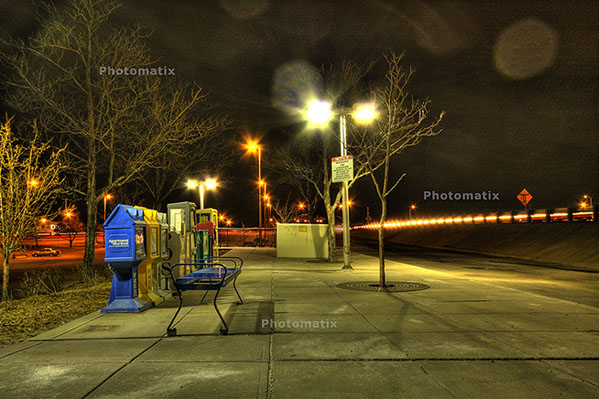
originalhdr

Needless to say, it didn’t really have the “wow” factor I was looking for.  (I should also throw a mention in for the folks at HDRsoft that produce Photomatix, the HDR software utility that I was testing at the time I originally put this HDR together – still working on a review of that – I lost the trial version after re-installing XP, but will get that back shortly.)  Anyway,  given the success I’d had with some other images in HDR and the background I tried, figured it was worth the effort to blend in a different background.  Here’s the results.
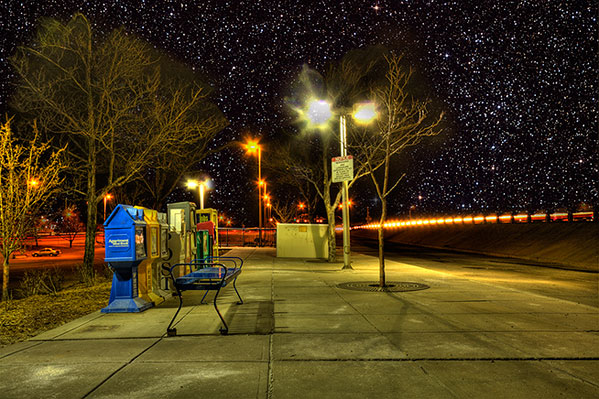
hackjob

Keep in mind, this was after literally hours and hours of painstakingly selecting branches, twigs, and  what not literally zoomed in to almost the pixel level.  Still, not that flattering a result and clearly a less than “stellar” job.  I relegated that to the “learn from your mistakes” folder and had not really touched it since.

So, this was my test for the Mask pro – could it do what I couldn’t after at least ten hours of agonizing masking selections and duping to repeated layers to start up the following day?  Well, let’s see, here’s what happened.

After installing Mask Pro, I loaded the tone-mapped HDR image into Photoshop.  Then, rather than taking any time to tweak, I went straight to Mask Pro (after all, it should do the work for me, right?).  After a short 7-slide presentation on the tools, my first screen looked like this:
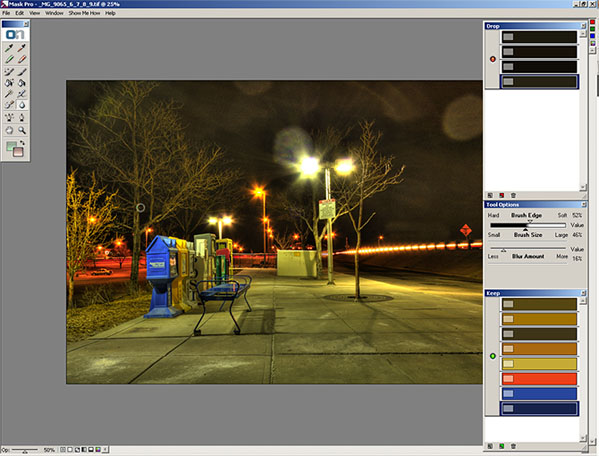
maskpro1a

Before I go on, let me explain how the tools on the right ended up how they were.  You see, Mask pro gives you eye dropper tools to select the colors you want to keep and the ones you want to subtract.    So, I went and selected the green eye dropper to define the colors to keep.  I clicked a few parts of the branches and signage, which took the better part of 5 seconds.  The end result was this color set:
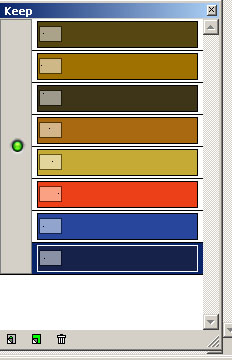
keep

Then I switched to the red eye dropper to define the colors to drop.  I clicked a few parts of the sky.  This took another 5 seconds or so.    The end result was this color set:
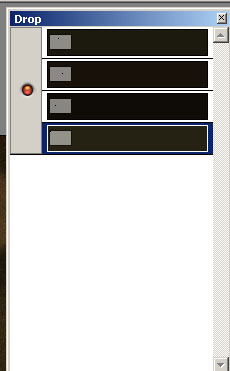
drop Lastly, I clicked the Magic Brush tool, from the Mask Pro tool panel maskpro_palette
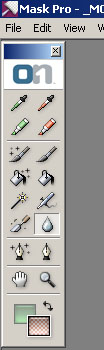
and just started painting around the sky.  I certainly did not take my time, as I was running on my Windows desktop which has a single core 2.3 Ghz celeron processor (it chugs when I load my browser fer Pete’s sake).  So, I dealt with about 5 minutes of a magic brush tool as it calculated the mask to apply as I painted impatiently across the image.  (After all, I wrote these blog posts after dinner, so time = sleep here.)

So, after about 5 minutes and 10 seconds, I have a mask that looks like this:
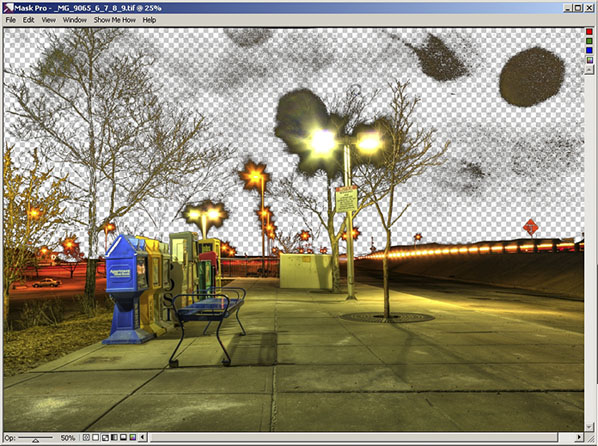
maskpro2

Yes, that was after 5 minutes!  I could already tell this was a wickedly intuitive and powerful tool (and I mean that in the best of ways), so I just stopped there and decided to take it back to PS for final cleanup and adding the new background.  To do that, I simply clicked the File menu, then “Save/apply” (another 2 seconds)…

Now back in Photoshop with the original image.  It looks the same, but take a look at the layers palette:
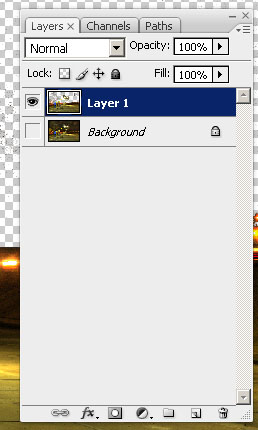
layers2

I know the low-res and smallness of captures for the blog make this hard to tell, but at this point I am pretty much ready to bring in the new background.  My only last step in PS is to duplicate the layer I just created from mask Pro to clean up the big blotch in the upper right, and a few specks in the rest of the sky on the third layer.   So, now I am ready to bring in my starry background again.  I place the object in the PS document to get this (for the record, I went with a different starry background to go for a more realistic effect rather than the Harry potter look of my swimming pool shots):
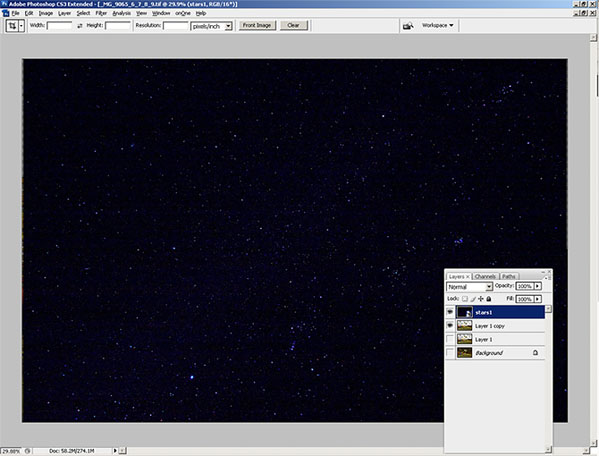
layers3

Finally, I just pulled the stars layer to sit below the Mask Pro layer and here’s the resulting layout in Photoshop:
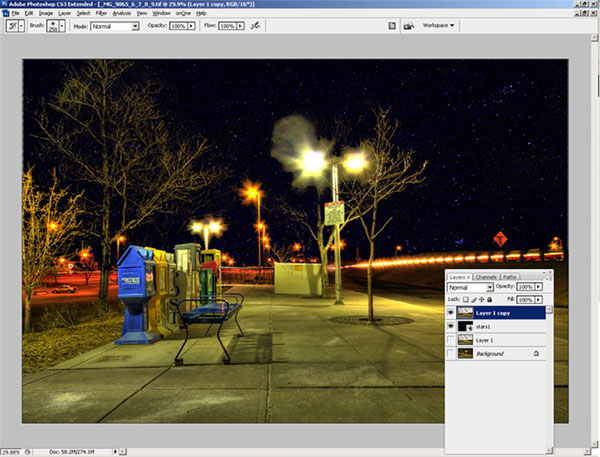
layers4

The last bit took all of another minute, tops (remember, I am working off a slow processor.  The final result, which took literally less than 10 minutes (the first took over 10 hours):
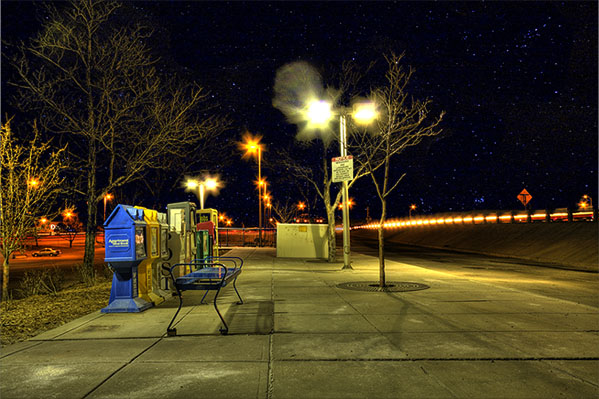
finalhdr

Such is the power of the OnOne mask Pro – just one of the multiple plugins that are available in this Suite.  If you want this kind of power and malleability in minutes, then enter the giveaway today.  it can literally save you hours, if not days, of post processing!  Here’s the Flickr page for photo entries and here’s the link to the rules.

What can I say – OnOne rocks!  Just to give you a true frame of reference – it took me about an hour and a half to write this post – and that includes getting the screen captures, then sizing them for the blog.  I also interspersed some Twitter time and surf time as well, so it’s not like I was really in any kind of “zone” or anything.  It was just another task in an evening of multi-tasking.  The original one took me over ten hours of processing and that was with no other apps running, seriously.  I was restarting the computer just to free up the RAM for usage only by PS every evening.

This feature alone can save you days of time in the digital darkroom.  Don’t delay and enter to win today! Happy shooting and we’ll see you back here again tomorrow.

Grab the Feed