Topaz Laps: Software Suite Review

So, as everyone is likely already aware, Topaz Labs approached me recently to sponsor a giveaway and generously donated their entire suite for some lucky listener/reader.  As is always the case, I like to say “thanks” in my own small way by giving the vendor some “air time” on the blog with a personalized review of whatever it is they are contributing.

In the case of the Topaz Suite – boy did I bite off more than I could chew!  The Topaz Labs package consists of 7 different Photoshop plugins with somewhat descriptive names for each plugin package, ranging between:

  • Adjust
  • Denoise
  • Simplify
  • Detail
  • Clean2
  • DeJPEG
  • Vivacity

There’s also two video plugins available:  Enhance and Moment.  I’ll address those in another post, just because, well… even just the 7 plugins for Photoshop was going to be a lot of plugins to review in one blog post!  Thinking I was up to the challenge, I powered on and installed each package, then fired up Photoshop.  Wanting to find an image that had some depth, color and tonal range to it, I picked one from a photo walk I did in Boulder a month or so ago of the tulips:
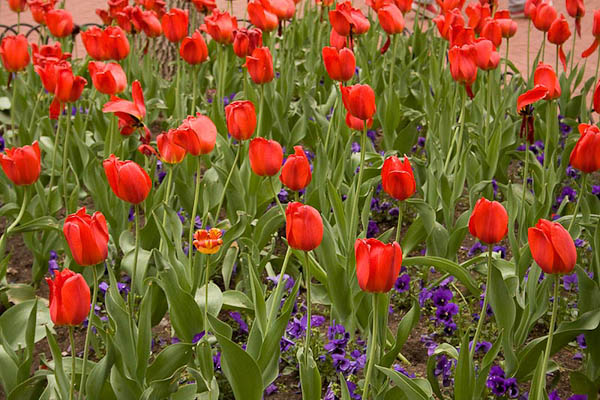
original_blog
Boulder Tulips

Kind of a neat image:  one flower all by itself ina sea of red tulips.  The green stalks and purple base also served as a nice contrasting set of colors to see how things progressed.  So, into the first plugin I went – the Topaz Adjust.  Lo and behold, within this one plugin are 21 different photo adjustment presets! That’s right – 21!  Here’s a quick look at the interface:
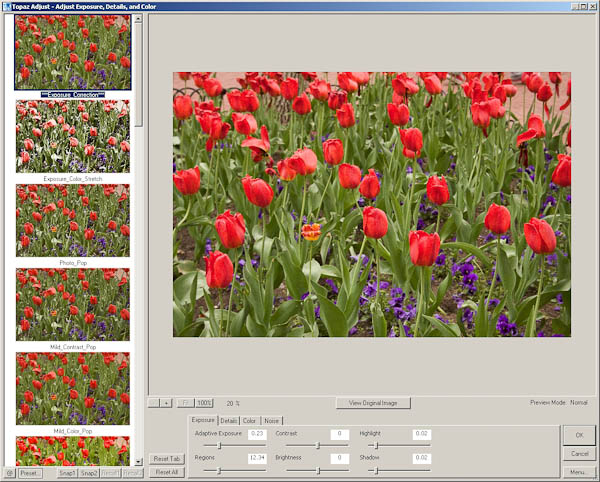
adjusteditview

See that left-hand column?  There’s 21 different variations of creative adjustments done to your photo to give you a specific look and feel to your images – all at the click of a button.  To the bottom center are all the slider controls for exposure, details, color, and yes – even noise handling.  You can select a creative style, then edit within that style to go for a unique look and feel all your own!  This is a very clever and unique approach to photography work flows, because now you can look at your photo with various edits in an simple and easy preview to see how various adjustment styles will look on them.  I’d like to give some face time to each style but there just isn’t room here in the blog to do each justice.  So….enter the photo gallery!

That’s right, I took my one image and ran it through each of the 21 possible adjustment styles.  On each style I just left the default sliders in place, but what’s especially cool is that these slider values change from one style to another, so if you are paying attention to the numbers, and you like a particular style, but want to drop just a touch of the contrast, or bump a touch of the noise, you can do so easily and intuitively!  Pretty darn cool in my book.  The styles go alphabetically in order in the gallery:

  • Clarity
  • Color Blast
  • Crisp
  • Detailed
  • Dramatic
  • Enhanced Contrast
  • Equalize
  • Exposure Color Stretch
  • Exposure Correction
  • Mild Color Pop
  • Mild Contrast
  • Mild Detail
  • Neutralizer
  • Photo Pop
  • Portrait Drama
  • Portrait Smooth
  • Psychedelic
  • Simplify
  • Small Details
  • Smooth and Flat
  • and Vibrance

To see the overall effect each adjustment style has on your images, visit this companion photo gallery here that shows each – the original is listed first, followed by the 21 different adjustment styles!

This alone would be worth a giveaway prize – but this is just one of the entire suite that Topaz Labs has donated to the blog/podcast for our next giveaway.  The rest of their various plugins will have to be reviewed individually on the blog, so this means during September, I’ll take a more detailed look at each of the plugins – clearly more than one will have to be addressed each week, and I’ll try to post an image gallery so you can see the effects of each plugin on some photos.  This is definitely a product to consider as a part of your arsenal of tools though – I’ve already seen so many possibilities for photo galleries and output options on my own collections that I could be busy for months just reviewing what these plugins have to offer.

One downside to the Topaz plugins is that they are only functional in Photoshop and Aperture.  From what I understand, a LR set is in R&D right now, and should be released in very short order.  But for the time being – Photoshop and Aperture are your installation options.  The only other downside I can see to all these options is the risk of decision paralysis – when prompted with too many options, it can often lead one to indecision.  For this reason, I’ve designed an action to use in my own work flow when using the Topaz Labs Adjust plugin.  Here’s what the action does:

  1. It takes my original file and creates 21 duplicate layers.
  2. Each adjustment style is then applied to its own layer, and the image is flattened and saved by that style name as a lower-resolution jpg file.
  3. I then go into Lightroom and look at all 21 (and the original) in either the Library module or in a web gallery module to see which one or two I like the most.
  4. I’ll then go back to Photoshop and find those two layers and delete the rest.
  5. Save that resulting file as a PSD
  6. On each adjustment style, I then tried some various tweaks on the sliders to see if there were minor adjustments that I found more appealing to my tastes.

This is just my work flow that I am thinking will work well for me – I like having at least a few options available, and since different scenes call for different adjustment styles – the action will help expedite my work flow.  It took a while to create the action as you have to be methodical and pay attention – but the resulting options for workup are worth it in my opinion.

Anyway, back to the Topaz Labs Adjust plugin – this thing rocks and I could easily see it become a part of my work flow (who am I kidding – it really already has since I built an action to support it!  LOL)  Don’t forget, next month you can WIN not just the Adjust plugin but the entire suite from Topaz Labs.  Keep checking in for details and the theme announcement.  Thanks to the good folks at Topaz Labs not only for their generous contribution to the LDP podcast, but also for the R&D they’ve invested in this entire series of plugins!  Judging from my review of the first component – this is sure to become part of the standard set of utilities for photographers and creatives!

Okay, that’s probably enough for today.  If you’re still chomping at the bit for more info about Topaz Labs software – go check out their blog – it’s got some great info on there too and really goes in depth from Product Manager Eric Yang (this is his Twitter link – follow him, very cool guy!)!  I’ve already added it to my own list of RSS feeds!  Check back tomorrow as we get back to the previous project I started – the manually adjusted Star Tracker!  In the meantime, you also have only a short time left in the Wacom Giveaway – Friday is the last day to submit your photos!  So, if you want to Win a Wacom (Bamboo Fun) – enter today over at the Flickr Thread!

Happy shooting everyone and we’ll see you back here tomorrow!

Grab the Feed

Post #500: Celebrating a Milestone!

balloons-42

Not sure where to begin really – this is all kind of surreal, because I really didn’t think that this milestone would see me where things are today with the blog.  Needless to say, the blog has succeeded beyond my wildest expectations, so thanks to everyone who’s made that possible.  Without further ado, here’s the big news (via YouTube video, so feed readers, stop in and get the news by taking a few minutes out of your day for this exciting video news bulletin!):

For the data hounds, here’s a rundown of some of the stats for a snapshot of what’s that’s happened thus far on the blog:

  • Posts = 500
  • Comments = 1107
  • 107 Categries
  • 544 Tags
  • Total Visitors = 231,000
  • Single Highest Traffic Day:  Thursday, April 10, 2008
  • Subscribers:  1006
  • Highest Subscriber Count Ever:  1018 (4 days ago)

That’s a lot of stuff when you think about it.  So, for all the thousands of you that have been tuning in regularly, thanks so much for all your kind thoughts, words, and contributions over all this time.  Tune in to the YouTube video for the contest news and some other fun stuff!  In the meantime, keep on shooting – you know what’s coming up in the next 500 posts!  Happy shooting everyone.  Have an awesome weekend and we’ll see you back here on Monday for post #501!

Post #498: A few shots from the Photo Walk

You’d think these would be shots from the Scott Kelby Photo Walk, but that’s only half right.  Ever since the first photo walk last year in Golden, CO…several of us kept the concept cooking with regular meet-ups (through www.meetup.com, a great place to organize get-togethers for any type of group, not just photography).  Anyway, this meetup group has been getting together on a regular basis (monthly to semi-monthly depending on season)…and we had our August photo walk back at historic Golden CO (in honor of last years Scott Kelby photowalk that was held there).

Since I am on the subject of photo walks, before the pics, it helps to say a few words about these gatherings.  They are probably one of the most enjoyable things about photography, because you get together with people that share the same passion you do for the craft.  You get to trade shots and techniques, talk shop, and gear, post processing – the works.  I have made some great friends from both photo walks, so kudos to Scott Kelby and the NAPP organization for hatching the idea for these types of get-togethers.  While the activity has always been around to a degree – the awareness and energy that they’ve brought to it are astounding!

Okay, enough fan-dom for the day – here’s my photo gallery shots I’ve worked on thus far.  Got a few regular shots and an HDR using the trial version of Photomatix (I still haven’t ponied up to buy this…I need to do that soon!):

_MG_7899
Large Sunflower

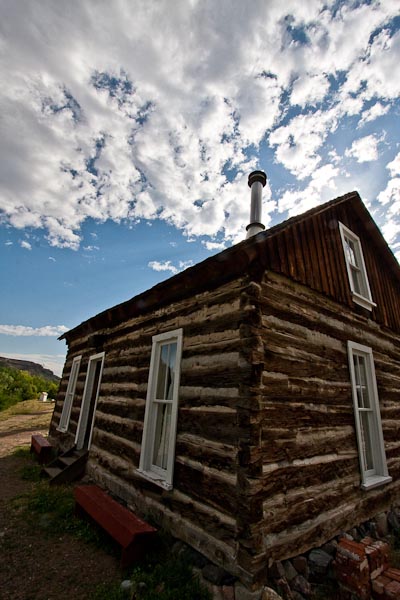
Farmhouse
Farmhouse
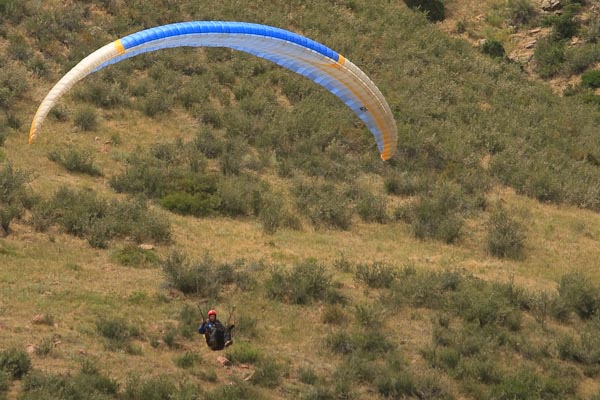
Para-sailing
Para-sailing
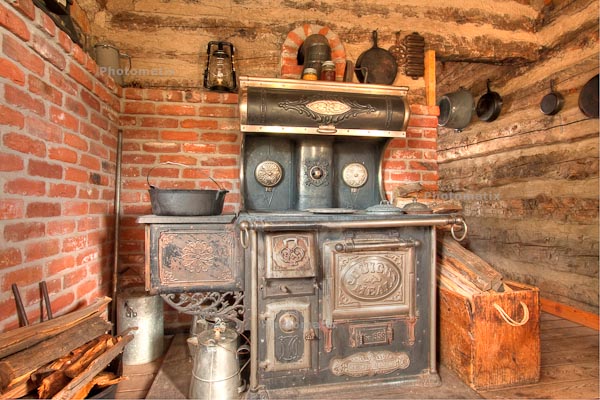
Wood Stove
Wood Stove

I know these are all pretty much snapshot material, but it’s part of what makes photo walks so much fun – just random pics, and socializing!  Unless of course you take your photowalking more serious…  On that note, share your thoughts on photo walks in the comments.  Do you find them useful?  If so, for what?  If not, share those thoughts as well.  Chime in, as comments are always appreciated!  (Oh yeah, can anyone tell which one is the HDR?  No peeking for the “photomatix” stamp!)

One final note – we are in the final days of the August contest over in the Flickr threads.  This month, the prize is a Wacom Bamboo Fun!  (I reviewed this last month on the blog, and you can check out the review here.)  The retail value of this is $100, and the submission count is a little lighter this go around, so your odds of winning are even better – for now!  Anyway, like the Lotto, if you don’t play, you can’t win – and this one is free!  So, share your “fun” themed shots today in the Flickr group – see the thread for more details here:  Bamboo Fun Giveaway

Okay, that’s all the photos, news, and contest info I have for this 498th post.  We’re closing in on magical #500 – only a couple days to go, so stay tuned as the posts will likely get more and more multimedia filled.  And, if you tune in to #500 – a great giveaway exclusive to that day will also be announced!  So, as we count down the days remaining, keep on shooting.  Until tomorrow, hope all your shots are great ones!

Grab the Feed

Follow me on Twitter

How to build a star tracker!

Rather than go through another hardware review today, I thought I would share a different kind of hardware with you – the DIY kind!  Over the weekend I embarked on a little project on building a device to track stars as they move across the sky (even though it’s really the earth that’s moving and not the sky).  Now granted, there are better ways to build star trackers, but many involve electronic motors, are more complex (in my mind anyway), and can get kind of costly (at least from what I’ve read).  So, I figured I’d start simple, and go from there.  Join me in this adventure in building my first star tracker for under $20!

It was a lot of fun and I learned a lot in doing it, both about other methods, some of the short comings of this approach, but for the cost, figured it’d be a good entry into doing these kinds of things for comparison sake.  Check out the main YouTube video that gives a narrative on the process and my finished result:

The reference material I used for building this leaf-style star tracker came from a professor at the Rochester Institute of Technology (sounds impressive enough to me!), so figured I should give credit here as well:  http://people.rit.edu/andpph/text-star-tracker.html

If you have thoughts, comments, feedback, or suggestions to either improve this one, on how you’ve made your own (or plan on making one), and even if you have shots to share made from DIY star tracker kits, please feel free to et me know via either the comments or email!  I will start a photo gallery for all shots shared and plan on updating that monthly with all the photos received, either via links in the comments or via email!

Happy (star) shooting, and we’ll see you back here again tomorrow!

P.S.  Don’t forget, we’ve still got the Wacom Bamboo Fun Giveaway going on all this month!  Share your shots in the Flickr thread and you’re entered to win this prize worth $100 retail!  Thanks go out to the folks at Wacom for contributing this awesome tool for blog readers and podcast listeners!

Grab the Feed

Great Scott, Mat, and Contests, Oh My!

Heh, cheesy headline, but they all seam together on this week’s episode of Learning Digital Photography!  Yup, the podcast is done, and for those that didn’t catch my Twitter tease, this week I had the distinct pleasure of talking with none other than Scott Bourne on the show!  If you don’t know who Scott Bourne is, then you’re living in a cave.

Scott is a regular contributor to Mac Break Weekly, This Week in Photography, and owner/operator of PhotoFocus.  You can find him there, via his Bourne Media Group online presence and a bazillion other places like Photoshop World, Aperture Nature Photography Workshops, Bosque Del Apache, and much much more.  I could link to it all but that would take an entire post of it’s own, so will point you to his main presence at Photofocus and Twitter:

http://www.photofocus.com

http://www.twitter.com/scottbourne

We had a great talk on this week’s show, covering his photo background from Motocross to Wedding work, and of course his Avian work as well.  We took a look at a little of the gear side, got some nuggets on branding and the business side, and even had a chance for a couple twitter questions.  Great stuff and all packed into a mere 30 minute interview!  Thanks again to Scott for taking the time to talk to me on the podcast!

Other content from the show includes a discussion on some of the things to consider on matting and framing (hence mats in the title), and an in-depth look at the finalists from the last LDP contest.  There’s also nuggets and links for other contests out on the web as well as what to look for in future LDP contests, so some teaser stuff there too.  All in all, a great (but long) show so grab it from your preferred source point, whether with the folks at PLM, or in iTunes!

Here’s the links, as promised from the show!

Mats and Framing

  1. American Frame
  2. Redimat
  3. Guide to Preservation Matting

Contests

  1. OnOne Top Ten Finalists
  2. Wacom Giveaway
  3. Bogen Imaging Macro Giveaway
  4. Music/Band Photography Contest

Gear: Ring Flash

  1. Canon Ring Flash
  2. RayFlash
  3. Metz Ring Flash

Technique: Causes of Blur

  1. Camera shake
  2. Subject Shake
  3. Sharpness/Depth of Field

So, there’s the link love for the show – it was a lof of fun this week, but the weekend is almost upon us.  This Saturday it’s another photoshoot with the Meetup Group and then some night photography as I prep for the next article of PhotographyBB Magazine! Make sure you get out and do some shooting too.  Have a good weekend everyone and we’ll see you back here on Monday!  Happy shooting!

Grab the Feed

[display_podcast]

How I shot Lightning!

Today the post is going to revolve more around a set of photos I took the other day – you see while en route back to the house, I noticed that the clouds were passing over the mountains and the sun was starting to set.  It had the makings for a really nice sunset.  Never one to turn away the opportunity to capture a sunset, I hurried home and gathered my gear, and took off to my favorite spot near the house for landscape work.

Well, the clouds and the sun didn’t really cooperate so I gave up on that and starting fiddling around with some HDR kinds of things.  I saw a traffic light nearby and there wasn’t much traffic so tried to time some bracketed exposures (my shutter speed was getting near 30 seconds on the top end of the bracket).  Some possibilities developed, but nothing too earth shattering, and I was starting to feel a few drops of rain, so I packed up to head back over to the house – about 2 miles away.

As I was coming back to the house, the clouds that evaded me on the mountainous horizon were ominously hanging over the cityline of Denver (another scene I’d been meaning to shoot) and flashes of lightning were coursing through the clouds, with some pretty regular spikes coming down.  All of this was about 30 miles away, and heading away from me so i was feeling pretty safe except for the possibility of some raindrops now and then.

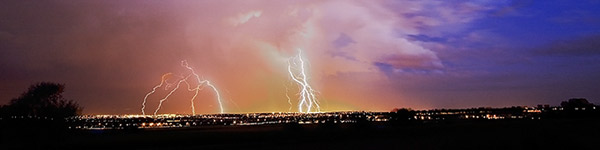
So, I found a nook by the open range, set up the camera on my trusty tripod, and tried to recall things I’d read about how to shoot lightning.  Apparently some of it stuck, because I came away with this:

lightning_blog
Lightning over Denver

So, how did I do this?  I kept four key things in mind:

  1. I used my tripod!  Stability was key because every single exposure was no less than 15 seconds!  When shooting lightning, you want to open the shutter for a longer time to increase your odds of catching it.  Because it was flashing so regularly I eventually dropped my shutter to 15 seconds and still managed 6 or 7 really good captures.
  2. Keep the noise Down – I dropped my ISO to 100 for all shots and made sure long exposure noise reduction was turned on in camera.  Sure it took twice as long to capture each image, but in the long run it was worth it because there was much less noise to process on the back end.
  3. Don’t touch the camera!  I set the camera to bracket exposures and put it on a two-second delay.  So, by the time the camera shutter opened I was no longer touching it, and then the second and third shots fired automatically.
  4. I made sure I was in a sweet spot of my lens.  Part of this is knowing your gear – I was shooting the 10-22mm (wide angle) from Canon, and know that when it goes below f4 it can get fuzzy.  So, I was at f11 for most of my shots.  Great depth of field and everything is sharp!

Well, a fifth one was post-processing.  After a few rather unpleasant attempts to process as HDR images, I enlisted the aide of friend-of-the-blog Terry Reinert, who you know from our podcast talk a short time ago.  Terry is wicked smart (he’s an engineer) and knows the heck out of HDR.  I asked him what I was doing wrong (because the clouds were getting blotches scattered through them and generally looking poorly).  He gave some insights, what he was finding yielded better results and sent me a low res sample via email.  I liked the path he took, but the colors were not quite where I remembered them from Sunday, so dove in again with the new-found knowledge.  I tried a few quick variations on his technique, but in the interests of time, just did a short version to post here.  Once I get my final edit done (probably this weekend, I will likely be adding the image to my portfolio, so will also post that here as well.  For now though, I wanted to share the back story and a quick version of one processed version that I found appealing.  I am not crazy about the black across the bottom, but since my time was limited here, I’ll likely be addressing that this weekend when I have more time.  For now though, the quick version and a panorama crop looked kinda cool!

Thanks go out to Terry for giving a hand.   In our discussion he also mentioned possibly doing a tutorial on blending using the images, so keep your eyes on Terry’s blog (Where Art and Engineering Collide) as I may be a featured artist!  (How cool would that be?) ETA:  On posting the link to his blog, I see he’s already put his tutorial together – thanks Terry! 🙂

In other blog/photo news, as you all know from yesterday, the OnOne Giveaway concluded with Pete Petersheim being the big winner.  The new contest is underway though, with a new thread up at the Learning Digital Photography group on Flickr, so be sure to stop in there and share your images in the new thread (the theme this go around is “Fun” since the price is a Wacom Bamboo Fun!)  Good luck to everyone and don’t forget to have some fun!

Happy shooting and we’ll see you back here again tomorrow!

Grab the Feed

And the winner is…

Ladies and Gentlemen,

Here today, I am happy to announce that the winner for the OnOne Software Plugin Suite Giveaway has been decided.  So, without further ado, please give it up for Pete Petersheim!  Pete submitted the following image to the LDP contest thread, which got the ultimate nod:

Pete Petersheim's Winning Image

Click the picture to go to his Flickr thread, wish him congratulations on a job well done.  Note there are two images in his Flickr thread, a cropped version (which was entered) and the full-size one.  I think that regardless of which he had entered, it would have won the day.  The colors, composition and impressive post-processing, as well as his unique flair for something unique is just superb.  Congrats Pete!  Send me a Flickr mail message, DM me on Twitter, or email me here and I’ll get you the contact info for the folks at OnOne to get the software prize out to you in short order!

To all the entrants – thanks so much for participating – we all learn so much from one another it really is amazing to see the artistic talents that inspire in new and exciting ways!  For a full look on the entrants and the finalists, there are web galleries here:

All OnOne Entries

The Top Ten

I’d also like to take a moment and thank the folks at OnOne software for their highly generous contribution – since the winner has been announced, it’s probably appropriate to note that there is also a very generous discount being offered on the entire suite right now through Thursday, August 13th!  Save $150 off the bundle, which is an amazing savings.  So, for those who are still interested, the time is still there to save a lot of money on the package – just tell them you heard about it here at Canon Blogger/Learning Digital Photography!

With the July contest completed now, it’s probably a good time to turn our focus to the August contest – you can win a Wacom Bamboo Fun valued at $100!  I reviewed this tablet a while ago here, so if you’d like some feedback that’s a good starting point.   But, don’t forget to enter your images – you can pull from archives this go around, and submit up to three images in the Flickr Thread!  More details are also available on Flickr!

That’s it for today, so congrats to Pete!  Thanks to Wacom!  And  Happy Shooting!  (We’ll see you back here again tomorrow!)

Grab the Feed

Reviews, Contests, and Blog Notes

Lots to cover today on the blog so I am going to get right to it.  First up, I’m trying to maintain the schedule of hardware reviews, so rather than go into detailed analysis, I am just sharing an abbreviated review here today on the Canon 28-135mm lens.  Also up on todays blog, the OnOne Software giveaway finalists have been announced!  Last up, a few administrative things to address.  So, without further ado, let’s get started:

The 28-135mm Review

The luck of this review is due to the Scott Kelby Worldwide Photowalk.  I had been hearing good things about this lens for a while, and finally bit the bullet and rented it from a local camera store to try it out.  I tried to keep in mind that the gear is a little more worn than usual, but did see some pros and cons on the lens, so let’s get started:

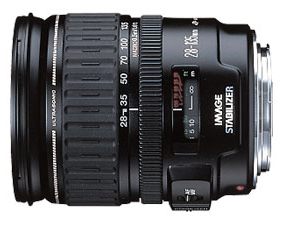
28-135mm

The 28-135 is an excellent walk-around lens.  The focal range is perfect for going fairly wide and also zooming in to a certain degree.  It offers some of the best features of both worlds, and does so at a pretty reasonable price considering what it has to offer:

Pros

  1. Focal Range:  As mentioned it has a nice range for use while moving from one environment to another.  Not quite a wide angle, and also not a zoom, but a nice combination of the both.
  2. Weight:  For an IS lens, this is amazingly light.  I was expecting it to be a lot heavier, so a definite positive (and happy surprise here).
  3. Image Quality:  I couldn’t believe how wide the sweet spot of this was.  I got crystal clear tack sharp shots from probably 30mm to 130mm.  To get that kind of range in a “sweet spot” is significantly impressive
  4. Price:  The price for this lens is a shade under $400 from B&H and for an IS lens, that’s pretty darn good – about as cheap as you can get given the feature.

Cons

  1. Battery drain:  Although it’s related to the positive of Image Stabilization, the battery did seem to go rather quickly.
  2. Weight:  I know, it was listed as a pro, but I am also listing it as a negative, because with many of the newer SLR’s the weight doesn’t balance as well as it might have on the 20D or even the 350D.  Don’t get me wrong, I like light, but I also like balanced, and here I think the weight of the dated design has an impact on balance.

There’s a lot more I could go into here, but on the whole, the lens is a great one, and with the pros definitely outweighing the cons, it’s definitely one to consider adding to your gear bag – if you like to photo walk!  If you’d like to see samples of the 28-135 in action, feel free to check out this montage of shots I compiled from the Scott Kelby Photowalk:

The OnOne Giveaway Finalists!

I know, the moment you’ve all been waiting for – the finalists.  I am pushing forward here partly because my counterpart at OnOne, Mike Wong, has been on vacation, and is getting back soon, and secondly, because I understand OnOne is having an excellent promo sale going on right now for the suite, so I’d like to get this wrapped up so that those who have been waiting to hear can still take advantage of the opportunity to save a little $$$!  Lastly, also because the anticipation over the OnOne giveaway is a primary focus for many listeners, and other contests are both underway and coming up!  So, without further ado, here are the finalists I’ve chosen.

OnOne Software Giveaway Finalists

The quality of entries made it super hard to pick, because there were so many that were deserving of moving forward into the finals – but decisions had to be made.  Thanks to all for entering, and best of luck to the finalists – Mike and I will talk this week and hopefully have someone get a great email by Friday with the news that they are the proud winner of the OnOne Software Plugin Suite Giveaway!

Blog Notes

A couple updates are coming soon to the blog, and a couple have already been made.  Some things you may or may not have noticed that have already taken place:

The links in the sidebar have been broken out into categories from one another so you can find things easier

A paypal link has been added to the sidebar – I had mentioned this once before, and try not to push it, but donations are always welcome to help offset the costs of running this blog (bandwidth, time, and storage on my hosting provider)

The picture has been updated in the header.  I try to change this out periodically, and in the next incarnation that will randomize on each visit through an entire gallery of photos, but a new one is in place, so if you are picking up the content from a feeder – stop on over to see the changes!

Last but not least, thanks to Terry Reinert, I’ve added a plugin for fellow bloggers – when you post a comment here, your last post from your own blog is happily linked to your comment!  Enjoy!

So, that’s it for today?  Like the review and the changes?  How about those OnOne finalists?  Kudos to everyone who submitted images too.  Don’t forget to jump into the latest and greatest giveaway – the winner will get Wacom Bamboo Fun valued at $100!  Be sure to throw your best “Fun” themed images into the contest thread here:  Giveaway Thread

Happy shooting and we’ll see you back here tomorrow!
Grab the feed

Teaching to Learn…

For those of you that don’t know – there is a cool little feature available for iPhone and iPod Touch users called AudioBoo, where you can record up to three minutes of audio soundbites and share online.  It’s a pretty neat little feature, and allows for short bursts of ideas.  I shared just such a recording (they are called “boos”) this evening after I left the Exposure Denver photo club meeting.  You can listen to the recording here or continue reading below my thoughts on the Exposure Denver experience!

Speaking of which, the gang from the group was so cool – everyone was so welcoming!  They asked me to come in and share some tips and insights on Lightroom, which I was quite flattered but honored to do. If you want to learn more about Exposure Denver, follow the link to their blog where they have news of upcoming events, activities and more.  These folks take it to the next level with regular galleries, themes, critiques, reviews, and yes, you can sell prints at the shows!  A lot of thought, time and preparations go into the group and everyone contributes!  It was quite an energizing and motivating dynamic and has me very excited in ways that I have not even explored yet photographically and creatively.  My head is literally bursting with possibilities.  And why is this?

Because I was thrust into a teaching role, on a subject I am (or was) admittedly not an expert in!  I have no idea how it all started anymore, but this further confirms what I’ve known from prior experience in another field – the best way to learn about something is to try and teach it to someone else.  It forces you to get up to speed, get current, and learn more than you did before.  This happens in three ways:

You do research to prepare your class note, talking points and handouts.  I learned so much just from pulling all these resources together.

Others in the class will know things you don’t.  Without fail, this always happens.  There is no way you can expect to know more than everyone else on a subject you are teaching unless you have 20 years of age and experience over the audience.  But I was not in front of kindgarteners this evening – these were peers (and several were even a few steps ahead of me).  We each brought value to the table and while some probably learned a lot from me – others schooled me!  (But in a good way!)

So, if you want to really get your fingernails dirty, dig into something and know it better than you ever did before:  try teaching it!  I did and learned more than I ever have before about Lightrooom.

Filling the Frame: Flowers, Faces, & Fixtures

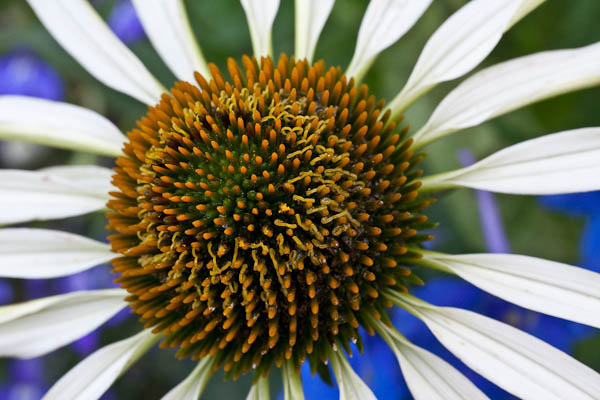
Rules of Composition are all around us, and we are reminded of them all the time.  Terms like Rule of Thirds are bandied about by everyone (including yours truly, having blogged about it myself here, here and here).  Other terms and compositional “best practices” and rules of thumb include things like “The Golden Mean”, “Sunny 16” and many many more.  But one that I have found to be most successful is the one of “filling the frame”.  This holds true for many types of photography.  For instance, there’s floral photography:

Filling the Frame in Downtown Denver

There’s also portraiture:

Filling the Frame with a Face

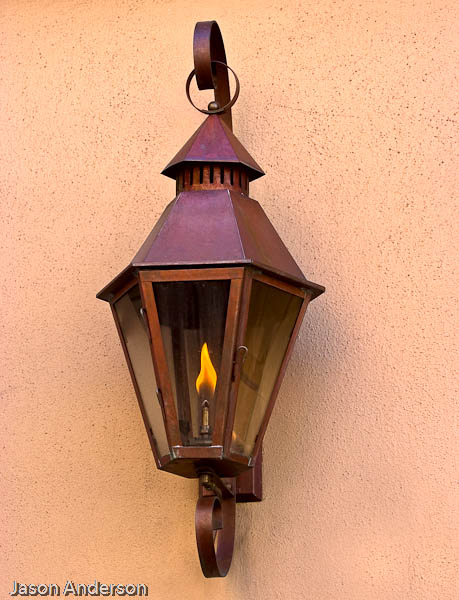
Architectural work also can use this concept:

lamp post

The one that probably does not lend itself too well to the compositional approach of “filling the frame” is landscape work.  But, as we all, know, exceptions often prove the rule!  And as much as I hate to admit it, and agree with the rules, here’s one that can almost always be used to improve your photography.  Here’s three reasons couple reasons why filling the frame works a lot of the time:

  1. It eliminates distractions – everything else around it becomes cropped out of the scene, leaving the viewer with nothing to grab their attention but the subject of the photo.  In the first shot, what else can you see besides the flower?  The second?  The third?  There is literally nothing else to look at.
  2. It accentuates lines and points of focus or interest in your pictures.  In the first shot – your eyes can’t help but go to the center because that’s where all the lines are pointing.  In the second, the girls eyes are a natural point of focus, and then in the third – the flame naturally draws you in as well as the sharp lines of the lamp itself.
  3. Backgrounds become blurred and/or beautiful! Bokeh, or soft blurring of out of focus areas is a natural side effect of getting up close and personal.  And if your f-stop is set lower to catch more detail, you are likely in close enough where the entire background is one consistent color like in the latter two shots.

This is, of course, just my 2¢.  What are your thoughts on filling the frame?  Does the approach work or is it too “in your face”?  These are questions that will likely be posed until the end of time, because they are by their very nature, subjective.  nevertheless, in sharing our thoughts, we can increase our appreciation of, and become more cognizant of the works of others and grow as artists.  So, share your thoughts in the comments!

In the meantime, happy shooting, and we’ll see you back here again tomorrow!

Grab the Feed