Can anyone guess the significance of the post title right off the bat? Any takers at all? For those that could, cool! For those that can’t, 37 is a reference to the last podcast for 2009! Episode #37 (Longevity of Lenses) is now available for your listening pleasure in iTunes and with the folks hosting the show directly on the web at Personal Life Media. It might be an hour or so actually before the show is available for download on iTunes, so hold off for a little there before downloading – you might get the previous episode! It does take a look at the subject of lens longevity much along the lines of the previous post here on the blog, but it also speaks to things like depreciation, and considers the business element of lenses too – so there’s always more in the podcast for blog readers to enjoy!
I can’t guarantee I will have a post ready for tomorrow, so this could also be the last post for 2009 as well. It’s always fun to look back and review the year this close to the end. I’ll have some more details trickling out once we’re into 2010, including the always popular “Best Blogs”. There does seem to be a trend as in 2007 I posted my “Top 7 of ’07”, followed by the Top 8 of ’08, and most recently, the “Top 9 of ’09”. Can you guess what is coming soon in January? 🙂
Here though, it seemed appropriate given that the podcast was released today, to note that it is episode 37 of the show. That means 37 episodes in 52 weeks – that’s more than one every other week. I am not sure what the average show length is, but am guessing it is in the 30-45 minute realm, which means some people out there have spent at least 26 hours (over a day!) listening to me talk about photography! Got another day available for 2010?
I hope so because we’re going to have a lot more fun and cool stuff coming up in the podcast, and on the new radio show for newcomers over at WebtalkRadio! More guests, more articles, more tips and tricks, and yes…more contests! These shows and articles and contests though really are here for you, the listener and reader though, so if you want me to cover anything specific, please feel free to let me know in the comments of the blog or via email!
Anyway, enough of the “back story”. Here’s the show notes:
Last but not least…don’t forget the contest deadline is rapidly approaching – tomorrow midnight is your last chance to get your favorite Giving photo into the Flickr thread to be eligible for the prize bonanza! Lots of stuff is going to go to some lucky participant, so get it up there and good luck! Happy New Year one and all, and we’ll see you next year here on the blog/podcast/etc.! Happy Shooting!
Yesterday we looked at things to consider when getting a new camera body…while the idea is all well and good, lenses are another story, and since we are likely to invest more in glass than in cameras (Have you seen the costs of some of the really good glass lately?), the life of a lens is something worth considering.
In all things technology-related, there is a principle called Moore’s Law which states that technology will advance at a rate of re-doubling roughly every two years. While this principle was developed primarily for computers, we can draw similar analogies for digital photography too, with the sensor being analogous to the transistor. The rate of increase has not quite been on par with re-doubling every 2 years, but the increases can be noted pretty impressively going from a mere 4 in 2001 to a current rate of 21 MP per frame for DSLR cameras (I am only looking at the Canon line-up here:
Canon 1Ds Mark III = 21MP (2007), Retail
Canon 1Ds Mark II = 16 MP (2004)
Canon 1Ds = 11MP (2002)
Canon 1D = 4 (2001)
Lenses aren’t like that though – focal lengths don’t change that much. Instead, technology has allowed lenses to become faster at the longer end of the given focal lengths. We’ve also seen the introduction of image-stabilization technologies. The addition of new technologies in lenses does not necessarily deprecate previous generations – it merely antiquates them! This means your lens may not have the bells and whistles of future generations, but it should work indefinitely if treated properly.
Keep in mind though that there is a distinction between full frame and crop sensor cameras here though, because Canon has two lens lines, the EF line and the EF-S line. The EF-S line is intended for the crop sensor cameras and cannot be used on the full frame mounts – if you try to use an EF-S lens on a full frame body, the mirror could slap down and shatter the back element of the glass, so avoid this scenario if at all possible! (There are some converters on the market that will extend the gap between the mirror and the element to avoid this, but I’ve not used them.)
Lenses are also different from camera bodies because there are no moving parts that can fail. Well, that’s not entirely true because zooms do have moving parts when you rotate the lens, and these can fail. * However, because the lens is always a closed item, the susceptibility of a lens to parts failure is not as high as it is for camera components. Shutters, for instance, have a certain lifespan for which they are rated, (usually somewhere between 50,000-150,000 actuations). Lenses don’t fail after a certain number of focal adjustments (assuming you are handling the lens correctly), and in the case of fixed focal length lenses (primes), this is even less the case.
So, a lens can literally last for as long as the vendor makes a body that will accept the mounting mechanism, and in the case of most vendors, I don’t see that changing any time soon. I’ve had my kit lens from Canon when I got my first Rebel XT back in 2004 and it still works great on my 40D – it may not be in the lineup anymore (neither is my 40D either, but I digress…), but any EOS body will accept this lens and the image quality has not deteriorated at all over time! Lenses can last forever!
How long have you kept your lenses? Do you have any “go-to” lenses in your bag that you anticipate will always be there? Let me know your favorites!
On a blog administrative note, don’t forget that there’s still a little time left in the Flickr Giveaway thread for December, so if you have any shots (the holidays are good times to capture those “Giving” themed photos), make sure to get one in for a chance to win that $400= prize package! Happy Shooting and we’ll see you back here again tomorrow!
*ETA: Special thanks to Marco for pointing out in the comments that there are quite a few moving parts in even fixed focal length lenses. In addition to the focusing ring, there is also the diaphragm that moves which closes down the aperture to the correct setting for every actuation of the shutter, so there are moving parts in any lens, including fixed focal lengths.)
With the major holiday of the year behind us, many are proudly wielding new cameras…but many are also asking questions. The most popular question I am getting via emails is something along the lines of:
“I got a new ______ for Christmas. Now What?” (Insert your own camera make/model in the blank)
The answer to this really depends on what, if anything, you had before the new item made its way into your hands. For simplicity sake, I’ll break the response down to 3 different categories:
1. This is your first “serious” camera, and you are making the foray into digital photography. Right off the bat, let me say Congratulations! Joining the digital revolution of photography and imaging is definitely exciting, and the onslaught of information can be intimidating. A couple resources are better in this case over a huge amount of information overload. In this case, I would recommend doing three things:
Read the Manual! Seriously – it may not be the most well-written thing, but it can give you insights as to what all the buttons, dials, and knobs do.
Learn the basics of exposure – The Digital Photography School offers a great page that goes over the nuts and bolts of how exposure works in cameras – very helpful!
Learn the basics of composition – There are so many resources on this, but I like Wikipedia because it links to many others and thus I would deem it very reliable and unbiased. The one linked here is the article on the Rule of Thirds. Many other sites cover this too (including mine), but this is just a superb starting point.
Make an inventory – if this is an SLR, it means you should now be including it on an inventory of “high ticket” items in your house, and a home inventory is always a good thing to have in case of disaster!
Get out and shoot, practice, then shoot some more! Trial and error is an important part of the learning process, and by learning what doesn’t work, you will be one step closer to learning what does work. So, don’t be afraid of getting out and shooting!
2. This is an “upgrade” from a previous digital camera, and you are simply adding more features. In this scenario, you are probably already armed with the basics, and are looking to expand your creative efforts with the increased features of faster shutter speeds, larger MP counts, etc. Here, there’s only three things instead of the five above:
Read the manual – there are many more options, custom functions, features, buttons, dials, knobs, and menu options. Reading this will help get all this sundry stuff down quicker so you can…
Get out and shoot – the tried and true rule of practice, practice, and more practice is what will gain the most in terms of comfort and ease of use for you whether it’s a new camera or an upgrade! It also will give you an opportunity to see and note the differences between your previous body and test for things like sharpness, functionality, and all that sort of stuff while you are still in the important warranty period.
If you already have an inventory of gear, be sure to add it here, making note of the serial, registration, purchase date and (if available) location of purchase. If you don’t have an inventory of gear – the new addition should be motivation enough to ensure that you do get one together. You may also want to consider your insurance situation: Do you have coverage? Do you have enough? Call your agent to find out.
3. Here, you are an established photographer, and this is simply adding another item to your tool belt. In this scenario, you are likely adding another body for redundancy purposes, or to relegate your other one to a backup role. Nevertheless, there are some important things to consider doing as you move forward:
Use it! Check for compatibility with all your current lenses – that everything works as expected, that there are no cracks, chinks, nicks, or other things that you should be concerned about.
Add the gear to the list of inventory that you likely already have – make note of the serial numbers, the date of purchase, and if your gifter doesn’t mind, the place where purchased. All this can be very helpful in keeping records current and up to date. Check with your insurance agent and make sure you still have enough coverage for your gear – see that they get all this information too.
There you have it, some key points to keep in mind for you and your new camera. Congratulations on the new gear, and don’t forget to get creative, because while the gear is fun – it’s really just a tool in your creative tool belt! Did I miss anything? Are these categories sufficient enough for most? Do you fit into one of these categories or is another one needed for your situation? Any other ideas for what to do with a new camera purchase? Got any specific questions? What kind of camera did you get? Share your own questions, feedback, and stories below, by sounding off in the comments!
Last, but not least, don’t forget about the December Giveaway over on FLickr. Over $400 in prizes including books, prints, papers, and software that are great for any photographer! Thursday the 31st is the last day to enter, so make sure you get your best “Giving” themed photo in before the deadline!
Happy shooting all, and we’ll see you back here again tomorrow!
While recently listening to This Week in Tech (a great podcast, and I highly recommend it), the show host, Leo Laporte, made an interesting observation about the advancement of technology. He was musing about the changes that have happened in audio consumption. We listen to much of our music in iPods and portable music players, when not too long ago, we were confined to a certain space. To that end, he noted that the technology of audio in those days revolved around things like the number of amps, tweeters and woofers, quadraphonics, decibels, and much of that technical information. We jam-packed our houses with stereo components, our cars with subwoofers, and on and on. To get truly high quality audio you needed to have resources (a.k.a. money), and the producers of that audio content was restrictive because of the costs.
Not today – these days you can plug a $5 microphone into a USB port on a $400 computer, say or sing anything you want, and almost instantly have beautiful high quality digital recordings of whatever you like. This is a good thing though – because even though more people are recording audio, what matters is what the message of that audio is saying. I can’t just go on the podcast and talk about nothing because no one would listen…although sometimes it feels like I am blathering on and on! 🙂 As the old saying goes, “content is king“! Leo’s observation was that in the audio world, it’s a wonderful thing because anyone can produce audio, and there are now more voices for creativity. With the lower cost of entry to producing high end audio, two questions came about. The first is “What does that content say (what is the point, or message)?” The second is “How do you want to consume that media?” (With the options being whether you want it on a CD in your car, on your iPod at the gym, on your computer as you work, or where ever.)
It was a very astute observation, and that description applies to other media as well. I am, of course, thinking about photography. Think about the analogy for a minute. For the longest time we had the film world, and as ASA speeds got better, grain got finer, the size and quality of image development improved as technology permitted. With the movement to the digital world, and the subsequent “Megapixel Wars”, capturing high quality detail in your photography was no longer such an arduous process. I believe we are at a crossroad now in digital photography, where the technology has expanded to a quality level that anyone is able to produce excellent quality images, in terms of technical details. The portability factor for audiophiles doesn’t really apply as much to photography though as the medium is more portable by definition. You are also looking at the image rather than listening to it.
The advances in the technology of photography has also introduced a creative outlet for many where it previously did not exist. The decreasing costs of production have allowed many to find their “photography voice”. With the holidays upon us, many are likely to get a shiny new camera with lots of bells and whistles, and for some out there, this will be an opportunity to “sing”! It’s an exciting time to be a part of the chorus because with so many voices, there are lots of melodies and harmonies to be heard and enjoyed.
This will undoubtedly lead many to ask “So, how do I make my pictures sing?” It’s a great question, and one that I have been tackling in some way, shape, or form for some time now from various points of view, including technical, compositional, and subtle intangibles that are all part of this larger question of how to better express yourself photographically. There’s more to come on that, and I’ll be sharing more thoughts on this in the weeks to come. But it is a good exercise, so I would like to throw it to the reading and listening audiences. As we take a blogging break over the holidays, ask yourself (and post your thoughts here in the blog) the following two questions:
Can pictures really “sing”? Why, or why not?
If so, what does it take to make your pictures sing?
Share your thoughts in the comments below! As a reminder, you can also now embed photos in your comments by using the link to attach a URL. Happy shooting, Merry Christmas, and we’ll see you back here next week!
P.S. Don’t forget – next week is the last week to add your “Giving” themed photos to the December Giveaway! Should be lots of opportunities to capture some photos with that theme over the weekend! There’s over $400 in prizes will go to one lucky person, so post your best photo to the Flickr thread here. The guidelines are posted there, so be sure to check those to make sure your entry is counted…Happy Shooting and good luck to all!
With the increasing popularity and discussion of video (we are always hearing about the convergence of photography and videography), I thought it might be interesting to take a look at the different video hosting services, and look at their functionality. So, earlier today I recorded a video using Quicktime Pro on the Mac, and tried uploading it to 3 different popular services: YouTube, Vimeo, and Animoto. Here are the videos in that order, followed by my thoughts on each:
YouTube:
Thoughts
Price: It’s free! Nothing beats free in my book, and with the competitive landscape of technology, this is pretty hard to beat.
Quality: The thumbnail does not look right, but that’s a minor nit…on playback it seems pretty good.
Ease of use: Another pro here as well…it was easy (and quick) to upload. It took less than a minute to upload, and adding the video details was also easy. You do need a Google account to do this though, but since that is also free, the downside here is hard to find.
Accessibility: It was VERY easy to find the embed code to copy/paste into the blog. And YouTube/Google is pretty recognizable as far as things go, so it’s going to be hard to compete here. But, let’s look at the other services…
Limitations: The only one I can find is that you are limited to videos under 10 minutes. You can do HD quality, up to 2GB per video (so no data size limit), with no waiting in line for video conversion or anything like that. At first I thought 10 minute limit was, well…limiting, but after looking at the other two services, not as much.
Price: It’s free…kind of. You can go the free route, but there are downsides which I will go into shortly.
Quality: It seems on par with YouTube in terms of video quality,
Ease of use: Also on par with YouTube, and the dialogs are very similar, so kind of a 6 of one, half dozen of the other sort of comparison here.
Accessibility: Vimeo videos are just as accessible as YouTube ones are, anyone can see them if you set them up the same, so kind of an interesting dichotomy here…
Limitations: Your limitations with Vimeo are that you can only upload 500MB of data per week. This may sound like a lot, but when it comes to video, that could get eaten up pretty quick. I didn’t see a length limit on Vimeo, but could be wrong here. Another limitation on the free account is that you have to wait in line for your videos to get uploaded. I uploaded the video 20 minutes ago, and still have another 40 minutes to wait before it will start the conversion for me. If you upgrade your free account to the Vimeo Plus one, you can get 5 GB of content, HD quality, no ads, and for $60/year or $10/month. Not too pricey, but again, in a competitive economy, it’s something to consider…
Animoto:
Not reviewable – as it turns out, Animoto only allows 30 second videos for free – everything else is a paid service. The price is cheaper than Vimeo for the service at $30 per year, and it does seem to have no limitations on video length or things of that nature, but the fact that you can only do a 30 second video on their free service seems rather lame. I realize that we need to be quick and to the point with our content, but 30 seconds? Really? This one gets a major thumbs down from me for this and on that basis would not recommend it.
Self-Hosting
In the interests of being as broad in the review process as possible, I thought it would help to also include the self-hosted option as one worth considering. There are some caveats to this though, as services and limitations would vary from one hosting service to another. I use Dreamhost, and I like their hosting, so figured it would be worth showing that here.(You can sign up from the link or from using the promo code CBPROMO to save 50% on sign-up!)
Price: Free…kind of. You do have to pay the hosting company for hosting your website, but as far as I know ISP’s typically do not charge additional fees for specific types of content.
Quality: Perfect! Since you are uploading the original video, there is no degradation in video quality – but that being the case, you are solely responsible for quality control…fair warning.
Ease of Use: Again, it depends on your host. For me and the blog, it’s pretty straightforward as I am using a self-installed version of WordPress and I am familiar enough with the functions and formats to handle it, but if you don’t want to be bothered with uploading a video via FTP, then referencing that source URL in your WordPress or website with HTML and all that, it could be challenging.
Accessibility: I hate to beat a dead horse, but it also will be a function of your host, and what format you choose to upload your videos. I uploaded the raw Quicktime video, so it will be dependent on people having Quicktime on their computer. There should be a conversion utility (I think it’s called jwplayer) that converts the .mov format to flash for easier viewing on the web, but this may need to be installed in your version. It is free, but could be a limitation as Flash viewers are more common.
Limitations: You are only limited by your own comfort level here – if you don’t want to deal with all the nitty gritty details, then this could be problematic. For those that enjoy managing all their own content, this could be ideal though, it really just depends where on the spectrum you are. For me, I am okay dealing with it, but if I had my choice between fussing over the details and using a service like YouTube to host it for me so I can go back out and shoot more, record more, and research more content, I’d choose the latter.
*****
So, that’s the top three reviewed for your consideration. If I had to vote on one, I would say YouTube gets the nod. Ease of use, lack of expense, and visibility is just unbeatable. But, keep in mind, that’s just my thoughts. What are yours? Anyone have any particular favorites or preferences for video hosting? Any I missed? Benefits and downsides? Sound off in the comments!
In other blog news, don’t forget, the post from Saturday (yes, I made a Saturday post!) allows you to embed your own photos to the comments! Share your own thoughts on the best photos of 2009 – they do have to be online (embedded via URL) but it’s a great way to share your favorites with the community at large.
Finally, time is ticking away on the December Giveaway. Over $400 in prizes including books, prints, paper, and software are up for grabs so make sure you get your “Giving” themed photo to the Flickr thread before the end of the year!
Is your shopping done? Mine isn’t – I am going to be braving the stores tomorrow for some last minute ideas I had that popped in my head over the weekend. Unfortunately for Tracy, she is not a photographer, so camera-related items are not really an option. But, if you are running out of time and ideas, rest assured, I’ve got a few more here for you today. Fair warning though, because when you’ve waited this long to shop, the sticker prices for items are generally in the higher end rather than the lower end. (You may recall that I did a list of 25 for under $25 a few weeks ago.) So, without further ado, here’s the final recommendations for this holiday season…
1. Membership: Being a member of organizations has perks, and there are several out there that can help different types of photographers for different reasons, but three that I would highly recommend are membership to NAPP (of which I am a member – $99/year), PPA, ($194/yr) and ASMP ($140/yr). If these are a little out of your league – a Flickr Pro membership is only $25, and gives you access to lots of things that aren’t available in the free version.
2. Prints and Framing: I’ve talked up Mpix before, and would highly recommend them as a printing outfit for anyone, but regardless of your preferences, giving prints as gifts is always appreciated, especially when accentuated by frames, and photographers are no different. Gift certificates to places like Mpix, and even your local frame and print shops is something that will not only be appreciated but used!
3. Seminars and Workshops: Having been to only one, this is something I would love to get more experience with, and there certainly is no dearth of these available. Kelby Training is the one I know best, but there are literally dozens of outfits that offer on-hand seminars and workshops on everything from lighting, post processing, One that interests me specifically is the Santa Fe workshops, where Joe McNally teaches, but others are all over the country from Maine to California, Florida, and everywhere in between. If you know of any particular seminars and workshops, feel free to post links in the comments!
4. Software: High Dynamic Range (HDR) photography is here to stay, and for those of you interested in getting great results, you’ll need some software to help you process those images. Photoshop is okay at it, but if you want better results, a 3rd party product that is dedicated for the tone mapping and processing is really required. The one I like (and that most others like as well), is Photomatix, from the folks at HDR Soft. They have educational discounts as well for students, teachers, and the like.
5. Video: I know, convergence and the ability to shoot video inside your camera is becoming increasingly common, but this video recorder is just too cool (and low cost) to shrug aside…I am talking about the Flip video Ultra HD Camcorder. For $150 from B&H, it’s a super deal, and the recording quality is superb. I’ve seen lots of people with these, and I’ve seen the results – remarkable quality for the cost.
So, get out those credit cards, and get the gift that suits your photog best! In the meantime, we’ve got a couple things going on here now at the blog, so be sure to chime in before the end of the year:
December Giveaway – Win $40+ of prizes, including books, prints, paper and software
Share your Best photos from 2009 – I’ve added the ability to embed photos in the comments section, so if you have an image you like from 2009 and it’s online, share it in the comments for Saturday’s post
That’s it for today – happy shooting and happy holidays as we count down the remaining days to Christmas!
Okay, the end isn’t near, but the end of the year is near, and it’s time to start doing wrap-ups all over the internet and other publications. Heck, even Time Magazine has a photos of the year, as did Rangefinder, and many blog authors are doing the same. So, in the interests of always “doing something different”, I am inviting everyone that listens to the podcast and reads the blog to share your own thoughts of 2009 in the comments. Here’s the questions that I always think about at the end of the year:
What was my best photo?
What was my biggest accomplishment?
What software/hardware really stood out above the rest for me?
What was my favorite book of the year that I read?
What new blog became a staple in my reading?
So, rather than me telling you, this year you have an opportunity to tell me what your favorites are! Feel free to sound off in the comments or via email…the address as always is jason<at>canonblogger<dot>com
In the blog notes for the week – the latest podcast is up, and lots of blog/podcast news to share. I also took a more detailed look at photography and the law, and some of the resources I rely on. Lastly, as always were the listener questions and answers. Enjoy the show, and here’s the links/show notes:
Enjoy the show – as an added bonus I added another link in the show notes that wasn’t actually IN the show. Anyone know which one it is? Winner is the first person who guesses right in the comments! Oh yeah, and here’s a link to the show on PLM and iTunes!
So, that’s it for this week – looking forward to hearing people’s thoughts of the year! Happy shooting and we’ll see you back here again on Monday, have a great weekend!
While recently participating in a Photowalk group outing to Rocky Mountain National Park, with the fellow local photogs, I learned about this great little plugin for Lightroom that allows you to export your photos directly to Flickr…all within Lightroom! It’s a pretty cool little plugin, and as you know, when I learn something new – so do you!
This plugin comes courtesy of Jeffrey Friedl, and one of the greatest features of it is the cost – absolutely free! Well, that’s not exactly true, you do need to spend one cent via Paypal, but for a penny, check out what you can do:
I started off downloading the ZIP file (and it works for Windows or Mac) and expanding the archive. Then I moved the plugin to the root of my Applications folder on the Mac (you can choose where ever you want to store plugins, you just have to tell Lightroom – and for me this is an easy place). The icon for it looks like this:
Flickr Uploader Plugin Icon
Nothing too spectacular yet, and there’s a little bit of installation and customization needed. Your needs may vary based on how you want to use the plugin, Flickr, and Lightroom, but the cool thing is that Jeffrey has put together a plugin for most online locales including Smugmug, Zenfolio, Facebook, Photobucket, and many more. So, if you use another resource, it’s worth checking out. I’ll continue here for the Flickr plugin and you can decide for yourself if it’s worth adding this tool to your workflow.
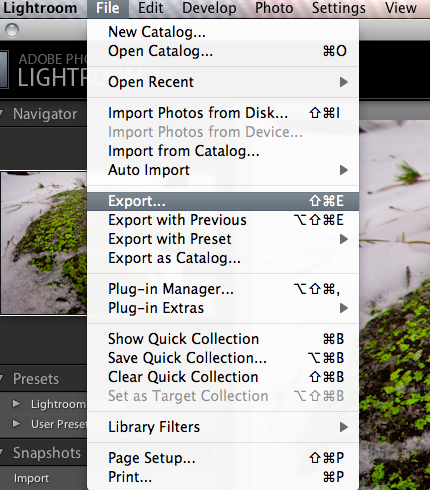
Next up, I went ahead and configured the plugin from inside of Lightroom to use my Flickr account. Here’s what I did. To start, click on Export, just as if you are exporting to disk or some other resource
Open Export Dialog
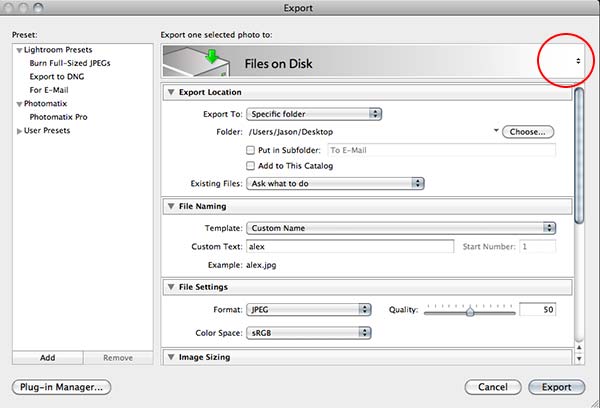
One the export dialog box is open (and here’s the tricky part), look to the far right of the gray bar across the top that says “Export to Disk”. You’ll see two little arrows which means there are menu options:
Files on Disk
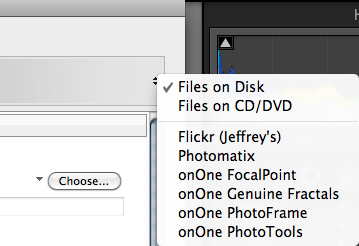
If you click on those arrows, you’ll get a new dialog box (bet you didn’t know that was there – did you? 🙂 ), and the Flickr option will show up. Select the Flickr dialog one for our purposes here:
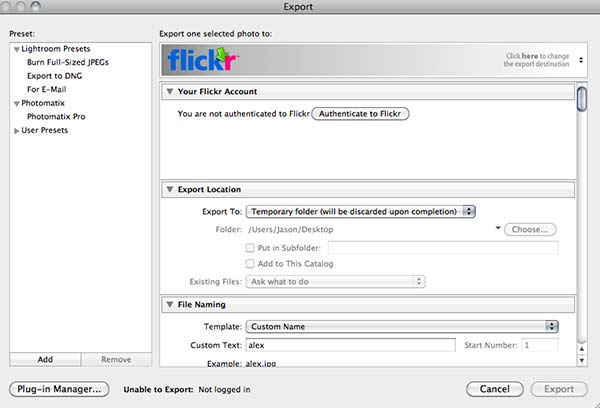
Flicker Exporter
Once you select the Flickr Exporter, you will get a new dialog box that will start the authentication process that Lightroom will use to log into Flickr. If you have multiple Flickr accounts, or specific authentication methods you prefer, these steps may change a little based on your needs. But here, I am doing things the most straightforward way:
Flickr Authentication
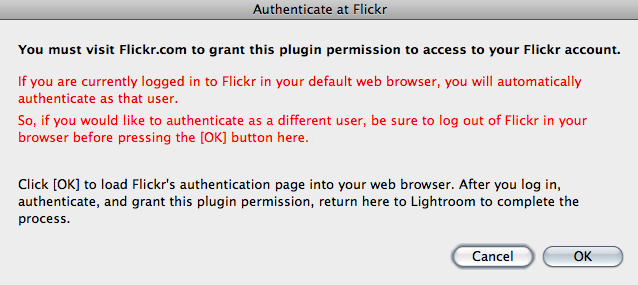
Next up, if you are logged into Flickr already, the plugin will open a page that will grant access to the plugin. So, it helps if you are already logged into your Flickr account on the internet. So, you’ll get a dialog box that looks something like this from the plugin to that effect:
Warning Notice from Plugin
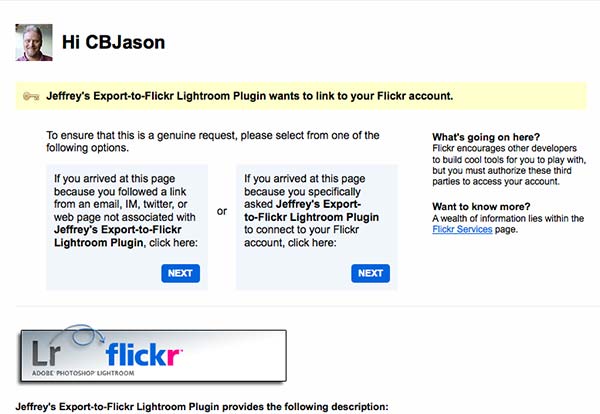
On clicking the OK button, it will take you to the grant access page, and you’ll get another dialog box that grants the plugin access to post photos to your Flickr account (which, after all, is the goal, right?). The one notable difference you will see in yours is that my face won’t be staring back at you like here. That is the avatar for my Flickr account, so your screen should show your avatar – if it shows something different, then you are in the wrong account (but I guess that goes without saying)!
Granting Access from Flickr Side
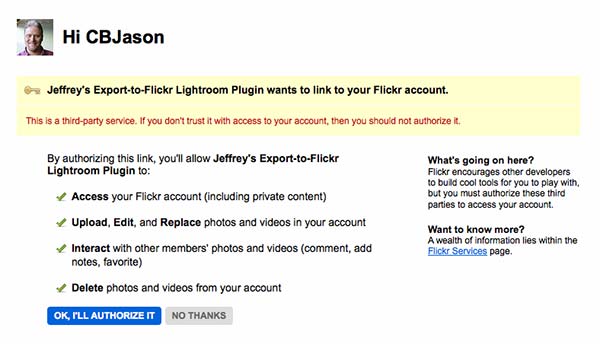
A second confirmation screen from Flickr will also let you know that this is a 3rd party application, and just acts as a security measure to make sure you are aware of what that means. Click the button that says “OK, I’ll authorize it”, as shown below. Again, while it goes without saying at this point, your dialog will look a little different different. If it doesn’t and you see my avatar in your Flickr account, I am gonna be calling soon! 🙂
Authorization
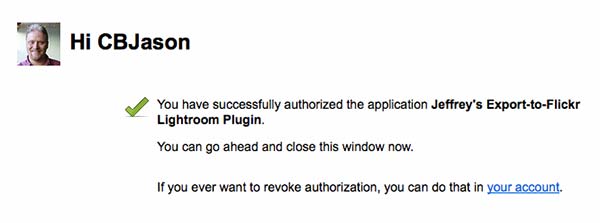
Finally, you will get a confirmation screen on Flickr, noting what you’ve done (they make it pretty clear what you’ve done, and how to delete it if needed on the Flickr side):
Flickr Confirmation
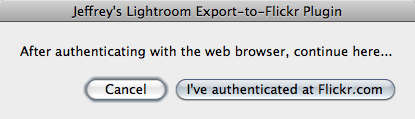
On return to the Lightroom interface, you’ll get a confirmation screen there as well – just click it to continue:
Lightroom Confirmation
On granting access, you’ll get an authorization code, which for obvious reasons I am not going to post here, but make a note of that code and enter it back when you return to Lightroom. On completing that you will be presented with the Flickr Uploader Dialog. Here I am going to show you a few key ones that you have to scroll down to be aware of in making your uploading preferences.
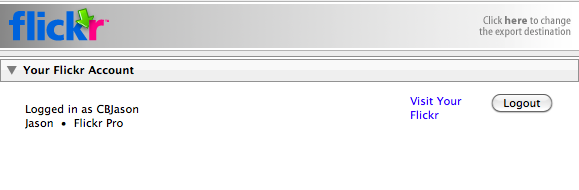
Your Flickr Account login in Lightroom
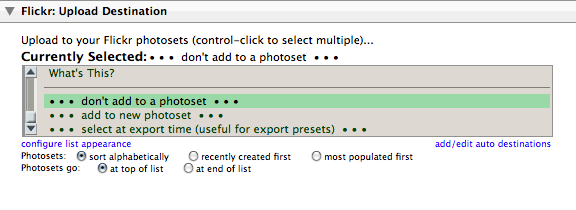
This first shot (above) shows the top part of the dialog, and shows how you are authenticating on Flickr. Now, use the scroll bar on the right side to move down through the options. First stop, the Photo Set. On authenticating, the plugin will pull your complete list of photo sets from Flickr. If you don’t have any photo sets built, then none will be here. Since I do have photo sets, it will default to the first one alphabetically. You can change the sort order, and specify what photo set (if any) you want the uploaded image to be added to, as desired. For this example, I did not add the photo to an existing set, or create a new one.
Photo Set Choice
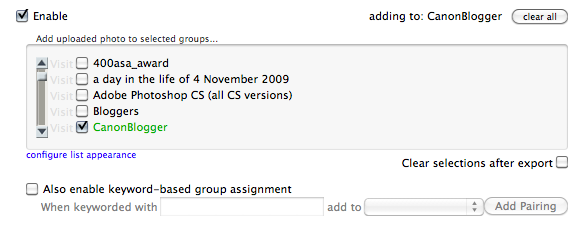
Pretty straightforward, but let’s keep scrolling through a few more key items you will want to think about utilizing or disabling depending on your work flow. The next one I think warrants mentioning here is the groups. One of the ways you can increase the visibility of your photos on Flickr is by participating in groups. More people look at them, you’ll get more feedback, and sharing our photos with others is the goal anyway, so go ahead and add the appropriate groups here. I selected the group “CanonBlogger” for obvious reasons! 🙂
Publishing to a Group
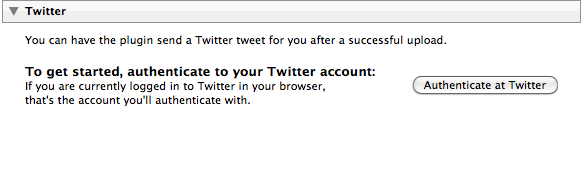
Only a few other options that I think are useful from this plugin, so we’re almost done. Next up, is another social networking one that I tend to use fairly regularly – Twitter:
Twitter posting
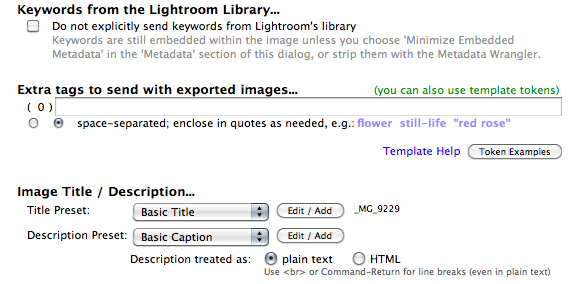
Last but not least are the meta tagging options you have available to you from the plugin interface. The options are just to diverse to go into detail here, and I prefer to tag photos on Flickr differently than in Lightroom, so I leave these blank, but in the interests of full disclosure, here are some of the tagging and naming options in the plugin dialog:
Tagging Photos
If you think about it, for a penny, this is a pretty good deal (I went ahead and made a donation, which I would also encourage you to do as well – Jeffrey has clearly put a lot of time into developing these plugins, and he needs to eat, just like the rest of us). So, there you have it – the process of finding, downloading, installing, configuring and using the Lightroom Flickr uploader. As I mentioned at the beginning of the post, there are other uploaders available as well, and I am going to probably go get the one for Smugmug as I have an account there too. It just makes the sharing of your photos that much easier. (Who knows, the Facebook one may also make its way into my utility belt at some point once I get more comfortable with it…)
If you have questions or problems with the installation or the uploader itself, Jeffrey has a good FAQ page here that should answer most questions for you. If not, I am sure he has an email address available somewhere for specific questions not addressed online. For my work, I think this plugin totally rocks! It’s going to become a staple in my work flow, and if you are into social media at all, I would highly recommend it for those purposes as well.
In talking about all of this, it bears mentioning that some of us are not fans of Flickr, Twitter, or Facebook, and while I can understand the hesitation of some, it’s really a matter of personal preference, and maximizing the time you spend on your computer. if these outlets aren’t your cup of tea, that is totally fine. But if you have the Flickr plugin – it is that much easier for you to participate in the Monthly Giveaways here at Canon Blogger/Learning Digital Photography!
With those thoughts, I’ll leave well enough alone as this post has gone on long enough for one day. Happy shooting (and uploading) and we’ll see you back here again tomorrow.
There’s a fine line between standing up for your rights and intentionally inciting controversy. As you may know, I have been known to stand up for my rights. At the same time I can also respect the need to be cautious, given the nature of the time that we live in. Since you probably are wanting to know where this is coming from, while going through my daily blog reads, and weekly reader posts, I was reading a post from friend-of-the-blog Becky Thomas. She had a post up on her blog about someone who was detained (note – detained, not arrested) for “taking photos”.
Since I am all about standing up for your rights as a photographer – I followed her link to the video on YouTube. While the video was interesting, there seemed to be some confusion on both the photographer’s perspective as well as the metro authority guy. Yeah, the guy with the badge mis-quoted metro rules, and used some heavy-handed tactics to get information from the photographer. But, all he was trying to do was get general information from a guy with a camera (who in my opinion was being as uncooperative as possible, all while video-recording it surreptitiously).
So, in the interests of hopefully offering some general guidance for photographers that like to go out and take pictures in public areas, here are a few tips to shooting in public, and how to conduct yourself:
Know your rights. Yes, you have the right to take pictures in public places, with a few exceptions. A great starting point is a nice PDF that Bert Krages has put together. Keep in mind also, that just because you are outside, does not necessarily mean you are “in public”. Malls, for instance, are privately owned, as are some metro and rapid transit systems. While they are accessible to the general public, they can be privately owned, and as such, have guidelines for taking photos and filmography (and the guy in the video actually linked to the website for the metro, which clearly states that a form should be filled out and submitted in advance – that they generally will work with people, which he apparently was not interested in…because he produced no such form and did not indicate his awareness level to the authorities). If you have any doubt about your area, check the locale’s website, and if there’s a phone number – call – it pays to be informed!
Be open, honest, and friendly with authorities. One of your greatest tactics in defusing possibly fractious and unpleasant situations is a willingness to cooperate. Not having any identification, or an unwillingness to present that ID, is not a step in the right direction. Neither is muted responses of “just taking photos”. Usually, if you are open, honest, and friendly, any concerns over your activities are allayed. Yes, officers should be the same way, but in the event that one isn’t – wouldn’t it be better if you were the one in control of your faculties?*
Have your own ammo! No, I don’t mean carry a weapon, that’s not going to help. What I mean is to carry your ID with you. Carry a copy of the Bert Krages PDF, and even better, carry a few business cards. Make sure the card has your name, phone number, and web address (or blog). Show that you take your profession (or hobby) seriously. Heck, even carry a little 4×6 wallet of photos with you (it can never hurt to have a sample portfolio with you – you may land a gig!) Finally, keep a notepad and pen or pencil with you. If things really do deteriorate, and you feel you are being held illegally, make sure to note officer names and badge numbers. Don’t resist anything though because that will accomplish nothing, and just exacerbate the situation, making things worse.
Feed the cat! Showing an interest (even if misguided) in you as a photographer should be a compliment. Take it as such even if it was not intended that way. Start showing anyone inquiring about what you are shooting some of your work. Whether that work is from the back of your LCD, your small 4×6 wallet shots, or your business card, it can immediately defuse a situation because you are being open, honest, and forthright. Trying to hide things only makes you look more suspicious. Remain happy and excited about your craft, while also respecting the job that authorities have. They see things that are potentially unsafe in their eyes, and whether the situation is unsafe, threatening or not, the best way to defuse that is to show them you are safe. Show them you are after an artistic vision or a creative perspective, and not a confrontation.
*As a sidebar, I have had a few anecdotes with people in positions of authority, whether they be uniformed officers of the law, or hired security. The first happened at Charleston Airport. I had arrived a little early to pick up some relative a while back, and since the light was nice (and I had my camera). I started walking around the parking garage, looking for interesting light and angles in the building. After about 20 minutes an officer rode up to me on her bicycle, and asked if I was taking pictures. I (excitedly) said something to the effect of “Yeah, I am here picking up my in-laws and arrived early. It’s some great light and the angles in here are really cool! Check it out!” I then offered her my camera, and showed a few shots from the LCD. (And they were cool too! 🙂 ) She asked if I did work professionally, and I said, not yet, but if she knew of anyone that wanted some work done – I did just get some cards made up – do you want one? She took it, smiled, nodded and rode off. (A month or two later, a bank called me and asked if I had any landscapes that they could look at for putting on their walls…)
The other was here in Denver. After work (when I was still working…*sigh*), I made my way down to the bus depot called Market Street Station. I missed my bus, so had half an hour to kill…and, with my camera readily available, started walking around looking for interesting light, textures and scenes. After about ten minutes an RTD guy walked up and asked if I had slipped or something. No, why? Saw you taking pictures of the stairs. “Oh, no…just an enthusiast photographer, and saw some cool scenes – here, check out the stuff I got” I showed him the few shots, and he asked if I had a business card. “You Bet!” Turns out his daughter was getting married! (She had already booked a photographer.)
The larger point of these two anecdotes is that when approached, I was friendly, open, willing to share, and defused any potentially volatile situations with pleasantries and willingness to accommodate curiosity. After all I don’t want to spend time in jail, or in a detention facility for anything – I want to take pictures, and that is what it is supposed to be about, right? Let me know – am I off base here? Do you disagree? Am I going overboard with pleasantries? Sound off in the comments or via e-mail! This one could be interesting, so I’ll ask in advance to keep things family-friendly! 🙂
Happy shooting and we’ll see you back here again tomorrow! (Oh yeah, and don’t forget the December Giveaway – $400 in prizes by merely posting a “Giveaway” themed photo to the Flickr thread!)