Off the Air

Hey all, it’s Friday night, nearing on midnight Eastern time, and our “D-Day” is about 9 hours away.  As the immortal words of John Denver “My bags are packed and I’m ready to go…”  Well, not really, as I still have the computer stuff, photo stuff, and food stuff to pack in the cars, but that should take a mere 30 minutes or so, perhaps an hour, and then we’re off into the wild blue yonder.

Since I am not sure if I will have internet access initially, and being that this is Friday, I’ve planned ahead and taken care of a few days of material in advance.  They are set to auto-post around 6am of every day for Monday, Tuesday, and Wednesday.  If I have an internet connection anywhere while en route, I will check in on the comments and email so keep ’em coming!  (For those of you that wonder if there is ever any email or stuff I get from people that doesn’t make it to the blog – check back in Monday for a special treat!)

Here’s what’s up ahead next week:

Monday:  Canon Blogger Mailbag

Tuesday:  Two-minute tip

Wednesday:  Roll out the welcome wagon

So, keep clicking those cameras, happy shooting!  We’ll catch back up on the tail end of our journey!  Until next week (from the Wild West!)

Thursday Thoughts

As I have been packing for the eventual move which I am sure all of you are sick of hearing about by now, I have also been finishing up a few photo-related projects while in the process of packing all our earthly posessions.  That mountainous task is almost done, and a few good things have come about as a result of it.

You may or may not recall a project I began a while ago where I was collecting only the articles of personal interest I find in my magazine subscriptions.  I clipped these out, and would save them in a binder.  The rest of the magazine I threw away.  Well, as we have been packing, these magazines have no longer been thrown away as they now represented “packing material!”  That’s right, I’ve been using the other pages of magazines as packing material.  Granted, they’ve been through a cross-cut shredder, so are now totally illegible, but as you may recall from Week 5 of the “What’s This?”, it makes for a cool picture.

The other piece of good news that’s come from all this is that the Magazine Reduction Project is now almost complete.  I have about 6-10 magazines left to tear through, and the resulting kept articles will extend passed the reach of a single 1-inch binder (2.54cm for those of you on the other side of the pond)…the articles are filling the side pockets of each cover to the binder, so when I get to Colorado, a new binder will be in order.

The last piece of good news about this is that I have one subject that is always timely for photography that came from one of my more recent “shredding sessions”.  Naturally, alliteration is involved, as it’s a Top Ten Camera Tips!

These came from the March/April 2006 issue of PCPhoto.  The funny thing is that the more things change, the more they stay the same…as Joe McNally says at his Google Talk session, “Some of this stuff, you just gotta know it…”

Top Ten Camera Tips

  1. Be Wary of Underexposure
  2. You get what you pay for (most of the time)
  3. Raw is no substitute for shooting it right
  4. Avoid Increasing noise
  5. Minimize banding
  6. Overexposure can be a bad thing too
  7. Exposre to use the whole tonal range of your sensor
  8. Sharpness comes from shooting sharp
  9. Think ahead as you shoot
  10. Compose to get the best shot from the Start

As you can tell – not much has changed in the principles of shooting photography since 2006.  Gear sure has changed, but this just goes to show you that the fundamentals never go away.  Always take the time to learn the fundamentals and in the long haul, you will be both a better person and a better photographer for it.

Okay, that’s it for toda, I’ve rambed on long enough.  Happy Thursday all, keep on shooting, watch those apertures, and we’ll see you back here tomorrow!

What-s This – Week 7

What's This?

Kind of funny how moving gives you new perspective on things. While packing and discarding and selling various things we’ve collected over the past 4 years, I wind up seeing things I’ve not seen in a while (or at least seeing things in a new way as I bend and lean over boxes to get through a day.

The above is a different angle on an everyday object. It is a “what’s this” though, because it likely is not obvious to most. Undoubtedly, someone will prove me wrong by saying “This is a ___” and get it right in like 2 hours!

As promised, I’ve also processed a few shots from my “Shoot the Day!” activities, and posted them at the CB Flickr Pool for your enjoyment. While over there, feel free to share your own shots from the day. If you have one that’s also based on the theme of “Freedom” you may win a $25 gift card from B&H.

Not much else going on today…two more days before we hit the road. Until tomorrow, happy shooting and watch those apertures!

Tuesday Two Minute Tip

Clouds Filter
That’s right, I’ve finally gotten back in the saddle for some good old fashioned Photoshop fun. Today, it’s a quickie, but then again, that’s how we like our information on the web: short, sweet, and to the point. Today I give a little tip on how you can use the Clouds filter in Photoshop. This technique works in pretty much any of the last 3 iterations of the software (I am assuming it works in CS – I got into the game in CS2 worlds…).

Anyway, take a gander on the download feed listed at the end of the post. The result of the tip is actually at the top of the post so you kind of get a little teaser there! (Yes, I am a tease!) Not much else today, as I am still swimming in a sea of boxes. I’m hopefully a little ahead of the game now for video tips and tricks, as next weeks is set to auto publish Tuesday morning.

I do have my “Shoot the Day” pics for Photoshelter, and will hopefully have those processed (at least a quick process in DPP) and ready to share tomorrow, so stop on back to check those out. In the final news tidbit – don’t forget the Photo Contest here at CB. Stop over and share some pics along the lines of a “Freedom” theme, and you could win a $25 gift card to B&H! 2nd place and 3rd place prizes will be awarded too!

So, until next time, happy shooting and we’ll see you back here tomorrow!

Wed Edit: The linked video is not displaying for some reason so for the time being, it can be downloaded directly here

CB Episode #48: Clouds Filter

[display_podcast]

PlayPlay

Monday Minutes

Hey gang, welcome to Monday, July 21st. Today is an exciting day for several reasons, both personally and professionally:
  1. First of all, unless traffic falls precipitously, today Canon Blogger will go over the 60,000 mark in terms of number of visitors! I am both honored and flattered to have been the source of such interest since starting the blog. Since I installed Google Analytics and got that running on October 1st, I am using that date as the unofficial start date for the blog. While the first blog post was technically made much earlier than that (August 22nd), the first month or so was really a testing month just to work out the details of layout, setup, and configuration. So, thanks to all 60,000+ viewers who have taken the time to visit the blog over the last 9 months and 20 days! Special thanks also to those who have contributed and shared their thoughts and feedback from time to time.
  2. Also today is exciting because it is technically my last full day of work here in South Carolina. I will be off on “vacation” Tuesday through Thursday (if you can call packing boxes and moving heavy furniture around a vacation), and then on my return to work Friday, I will work only for a few hours before out-processing. I have been with this company for almost 2 years, which in the IT sector is a significant amount of time, so in a way it’s kind of sad to leave. In other ways though, it is very exciting (and liberating) when we look at what is coming down the pike. So, this is it – ready or not, Colorado here we come! I am not sure how often I will be able to connect to the internet once we cut things off on Friday, but I will try to set up a few extra posts this week and have them published automatically by the blog software (or as Dave Cross calls it, “robot posts”).
  3. Next in the area of photo news, Photoshelter had its first “Shoot the Day!” event yesterday, and after I spent the requisite amount of time immersed in boxes and packing foam, I picked up my camera and began in earnest to “shoot the day.” As in most things, a theme began to slowly emerge as I made my way around town, running errands and capturing shots. Rather than spoil the fun of the theme with verbiage, I will wait until this afternoon when I can sit down and process everything for the blog to share the images.
  4. Here I would also like to take a moment and refer any readers over to the blog of Jason D. Moore. Although he is also going through a move, his blog has maintained quite an impressive array of content and information, and even some photography shots. I don’t know how he does that – kudos to Jason, and a big “Hey, how are ya?” when he sees the pingback from here. (Jason was kind enough to include little ole CB on his blogroll…) Monday is his weekly P&P listing, which summarizes the activities of many of the most popular blogs on the internet. Be sure to stop over and see everything he has to offer. Last but not least, a reminder about the First Ever Photo Contest here at CB. Simply photograph the concept of “Freedom” in your own way, and share over at the CB Flickr group pool to be eligible for prizes, including a $25 B&H Photo gift card for the winner.
Happy shooting, and we’ll see you back here tomorrow (or possibly this afternoon for a photo montage!)

Friday Flyby

Here’s a few tidbits for you this Friday – I am literally running out the door for a “last supper” with some famiyl friends before we leave for Colorado next week.  So, the post today is expectedly short.  Call it the “Fantastic Four for Friday!”

  1. Don’t forget, the Canonblogger Photo Contest.  Join the Flickr group, share a shot and win a $25 gift card to B&H!
  2. Shoot the Day! is this Sunday!  Register at Photoshelter and share pics there to win prizes too!
  3. For the latest in photo news, and to bring yourself up to speed with copyright law, head over Scott Kelby’s blog, he’s had a few people sharing their wisdom and experience (the guest writers are attornies) here and here.
  4. Last but not least, special thanks go out to Scott Eggleston from Weekly Photo Tips.  A photo I shared with him over at his blog won and I received a battery storage compartment and a book on travel photography.

That’s it for this week.  Happy shooting, watch those apertures and se you next week.

Kickstart that Creativity

In a rut?  Got writer’s block or photo funk?  Here’s some great ways to kickstart those creative juices!  This is actually part of a larger work I am putting together, called 101 Sources of Inspiration.  Here’s the first 25 I’ve put together:

Inspired Photography:

25 sources of inspiration


As we all endeavor to find new ways to express ourselves creatively, we can often find ourselves in search of inspiration to give purpose and definition to our expression.  Here are a number of sources that can inspire.  Some are traditional, while others are hopefully new venues to spark those creative juices.


  1. Tour a museum
  2. Look at others works.  The internet is rife with photo blogs, galleries, and imagery that can awe and inspire.
  3. Listen to music – of all types!
  4. The dictionary – open to any random page, find the 1st noun (or verb, or adjective, whatever) and try to capture a picture that encompasses the essence of that word.
  5. Take any object you see every day and turn it upside down, backwards or sideways.  Use it in that position for a day or two (unless it’s a drinking glass!)  Your brain will be forced to think differently.
  6. Read!  Whether it’s a magazine, book, recipe, or anything, it doesn’t matter.  Go to the local bookstore and pick up something you’ve never read before and open to the first page that catches your eye.  Inspiration can often come from such places.
  7. Pick a letter of the alphabet and try to find that in objects around you (buttons on the phone don’t count!).
  8. Draw!  It doesn’t have to be structured with paints or anything – use a crayon, pen, pencil, whatever you have handy.  Just start doodling and a direction or theme will come to you eventually.
  9. Close your eyes.  Count your breaths.  If you don’t fall asleep you will start to hear things you didn’t hear before, or sense things you were otherwise unaware of.  Pick any one of them and try to define it in one word.  Now take that word and express it with your camera!
  10.  Donate some time to a worthy cause.  Pick a cause, whether it’s the United Way, March of Dimes, your church, or some other local venue.  Participating in such a way has its own rewards and often can be an excellent source of inspiration.  The Big Brother/Big Sister program is also a great one!
  11.  Buy a compact (you can get these at a discount in places like dollar stores, yard sales, and flea markets.) and use that mirror to look at things.  Looking at the reflection of something can often open your mind to new possibilities. 
  12. Take a walk in a new area.  Whether it’s a forest road, a new street, or whatever – new scenes can often inspire.
  13. Visit a place you frequent during an unusual time.  (For example, if you get a coffee at Dunkin Doughnuts every morning – try stopping in at night.)
  14. Change your desktop to a neutral gray – your eye will start wandering away from the bland to find color or something of interest elsewhere.
  15. Plant something.  The act of planting gets you doing something to help the environment, and gets your hands doing something different. 
  16. Join a photo club.
  17. Sing the first line of the first song that comes to mind – out loud!  Take the third word and find a way to capture that word in camera.
  18. Go to the hardware store and stroll the aisles looking at the products.  If something catches your eye, go with it.  If nothing does, buy a box of something, anything.  Whether it’s nails, screws, washers, grommets, o-rings, or whatever happens to be in the next closest aisle.  Take it home and dump the contents on a table.  Take a picture of it.  Now start arranging the objects.  Take a picture of that.  Keep re-arranging, and taking pictures.  Look down at the objects.  Look up at them (if you can).  Put them on their side, upside down or any which way works.  Try balancing one on top of another.  You’d be surprised where this takes you!
  19. Open an old photo album and look through some of your past work.  Pick a number and say you’ll make it your next project to re-create that scene.
  20. Spell the longest word you can think of.  Now try to find a way to capture the essence of that concept on film! (Anti-disestablishmentarianism doesn’t count!)
  21. Dance to the next song you hear on the radio (or your iPod)!  What do your feet do?  Take a picture of your feet!
  22. Make a trip to the local animal shelter.
  23. Take a self-portrait.  It doesn’t have to be your face – try just your hands, feet, or knees.
  24. Organize a photo-walk.  Put an ad on Craigslist or your local paper and make it open to all.  You’d be surprised the amount of people that show up who have ideas of their own to share that can really jump-start your creativity.
  25. Go to a playground and play on the swings, merry-go-round, or see-saw.  Act goofy!  Changing your mindset and environment to that of a kid can open up creative avenues that have been closed for a while.

Got another way to inspire or encourage creativity?  Sound off in the comments…meanwhile, happy shooting, watch those apertures, and we’ll see you back here again tomorrow!

What’s this? – Week 6

What's This - Week 6

So, any guesses for the latest edition of “What’s This?” Last week, the crop was from some fancy ornate crown molding in a capture from an old plantation house here in SC. It was kind of a stretch as I was pulling from my portfolio, rather than taking a shot specifically with the weekly theme in mind. This week I did a mite better though. I had hoped to have a tutorial compiled for publishing tonight too, but alas, t’was not meant to be. Someone did mention in the comments earlier this week though that the title page was notdisplaying correctly in their feed reader. Could anyone enlighten me further, as I don’t see any punctuation or anything wrong in the blog title header info. Thanks a bunch! Good luck with the theme, and we’ll see you out here again tomorrow! Happy shooting and watch those apertures…

Slideshow Secrets

As I thought about the tutorial for today, I pondered doing a quick set of tips for Photoshop, like CTRL+J for a duplicate late, CTRL=ALT+SHift+E to stamp all visible layers on to a new layer, and other such trinkets.  While debating which ones to include I was continuing the process of winnowing down the last of my photo magazines to just the articles I wanted to keep.   I was also thinking that perhaps a subject would come to me that could add a new dimension to the blog, when as luck would have it – the subject came to me.

From back in October of 2006 – nearly two years ago, I saw an article in PCPhoto that took a look at tips for making great slideshows.  Written by Chuck Summers, it reminded me of the days of yore when my dad would crank up a slide projector to have us watch slideshows of ourselves in Florida, the Grand Canyon, and other family adventures.  Well, the digital age is most definitely upon us, and one area I’ve not gotten into much is that of slideshows.

Chuck did a great job with this article, and I’ve condensed it down here to the nuts and bolts of each tip (twelve total, which makes for great alliteration – it pains me to dodge the obvious usage!)  Anyway, here’s his 12 Slideshow Tips:

  1. Determine the Theme and Purpose of Your Show
  2. Set a length
  3. Methodically edit your images
  4. Maximize image effectiveness
  5. Prep images
  6. Set Image Order
  7. Determine transitions
  8. Title Slides
  9. Choose music to set the mood
  10. Time the Presentation
  11. Preview, Evaluate and Revise
  12. Test Projection Needs

While very informative, and logical in layout (I like logic!), what the article did not present is software recommendations.  I’ve read various bits and pieces around but have not had reason to delve into it thus far.  However, with a cross country move coming up, I thought it might be fun to take images that capture the trek from the East Coast to the Rocky Mountains and compile them into a slideshow when done.

To do that though, I need some software that is designed for slideshows.  I know Photoshop and LR can do these functions, but as an old hat, I like a specially designed piece of software for each function.  Thus, I can’t help but wonder what would be the best software to accomplish these ends.  I recall Proshow Gold as a name, but forget who produces it.  In the interests of full disclosure, I feel that I should also state that I actually have not really tried the slieshow functions in either PS or LR, so am appropriately ignorant on both counts.

So, what should it be?  Should I use Proshow Gold, Photoshop, Lightroom (I am using the Beta 2 via invite), or is there some other software out there that is better purposed to these ends?  Any slideshow superstars care to share their own secrets on software and other tips for making great shows?  Feel free to educate me in the comments.

Meanwhile, happy shooting, watch those apertures, and see you here again tomorrow.  (Perhaps a video tutorial is in the air for then…ya never know! 🙂 )

Monday Mindbender

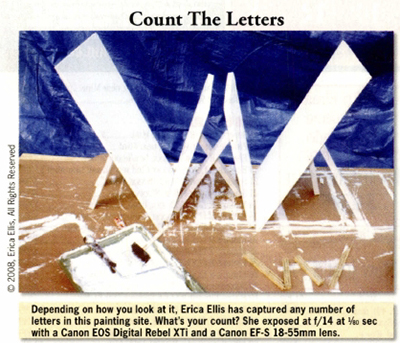
I was catching up on some recent photo magazines and the August issue of Shutterbug had a pretty cool picture. The theme was “Letters”, and people were taking pictures of various letters of the alphabet. Erica Ellis had a very interesting capture, shown below:

Alphabet Setup

The challenge here was to see how many letters of the alphabet you could find in the image. It took me about ten minutes, but I was successfully able to decipher the outline of all 26 letters of the alphabet. How many did you get? Share your results in the comments (or over at the Flickr site. FOr those that give up, I put together a PDF of all the letters below. Try it yourself though as this is just one interpretation of things. have fun, and enjoy the “Monday Mindbender”! It’s a great way to stimulate the creative juices to get you thinking outside the box!

See you all back here tomorrow for the Tuesday Tutorial (I’d better start working on one, eh? 🙂 )