Improve your photo workflow!

Lightroom Logo

Keyboard shortcuts are great ways to improve your efficiency when working on post production.  Here’s a couple that I use in Lightroom to help improve things so I can get my processing done, and get out and back to shooting that much quicker!

CMD/CONTROL+8

This takes me all the way down the Develop Module to Camera Calibration.  If I ever want to make adjustments to which profile to use (typically I use Camera Standard, but it’s always fun to experiment), this gets me there a lot quicker than scrolling with my mouse or tablet!

R

Yup, that’s it – just the letter R.  From the Library Module, this will take you to the Develop Module, turn on the crop tool and show you how you currently have your image cropped for composition.  That’s it – one letter, no fuss no muss!

Module Switching

A super slick way to move between modules is to use your Command key (CTRL Key on Windows) and the ALT key along with the number for each module.  It’s super easy to remember too:

Library = CMD/CTRL+ALT+1

Develop = CMD/CTRL+ALT+2

Slideshow = CMD/CTRL+ALT+3

Print = CMD/CTRL+ALT+4

Web = CMD/CTRL+ALT+5

That’s it – 3 easy ways to improve your work flow with Lightroom shortcuts!  Wawnt some more?  Check out the full detailed reference guide straight from Adobe here.  What ways have you found to improve your own work flow?  There’s tons out there, so share your own in the comments!  Thanks for stopping in and we’ll see you here again next time!

A Few From the Fire House

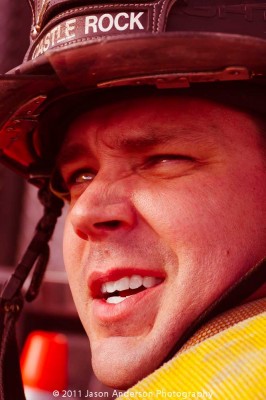
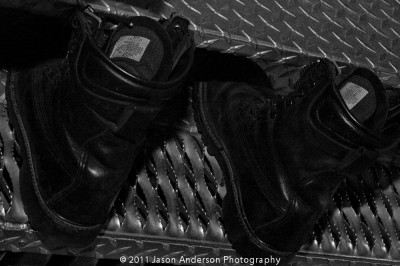
Nothing tip-related, tutorial-esque, or educational today, just thought I’d share some photos from one of the local photo clubs I participate in regularly.  One of our members is the on-staff photographer, and was able to get us permission to take photos for an entire session.  We even got one of the guys to get in his gear and do some shots with us.  Devin is the guys name and he totally was cool with our posing instructions and everything – this guy even kept this super heavy fire hose on his shoulder for like 30 minutes while we had him stand and pose, looking in various directions and holding his head a certain way.

So, without further ado – here’s a few samples/selects from what I am affectionately calling:

The Fire House Shoot

Fire House 1

Fire House 2

Fire House 3

Fire House 4

Fire House 5


And to close out the series, one that struck me while there was a scene that reminded me of why we have these courageous men to serve and protect us…

Fire House 6


The poses that Devin struck were directed courtesy of yours truly (stop back in later this week for more details on the posing techniques I used), and all post processing was done using your favorite photo editor (and mine):  Adobe Lightroom!


Adobe Lightroom 3

Thanks to Tim Tonge for organizing the event, and to the brave men of Castle Rock Firehouse for tolerating our presence for an afternoon!

Spring Photo Projects

With Spring in the air (if not already sprung), many of us are out and about brimming with photo ideas after being couped up for a chilly winter.  What’s that you say?  No photo projects brimming yet?  No problem – here’s a few to get you started:

1.  The Call of the Birds: Avian photography has always been something of an art form, with many of the hard core, die hard types venturing way out into the boonies of mountains, hills, lakes, and other far-reaching places.  For the rest of us though, it’s tough to find the resources (time and money) to go to the birds, so another option is to bring the birds to you!  Buy some bird feeders and see what comes!  My folks have several bird feeders in upstate New York, and every time I visit, there are birds flying everywhere.  Pine cones with peanut butter, humming bird feeders with sugar water, and even just a plain old bird bath with feed from your local DIY store can bring a bounty of birds to your doorstep!

Avian Photography 1

Avian Photography 2

2.  Join a photo group: We’re everywhere!  From ASMP groups to NAPP groups, Meetup groups, and WPPI, you can find groups for pretty much anything ranging from professional development, to studio lighting, and just groups of photographers that like to get out and shoot together for the love of the craft and the camraderie of it all!  I’m a member of several local groups, all via the site Meetup.com, and I don’t have to pay a cent to participate!  (I do contribute though, just because I like supporting such efforts…)

3.  Shooting in a park:  Get some photographer-friends, family-friends, or just some friends to join you in a park.  Set up a blanket, a few light stands, and have some park-type food available:  (crackers, cheese, water, whatever).  Add an ipod with some speakers for a little music.  Offer gag prizes for people who dance, act silly, or pose for the camera.  Process the photos and post online so they can share, download, add to Facebook, Twitter, or print!  Low cost, fun, and helps to build your portfolio!

The ideas are only limited by your creativity!  Got your own ideas for photographic opportunities this Spring?  Sound off in the comments to share, encourage, and inspire others!  Happy shooting, and we’ll see you back here next time!

P.S.  Don’t forget the April photo contest on Flickr – win a BacklitBox of your favorite photo!  Flickr Contest Thread


8 Megapixels…

When I first transitioned to digital photography seriously, my camera of choice was the Canon Rebel XT. In that camera I found a whopping 3 frames per second, 8 megapixels, and a host of other features and benefits that go with SLR photography. The times, how they change…

My Droid2 smart phone bit the bullet (this was the third one of these to die prematurely), and Verizon in its wisdom decided I needed to go to a different model phone.  After several logistical problems with getting the correct battery shipped for the correct model to the correct address, I finally got a battery for the new phone, powered it up and activated my number on the new line.  Imagine my surprise when I found out that this new phone has…yup:

8 Megapixels!

It staggers my mind that they can fit the same number of pixels on this teensy sensor that used to fill a sensor for an SLR.  My hesitancy at embracing this MP count is that there will be excess noise, and pixelation on the images.  While the smart phone features (phone, email, Facebook, Twitter, etc.) look to perform adequately, the camera is always a point of contention for me as I wish these phones could adapt somewhat and figure out a way to have an adjustable aperture.  If you can fit that many pixels onto that teensy a sensor, surely the aperture could be adjustable!

This could just be me ranting on quixotically though – so, here’s a sample image at full resolution (click it to see full size).  Does this seem decent enough for a camera phone?  Sound off in the comments with your own thoughts on cell phone cameras – what features are good, what should be thrown out, and what should be improved?  (No carrier bashing please – try thinking of this as carrier agnostically as possible! 🙂

Droix X Test Shot

Everything Old is New Again

Let’s face it.  The economy is still not the powerhouse it was five years ago.  We’re all still reeling a little bit and saving money is at a premium, while spending excessively is a luxury only for those with deep pockets!  Count me in the former group too, so when someone asked me recently if it’s worth saving the coin to buy used I answered…“It depends”! I know, you thought I’d say yes, but it really does depend.  Here’s where and when it can be a good idea when upgrading your camera!

Buying used cameras versus new cameras

It’s no secret by now that the best place to invest the bulk of your money is in your lenses.  However, you still gotta have a camera, right?  So, should you opt for using last years model and risk having a client show up with better gear than you?  Or, should you just step up, spend the bigger dollars and always be on the leading edge?  If it’s a matter of economics, and there’s no gear limitations that stand in your way (slow shutter speed/clicks per second, etc), my answer is to always go used.  There are some of the perils and pitfalls of buying used gear though, so here’s a few tips to keep in mind when shopping around for used gear:

1. Shutter count – the shutter has an expected lifecycle of clicks it is built for. If you can get the shutter count (lots of software programs to do this) make sure you have at least 50% of them left.

2. Overall camera condition – check the camera for nicks scratches, scuff marks, and the like. If it’s all beat up, that cold be indicative of interior problems.

3. Sensor and other internals – Some problems aren’t as easily determined on a visual inspection, and it’s always best to take a few shots with the camera. Check to see if the sensor is scratched, nicked, has dust spots, etc. If it’s dust, that can be easily cleaned, but nicks and/or scratches can be a deal-breaker.

There’s obviously more to it than that, but those are the basics in looking at used camera bodies. In general, my rule of thumb when buying/selling used gear is to start at retail minus 10-15%. If the price is in that ballpark, it’s likely well cared for. I also look at seller ratings whenever possible. Fred Miranda is one of the better places to buy and sell, but Craigslist can be good since they are most often local and you can go do a visual inspection before throwing money out the window… If you’d like my take on buying and selling through FM – I’ve touched on this before here

What experiences have others had with buying and selling new gear?  Any places that are preferred?  Places to avoid?  Sound off in the comments with your own thoughts and experiences!  In the meantime, remember, it’s really not about the gear – it’s who’s behind it, so keep on shooting!

One last thing to mention today – the April contest is live (I announced it over the weekend in the free newsletter blast), and the winner will get an 8×10 image of their choice printed and mounted in a pretty cool Backlitbox!  Very cool prize and thanks to the folks at Backlitbox for sponsoring the April giveaway!  I promise more details are forthcoming here soon in the form of a product review, but time’s a-wastin’, so be sure to get your entries in soon!  Congrats also to Evelyn for her win of the March giveaway!  She’s getting a very cool Tether Table from the folks over at Tether Tools – just drop me an email to claim your prize!  Here’s her winning image up in lights!

Flat Tire

Do you Have Your Torx in Order?


So, after years and years of advice and instruction on maintaining hard drive redundancy, and the benefits of upgrading from time to time, I finally am following my own advice and upgrading my venerable Macbook Pro.  After a screamingly good deal came out for laptop disk drives locally, I went out and snagged a 750GB 7200 RPM hard drive from MicroCenter and brought it home.  I also picked up a copy of Mac OS X.6 since my previous upgrade came through a friends DVD who was no longer living in the area.  All told, I am in for a little over $100 – not too shabby!  However, as they say, the Devil’s in the Details!

I’ve changed out lots of hard drives in my time…after all, it’s no secret that I am a working IT professional – that’s my day job.  I’ve been doing that for about 10 years now, so hardware upgrades are pretty routine for me by this point – and I’ve got lots of tools to do it with too…everything from magnets, to phillips heads, to flat heads, to Torx bits for unique screws, and even a pair of nylon pliers.  But all of this based on a Windows background.  I’d never done much with Macs.  The mentality I’ve always had though is that hardware is hardware, right?  I did check out a few tutorial videos on YouTube and all the tools sounded like ones I own, so I jumped right in and off I went – until I got inside the Mac and was presented with two teeny tiny screws that required a Torx bit T6.  I went to my trusty toolbelt and saw my Torx bits went from T30 all the way down to T4 – awesome!  Until I noticed that one slot was missing – and sure enough, it was the dreaded T6!

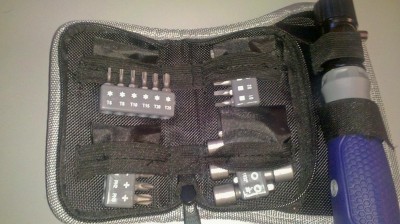
A trip to Wal-Mart yielded no dice (it was getting late), so this morning off to Lowe’s I went.  I did find the T6 bit – but it was in a package of other bits and a nut driver – for $20:

Torx KitSuffice to say, I was a bit (if you’ll pardon the expression), a bit torqued to be missing what was likely a 50 cent bit and having to spend nearly $20 to reassemble the Mac.  However, the eternal optimist, I put the positive spin on it – this is a nice kit I bought and the rest will probably go to Good Will since they are showing their age a bit.  Finally, of course, the educational moment for me:  I finally got my Torx in Order!
So, with the Mac now flying on a 7200rpm drive with plenty of storage, my weekend will likely be spent performing a fresh install of all my favorite apps.  Which ones do you think will go on there first?  I’ll give you a hint – the company name starts with A and ends with dobe!  The takeaway from all this – make sure you have your Torx in order – it is definitely a good motto to add to your motto book!  Have a great weekend everyone – just because I wont be shooting doesn’t mean you can’t so be safe, be smart, and…(wait for it)…

Happy Shooting!

That Face!

Last week I wrapped things up with three tips for posing your subjects better, and boy did that launch a flurry of questions…so many that I think the next podcast will be dedicated to tips on posing your subjects.  There’s so much to take into account, it really shouldn’t be that much of a surprise.

However, until then a few nuggets here and there will have to do.  (I am trying to coordinate with friend-of-the-blog Kevin Mullins to have a go at a podcast and this would be a great subject for him as he’s an accomplished wedding, event, and photographer from across the pond.  Kevin, I promise we’ll find a date here soon!)

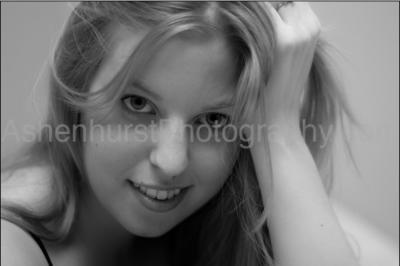
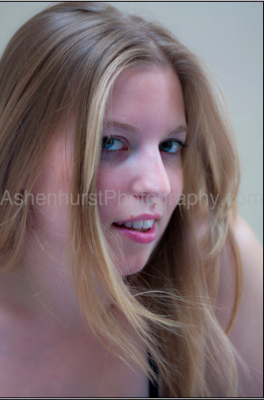
So, the nuggets for this week are facial features – because at the heart of the portrait photographer is bringing out the beauty in your subjects’ face!  Here’s a great set of tips for bringing out the best in your subjects!  When shooting subjects it helps to keep in mind the three basic facial positions:  full front, 3/4 pose, and profile positions:

Three-Fourths view

Three Fourths View


Profile View


For subjects with round or wide faces, it helps to raise the camera angle slightly so as to look down to them just a little bit.  This elongates things a little more and minimizes the width perception.  It also helps to approach them with a pose that has a 3/4 look rather than a full frontal look.

For subjects with a thin face, just the opposite holds true – have their full face looking toward you with the camera and try to keep the camera at eye level with your subject.  Going up or down below their eye level will only serve to elongate a thin face even more.

For subjects with a large nose, it can often help to have them also face the camera directly.  By doing this, their nose will point straight into the camera to help minimize its size, and lets viewers see the rest of their pretty face!

For subjects with a smaller nose, it’s time to shift back to the 3/4 look…this will bring more depth to their face and “enhance” things a little…

Other tips I’ve picked up that are not specifically related to facial positioning include things like:

  • People Deep-Set Eyes – Point light into their eyes. Light coming too far from the sides will accentuate the depth.
  • Glasses – Bounce the light off the ceiling where possible. If not, position the subject so that glasses are pointed away from the lights.
  • Dark Hair – Make sure that the background provides enough contrast so hair doesn’t just blend into it. Hair lights or a light on the backdrop are extremely helpful. Also make sure the background doesn’t show through hair.
  • Double Chin – A slightly higher camera angle will be more flattering than straight on. It also helps to have the subject leaning forward.
  • Large ears – Use a ¾ face pose or a profile.

There you have it!  Great ways to capture portraiture, specifically when working with facial angles.  Special thanks go out to my good friend Evan Ashenhurst for sharing some of his portfolio for this article.  You can see more of his work on his website at:  Ashenhurst Photography

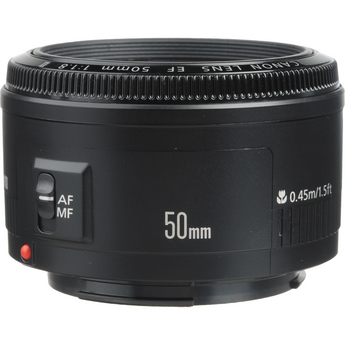
A final footnote – since I will undoubtedly get a few questions about which lenses are best to shoot portraiture with, my favorite is the nifty fifty actually.  Amazingly sharp and the 1.8 depth of field is to be envied among all glass.  If you’re in the market for a portrait lens, you’ll definitely want to check this bad boy out.  Here’s the Canon-mount, a steal for less than $150 retail!

Canon Mount 50mm 1.4

Three Top Tips for Posing Your Subject

As the Spring weather comes upon us, so does the urge to get out and shoot more.  Models are also more willing to brave the warmer temps, so it’s easier to get some willing subjects.  As you start to venture out of the warm caves, here’s a couple tips to getting your subjects to pleasing postures:

1.  Turn and Burn:  So many photogs want to get facial expressions but in doing so, forget that most of the time we never see someone’s full face toward us.  It’s usually more of an angled shot, and that’s why it’s often recommended to turn your model to one side.  Some models will swear that one side is better than the other, but when it comes to photography, my thought is not so much shooting their best side, rather shooting an expressive side!

Stand to the Side

2.  Breathe! – That’s right, so often when a model poses, the natural inclination is to “hold that pose” which subconsciously puts them in a state where they hold their breath.  Help them remember by even telling them to do so.  “Turn here, great, now chin up, awesome, and just a little to the right, excellent!  perfect!  Hold that pose….!  Oh, and don’t forget to breathe!  Take a deep breath and now exhale…fill those lungs with air!”  Not only will it surprise the model, but you may get a more natural smile – and if you’re lucky, even a laugh!

Posing Your Subject

3.  Encourage the lean! – When people start to get in posing mode, there is a tendency to lean forward.  Leaning into the front shoulder is common, as is leaning to accentuate cleavage for a woman.  If you think about it though, the forward lean does make everything look a little bigger!  That’s not always a desirable thing, so encourage your models to lean back just a tad.  Not too much as you don’t want them to fall over, but at least make sure their weight is shifted to the back leg.

Leaning Back a Tad

The other thing to remember, (kind of sneak tip for you), is that modeling rules work for both men and women, so even though the ones here are all women, many of the same rules apply!  There ya have it – 3 tips to get you started with subject posing and portraiture!  Got your own tips?  Share ’em in the comments!  Have a great weekend and happy shooting!