I Need Your Help!

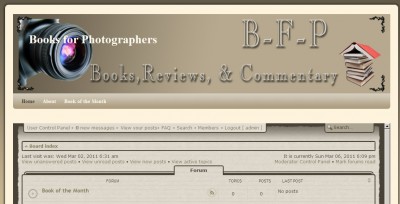
A fellow photographer mentioned to me the other day that there did not seem to be a good resource online where one could go and read reviews on photography books.  Sure, there’s the canned ones from Amazon, Borders, Barnes and Noble, etc., but nothing that was out there just for photography books!

I started searching and sure enough – she was right!  So, as a sort of philanthropic venture, I decided to create a website for this purpose.  While the design is a work in progress (we all know about WIP’s, right?). but the site is live and the forums are ready for people to start contributing their own reviews on any number of photography books.  I’ve tried to break the categories out in a hopefully logical structure, so take a peek, register (it’s free) and start sharing your own thoughts about books from your own library!

Who knows – in time, this could become a pretty exhaustive library of reviews, and discussions on the state of the photography book industry!  To do it though, I need your help, so take a moment and register today!  Happy reading!

Enter your email address:

Delivered by FeedBurner

February Winners – Everyone!

Given the rigors of the week, closing out the February contest was not high enough on my radar, but having stirred from the hydro-codone-induced sleep, I remembered that it’s time to close out February and begin March contests.  As you may recall, for February, a $50 discount card is being offered up to all participants in the February LDP Contest giveaway, so for those of you who participated and were patiently awaiting the discount code – it’s been published in the February contest thread.

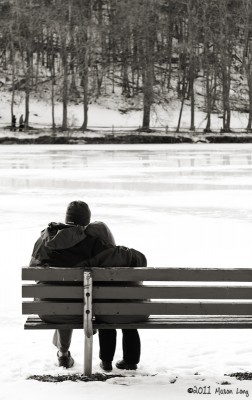
And now – the moment you’ve all been waiting for:  the February co-winners, each of whom gets $150 in printing from NPL, the ones whose images were most compelling, the ones…all right already, they are:

Mason Long

Mason Long

Frank Sammut

Frank Sammut

You can find their respective Flickr streams of these and their other photo libraries here and here respectively!  Congrats to both of you and I’ve sent your names over to our contact with Nations Photo Lab so they can deliver the coupon codes for your prizes to you!  Thanks again to Nations Photo Lab for their generous donations for the month of February!  Be sure to tune in on Monday for the announcement of the March contest!

Did You Know…

This last week has been kind of rough – after teaching in Minnesota on Sat., my whole time schedule was thrown off and I never really have been able to get my body clock back in sync.  (I don’t know how traveling types do that…)  That, combined with a little out-patient surgical procedure on Friday made for a lot of distractions.  So, apologies in advance for being a little hit and miss with the blog posting.

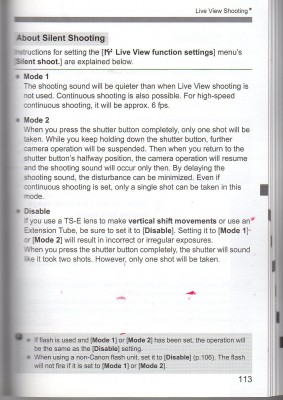
Today though, I thought I’d share a little-known (or at least not-often-discussed) tip about the Canon EOS camera line.  Did you know that there is a silent shooting mode?  To enable this mode of shooting, simply switch your camera to the live shooting mode (where you compose your image using the LCD instead of the viewfinder), and when pressing the shutter, it’s much quieter than when normally pressed!  I knew about this, but honestly had not used it in quite a while.  It’s one of those “Oh yeah…..!” moments and when reviewing some material, I came across this from the owner’s manual.  Here’s the page directly from the 40D guide:

Silent

This is a very handy feature to have if you don’t want to interrupt an emotional moment during an event (say a bride and groom kissing, a baby sleeping, or some other such occasion).Got your own unknown or not-often-mentioned feature to share about your own gear?  Sound off in the comments!  Have a great weekend all and we’ll see you back here next week!

Subscribe to CanonBlogger by Email

Three Reasons You Should Be Using a Card Reader

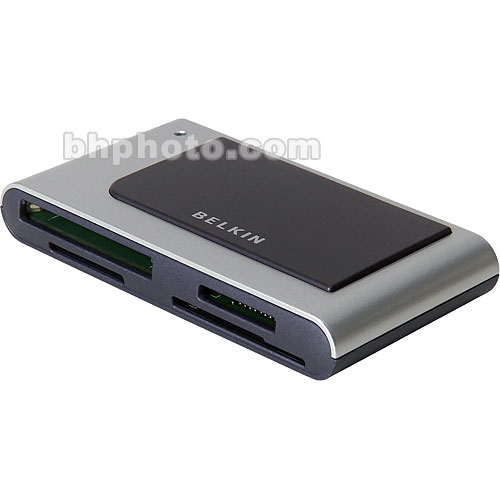
Card Reader from B&H Photo

One of the most surprising things I learned about during our recent trip to Brainerd, MN was that many photographers are tethering their cameras to their computers for transferring photos over for processing.  While tethering via cable is always an option, there are many risks to doing so, and during our talk, we took a few minutes to share some reasons why it’s better to use a card reader than to import from your camera.  Since there were so many people that seemed to appreciate the insights, I thought I’d take some time to share some of those insights here:

  1. Speed – Card readers have nothing else to do other than transfer data onto and off of a card to a computer.  No camera firmware is required, no menus need to be loaded, and no power is needed.  It’s a simple plug-and-play process for practically any computer and you can increase your transfer speeds significantly by taking this route over camera direct transfers.  Seriously…with the super fast UDMA cards out there today, you can really see a decrease in transfer times, which gets you on with other things even that much quicker.
  2. Reliability – Because cameras are such advanced devices that have so many working parts and components, the process of connecting them to a computer does take a certain toll and if the cable is frayed, or a connection is lost, or even power is lost, you can risk losing and/or corrupting your images during the transfer process.  Eliminate the risk of losing those precious memories you’ve created and use a card reader!
  3. Conserving Battery drain – In Minnesota it was cold!  We were in negative temperatures for a good portion of our stay, and with lower temps comes decreased battery time.  If we had to deal with draining our camera batteries to transfer images to a laptop or desktop computer, they likely would not have lasted.  It’s important here to remember that plugging a camera into a USB port isn’t like plugging in a phone or other devices.  Plugging in doesn’t charge the batter, it discharges the battery!  Something to keep in mind when conserving your battery life.

So, what kind should you get?  The answer here (as always) starts with “It depends…”  What kind of camera and card are you using? Do you have multiple cameras and multiple card format types?  Cards range in size and format from SD, CF, to Memory Sticks, and other proprietary sizes and shares.  Formats also include the new UDMA which increases write/read transfer rates, and varying capacities from extended capacity (XC) and other older ones which may require specific types of readers.  Check these considerations before making a purchase.  My suggestion though is to get a reader that can read both standard capacity cards as well as the XC formatted ones.  These can be found for as little as $5 through sites like Newegg.com and Amazon, but the better quality ones are available through camera retailers like B&H Photo, Adorama, and Sammy’s.

There are, of course, other reasons to use a card reader over a camera for data – and I could go on with a quite extensive list here, but would really like to hear from others:  what are your reasons for using a particular transfer setup?  Do you have a reader preference?  Or are you using the camera to tether?  Sound off in the comments with your own ideas and suggestions!

Enter your email address: 

Delivered by FeedBurner