
At long last! After several weeks hiatus with starting a new job, and lots of other activities distracting me, I finally just dove in and assembled another podcast. No fuss, no muss, no guests, no news – it’s all you! That’s right, another Q&A show – the best of the listener questions answered in this latest episode of The Learning Digital Photography Podcast! It should be up on iTunes in a bit, and of course, is immediately available from right here in the RSS feed and the blog. Continue reading “Episode #52 – Why We Charge!”
Month: November 2010
Be sure about your ballhead…
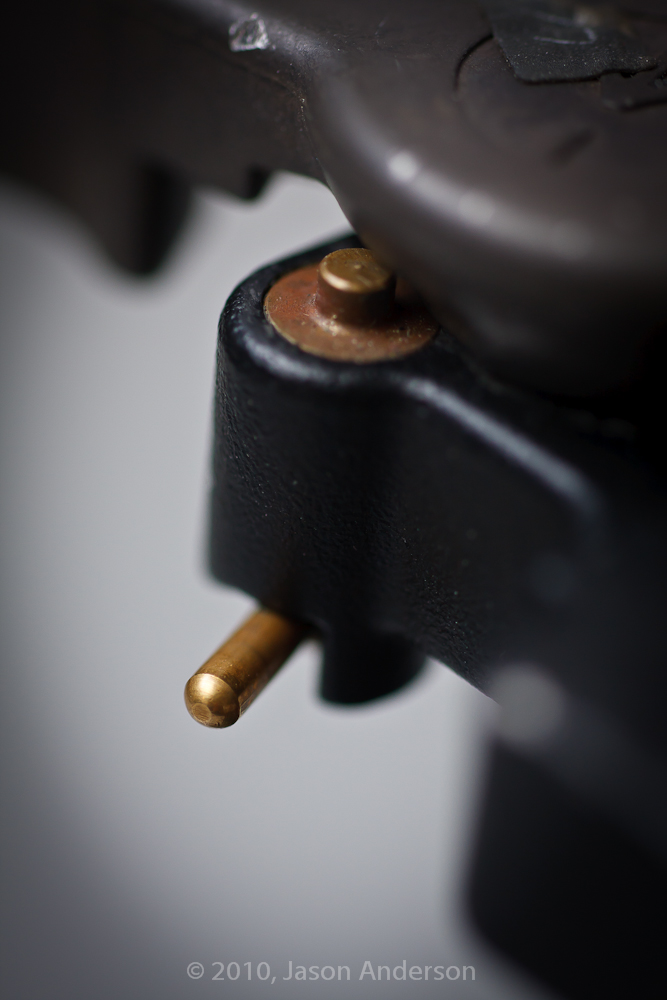
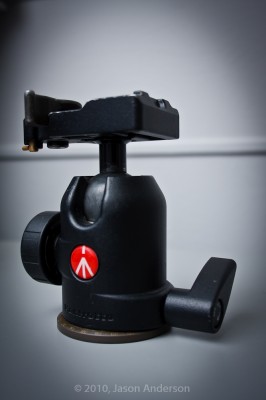
A good tripod really consists of two components – the legs and the head. Without the legs, you get no stability, and without the head, there’s no way to mount a camera to the legs. With so many options out there not only in terms of vendors, but also in terms of head types and styles – there’s a lot to choose from. One of the most popular types of heads is the ball-head. I’ve owned just such a ballhead for a number of years now – the Manfrotto 488RC2.
Close to Home – from Craft and Vision
I was on the verge of taking a day off on account of tired – my new shift at work goes from 6:30am to 3:30, and the adjustment on my internal body clock has been a challenging one to accommodate. However, I remembered a quick post I wanted to make to share with everyone a great eBook I had the pleasure of previewing from the crew working with David DuChemin. So, now is as good a time as any! Continue reading “Close to Home – from Craft and Vision”
Welcome to NAPP!
For the month of October, the theme of the contest series has been STUDY…and people have been submitting their images to the Flickr thread in hopes of winning a years’ subscription to the well-respected National Association of Photoshop Professionals. I’ve spoken highly of them before and their educational approach to not only Photoshop, but much of the Adobe family of products, as well as to graphic and web design, oh yeah….and photography… is literally unparalleled. With over 70,000 members worldwide, it’s an impressive organization and I have learned a lot from my own participation in NAPP events, seminars, and their community forums. Winning a year membership to NAPP is like giving a fisherman (or woman) the keys to a lake full of fish, and time needed to learn to use the nets. NAPP membership can literally change your life! Continue reading “Welcome to NAPP!”
Hardware Review: Sigma 70-200 f2.8
The kind folks at Sigma have become quite the regular contributor to the review section here – as you keep asking for lens reviews, the Sigma brand keeps coming up, and they continue to be generous with my participation in the loaner program. Thus far the lens line-up I’ve reviewed from the Sigma Collection include:
- Sigma 8-16mm
- Sigma 4.5mm Circular Fisheye
- Sigma 50mm f1.4
- Sigma 10-20mm
- Sigma 18-250mm
- Sigma 70mm Macro
Having compiled quite the list of review lenses, I am happy to announce the latest addition to this review series (some day I hope to have reviewed every lens Sigma has! 🙂 ) I give you the Sigma 70-200 f.28…
This lens is the comparable one to the Canon 70-200 f2.8, and while I’ve not had a chance to test the Canon equivalent, there are some optical similarities. I won’t go so far as to compare it to my own Canon 70-200 f4.0 simply because there are enough differences that it would be an apples to oranges comparison. So, here I’ll just share my own thoughts and shots on and from the lens for everyone to consider. Here is everything from soup to nuts:
The (Alphabet) Soup
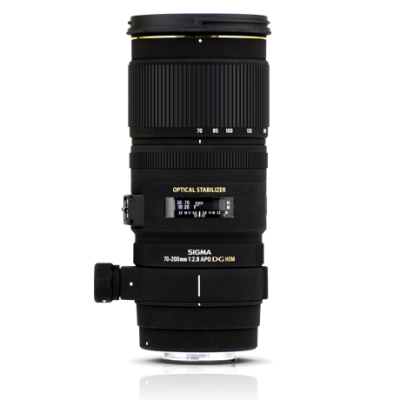
This is the 70-200 F2.8 EX DG OS HSM lens – quite a mouthful, but all of these features are important. The EX signifies that this lens has benefitted from the now signature finish of Sigma lenses. It’s smooth but rugged, and hard to really explain, but denotes quality and professionalism while being also understated – it means business. I’ve raved about the finish that Sigma puts on their lenses and this one is no exception. Top Notch! The DG? That means it’s optimized for Digital use. To quote Sigma,
“These are large-aperture lenses with wide angles and short minimum focusing distances. With an abundance of peripheral illumination, they are ideal lenses for Digital SLR Cameras whilst retaining suitability for traditional 35mm SLRs.”
In other words, the f2.8 means the aperture is designed for the width and opening, optimizing the amount of light that comes in, and minimizing barrel distortion. The end result of all this means you spend less time in post fixing things. A definite plus in my book!
OS is the now easily recognizable label of optical stabilization. These lenses have built in mechanisms that counter your movement to allow for shooting at slower shutter speeds. Slower shutter speeds, wide open apertures all means you can shoot and get quality results in lower light! I’ll go into more details on their OS features later though.
HSM refers to the Hyper Sonic Motor, which means nearly whisper quiet movement as the lens picks up on the AF points. Less noise means less distraction. This is good regardless of whether you are shooting portraits, wildlife, or street photography. Remember, it’s not about the photographer, it’s about the photo, and the HSM is an added bonus to help achieve that end goal!
The Nuts
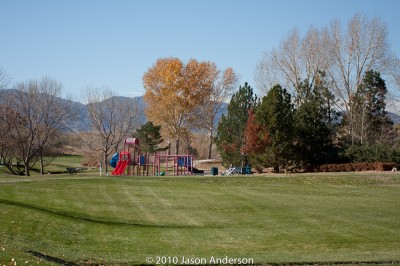
All the acronyms in the world won’t tell you a thing about lens performance though, and neither will my blathering about this or that, so let’s just get to the nuts. I went out with the lens to take some test shots and basically get a feel for the optical quality throughout the lens. I took some at short range (70mm), some in the middle (ranging from 120-150mm), and some at the long end (200mm). Shot groups also were mixed between simple test shots (a street) to portraits, and landscapes to get an idea of the focal range. Here’s said shots!
The 70mm shots



Mid-range Shots



Long Range Shots



Here, you can get an idea of both the optical quality and range of the optics as well as an idea of how it would perform in a variety of functions. I should also note that I have done literally no post production work in these at all. The only sharpening that was applied was on output sharpening from Lightroom, and that was set “For Screen” by default on all my images. In other words, nothing has been tweaked. Having said that, let’s take a look at some of the pros and cons of the optics overall.
Pros ~
I absolutely love the bokeh on this lens at long range. It compresses subjects nicely for portraiture, and throws the background nicely out of focus with some great treatment due to the optics. These shots were taken in afternoon light, and the sun was coming in and out of the scene – which could change the settings quickly. We were shooting on a monopod, and with IS on so the minor changes in shutter speed (these were aperture priority shots) didn’t really affect us. The f2.8 end came out nicely too, which was as expected though – that’s the whole reason for the f2.8 My excitement was primarily lent toward the bokeh at the long end which came out to about f4.5 Not too shabby!
I also was a huge fan of the OS – optical stabilization. It had two settings…OS 1 for shooting handheld, which counters both vertical and horizontal axis movement, and if you are shooting on a monopod (which is common with heavier glass), you can switch to OS 2, which turns off the one axis (horizontal I think). This allowed me to take some pretty decent shots at a hockey game a few weeks ago. You may recall seeing a gallery of those shots here on the blog. I was toggling between the OS1 and OS2 for that series so some shots did come out better than others – the ones with OS2 were the sharper in the set!
Another advantage here is that the collar for tripod or monopod mounting is included. I had to shell out an additional $50 for my Canon when I bought the f4, so seeing it included here was a happy surprise. I hate to go on and on here, but there was one other feature that bears mentioning and that is the smooth rotation I was getting from the lens as I worked it through the focal range. Either this was brand new, or had just been serviced because it was about the smoothest glass I’d seen from Sigma yet…and given the laundry list up top, that’s saying something!
And finally, the last big notch in favor of it, is – of course – the price. Coming it at $1700 this lens is certainly not cheap. However the savings is still there as it offers a s$200 over the Canon equivalent which comes in at at $1900! For the cost conscious (and who isn’t these days), that $200 can go toward many other accouterments in your shopping cart! And from what I can tell, the image quality is pretty darn good. (I got my prices from B&H Photo – the Sigma one is here and the Canon one is here)
Cons ~
This was much heavier and bigger than I anticipated. It was longer than my own 70-200 from Canon. Now I grant you my own is only an f4.0 and does not have the OS (or IS if you prefer – for the strict Canonistas out there). But I was a little surprised. I think that’s why my initial shots were a little oof – out of focus – because my arms just weren’t used to carrying the weight around. Lesson learned though – when moving into the fast glass category, at least shoot with a monopod, arm strain is greatly reduced!
The other big con was battery drain. All the time I could hear the OS kicking on and off as it would sense movement, even as I walked around. This caused some noticeable drain on my battery and I found myself swapping out after about 3 hours of shooting. Maybe this is typical of optically stabilized lenses and I am just not used to it, but the drain was something else that I had to take into account. I did have a spare with me, so it wasn’t that big a deal – but I certainly could not have shot all day on only two batteries with this lens.
While the collar was included, I don’t believe the lens hood is. Now the test unit I had did include a nice lens hood with the butterflies to avoid as much vignetting as possible, but that would likely add to the cost. Based on prices seen on B&H though, that’s only in the neighborhood of $25 (Direct link to Sigma marketplace here).
The Decision:
I would loved to have held onto this lens a while longer, and truth be told, will probably end up buying it. The Canon 70-200f4 may be working its last days in my bag, just because the faster glass and features are sure to see much more use from me. Coming up tomorrow, the results of the October contest giveaway – and announcing the November giveaway…make sure you stop in for that! Happy shooting and we’ll see you then!
3 Things to Beware Of…
A recent birthday launching me firmly into my fourth decade of existence yielded some nice returns…which has afforded me the opportunity to upgrade my monitor. I’ve been in desperate need of an upgrade to my setup as I have been working off a Dell 19″ and a Dell 17″ for my two display setup for a while now. Given the birthday broohaha, I had about $250 to go find something new. So, on a shopping spree I went, and I come back from said spree, with three new nuggets of information to share…or more to beware of when purchasing a new monitor.
#1 – Understand the data
I was out two weeks ago with this money (probably burning a hole in my pocket, and came across an HP monitor in none other than Best Buy. The price was right ($249), as were the dimensions (23″). I was looking at some of the other monitors, and none really filled the bill like this one did. The only downside was that there was no USB port (or so I thought). The salesman also pointed out the contrast ratio of 40,000:1! Without thinking about it to much, I figured it certainly wouldn’t be a bad monitor – so why not give it a whirl! After all, a 30 day return policy to the brick-and-mortar worked in my favor. So, home it came for setup. A few landmines awaited:
Size – While the dimensions of the monitor are always important, another consideration to take into account is the elevation or lift you get. My old faithful Dell had a telescoping arm that elevated it nicely over my Drobo, and kept it right at eye level for me (or very near it to prevent me from hunching over too much and becoming Lurch!. The HP 2310m had no such benefit and I then found myself shopping around for monitor stands. Subtract another $40 for a decent quality stand (Allsop).
USB Ports – I neglected to consider that the HP had no USB ports. I previously had 3 things coming off the old monitor – a printer, my mouse, and a dangler I could connect my card reader to easily. So, some rewiring was in order. But, this helped me clean up some cable management issues, so that’s not necessarily a bad thing.
Contrast Ratio – If you take away nothing else from this post, consider this: contrast ratios are meaningless! That’s right, they are meaningless numbers, generated by each vendor to measure their own “belief” of what the expected performance could be of the monitor under the most extreme settings. I got a hard knock here, recalling after some collaboration with the crew over in the NAPP forums (thanks to Andrew Rodney for the reminder). As it turns out, pretty much anything past 1000:1 is meaningless under a calibrated workspace, because monitors just aren’t made to produce a useful contrast past this once calibrated. Some of the really price ones from LaCie and Eizo do, but those are in the thousands of dollars range. So, keeping true to my budget, I had to settle for consumer grade gear. But, I wish I would have known that before buying, because the decision was made in haste and on bad information. So, lesson learned – know the important data! Contrast Ratio = 1000:1 or greater is fine!
#2 – Don’t Be Afraid to Settle
After finding out all these little caveats, I also got an email blast from Newegg, touting their Halloween deals, and of course, a monitor came up in the laundry list. An ASUS 25″ for $230! I was floored. Two more inches of real estate, for $30 less! So, I started digging into the reviews, forums, and consumer reports. I’d purchased a few of their motherboards over the years and was happy with those. A trip back to the NAPP forums did alert me to a few misgivings some had about the brand though, so I decided against returning the HP in exchange for the ASUS. After all, it was only $30 difference in price, and would have possibly got me in a situation where I may not have been able to return the ASUS without getting an ugly restocking fee. And besides, the low profile and lack of USB were also present there, so there wasn’t much to gain. Then I saw the LG.
It was on display at Sam’s Club, and I’d seen these things in use in lots of retail settings, including warehouse environments, retail, and even doctor offices. The seemed to be of decent enough quality, although the contrast was always way over cranked. I could fix that with a calibration though, so checked the price: $189! A savings of $60 (figure in tax). That would negate the $40 spent on the monitor stand and give me a little change back in the wallet. Off to the web I went for more research. Turns out this isn’t that bad a monitor. I decided to go for the savings and returned the HP, bringing the LG home. Now, all that was left was to set it up, and I was off to the races!
#3 – Calibrate it!
Last but not least, I set the LG up to calibrate. After twenty minutes trying to dial in the color, contrast, and brightness, I was beginning to understand the differences between vendor makes and accuracy. I’d heard of monitors that just wouldn’t calibrate and was suspecting that this was the case for the LG. (The luminance was just way to low, and the colors would never fully align to center in my Gretag Macbeth colorimeter. I finally gave up, and went to take the colorimeter off. On doing so, I noticed that the ambient light filter was still on the puck that I had used to measure ambient light. That explained it! Sans filter, I placed the colorimeter back on the monitor, and within 5 minutes, had things dialed in pretty close to perfect. My luminance is 0.5 off, the color is at 6500, and contrast is spot on dead center. It’s got 30 days to satisfy me (and assuming nothing else goes on sale…) So, word to the wise – when calibrating your monitor, remove the ambient light filter – it can save a lot of headache!
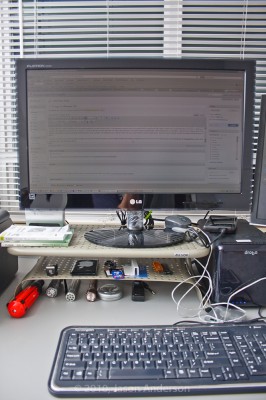
I’ve now moved the 19″ into the secondary position, the 23″ has become the primary, and the added benefit of the monitor stand has given me two new rows of surface area to store things like my thumb drives, media cards, businesss cards, and other bric-a-brac. More storage in an increasingly cluttered life is a good thing!
So, watch that contrast, check to calibrate, and exercise caution in spending habits – especially if you can’t return things easily.
Now it’s your turn – got any purchasing stories or tales to share where you learned something in the experience? Sound off in the comments, let me know your thoughts on the above, or to share your own “war stories”. Thanks for stopping in and we’ll be back tomorrow with more photo goodness.
P.S. Another heads up reminder, that the November Newsletter will be coming out this Friday, so if you’ve not signed up – make sure you pick up a subscription for it either in the sidebar or here. It’s free, and only available to subscribers!