Migrating Photoshop to a New Computer

Over the past three years or so, I’ve had several people ask me about what’s involved in migrating from one installation of Photoshop to another, or what’s involved in moving from an old system to a new system.  With Photoshop, it’s just not as easy as it is with other applications for a number of reasons:

1.  Dependencies – While Photoshop is insanely popular, this popularity has spawned an entire industry of third party applications called plug-ins that get installed into Photoshop.  If you simply remove Photoshop without considering these 3rd party “apps”, you could lose their functionality.  There are also other things that become part of your work flow in Photoshop that you may want to save too, including actions, scripts, font folders, brushes, and much more.

2.  Licensing – Because it’s not a cheap application, Adobe has to carefully manage licensing, which means that any serial number can only be activated twice before it gets “locked”.  This allows you to have an installation on a desktop and a laptop, or a work computer and a home computer.  Well, if you go an just un-install or delete the files for Photoshop, you may find yourself unable to activate again should you re-install on a new computer.  The way to avoid this is to ensure you de-authorize (or deactivate) before uninstalling.  This will free up the license for use again.

3.  Other add-ons – Photoshop also has other add-in elements like automation tasks you may have added over time.  I have a few from On One, Topaz Labs, and a few others that I’ve gathered over time.  Make sure you check to make sure these don’t have installers with licensing too, because that can also be problematic for a software migration.

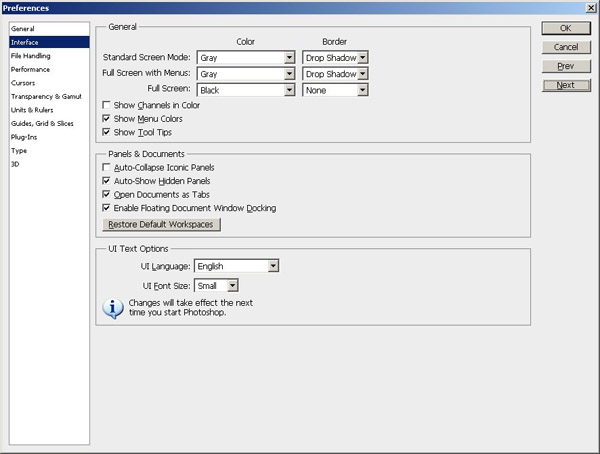
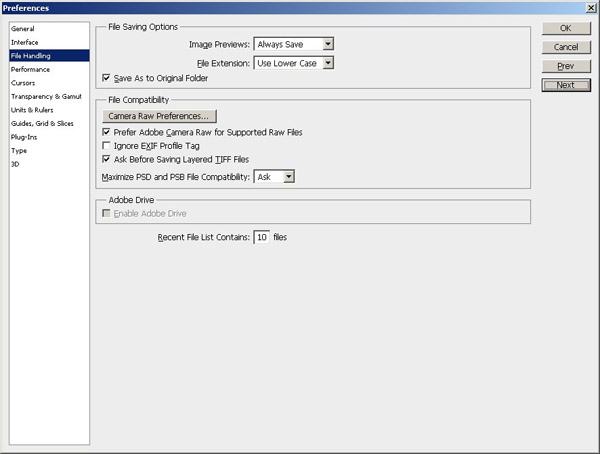
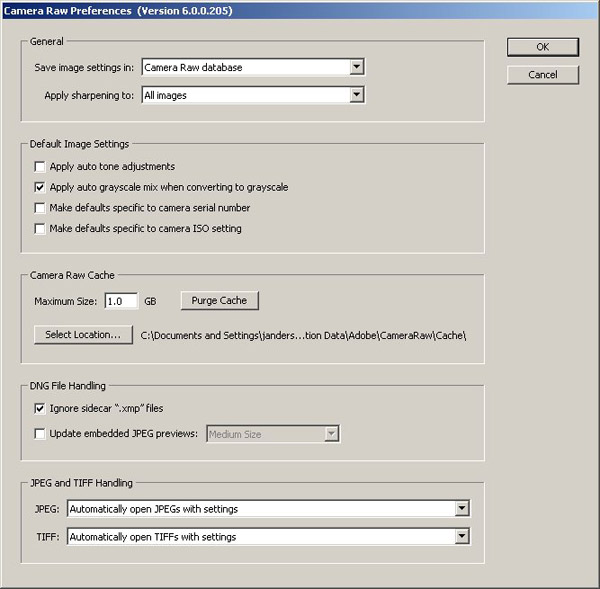
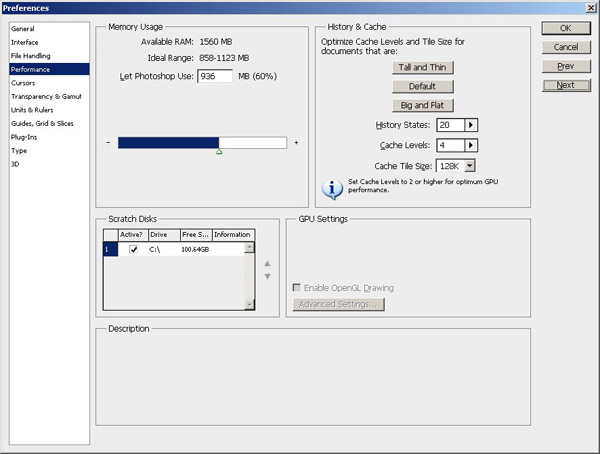
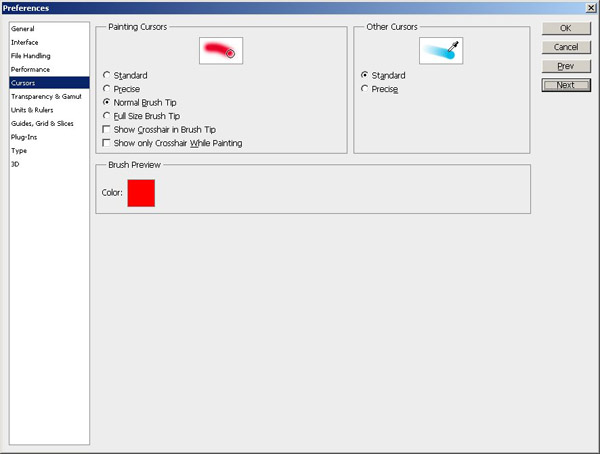
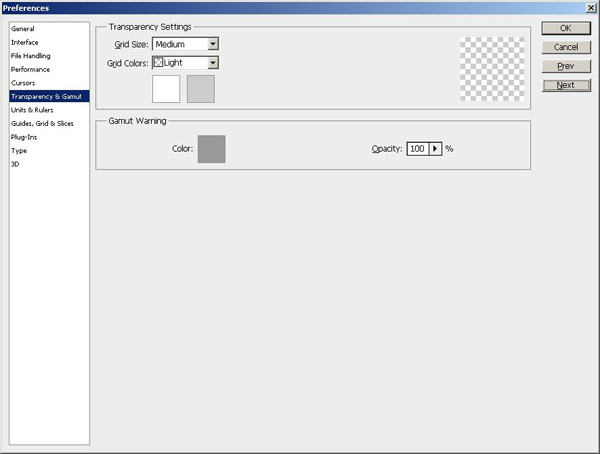
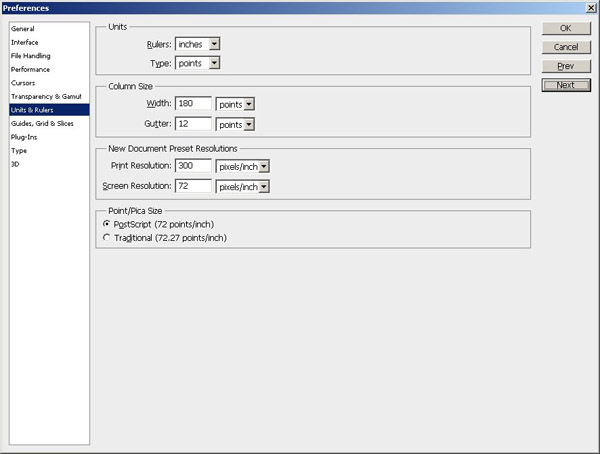
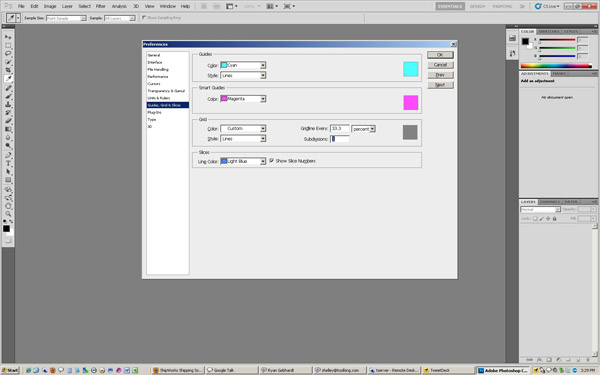
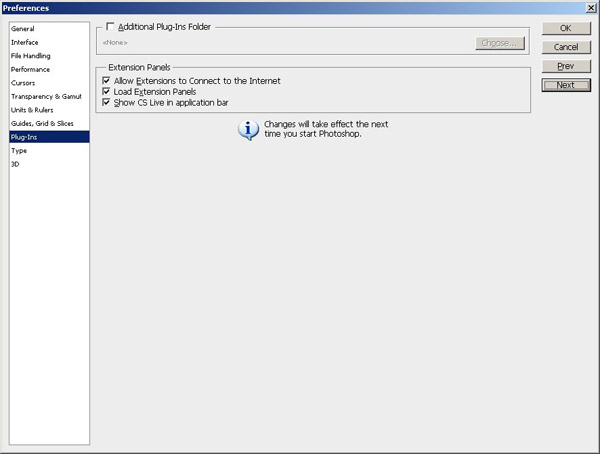
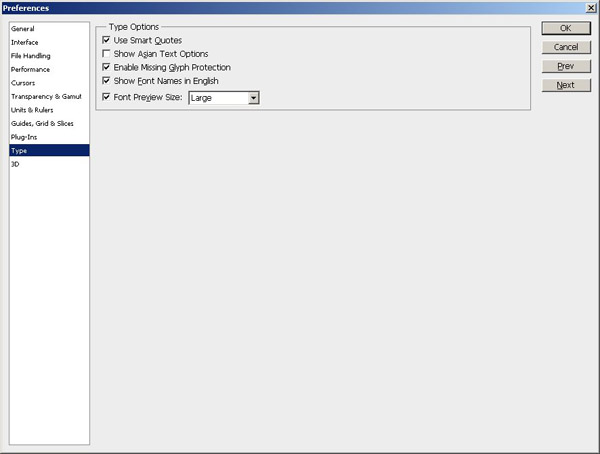
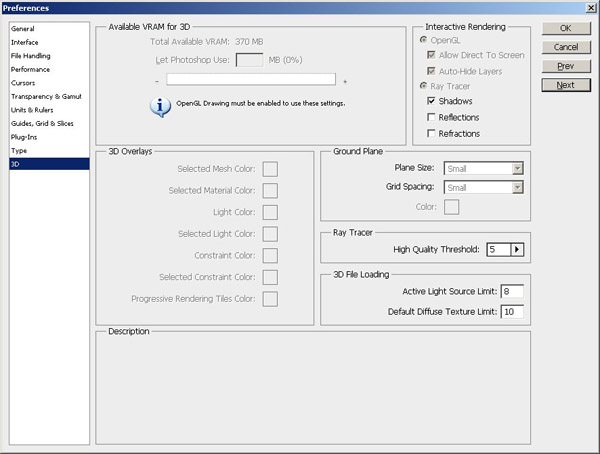
4.  System settings – Unlike e-mail, some settings and preferences don’t stay with you during the course of a migration.  So, it’s often helpful to grab screen captures of various setup windows so that you can get things configured just right once you get in your new digs!  Here are the 11 screens you may want to capture before un-installing off any computer:
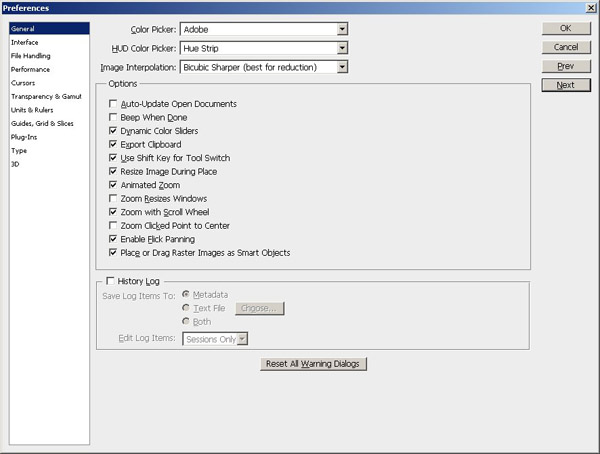
PS Preferences

PS Preferences

PS Preferences

PS Preferences

PS Preferences

PS Preferences

PS Preferences

PS Preferences

PS Preferences

PS Preferences

PS Preferences

PS Preferences

As you can tell, there’s a lot to consider.  And, given the length of this post already with the included screen captures, to make things easier in terms of reference information, I’ve put together a step-by-step procedure to migrate Photoshop from one computer to another that you can download for free!  Enjoy!

Migrating Photoshop

Happy shooting and we’ll see you back here again tomorrow!
What smart phone do you own/want?

Courtesy of the previous post, I’ve added a poll to the blog (which I rarely do anymore)…so you can sound off anonymously:

[poll id=”8“]

Share with your family, friends, colleagues, whomever – I’m really interested to see where people are in this whole smart phone deal…have a great weekend!

Making the Switch…

We’ve all heard the stories of people switching vendors.  Scott Bourne was noted for his switch from Canon to Nikon.  Friends and family often talking about switching from Ford to Chevy, or from Coke to Pepsi, and even *gasp* switching from PC to Mac.  As I find myself moving more and more toward Apple products I contemplated making another switch – from Verizon to AT&T.  You see, my contract with Verizon was due to expire soon, and I would then have the choice (and choice is a good thing) to move however I want.  For me it was a tough decision for a number of reasons:

Pros

  • Many of my friends in both IT and the creative fields own iPhones…and not being able to do some things with my phone that they could do was aggravating.
  • I also did not enjoy having to walk around with two devices – my 1990’s flip phone and my iTouch.  I wanted to unify everything under one umbrella

Cons

  • However, getting the iPhone meant going to AT&T.  I’ve had Verizon service for many years now, and while talking to any support staff anywhere is not my cup of tea, Verizon has rarely given me any reason to call.  From what I understand of previous experience with AT&T, there are often reasons to call…
  • I know this was covered just yesterday on the blog, but the lack of Flash support on Apple products is troublesome.  While I understand that things change – I need a new phone now.  Given Apple’s “heel digging” on this subject, and the impending release of Flash support in conjunction with Google (Adobe and Google working together..wow!) made the Android OS a palatable option.  Plus, HTML5 is readily going to be accessible under both if it ever becomes finalized (you know it’s just a specification right now…right?)

I was also a little less than enamored with the public image Apple has had recently what with the whole fiasco of the thundering police in the case of the iPhone 4 beta product that they wanted back (see video here about it).  That compiled with the fact that Apple has admitted that they changed their SDK to specifically exclude developers from using Adobe products when working on iPhone development.  This is like telling a photographer to only use a Canon or one particular set of cameras to take pictures.  That was the icing on the cake for me.  The end result?  I got a Droid!

I’ve already set up a website where I am sharing my experiences with the Droid so far – mostly it’s been pics (kind of an abbreviated 365 project).  Feel free to stop by the site where I am trying to post a photo a day from the Droid.  It’s at www.mydroidpics.com.  I’ll also probably start throwing in a few commentary type posts periodically about new apps and features as I discover them…

So, I’ve made the switch.  From flip phone to smart phone!  And the solution for me was:

THE MOTOROLA DROID!

Motorola Droid

What kind of phone are you using?  Is it a smart phone?  Is it a Droid or an iPhone?  What things do you like/dislike about it?  Sound off in the comments – I’d love to hear what others are thinking about the smart phone fad!  Have a great weekend and keep on shooting!

Keep on Shootin'!

It’s been a while since an episode of LDP ran, but as we keep on shootin’ our way through life, so to does LDP continue on albeit not as frequently as any of us would like!  Nevertheless, I get caught up somewhat on the photo news beat with some of the top stories over the past three weeks, have a great conversation with Tyler Stableford, a recent addition to the distinguished annals of the Canon Explorers of Light group.  He’s been featured in photo magazines including Sports Illustrated, National Geographic, and many more.  A recent series on the Colorado F-16 fighter pilots is what caught my eye about him and we recently had a chance to chew the fat…on this show! Continue reading “Keep on Shootin'!”

Hardware Review: Sigma 4.5mm Fisheye (Circular)

Sigma 4.5mm f2.8 Circular Fisheye

As things start to settle down again, I’ve got a pile of reviews pending work, so this past weekend, while in bachelor status temporarily, I really knocked out a few projects, including getting caught up on some overdue reviews and blog writing.  Today, the first of these projects is the Sigma 4.5mm fisheye lens review.  This is a super cool lens, and has a lot of opportunities for creative exploration.  I took the typical test shots indoors to get a feel for where it’s strengths and weaknesses are, how it focuses, and then took to the streets. Continue reading “Hardware Review: Sigma 4.5mm Fisheye (Circular)”

Droid 2

So, the Droid has been in use for about a week now…and I gave some initial feedback on it yesterday, but thought it might be helpful to give a short video on how to tether the Droid to a computer.  It’s pretty straightforward, so here you are (special shout outs to Rich Charpentier for requesting it)…

As you can see – nothing too difficult or fancy to tether a Droid, which makes for great file manipulation and transfer, which means photos are also easily archived across multiple platforms!  How are others tethering their smart phones?  Just as easily?  I didn’t like the Touch having to go through iTunes and be “licensed” on each computer.  Thoughts and feedback welcome in the comments!

Don’t forget – I am also sharing pics daily on http://mydroidpics.com Won’t set the photo world on fire, but you can get an idea of the quality of images coming off the Droid! 🙂  Happy shooting all and we’ll see you back here tomorrow!

The Droid Hath Come

That’s right folks – the time has come for an upgrade to my rinky dinky 1990’s flip phone.  I’ve gotten with the decade and upgraded to a Droid from Motorola (yes, I am on Verizon).  The upgrade was pretty smooth, although the “tech” at Best Buy had trouble migrating my contacts over.  Since I use Gmail for most of my contact info anyway, I figured it would migrate in pretty seamlessly once I got online and sure enough, everything pulled down no problem.

So, how is this related to photography?  Well, I can now take and share 5 MP photos with much more ease.  The Droid also has an app for Audioboo, so I can go back to creating audio shorts regularly on all things photography too.  Plus, as photographers, let’s face it, we are gadget-hounds, and this is definitely a gadget worth considering.  Here’s a couple pics I took of the Droid the other day:

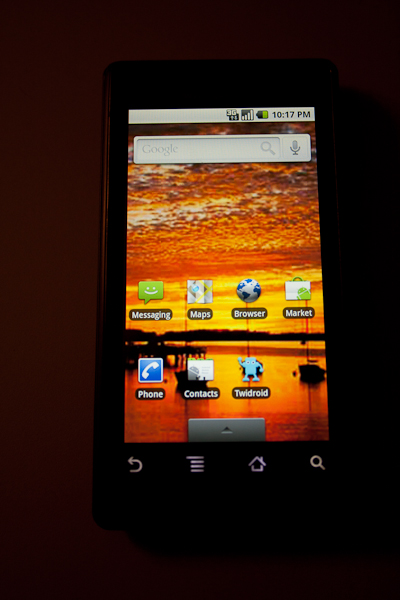
Droid Main Screen

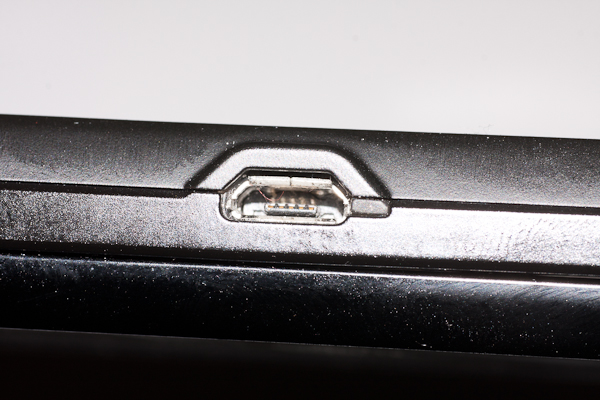
There’s the Main screen of the Droid, with my own wallpaper already selected as the background.  The audio port is the 3.5mm standard, and another neat feature I like is the micro-USB port for charging and tethering to a computer (that’s right, tethering to a computer!)  Check it out:

Droid Main Screen

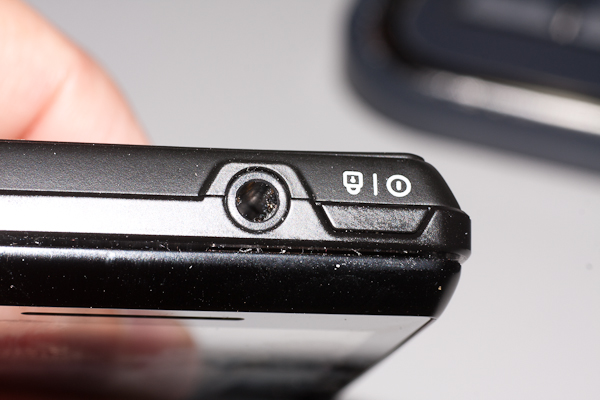
And, the headphone jack which is right next to the on/off button – makes it easy to find and access:

Headphone jack

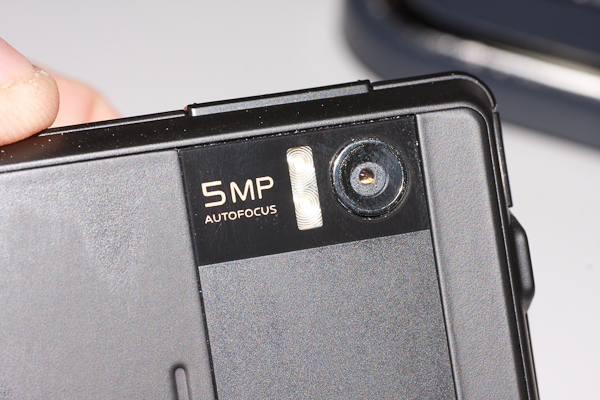
And, last but not least – the 5 MP camera!  This is probably what I am most excited about!

Droid Camera

If you’d like to see some actual pics from the camera… check out the new blog I set up just for that purpose.  I’ll try to post a shot or two every day over at:  www.mydroidpics.com

That’s it for today, but more photo goodness coming tomorrow, but I can’t tell you yet (it’s a surprise!)…happy shooting and we’ll see you then!