Flickr Plugin for Lightroom

While recently participating in a Photowalk group outing to Rocky Mountain National Park, with the fellow local photogs, I learned about this great little plugin for Lightroom that allows you to export your photos directly to Flickr…all within Lightroom!  It’s a pretty cool little plugin, and as you know, when I learn something new – so do you!

This plugin comes courtesy of Jeffrey Friedl, and one of the greatest features of it is the cost – absolutely free!  Well, that’s not exactly true, you do need to spend one cent via Paypal, but for a penny, check out what you can do:

I started off downloading the ZIP file (and it works for Windows or Mac) and expanding the archive.  Then I moved the plugin to the root of my Applications folder on the Mac (you can choose where ever you want to store plugins, you just have to tell Lightroom – and for me this is an easy place).  The icon for it looks like this:

Flickr Uploader Plugin Icon

Nothing too spectacular yet, and there’s a little bit of installation and customization needed.  Your needs may vary based on how you want to use the plugin, Flickr, and Lightroom, but the cool thing is that Jeffrey has put together a plugin for most online locales including Smugmug, Zenfolio, Facebook, Photobucket, and many more.  So, if you use another resource, it’s worth checking out.  I’ll continue here for the Flickr plugin and you can decide for yourself if it’s worth adding this tool to your workflow.

Next up, I went ahead and configured the plugin from inside of Lightroom to use my Flickr account.  Here’s what I did. To start, click on Export, just as if you are exporting to disk or some other resource
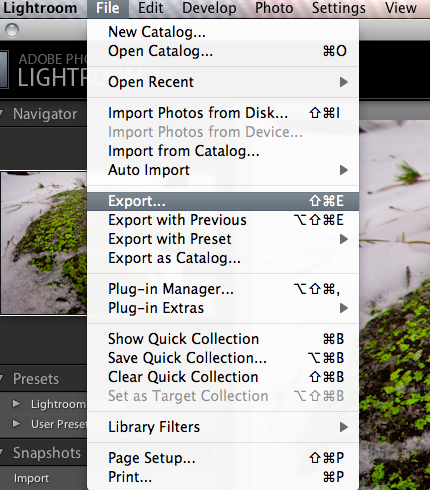
Open Export Dialog
Open Export Dialog

One the export dialog box is open (and here’s the tricky part), look to the far right of the gray bar across the top that says “Export to Disk”.  You’ll see two little arrows which means there are menu options:
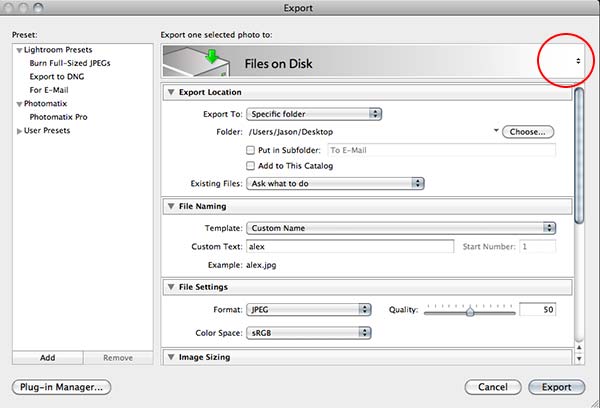
Files on Disk
Files on Disk

If you click on those arrows, you’ll get a new dialog box (bet you didn’t know that was there – did you? 🙂 ), and the Flickr option will show up.  Select the Flickr dialog one for our purposes here:
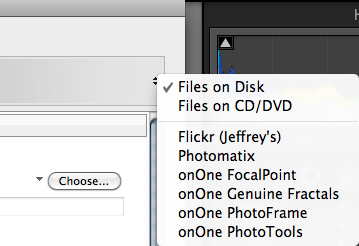
Flicker Exporter
Flicker Exporter

Once you select the Flickr Exporter, you will get a new dialog box that will start the authentication process that Lightroom will use to log into Flickr.  If you have multiple Flickr accounts, or specific authentication methods you prefer, these steps may change a little based on your needs.  But here, I am doing things the most straightforward way:
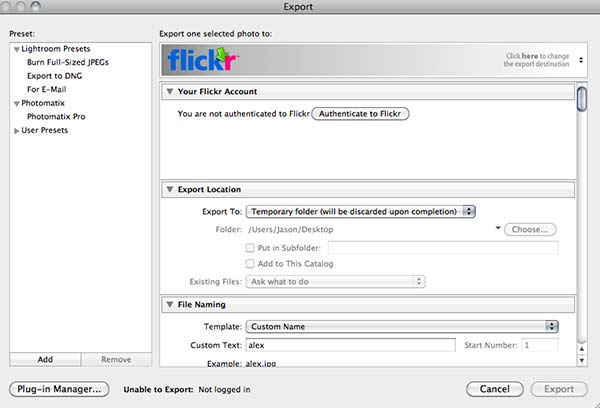
Flickr Authentication

Next up, if you are logged into Flickr already, the plugin will open a page that will grant access to the plugin.  So, it helps if you are already logged into your Flickr account on the internet.  So, you’ll get a dialog box that looks something like this from the plugin to that effect:
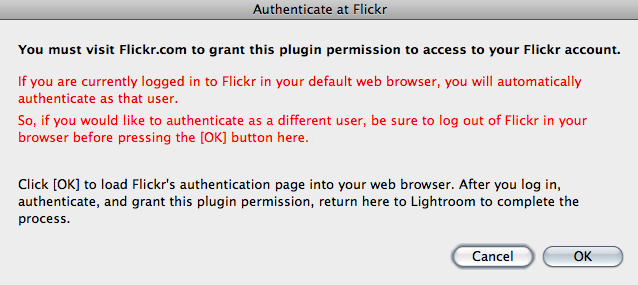
Warning Notice from Plugin

On clicking the OK button, it will take you to the grant access page, and you’ll get another dialog box that grants the plugin access to post photos to your Flickr account (which, after all, is the goal, right?).  The one notable difference you will see in yours is that my face won’t be staring back at you like here.  That is the avatar for my Flickr account, so your screen should show your avatar – if it shows something different, then you are in the wrong account (but I guess that goes without saying)!
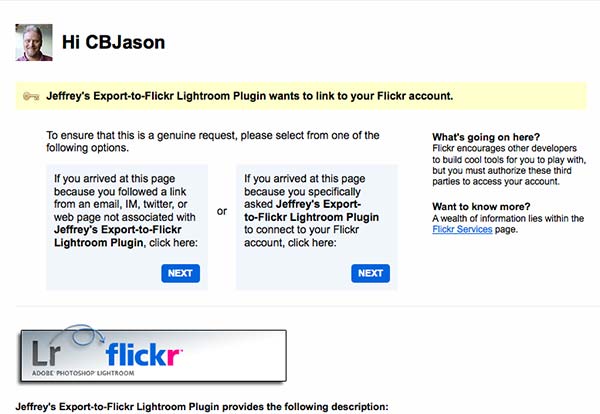
Granting Access from Flickr Side

A second confirmation screen from Flickr will also let you know that this is a 3rd party application, and just acts as a security measure to make sure you are aware of what that means.  Click the button that says “OK, I’ll authorize it”, as shown below.  Again, while it goes without saying at this point, your dialog will look a little different different.  If it doesn’t and you see my avatar in your Flickr account, I am gonna be calling soon! 🙂
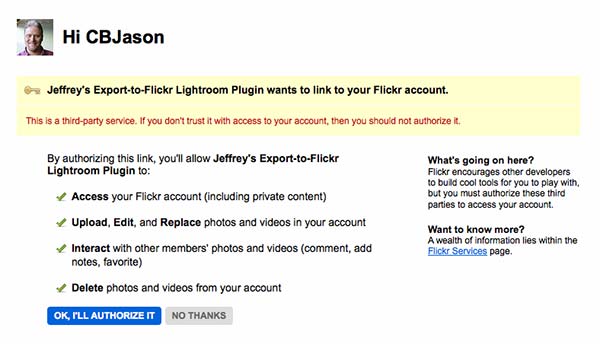
Authorization
Authorization

Finally, you will get a confirmation screen on Flickr, noting what you’ve done (they make it pretty clear what you’ve done, and how to delete it if needed on the Flickr side):
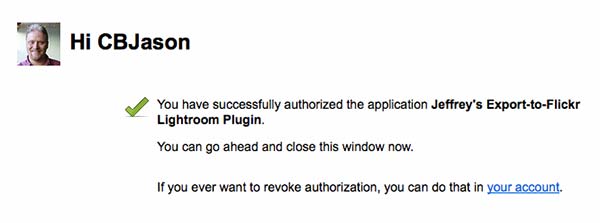
Flickr Confirmation
Flickr Confirmation

On return to the Lightroom interface, you’ll get a confirmation screen there as well – just click it to continue:
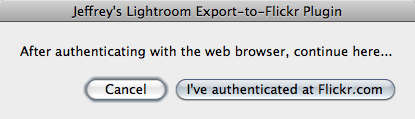
Lightroom Confirmation

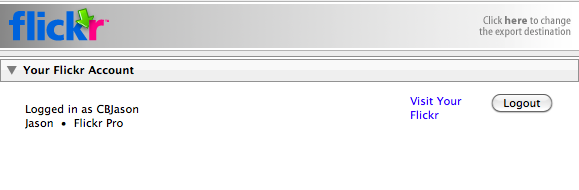
On granting access, you’ll get an authorization code, which for obvious reasons I am not going to post here, but make a note of that code and enter it back when you return to Lightroom.  On completing that you will be presented with the Flickr Uploader Dialog.  Here I am going to show you a few key ones that you have to scroll down to be aware of in making your uploading preferences.
Screen shot 2009-12-14 at 9.06.37 PM
Your Flickr Account login in Lightroom

This first shot (above) shows the top part of the dialog, and shows how you are authenticating on Flickr.  Now, use the scroll bar on the right side to move down through the options.  First stop, the Photo Set.  On authenticating, the plugin will pull your complete list of photo sets from Flickr.  If you don’t have any photo sets built, then none will be here.  Since I do have photo sets, it will default to the first one alphabetically.  You can change the sort order, and specify what photo set (if any) you want the uploaded image to be added to, as desired.  For this example, I did not add the photo to an existing set, or create a new one.
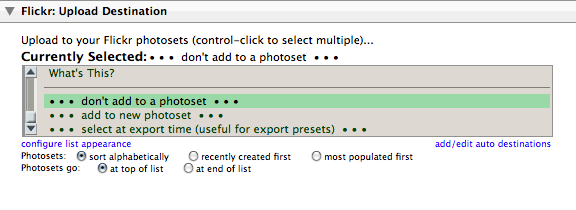
Photo Set Choice
Photo Set Choice

Pretty straightforward, but let’s keep scrolling through a few more key items you will want to think about utilizing or disabling depending on your work flow.  The next one I think warrants mentioning here is the groups.  One of the ways you can increase the visibility of your photos on Flickr is by participating in groups.  More people look at them, you’ll get more feedback, and sharing our photos with others is the goal anyway, so go ahead and add the appropriate groups here.  I selected the group “CanonBlogger” for obvious reasons! 🙂
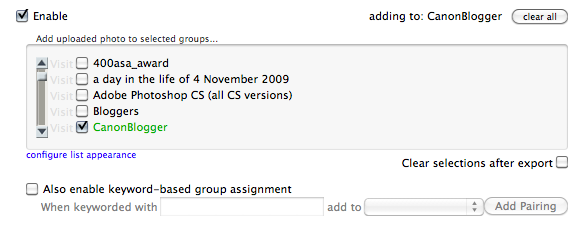
Screen shot 2009-12-14 at 9.09.00 PM
Publishing to a Group

Only a few other options that I think are useful from this plugin, so we’re almost done.  Next up, is another social networking one that I tend to use fairly regularly – Twitter:
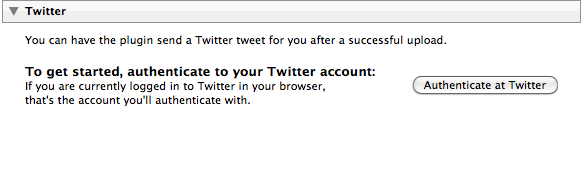
Twitter posting
Twitter posting

Last but not least are the meta tagging options you have available to you from the plugin interface.  The options are just to diverse to go into detail here, and I prefer to tag photos on Flickr differently than in Lightroom, so I leave these blank, but in the interests of full disclosure, here are some of the tagging and naming options in the plugin dialog:
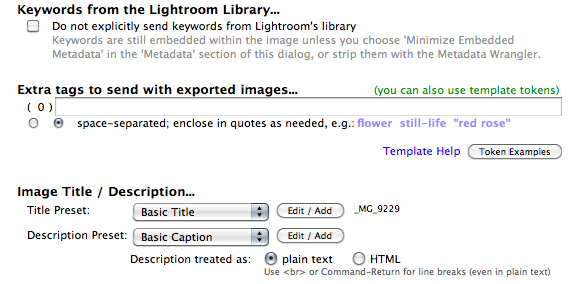
Tagging Photos
Tagging Photos

If you think about it, for a penny, this is a pretty good deal (I went ahead and made a donation, which I would also encourage you to do as well – Jeffrey has clearly put a lot of time into developing these plugins, and he needs to eat, just like the rest of us).  So, there you have it – the process of finding, downloading, installing, configuring and using the Lightroom Flickr uploader.  As I mentioned at the beginning of the post, there are other uploaders available as well, and I am going to probably go get the one for Smugmug as I have an account there too.  It just makes the sharing of your photos that much easier.  (Who knows, the Facebook one may also make its way into my utility belt at some point once I get more comfortable with it…)

If you have questions or problems with the installation or the uploader itself, Jeffrey has a good FAQ page here that should answer most questions for you.  If not, I am sure he has an email address available somewhere for specific questions not addressed online.  For my work, I think this plugin totally rocks!  It’s going to become a staple in my work flow, and if you are into social media at all, I would highly recommend it for those purposes as well.

In talking about all of this, it bears mentioning that some of us are not fans of Flickr, Twitter, or Facebook, and while I can understand the hesitation of some, it’s really a matter of personal preference, and maximizing the time you spend on your computer.  if these outlets aren’t your cup of tea, that is totally fine.  But if you have the Flickr plugin – it is that much easier for you to participate in the Monthly Giveaways here at Canon Blogger/Learning Digital Photography!

With those thoughts, I’ll leave well enough alone as this post has gone on long enough for one day.  Happy shooting (and uploading) and we’ll see you back here again tomorrow.
There’s a fine line…

There’s a fine line between standing up for your rights and intentionally inciting controversy.  As you may know, I have been known to stand up for my rights. At the same time I can also respect the need to be cautious, given the nature of the time that we live in.  Since you probably are wanting to know where this is coming from, while going through my daily blog reads, and weekly reader posts, I was reading a post from friend-of-the-blog Becky Thomas.  She had a post up on her blog about someone who was detained (note – detained, not arrested) for “taking photos”.

Since I am all about standing up for your rights as a photographer – I followed her link to the video on YouTube.  While the video was interesting, there seemed to be some confusion on both the photographer’s perspective as well as the metro authority guy.  Yeah, the guy with the badge mis-quoted metro rules, and used some heavy-handed tactics to get information from the photographer.  But, all he was trying to do was get general information from a guy with a camera (who in my opinion was being as uncooperative as possible, all while video-recording it surreptitiously).

So, in the interests of hopefully offering some general guidance for photographers that like to go out and take pictures in public areas, here are a few tips to shooting in public, and how to conduct yourself:

  1. Know your rights.  Yes, you have the right to take pictures in public places, with a few exceptions.  A great starting point is a nice PDF that Bert Krages has put together. Keep in mind also, that just because you are outside, does not necessarily mean you are “in public”.  Malls, for instance, are privately owned, as are some metro and rapid transit systems.  While they are accessible to the general public, they can be privately owned, and as such, have guidelines for taking photos and filmography (and the guy in the video actually linked to the website for the metro, which clearly states that a form should be filled out and submitted in advance – that they generally will work with people, which he apparently was not interested in…because he produced no such form and did not indicate his awareness level to the authorities).  If you have any doubt about your area, check the locale’s website, and if there’s a phone number – call – it pays to be informed!
  2. Be open, honest, and friendly with authorities.  One of your greatest tactics in defusing possibly fractious and unpleasant situations is a willingness to cooperate.  Not having any identification, or an unwillingness to present that ID, is not a step in the right direction.  Neither is muted responses of “just taking photos”.  Usually, if you are open, honest, and friendly, any concerns over your activities are allayed.  Yes, officers should be the same way, but in the event that one isn’t – wouldn’t it be better if you were the one in control of your faculties?*
  3. Have your own ammo!  No, I don’t mean carry a weapon, that’s not going to help.  What I mean is to carry your ID with you.  Carry a copy of the Bert Krages PDF, and even better, carry a few business cards.  Make sure the card has your name, phone number, and web address (or blog).  Show that you take your profession (or hobby) seriously.  Heck, even carry a little 4×6 wallet of photos with you (it can never hurt to have a sample portfolio with you – you may land a gig!)  Finally, keep a notepad and pen or pencil with you.  If things really do deteriorate, and you feel you are being held illegally, make sure to note officer names and badge numbers.  Don’t resist anything though because that will accomplish nothing, and just exacerbate the situation, making things worse.
  4. Feed the cat!  Showing an interest (even if misguided) in you as a photographer should be a compliment.  Take it as such even if it was not intended that way.  Start showing anyone inquiring about what you are shooting some of your work.  Whether that work is from the back of your LCD, your small 4×6 wallet shots, or your business card, it can immediately defuse a situation because you are being open, honest, and forthright.  Trying to hide things only makes you look more suspicious.  Remain happy and excited about your craft, while also respecting the job that authorities have.  They see things that are potentially unsafe in their eyes, and whether the situation is unsafe, threatening or not, the best way to defuse that is to show them you are safe.  Show them you are after an artistic vision or a creative perspective, and not a confrontation.

*As a sidebar, I have had a few anecdotes with people in positions of authority, whether they be uniformed officers of the law, or hired security.  The first happened at Charleston Airport.  I had arrived a little early to pick up some relative a while back, and since the light was nice (and I had my camera).  I started walking around the parking garage, looking for interesting light and angles in the building.  After about 20 minutes an officer rode up to me on her bicycle, and asked if I was taking pictures.  I (excitedly) said something to the effect of “Yeah, I am here picking up my in-laws and arrived early.  It’s some great light and the angles in here are really cool!  Check it out!”  I then  offered her my camera, and showed a few shots from the LCD.  (And they were cool too! 🙂 )  She asked if I did work professionally, and I said, not yet, but if she knew of anyone that wanted some work done – I did just get some cards made up – do you want one?  She took it, smiled, nodded and rode off.  (A month or two later, a bank called me and asked if I had any landscapes that they could look at for putting on their walls…)

The other was here in Denver.  After work (when I was still working…*sigh*), I made my way down to the bus depot called Market Street Station.  I missed my bus, so had half an hour to kill…and, with my camera readily available, started walking around looking for interesting light, textures and scenes.  After about ten minutes an RTD guy walked up and asked if I had slipped or something.  No, why? Saw you taking pictures of the stairs.  “Oh, no…just an enthusiast photographer, and saw some cool scenes – here, check out the stuff I got”  I showed him the few shots, and he asked if I had a business card.  “You Bet!”  Turns out his daughter was getting married!  (She had already booked a photographer.)

The larger point of these two anecdotes is that when approached, I was friendly, open, willing to share, and defused any potentially volatile situations with pleasantries and willingness to accommodate curiosity.  After all I don’t want to spend time in jail, or in a detention facility for anything – I want to take pictures, and that is what it is supposed to be about, right?  Let me know – am I off base here?  Do you disagree?  Am I going overboard with pleasantries? Sound off in the comments or via e-mail!  This one could be interesting, so I’ll ask in advance to keep things family-friendly! 🙂

Happy shooting and we’ll see you back here again tomorrow!  (Oh yeah, and don’t forget the December Giveaway – $400 in prizes by merely posting a “Giveaway” themed photo to the Flickr thread!)

I’m dreaming of an HDR Christmas

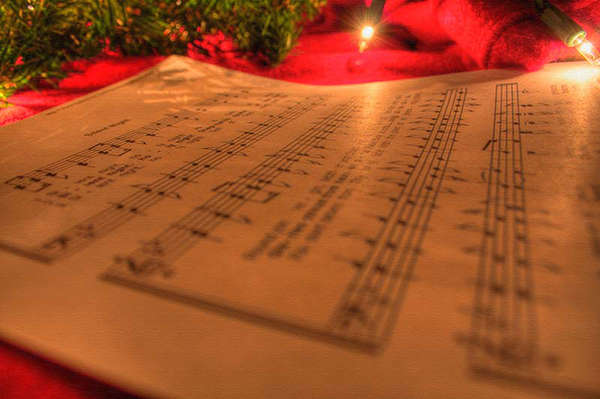
Last night I got the bug to try something I’d seen before – the classic Christmas-y look with a score of music and a shallow depth of field.  It was straightforward enough and after putting a piece of sheet music on the piano, and trying it that way, wasn’t getting the drop off in depth-of -field as I had hoped for.  So, I took a different approach and put the music sheet flat on a table, knowing the dof would drop off that way, with the foreground out of focus and receding off in the background too.

So, the second one came out okay, but the plain background of the table didn’t really work all that well…it needed something else – Christmas lights!  So, I got an extra garland that wasn’t used in the house and threw that down, encircling the paper.  But something was still missing…a little color.  What goes with green and white?  Red!  Enter a blanket strategically placed underneath it all to add a touch of color.  So, took a few shots, and liked it, but the shadows seemed kind of muted, and the lights were getting a little blown out.  Hmmm…could I be dreaming of an HDR Christmas?

An HDR Christmas
An HDR Christmas

The fact that the little star burst off the one light happened was purely incidental, but I think helped the overall composition.  How about the reading audience?  What are your thoughts?  Does it work?  Need something else?  What about your own holiday-themed work?  Feel free to share thoughts, feedback, samples and such in the comments!

In other Friday news, CB now has a Facebook fan page, so if you get a minute – stop by the Facebook page and sign up.  I’ll be sharing more photos, tips, tricks, and such there in the weeks to come as well, and you won’t know unless you’re a “fan”!  For those of you getting your news from the feed, the direct link to the Facebook page is here.

Don’t forget, the December Giveaway is also still underway – over $400 of super cool prizes including software, books, prints, and papers!  Just a cornucopia of prizes, all waiting to be given away for free! Just enter your photo at the Flickr thread:  December Giveaway. The theme this month is GIVING. Interpret however you like and good luck to all.  The rest of the contest details are here.

That’s about it for this Friday – have a great weekend everyone! Going on a sunrise shoot in the mountains tomorrow wit the Meetup group here in Denver, so it is going to be an early riser for me tomorrow.  Start time of 4am!  More on that next week!  Happy shooting and we’ll see you back here on Monday!

Geek Factor Alert

Today’s post comes courtesy of a comment posted to Twitter from a friend (who shall remain nameless) asking about whether a particular camera was compatible with their computer.

Being the eternal geek, I jumped right in (figured the water was warm), and suggested that it shouldn’t matter because they are using a card reader…right?  As it turns out, they were not, instead tethering the camera to the computer to transfer files.  While this method is needed for instant viewing (see the tethering via Lightroom post using Canon here and Nikon here), it’s not recommended for transferring of your photos and video off a card that is in your camera.  I tried to find a post on this to point the person to and realized that, son-of-a-gun, I had never really discussed this in detail.  So… here we go! 🙂

There are a number of reasons why it is a good idea to use a card reader and not connect your camera to your computer for transferring images and video:

  1. Data loss/corruption – The chances for losing data is so much higher because you are relying on the computer detecting the camera, and the proprietary interface between that and the computer (with drivers and software and all that jazz).
  2. Battery drain – Unless you have an AC adapter, using your camera to transfer pictures to your computer can be a serious drain on batteries…even with rechargeable batteries.  And, if you are transferring images to your computer and your camera batteries happen to die, guess what can happen…(see #1 above)!
  3. Software installation – When connecting your camera to your computer, often times you will need to install software in order for the computer to recognize the camera.  Easy enough sure, but do you really want to bog down your computer with unnecessary software?  What if that software is written to preload whenever the computer turns on?  Now computer performance is decreased, you have less space for other things.  Sure, hard drives are increasing in size and decreasing in cost all the time, but consider whether you will ever use the software for anything other than image transfer.  If yes, then absolutely, use it.  But if not – why bother?  From an IT perspective, if there is a way to do something without installing software, that is always preferred to adding another layer because adding that layer adds a breaking point (or point of failure), and it’s just another item that needs maintenance and updates.  After all, let’s face it.  Software is not as cleanly written as it used to be…
  4. Transfer speeds – Seriously.  Many don’t realize it, but data transfers happen a lot faster when you don’t have a camera sitting between you and the computer.  What may taken upwards of 3-5 minutes with a camera acting as the medium can often take less than 2 minutes with a straight connection to the media card.

So, there you have it, 4 reasons to use a card reader!  Need any more?  Got any of your own?  Think I’m wrong?  Please feel free to contribute your own experiences and share your own thoughts in the comments.  Until tomorrow, happy shooting all!

The Beauty of Bokeh Revisited

I know – the blog has not gotten much attention lately.  My apologies – but after the job loss, and pounding the pavement, my schedule has tightened up considerably, so the “planned posts” have pretty much been exhausted as I let myself get behind.  The good news is that with several opportunities on the horizon, I am a little less stressed about “real world” economics, and can dedicate some time back to the blog.  A few items of note:

#1 – The Year End Blowout Bash is underway – and LDP/Canon Blogger is giving away a ton of goodies.  I posted details about this last week, but in the interests of giving it a little more “face time”, I would encourage everyone to start thinking about their “giving” themed photos – could mean some seriously cool prizes coming your way to start the new year off right!  More details on the prize package and such here:

#2 – The 3rd edition of the LDP Newsletter is forthcoming – with some little known tidbits about the guests on most recent podcasts, including nuggets from David DuChemin and Andie Smith, as well as the monthly roundup, great quotes and christmas/holiday ideas for the photo buff in all of us.

#3 – With many things under way both professionally and personally for this time of year – the posting schedule that I had been adhering to for most of the year (hardware, software review, composition, podcast, etc.) is likely not going to be followed as strictly as things will be done more on a “catch as catch can” sort of thing.  If you like tuning in for one thing or another – keep on reading because the stuff you like will be there, just maybe not on the schedule you are accustomed to.

#4 – Last up, I’d like to point out that the donations tab is still active, and all are welcome to contribute via that conduit – but in the interests of getting some tangible things back to the reader and listeners that have been so encouraging, I am going to be coming out with some short eBooks (5-10 pages max) and there is a new link for the website to bookmark for that content:  https://canonblogger.com/store  While I am getting a fairly good idea of things readers and listeners would like to see/hear, feel free to send in questions, comments, suggestions and the like for store content as I am open to input.

So, with the vegetables out of the way, I’d like to delve into the “meat and ‘taters” segment of today’s post and that lies in the title:  bokeh

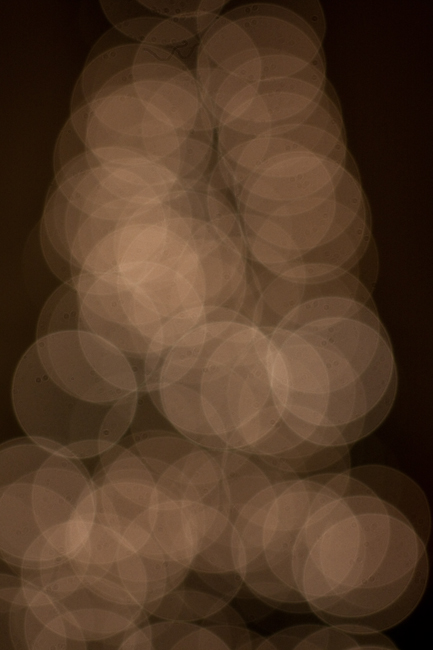
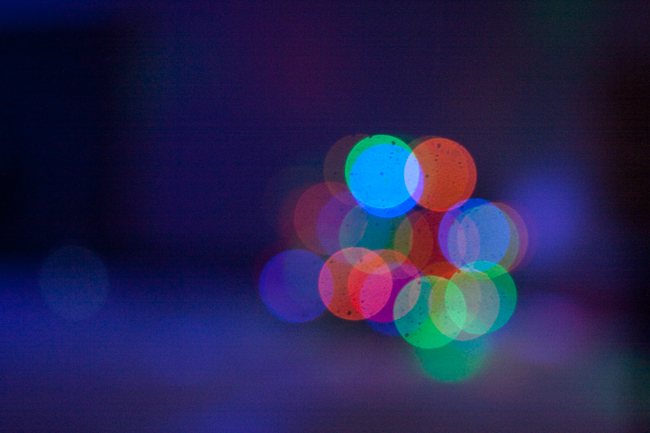
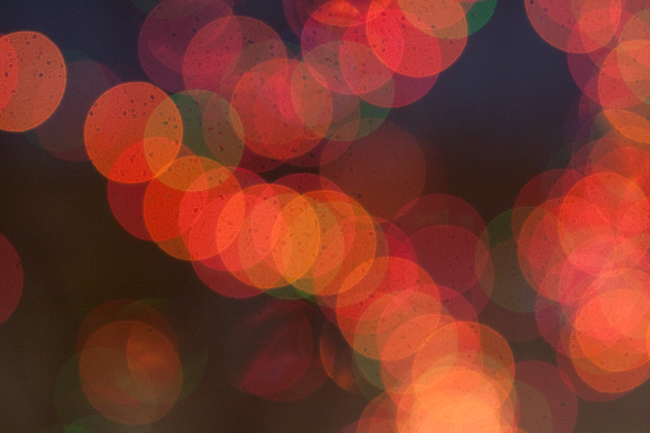
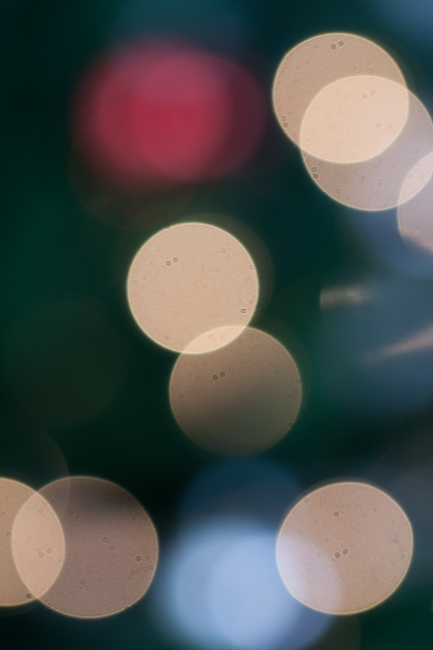
For those of you that may not be aware, bokeh refers to the blurred portions that are out of focus behind your subject matter.  The quality and nature of that out of focus portion can really enhance a photo, and can even become the subject matter itself when looked at creatively.  Now, I‘ve talked here on the blog about bokeh in the past, but in the spirit of the holidays, I thought it would be fun to share some samples of images where I actually forced the entire scene out of focus, to basically make the bokeh the subject:

The Beauty of Bokeh #1

The Beauty of Bokeh #2

The Beauty of Bokeh #3

The Beauty of Bokeh #4

The Beauty of Bokeh #5

As the samples show, you can make some pretty fun use of blur and bokeh.  Shapes lend themselves well, and varieties in colors, as well as monochromes too.  Another thing – when getting bokeh and blur – don’t worry too much about noise and crank the ISO if need be – it’s all about your creative mind.  You can remove noise if you must, but the idea is to capture something in a new way and getting bokeh this time of year specifically can be a lot of fun.  A few suggestions though:

    1. Look for shapes, as suggesting what the subject might really be can catch visual interest by teasing the eye – you know what it is by the shape…
    2. Look for light, because without much variation in light or bright spots, the bokeh will end up looking like just some smudges of a limited tonal range
    3. Use your best lens(es) as these produce softer bokeh – less angular edges, and more rounded or smooth textures, which is usually better for bokeh (“better for bokeh”, did I just say that?)
  1. Shoot wide open, then switch to manual focus and intentionally blur – push the lens further out of focus for variations on your bokeh elements.   Watch what happens and adjust to taste.

So, there’s a few ideas for you – there could be an eBook coming out on this later with more samples and suggestions so let me know if this whets your appetite.  Do you like the idea?  Want to see more?  Get more tips on shooting for the abstract?  Do the photos above help or hurt the idea?  Do you like them or think there are better samples?  Got any of your own?  Feel free to post links to your own libraries of bokeh and blur for everyone to enjoy – there might even be a newsletter mention in it for ya! 🙂

That’s gonna do it for today – coming up later this week, the aforementioned newsletter, another podcast, and much more, so keep on shooting, until then, may your batteries be charged and your memory cards filled with lots of photos this holiday season.  Now get out there and shoot ya some! 🙂

Podcast #35 is now live!

The latest episode of Learning Digital Photography is now live and ready for your download and listening pleasure.  As always, there’s news, interviews, and listener questions and answers – and this time it’s a theme of Treats, Travel and Tips.  I had the pleasure of bringing Andie Smith back to the blog/podcast and we actually had a chance to sit down and really chew the fat on a lot of stuff.

  • News
    • Nikon Contest – $100,000 Giveaway!
    • Saturday Night Live recorded on a Canon
  • Techie Tips for Shooting at Holiday Events
  • Interview with Andie Smith
    • AndieSmithPhotography.net
    • Andie.Smith on Flickr
    • @AndieSmith on Twitter
  • Recommended Reading
  • Listener Questions and Answers
    • Gift Ideas
    • Monopod Recommendations
    • Why the 800×600 Aspect Ratio for Giveaways?

That’s it for today – make sure you go grab the podcast from either the folks at PLM or via the iTunes feed.  I’ve now added a page (check the top header) where you can go grab them if you forget… 🙂

Happy shooting and we’ll see you back here again tomorrow!

[display_podcast]

December Giveaway News

A few days late, but the year-end giveaway is quite exciting as there is just a ton of good stuff going into this giveaway.  Here’s the inside skinny on what the winner is going to walk away with in December:

  • A free copy of the “Within the Frame”, the wildly successful and great book donated by David DuChemin!
  • A free copy of “Visionmongers”, the latest book from none other than David Duchemin!
  • A free copy of Photomatix, the software known for its HDR processing, donated by the folks over at HDRSoft!
  • A free 16″x20″ gallery wrap of a print of your choice, printed (and donated) by the folks over at MPix!
  • and as if that is not enough, the folks at Red River Paper have also expressed interest in joining the gievaway frenzy, so it looks like there will be a paper bundle in the mix too – (more details on the bundle specifics as those come in!)

With over $400 in free stuff, this is surely going to generate a lot of interest, so this go around, the guidelines are a little stricter than normal.  Here they are:

  1. Limit of one photo entry per person.
  2. Also, please make sure your photos are taken during the month of December.  I know – there’s a few days missing, so it’s less than a full month to shoot, but the theme is somewhat appropriate…more on that in a minute. Just remember, no archives!
  3. The  longest side of your image should be no larger than 800px or shorter than 600px.  Don’t confuse this with a 800×600 aspect ratio – the second side of the photo can be any length you want – just make sure the longest side is no larger than 800px and no shorter than 600px.  All entries should be posted in the Flickr Contest Thread.
  4. All entries must be live before midnight December 31st.

So, the theme is all that remains.  Since it’s a season of holidays far and wide, we’re going to go with the theme of:

GIVING

That’s it – interpret however you like.  Just tie in that theme somehow, and enter your best photo in the Flickr thread.  Good luck all, and may the best shot win!  Happy shooting, and we’ll see you back here again tomorrow!  Many thanks to David DuChemin, Mpix, HDRSoft, and Red River Paper for their generous contributions.  Now, let’s wow them with some amazing photography!

P.S.  Just a little reminder that the blog is still taking donations to not only help offset the cost of maintenance, but also now to help pay the bills – the “curveballs” referenced the other day was an abrupt notice that my position was being terminated.  So, please help to keep things alive and online through the holiday season!  I am going to try to get some extra special content out there for everyone so you can also get some use out of this feeble old mind for any donations (or purchases…) but no guarantees there yet.  (Special thanks to Rob Jones from Towner Jones Photography who has already donated very generously to the cause though…)

December Calendar and blog alert

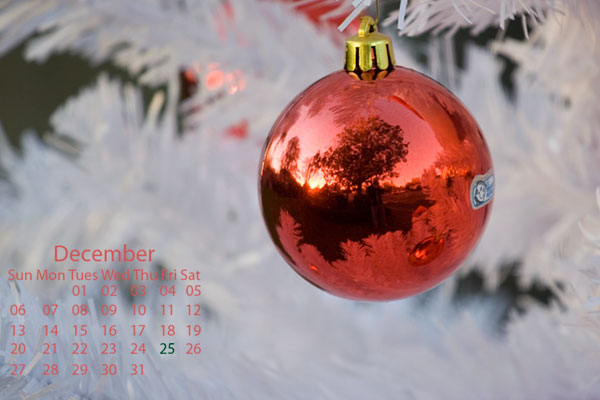
Happy Tuesday folks!  A few curve balls have been thrown my way recently, so the content may shift a little and be more sporadic as I make some adjustments both professionally and personally.  However, in the interests of keeping things positive, the December Calendar is ready for download!  Enjoy the Christmas-themed desktop:

December Wallpaper
December Wallpaper

Here are the dimensions available:

1600×1200 px

1280×1024 px

1024×768 px

And for those of you that know the specifics of the curve ball – there’s a donation button on the sidebar!  If you like the desktop calendar download, feel free to help off-set the curveballs from there directly!

[wp_cart:Calendar:price:2:end]

More content is coming soon for all too, so be sure to stop back regularly!  Enjoy the rest of the week and keep on shooting! 🙂