In the interests of full disclosure…

It recently came to my attention that the FTC commission has taken an interest in the reviews that bloggers provide as unbiased information on the products.  I guess this came about due to some people that gave reviews of products that were actually paid endorsements, and did not disclose this information to their readership.  The FTC is now apparently requiring that all reviewers release and disclose their relationship with the vendors of the products for which they are reviewing by December 1st.

So, in the interests of full disclosure, I have compiled a page to disclose exactly what I get for the review of products written here.  As most of you are already aware, the answer to that is nothing, with a few notable exceptions.  The products that I have reviewed here on the blog are entirely done via donations from vendors (where the products are then put up for giveaways in the monthly contests), or on loaner programs where the products are reviewed and then returned to the company.  The rest of the products I have reviewed are of my own gear which I have already purchased with my own money!

For those interested in viewing the page, it’s titled “Supporters of the Blog and Podcast and is displayed in the sidebar.

*****

Okay, with the legalities out of the way, just a couple other blog maintenance things to mention:

  • The next podcast is going live tomorrow!
  • The latest contest is underway over at Flickr (you can win a free copy of Noise Ninja from PictureCode – the theme this month is Fall)
  • The 2nd issue of the monthly newsletter is also under construction, so if you are interested in being a featured artist, let me know!

Wow – what a bunch of “official” sounding stuff – so unlike me!  Let’s change that up – share with me your thoughts on the FTC position.  Do you like it?  Agree?  Disagree?  Think they are off their rocker?  Call me the fence sitter, but I can see why they are doing it, but I think they’ve taken it too far.  What do you think?  Got any of your own bureaucratic wonders to share?  Sound off  – maybe if we get enough feedback saying that no one likes it, they will reconsider their position on “all bloggers”! 🙂  (Kind of like “rocking the vote”!)

Anyway, that’s about it for today, so Happy Shooting and we’ll see you back here again tomorrow!

Framing your work

Framing your work can be an expensive proposition.  Once you get an archival mat, conservation glass, and a custom frame created for your print – you can start spending upwards of $100 for something as small as an 8×10 print.  Depending on what it is you want to accomplish though, you could easily be spending as little as $10 per print to mat and frame.  Here’s a few things to consider, and some explanations why:

Classics are called classics for a reason – they work!

I like classic looks, and the museum style frame suits that look – a thin black border, simple white mat, and picture inside there.  Not only does it keep focus on the image, but because I can buy these easily and in bulk, which helps keep costs down.  Also, it makes ordering new materials easier (these will never go out of style…)  Even if you end up going through a frame shop, getting a classic style can make it easier to match things up down the road.  So, what if classic is not your thing?  That’s cool too – but remember, the more off the beaten path you go in framing, the tougher it can be to duplicate and repeat down the road (which can also increase costs).

Be aware of the learning curve

Buying things in bulk means you will have to do a little of the legwork yourself.   For instance, say you buy 50 mats from some online reseller and save money there.  Congratulations – but do you know how to mount a print to a mat?  You can tape a print, hinge it, or even super glue it.  Each will have pros and cons, and your results will vary depending on how much you know before dipping your toes in the water – so read up on attaching prints to mats before deciding to DIY.  (Quick tip:  You’ll ne to stockpile various supplies depending on your eventual display method including things like hinges, foam core board, low tack tape, perhaps a few cans of spray-on adhesive and perhaps a few Exact-o blades if you are cutting your own mats to custom sizes.  Heck, they even make mat cutters that you can get at hobby shops!)

Some Supplies
Some Supplies

Don’t Go Overboard

Much like the mat work, framing can be tricky in and of itself.  Making your own mats can be initially be pricey to get all the tools you will need (see above) .  Framing is no cheap project either.  Making your own frames involves getting long lengths of the borders, cutting at precise angles, and making sure it all seams together cleanly.  It requires patience, attention to detail, and specific tools which can be a drain on the wallet (Have you priced a miter saw at Lowe’s or Home Depot?  Even the cheap ones aren’t real cheap!)  So, if you want to go the DIY route, know that some startup costs will be associated with it.

Storage Issues

Physical prints, physical mats, physical frames, physical glass pieces – all of these take space.  How do you store all this stuff and in some semblance of order?  First off – find an understanding and encouraging significant other?  Don’t have one?  Make that a requirement if you do!  The amount of space that is involved in storing not only the obvious stuff, but the not-s0-obvious stuff, can be staggering!  I have so many boxes of materials it really is ridiculous.  It helps to have a system though, and labels are always a good idea.

Shoeboxes make great sizes for lots of things

Never have enough storage

********

So, there’s my trifecta of tips for framing your work. It’s just a starting point, but will hopefully help when you decide to start framing your work for display.  The results can be rewarding, but like anything else,  with a little work, pre-planning and preparedness, you will be well on your way to having a gratifying gallery of imagery!

Some Prints on the Wall

Some More Prints on the Wall

Keep in mind though – I certainly do not have a corner on the tips and tricks associated with matting, framing, and displaying your work…there are many other elements to consider and be aware of.  Just peruse the comments here to see a sample of what I am talking about – oh wait, that means you gotta share your own tips, tricks and ideas in the comments too!  So, sound off – what else do people do when preparing prints for framing?  Any styles that work?  Any vendors to recommend?

That’s it for today…thanks for stopping in, and be sure to stop back again tomorrow for more photo goodness.  Happy shooting and we’ll see you then!

Creative Cram Session

Guilt can be a powerful thing – after the internet outage last night, I felt as though dodging a post today was kind of an easy out, and that would be doing the readership a dis-service.  So, here’s a creative cram session tip for you…

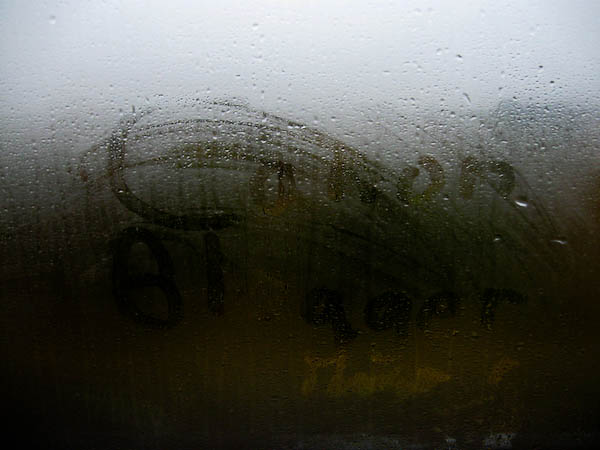
Try writing on a foggy window, then capturing that in camera.  Sounds easy right?  I tried it on the commute the other day (I ride a bus to work – easier on the wallet).  Best I could come away with from a few attempts follows:

Foggy Blogger
Foggy Blogger


Thoughts on the creative angle?  DOes it work?  If so, feel give the fog writing a whirl – I thought the effect was kind of neat, but the balance between the shadows can be tough to pull out.  Feel free to share links in the comments! 

Also, the Noise Ninja contest is underway and the winner gets a free copy of it for the month of October so be sure to share your images of the Fall in the FLickr thread.  Happy shooting and we’ll see you back here again tomorrow.

Internet Outage

As you may have guessed from the headline – sorry to disappoint, but due to an internet outage, I was unable to upload the content for today’s post last night (yes I only write a day in advance…LOL).  So, I’ll be back tomorrow with more photo goodness…

And there’s more!

First there was the blog…  Then video tips got added…  Then a podcast came to fruition…  Audio tips got added…

And now:  A Newsletter!

That’s right, I am happy to announce that the inaugural issue of the Canon Blogger Newsletter (CBN) is now ready for download.  It’s pretty much an introductory issue more than anything else, in hopes of doing three things:

  1. Tempting your taste buds (photographically speaking)
  2. Letting you know what’s in store for future issues
  3. Getting some preliminary feedback

As with anything, the first incarnation will have room for improvement, so here’s what I’d like to know…What are your thoughts on the design and layout?  Content?  Creativity?  Please let me know what you’d like to see as this really is your newsletter!

Here’s the link to…  download the Newsletter Here

Last up, the September contest giveaway is closed to entries and finalists announced.  I am waiting to hear back from the vendors on the grand prize winner, btu while we await that news, the October contest forges on.  This month, the lucky winner gets a free license of Noise Ninja, one of the best known and most widely used software resources for photographers.  Coming from the folks over at Picture Code, this is an $80 value for the Pro Bundle – well worth the money.  To win this, simply enter a recent photo in the Flickr Contest Thread, for October – the theme for the contest is FALL! Good luck to everyone – let’s start snapping!

On that note, hope everyone had a great weekend.  Surely there’s photos out there, so keep on shooting! (Don’t forget to sound off in the comments section with your thoughts on the newsletter!)

Grab the Feed
Follow me on Twitter
Enter the Contest

Blurring Water

An interesting question came cruising through the blog a few days ago.  While the submitter wished to remain anonymous (I asked them if I could share the details, which I always do to encourage any and all questions)…the details of the answer follow here today.  You see, what this person wanted to do was capture an image that included several challenging elements…including windy conditions, early (and late) light, moving water, and a deep need for detail from front to rear.

Without going into more detail, here’s basically what the shooter wants:

  1. High depth of field to capture detail (which requires a high aperture setting (f16 or f11)
  2. High shutter speed to freeze the leaf movement in the trees
  3. Blurred water

If you know anything about the exposure triangle (which we’ve talked about here before – shutter, aperture and ISO), then you know that any hopes of blurring the water with simple exposure adjustments is almost impossible.  WHile it can be done, the result will require post processing because at some point you will need to have a shutter speed where it’s long enough to blur the water.  There are some steps you can take in camera though – through ND filters.

ND Filters (Neutral Density) are basically light stoppers – they cut the amount of light that hits your sensor.  From anywhere by 50% to almost 100% (Check out the Wikipedia chart here for specifics).  You can stack them to net a greater effect (some of the dark ones are pretty expensive).

Even with the ND filters though, the end result will be blur in the water (wanted) and blur in the trees (not wanted).  So, some work is needed in your post processing.  I’ll propose two ways here:

Method #1

Overlay multiple images in Photoshop – Take several bracketed exposures and overlay the parts you want of each image to show through.  You can use the Mask tool to do this.  The problem here is that it can be tedious and time consuming to get things just right.

Method #2

The other way would be to take one image into Photoshop and use the blur tool or some other equivalent plugin (of which there are several), where you can selectively blur the area of the photo where you want it (but always do this on a duplicate layer or duplicate copy – never do this on the originals)…

Kind of a detailed post for a Friday, but one that I thought would be worth sharing regardless.  Did I miss something else?  If you have any other ideas that may be helpful, feel free to sound off in the comments with them as many brains are better than one!  Anyway, as we head into the weekend, there are just a few blog notes to let you know about:

    • The Topaz/Thinktank Contest has concluded, and I am waiting to hear from the vendors on who the lucky winner will be, so thanks in advance for your patience.
    • The October Contest is now under way!  We’ve got a very exciting contest from the folks at Noiseware – makers of the famous Noise Ninja software.  This software is fabulous at reducing noise in your images.  I’ve reviewed this in the past here on the blog, so feel free to peruse the archives for that review.  Why is it exciting though?  Because they are giving away TWO copies of the software – so we’re going to split this one up – one will be given away this month, and another at some yet to be determined point in the future.  The thread is now up in the Flickr Community – so feel free to start sharing your images there.  The theme this month:  Fall
    • Last but not least, a question for the readership – I am putting the final touches on something new and exciting that is coming out very soon for blog readers, but I am wondering if there is enough interest in doing something else as well – a forum!  I know, there’s tons of forums on the web, but I have literally connected dozens and dozens of people with similar needs and interests through the blog and podcast, and thought that CB might be in need of a community where participants and readers can share with one another.  There would also be areas to discuss recent podcasts, to share websites, and other useful online resources with one another – and who knows what more.  The first step though would be in setting it up – but to do that requires just a smidge of work.  The question is – is there enough interest?  So, sound off in the comments, let me know if you would like to see that happen!

      Okay, well this post has turned out to be much longer than I had anticipated, so let me stop rambling now.  Hope your weekend is great, and we’ll see you back here on Monday (hopefully with the new announcement to share)!  Happy shooting and we’ll see you then!