Reviews, Interviews and Vista Views

The latest episode of the Learning Digital Photography podcast is now live and for those of you picking this up in your feeds, make sure you stop over to iTunes or the via PLM to download the show.  This week, I go into a little more depth on how I conduct reviews of hardware and software as there have been quite a few listener questions about that particular subject matter.  Thanks to everyone who wrote in to share their thoughts and feedback!

In the second segment, an interview with fellow photog and NAPP member, Erik Bernskiold where we talk about not only what we like about NAPP, but about how we are gearing up for the summer fun of photography, with tips, tricks and suggestions from Erik on everything from Floral Photography to Landscapes.  We also get a little insight into Eriks’ blogging and web design background as he’s become quite the expert on the subject matter!  Not too bad for someone who’s not even out of school yet!  For more details on Erik, follow these show note links:

Many thanks to Erik for taking the time out of his schedule to sit down and talk with me on the show.  It was a lot of fun!  For the remainder of the show, I throw out some additional tips on landscape photography, and tackle a few listener questions.  Lots to listen to, so be sure to tune in, either from the download over at PLM or via iTunes.

A final little asterisk on the show:  I mistakenly recorded the intro as episode #25, when it’s episode #24.  Also given that I forgot to add the theme music to the entire compliation – it might as well be called the “blunder” show…but rather than spend time on a few minor nits trying to fix it, I’d rather just get the show and respective notes out to y’all for your listening enjoyment.  So, on that note, happy shooting, enjoy the show, and we’ll see you back here tomorrow!

The Un-review Software

This week I am going to talk about the lack of software in the weekly software review.  That’s right – the lack of it! You may be sitting there wondering which software item I am going to talk about, promote, or diss in some way shape or form, but instead of that, I actually want to talk about the general trending of software, hardware, and system resources.  Why?  Because we demand a lot from our computers these days.  Think about it – we want our computers to do many things from surfing the internet, to designing graphics, office functions, building websites, and yes, processing ever-increasing image file sizes.  At what point do we say we are asking enough of our computers?

Lately my main desktop computer had been getting slower and slower and slower, and it seemed no matter what I did whether it was beefing up the RAM, adding a faster hard drive, processor, or the like, and even re-installing the OS every 6 months – it was just getting pathetic.  At one point, I clocked abut 5 minutes for Firefox to start – on a fresh boot!  The culprit?  I am asking my computer to do too much.  I finally said enough is enough – and am re-purposing the computers in the house.  We have a grand total of five computers and each has a unique function:  from Office to web, to image processing, and podcasting.  And that’s just it – each computer has a task.  Yet I have not been disciplined about asking the computer to only perform its assigned task.  I revert to the one desktop and the one laptop.  The end result:  the systems s……l……o……w…… d……o……w……n…….

With a grand total of 78 programs at last count, it’s no wonder my cmputer was screaming “Mercy!”.  So, enough is enough.  I vowed to make each computer perform only one set of tasks, as explained above.  The end result:  removing about 50 applications from the main computer.  It took the better part of an evening (4 or 5 hours) but at the end, the computer is now screamingly fast again – and Firefox loads in seconds, not minutes.  The reason – purposing your computer for a specific software function.

So, instead of looking at adding new software all the time to your computers, you may want to take a look at the computer itself – is it doing the job you want, or are you asking too much?  Think about purposing your resources more efficiently.  Do you really need that HP 3600 printer driver on there from 4 years ago?  What about that trial version of Elements you downloaded a few months ago?  And the 4 instances of Tweetdeck you have there?  Really?  Clean out your software and watch your computer performance increase a notch or two as a result.  It’s just like us humans – we can get more done when we’re asked to do less all the time!  We’re faster, more productive, and yes, more focused on the task at hand.

So, check that installed software list and try cleaning things out from time to time – your computer will thank you!

Happy shooting and we’ll see you back here again tomorrow!

Hardware review: Sigma 10-20mm

The review you’ve all been waiting for – the one to compete with my Canon 10-22mm review from a few weeks back!  Well, there is no clear and decisive winner, so the wind is probably taken out of all the sails of those who were waiting for some smack-down talk.  The reason?  Some aspects I like better on the Sigma, and some on the Canon version of this lens.  So, I’ll refrain from declaring a “winner”, and just give you the lowdown on this lens, what I like, and what I don’t.  So, without further ado: Continue reading “Hardware review: Sigma 10-20mm”

Finally some good news – it’s Friday!

Well, there’s some other good news too.  Wacom delivered the something to me door yesterday to review here on the blog.  I’ll be doing a more detailed write-up for both Windows and Mac in the near future, but thought y’all might be interested in the unboxing – seeing what you get from the good folks at Wacom when you order a:

BAMBOO FUN!

So, here’s a little teaser video for those that are interested:

This might be fodder for an upcoming contest or giveaway, but only time will tell, so keep your fingers crossed.   In the meantime, here’s the rest of the Friday news:

Okay all, that’s it – been a crazy busy week, and I am tired, but also geared up for the weekend.  Happy shooting and we’ll see you back here next week for hopefully a little more of an uplifting series of content!

Grab the Feed

Write it down!

Sorry for the lack of a post yesterday folks – for those of you that Twitter and have me on follow, you’ll know that we had our cars taken out from under our noses (literally while we slept) early Tuesday morning.  By the time I woke up and got dressed for work (at 6) they were gone…

Suffice to say, the wind has kind of been taken out of my sails here, and after an entire day of dealing with police reports, insurance claims, DNA testing (yes, they took DNA from us), finger printing, and pretty much feeling like our private living space was totally disrespected and violated, I didn’t have much of a mood to put anything together for Wednesday.  With another weekend looming large and trying to resurrect some excitement for Tracy’s pending birthday, I am afraid today’s post will be no picnic either, as this is more of a lecture on security.  To make it photo-related, let’s look at it form an inventory perspective.

Say you were the victim of a crime – all your photo gear was taken from you.  Could you produce the records needed to replace everything?  With cars it’s easy, as insurance is in place, titles are held, and banks have documents as well that you can fall back on – but what about other items?  It took some digging through the Mac, but I was able to find the serial number for my iPod.  Do you know your serial numbers?  What about that expensive zoom lens?  What about your SLR serial number?  When was it purchased?  What was the purchase price?  What about the computers?  Software licenses?  Think about it – you’ve invested some serious money into this, whether it’s a hobby or a profession.  Do you have the records to produce in that worse case scenario?  If not, take my experience with the cars and apply it to your gear – write info down!  Update your inventories, and keep records of everything!  Finally, don’t tempt fate – lock things up.  Get a lock box or some kind of safe – and don’t leave things out in the open – it’s just an invitation waiting to be seen and responded to, so take precautions now to avoid lots of heartache and headaches later.  Here’s a sample spreadsheet to get you started:

Inventory Spreadsheet (right-click, and select download or Save as and the file name is “inventory.xls”)

That’s it for today folks – so, sorry for the “downer” of a post, but felt there was something there that could be learned by all of us – so enough of the doldrums now – forget the past and move into the future with positivity – so get out shooting, and be careful out there!  (Hello Hill Street Blues! 🙂 )  We’ll see you back here tomorrow, and hopefully the podcast that I’ve been meaning to finish will go up early next week.  Until then, keep on shootin’ (photos)!

The Business of Selling Your Photos

As economic belts are cinched, and we start spending our dollars more carefully than ever before, I am getting email a lot from photographers asking “What should I be charging for this event?”, or “A client wants a digital negative, what’s a fair rate?”, and even, “How much is my work worth?”

Truth be told, the economics of photography sales are just as much a mystery to me, and I don’t have all the answers.  But I know a few things about where to start, and how to research.  First and foremost, is to know your market.  Are you working in NYC, or in Duluth MN?  Have you looked at other photographers’ websites?  What are they charging?  Are they start-ups or established companies?  What kinds of services do they offer?  What kinds of services do you offer?  Do you provide print fulfillment or is that out-sourced?  What is your overhead?  Cost of equipment?  Cost of training?  The whole 9 yards – it’s a lot to filter.  Well, here’s some software that can give you a leg up in that regard – FotoQuotePro.

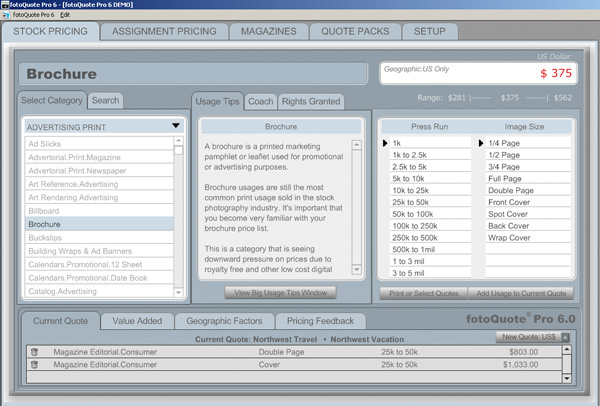
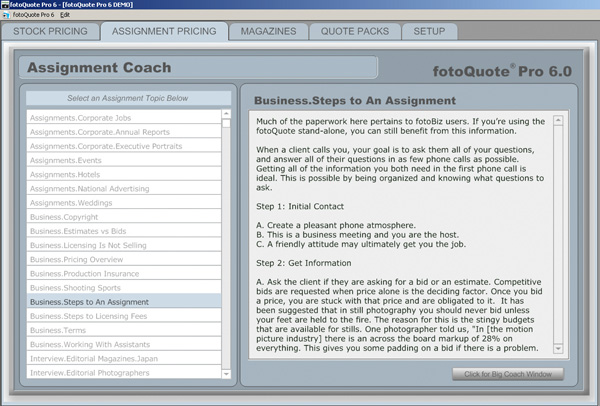
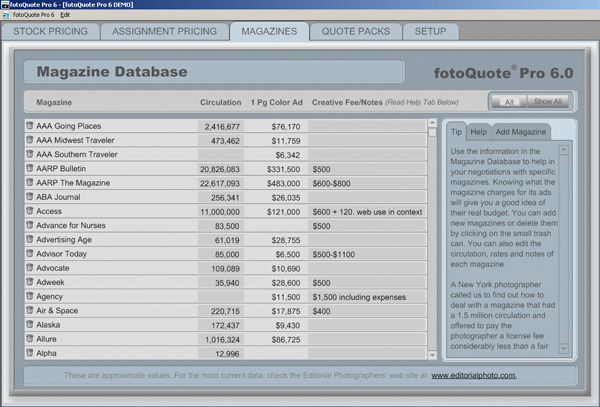
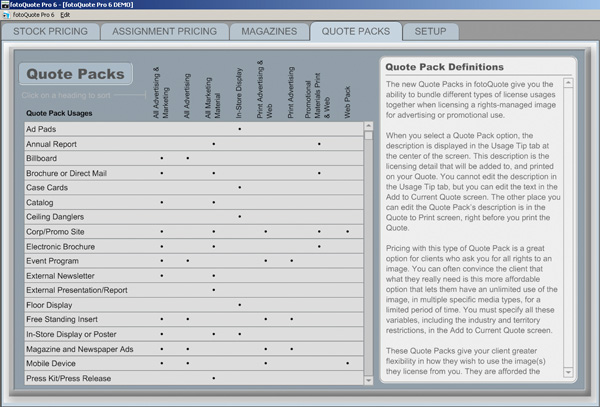
This software is very well designed and offers you rates for a wide variety of publications, ranging from magazines, to journals, brochures, quarterly reports, and a plethora of other variations.  Quarter page prints, half page, full page, distribution of media, and many other factors are tallied in to help Fotoquote determine your rate.  Granted this may not help the startup in portrait work, but if you are looking to market your work toward commercial and stock sites – this is definitely the software for you.  And now, in a special offer here at the blog – I’ve been able to garner a 33% discount for some lucky listener.  That’s right…33%!!  It regularly goes for a price of $150, and the good folks over at Cradoc Foto Software have generously donated a discount code.  Rather than buy and install it myself, I would like to pass this savings on to some lucky reader of the blog.

So, here’s how the winner of the discount code will be chosen – post a comment here at the blog.  Say what you like about the software, why you could use it, or simply introduce yourself to the rest of the readership.  This particular post will take comments through the end of June, so you have about two and a half weeks to get something out there and get a chance to win the discount code.  In the meantime, head on over to Cradoc Foto Software and download a trial to see what the program is all about.  In the meantime, here’s a few screen shots from the demo version to show you what they have to offer…

Tab 1 of FotoQuote Pro
Tab 2 of FotoQuote Pro
Tab 3 of FotoQuote Pro
Tab 4 of FotoQuote Pro
Tab 5 of FotoQuote Pro

Happy shooting, and we’ll see you back here again tomorrow!  (Oh yeah, and don’t forget, you can also share your thoughts and suggestions for future hardware and software reviews that take place right here on the blog!  Let me know what you think as it’s the contributions of readers that make this such a fulfilling blog – who knows, there might be a giveaway in that too!)

Grab the Feed

A dash of splash

First up – another web gallery of water drops – this time with a neutral black background that I developed in Lightroom.  I am tellin’ ya – this product is just too cool!  Photo management, editing, tagging, and gallery production all in one – what’s not to love?

Also up today, a little shout out to Dave Zarzacki, who owns a like new Canon XSi in mint condition, but just doesn’t need it in his gear bag (he’s trying to round out his collection with an SLR that will take all his current lenses).  It’s a great deal which includes the following:

  • XSi body (black) – $640 value from B&H
  • Canon 18-55 IS lens – $60 value as part of above kit from B&H
  • Tiffen UV filter – $7 value from B&H
  • 2 4GB SDHC cards – $25 value from Amazon
  • Gary Fong Puffer flash diffuser – $20 value from B&H
  • M-Rock Yellowstone bag ($54 value)

Individually, this would sell for over $800 easily, and Dave is only asking for $650 plus shipping.  I know the guy personally and can say that he knows how to take care of gear – this stuff will not have a scratch or scuff and will work as though new.  A great deal for someone starting out!  Any takers?  Drop me a line to get his email address and information.

Finally, for today, the Sigma lenses are in, and I can’t wait to start the review process on these this weekend!  Already found a few features that are just too cool for school!  Some other gear review items are on deck too – but I want to hear from you!  What do you want to learn more about in the way of products, gear, accessories, and such?  Sound off in the comments or with me via email!

Happy shooting all and we’ll see you back here tomorrow!

Grab the feed

Coulda beena contenduh

Actually, all 53 of the images that were submitted to the Lightroom Giveaway I’ve been taking entries for on the blog were contenders.   Truly some great images were submitted to the Flickr Thread for the giveaway I’ve been hosting for the past month.  Some really great images.

The rules were simple:  Take any two pictures you like in May, share them on Flickr thread (& be family/work-safe) and you are eligible to win a copy of Adobe Lightroom – courtesy of the good folks over at Adobe (especially Tom Hogarty who was kind enough to make an appearance on the podcast to talk about the product and to take so many listener questions!

Anyway, I said that after the close date (end of May), I would pick the ten images I thought were best and forward those on to him for a grand prize winner decision (not that there’s a 2nd place, runner-up, or anything like that).  well, in perusing the images Monday and Tuesday, I really couldn’t decide on ten.  There were just too many images that I felt deserving.  Such is the case of contests and giveaways though – and the role of judge is a lot harder than I thought it would be.  But, I did winnow the entries down though – just couldn’t go lower than 14.  So, without further ado, here are the 14 finalists!

Lightroom Giveaway Finalists

Naturally, rather than display the images in the blog, I figured it’d be appropriate to do so in a web gallery, created at the hands of Adobe Lightroom!  Hopefully, this will also give people a little more insight into not only Lightroom, but into critiquing your own work and prepping contest submissions.

That’s it for today – congrats to all the finalists, ant thanks to everyone who participated – it was a lot of fun to see everything.  We’ll see you back here again tomorrow, and hopefully I’ll hear from Tom soon on who the lucky winner is for the free copy of Adobe Photoshop Lightroom!  Keep on shooting, and we’ll see you back here tomorrow!

Grab the feed

Airtight Viewers – Web Gallery Options Reviewed

Initially, this week was supposed to be the second in a series of software review posts to take a more detailed look under the hood at Photoshop Elements as an alternative to Photoshop Creative Suite.  Truth be told though, the more I poke under the hood with Adobe’s Lightroom, the more hooked I get.  One of the absolute best features (in my opinion) is the web gallery options available to you in Lightroom.  The options are endless!  You can go from standard HTML, to Flash-based templates, and hybrids, with customizations galore.

One of my favorites though, is how Adobe integrated a certain type of web gallery – those from Airtight Interactive.  Not sure what the deal was, but the delivery of images via these methods is just amazing!  So amazing, that I had to visit the website of the developer a while back just to see for myself.  The best part is that this guy developed even more than what’s in Lightroom.  I literally could get lost in these viewers, and as a fan of imagery – cannot imagine anyone similarly inclined that would not just love these displays.  Easy to install, a snap to finish, and Adobe Lightroom integration – what’s not to love.  Rather than go into the nitty gritty details, I’d rather just let the products speak for themselves in a few web galleries I put together.  There are four main ones, with three having Lightroom integration:  Simple Viewer, Tilt Viewer, Auto Viewer, and Postcard Viewer.  Each holds appeal for me, and depending on the imagery I am delivering, I can see where each may be the one of choice.

Airtight Simple Viewer

For me, the go-to one is the Simple Viewer though.  Clean, simple, easy lines, and somewhat traditionalist, the simple viewer allows for intuitive and easy navigation while delivering your images with precision and clarity.  This type of display option is great for people who enjoy looking at images, but also don’t want to have to think about how to do anything.  Just click and serve up the next image.  Clean, simple,and to the point.  Artistic types and non-artistic types alike will enjoy this for the ability to rapidly peruse many images fluidly and easily.  No muss, no fuss, just photos!

Here’s a sample gallery from a little photo project I did over the weekend.

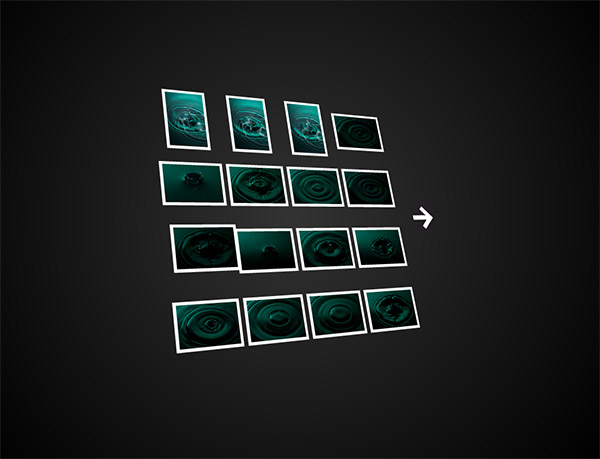
Airtight Tilt Viewer

A little tricker to manipulate for the one viewing the show, I can see why Adobe didn’t want to incorporate this one into their web presentation.  Where the Simple Viewer is easy to manipulate for even the most simple-minded, you   actually have to have a little acuity and dexterity to maneuver your mouse to control this slideshow.  I think portfolios that would work well with the Tilt Viewer are ones that are are more edgy and off the beaten path.  The grunge type look is pretty popular right now and these galleries work well in this kind of display because the viewer that comes here is more artistically inclined to begin with, so they probably enjoy the “tilted view”.

Here’s another sample gallery from that photo project I did over the weekend, as well as the preview of it in a browser:
Airtight Tilt Viewer Preview

Airtight Auto Viewer

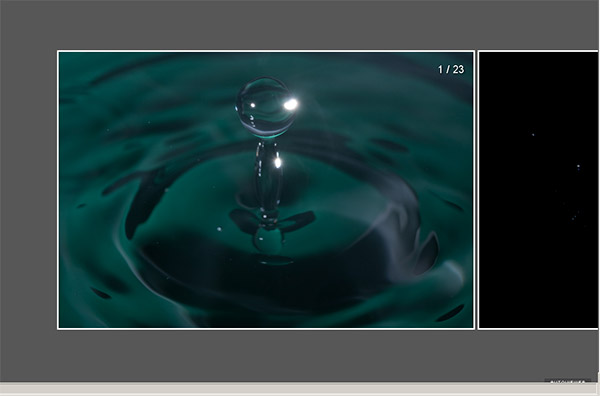
By its own definition, the auto viewer is  “designed to display a linear sequence of images and captions”.  Photo journalists may find the chronological characteristics of their work to fit well in this viewer, as would sequential types of shots.  Event photographers would find some appeal in this also because it delivers up a single image at a time, which gest every image some “face time”, whereas the Simple Viewer is more of a mass display where the viewer can just pick out their favorites to view closer.

Here’s that same gallery viewed in this style.  Because of the nature of this project, it actually may look a little disjointed, but only because I purged out some less than desirable shots before creating each gallery, so there could appear to be gaps.  When approached from a more journalistic approach, that element could easily be managed with more inclusion.  For RSS readers, here’s a snapshot of the gallery in a web browser:
Auto Viewer Preview

Airtight Postcard Viewer

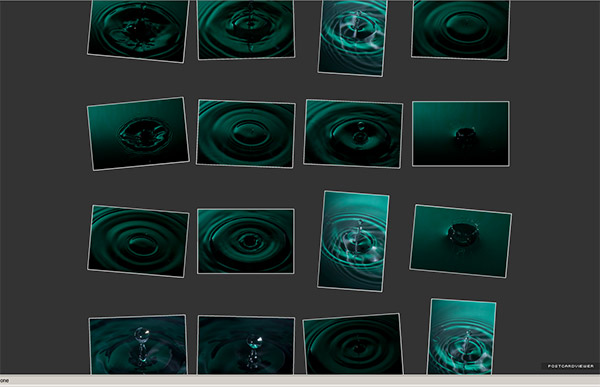
Here, the gallery has a great blend of classic photo gallery look and feel, while also incorporating a more “regular” sense to it.  The very name “postcard” suggests that anyone could look through this album and feel like they were a part of it.  Journalistic styles and event work would find appeal here again, but this style also lends itself toward the enthusiast or “prosumer” who wants to share their works with family and friends, but wants to do it with panache or style.  My only nit is that you only get one page of photos in either the LR or PS versions so images will extend above or below your page limit.  So, with this in mind, keep your galleries under the 20 count or keep the images smaller.

And finally, the photo gallery from this perspective, and a quick view:
postcard

*****

Having seen and read about each flavor, it’s your turn now.  What do you think of this approach toward web galleries?  Any particular favorites out there?  What about other web gallery options?  Any alternative approaches that people find unique or that offer an interesting way to display images?  Sound off in the comments, and let me know what you think – one may just end up getting reviewed! 🙂

In the meantime, happy shooting, and we’ll see you back here tomorrow!

Grab the Feed

Impact Lightstand – Hardware Review

This week’s hardware review is the Sigma Lightstand.  Specifically, the Impact 8 foot Air Cushion Lightstand.  While you may think that this is something that wouldn’t garner much discussion – I actually have found this to be a very handy tool.  “Tool?”, you ask.  Yes, a tool.  Sure, it’s primary function is to hold lights, but look at the variety even there – I’ve used it for small flashes (like my 550 EX II), studio strobes from Smith Victor, and water bags.

Lest you do a double take, that’s right, I used it along with a makeshift boom (arm that extends out to the side) to hold a water bag for a photo project.  The point is, light stands, like tripods, can function in a wide variety of capacities.   While I tend to shy away from making generalizations because I know my own gear experiences are unique, for me the biggest difference between a light stand and a tripod is weight and stability – light stands seem much lighter and aren’t as stable.  I am sure there are some high end light stands that provide excellent stability and can weigh a decent amount, but this one that I use is pretty light:

lightstand

I’ve linked the photo to the item at B&H (Item #IMLS8AQ  ) for those that want all the detailed specs, but here’s my two cents.

Pros:

  • Weight – these things are super light, and very easy to move around.  I could literally pick one of these up with one finger.
  • Extension – this basic model extends up to eight feet tall and compresses down into a shade under 3 feet.
  • Cost – very inexpensive, running a mere $35 from B&H Photo – small price to pay for an assistant
  • Size – this collapses down so small, I can fit my tripod, my monopod, umbrella, and this all in an over-the-shoulder bag!  Compactness is a plus, especially when travelling!
  • Functionality – aside from the obvious funtion of holding lights of various sizes, with a small clamp, you could hold pretty much anything from lights to grey cards to reflectors, to booms with water bags.  Heck, you can even jury-rig something from your garage or storage shed to make this guy hold pretty much anything for you.  So much for the photo assistant, eh?

Cons

  • Weight – yep, while a pro, it’s also a con – because they are so light, the can get easily bumped out of position or knocked over.  While using it with the boom/water bag for a weekend project, I bumped it ever so slightly with my foot and everything got knocked out of position.  Not by much, but when your DOF is a mere quarter of an inch and you are zoomed in tight on a water drop, one little bump requires re-setting everything from scratch again!
  • Workmanship – I was rather disappointed when I was going to pull out one of the extensions one day when the whole top pulled off the bottom legs.  It seems the nuts that are used to anchor legs and extensions into position weren’t tightened down all the way and as a result, a firm yank can pull it off the assembly.  Then, when I went to tighten it back down – the plastic collar that the screw/net combo fits through cracked on me.  *Sigh* Ah well – it still works, and I just have to make a mental note not to pull on the extension too roughly as the top will pop off.  But, what do you expect for $35?

Bottom line – I’d recommend this for people needed an extra set of hands from time to time.  If you are into off camera lighting (and after Wednesday, you should be!), then a light stand is a must – and this is a great entry level one that will fit your needs indefinitely, because even if you upgrade, an extra set of hands is just a few seconds away.

That’s it for today – make sure you stop in tomorrow for the next installment of software reviews!  Happy shooting and see you then!