Wanna Get Lucky?

How many times have you seen a picture where it just made you say “WOW!  I wish I could capture something like that!”  And, you ask the person, “How’d you get that shot?”  Typically you’ll get an answer like “Just got lucky I guess.”  Well, I am not sure I buy into that.  Does luck really factor into taking good pictures?  Perhaps on rare occasions it does, because as the old saying goes, “Even a blind squirrel can find a nut occasionally”

But consistently taking good pictures requires more than luck.  It requires certain key elements that anyone can incorporate to increase their “keeper ratio”.  Today, I’ll look at 5 ways to increase your keepers.  So, here’s 5 ways to get lucky!

  1. Plan ahead.  Just the mere act of planning for a shot can help.  If you know you’re going to be in the mountains, take a wide angle lens with you.  If you know you’re going to be at a party, take that nifty fifty.  Wildlife?  Take a zoom!  Remember, prior planning not only prevents poor performance, but it also can help you take better pictures.
  2. Learn the technical stuff.  Know the technical stuff.  Memorize it.   There are certain fundamentals you just have to know, and by taking that sundry stuff and migrating it to a point where it’s in the back of your head and you don’t even have to think about it, then they can become tools.  If you understand apertures inside and out, then you can really use depth of field to create better pictures.  The same goes for planes of view, angles of view, composition rules, and all that other stuff.
  3. Take lots of pictures.  As the old saying goes, practice makes perfect.  So, stop reading forums, blogs, magazines, books, and all that stuff from time to time (except for my blog of course!), and get out there and practice, practice, practice!
  4. Look at the pictures of others.  Not only is appreciation of others work inspiring in its own right, but you can also train your eye to see what makes some images just “work”.
  5. Dedicate some time each day to do something related to photography.  It can be any of the above, from taking pictures, to editing pictures, looking at the works of others, studying your manual (learning about apertures, shutters, etc.), or any other photography-related ideas.  You can only improve your skills by repeated use.  Since I’ve referenced other idioms, another one could apply here:  If you don’t use it, you lose it.  Just like musicians who practice every day to get better, if you don’t practice your craft regularly, you won’t get better.

So, there you have it, 5 ways to improve your luck.  And this is just from my own perspective.  As is always the case when it comes to opinions, there are probably many more out there.  Got your own ideas about ways to “get lucky”?  Share them in the comments section or via email.  In the meantime, Happy Shooting – hope everyone can “get lucky”!
Recommended Reading

Ever get the feeling that you are spending too much time at the computer, but you still are thirsting for knowledge? Well, for those of us that grew up before then internet, we had these great things called books! It goes without saying that there are literally thousands of books about photography, both film and digital. As in all things, the cream really does rise to the top though. Over the past 3 or 4 years, I have found myself constantly referring back to and seen others reference these, which in my mind means that they are well-worth the time spent lost between the pages:

Technical Texts

  • The Digital Photography Book, Vols. 1 & 2, Scott Kelby
  • Nature Photography Field Guide, John Shaw
  • Understanding Exposure, Bryan Peterson
  • Complete Digital Photography, Tom Ang
  • Light and Lens – Photography in the Digital Age, Robert Hirsch

Creative Inspiration and Understanding

  • The Photographer’s Eye, Michael Freeman
  • The Photographer’s Eye, John Szarkowski (Yes, the same title but different author)
  • The Camera, Ansel Adams
  • The Negative, Ansel Adams
  • The Print, Ansel Adams

Workflow, Organization and Purpose

  • The DAM Book -Digital Asset Management for Photographers, Peter Krough
  • Raw 101 – Better Images with Photoshop and Photoshop Elements, Jon Canfield
  • The Photoshop CS_ Book for Digital Photographers, Scott Kelby (where _ = your version, whether CS, CS2, CS3 or now CS4) – great beginner reference
  • Shooting and Selling Your Photos, Jim Zuckerman

Naturally, we all learn differently, and we all enter the field at diferent points along the never-ending learning curve, but some of these may be really useful and I would encourage you to use them, whether for a doorstop, a reference, or a bible!  With that in mind, I’ll throw this out for others to include their favorite books – they can be technical, inspirational, organizational, or any “ional”, as long as it’s related to photography!  What are your favorite books?

Multimedia Monday

With the “New and Improved” podcast starting out at PLM this week, there’s a couple exciting things to announce. First off, the drawing for the Think Tank Photo Streetwalker bag was done live on the podcast this week, and the winner was announced in the lead segment. Congrats go out to the winner (you know who you are!), so do get me your address so I can ship you the bag post haste!

The meat segment (aka middle segment) I talk about some new sources of inspiration – specifically the grocery store and in a restaurant. The next time you are at a restaurant, take your camera because the table makes for a great tripod, and you can get some really cool shots. Case in point, is the new gallery I have set up here at the blog, titled Tabletop Photography. I’m also sharing a few sources of inspiration from the grocery store too (tune in tomorrow for those).

The listener questions were really good ones from Meredith and Jason, where I take a look at the value of carbon fiber and the issue of when and where are we permitted to photograph. Last but not least, the photo tip of the week concerns copyright and registering your work, so make sure you stay tuned for that.

Lots of photo goodness to share, so make sure you tune in for the audio, and stop by the blog to pick up the link for the photo gallery. Photos, podcasts, and questions galore. Enjoy the day and we’ll see you back here tomorrow! Happy Shooting!

The Crop Factor…

First off, my apologies for the absenteeism yesterday.  After a really fun photo shoot with some friends in downtown Denver (more on that next week), I got home super late (by working standards – my shift is 7-4 and I need to take a bus an hour to get there…so I leave at 6, which means I am up at 5!), and went almost straight to bed!  Hopefully the content today will make up for this, because it’s time to talk about (cue fanfare music)…the crop factor!

Now, before anyone gets all uppity because sensor crop factors have been discussed ad infinitum, just relax, because this isn’t about sensors (well, a little, but indirectly).  I am talking about cropping your pictures in camera.  We all do it, often to improve composition, or to focus in on one area of an image – but what about those undesired crops?  What am I talking about?  I am talking about images where it looks really great “in camera” but when you go to print it, the native aspect ratio won’t work for the size you want to print to.  See, most SLR cameras (non-full frame anyway) have roughly an aspect ratio of 2:3.  This means that you can print at this ratio without losing anything in your image.  But, if you want to print at a different aspect ratio, then something has to be cropped out.

So, what aspect ratio will work with the 2:3 proportions? Who all remembers their grade school math?  All you have to do is multiply each side of the ratio by the same number.  So, prints that work are …

  • 2×3″ prints (2:3 x 1:1 = 2×3)
  • 4×6″ prints (2:3 x 2:2 = 4:6)
  • 6×9″ prints (2:3 x 3:3 = 6:9)
  • 8×12″ prints (2:3 x 4:4 = 8:12)

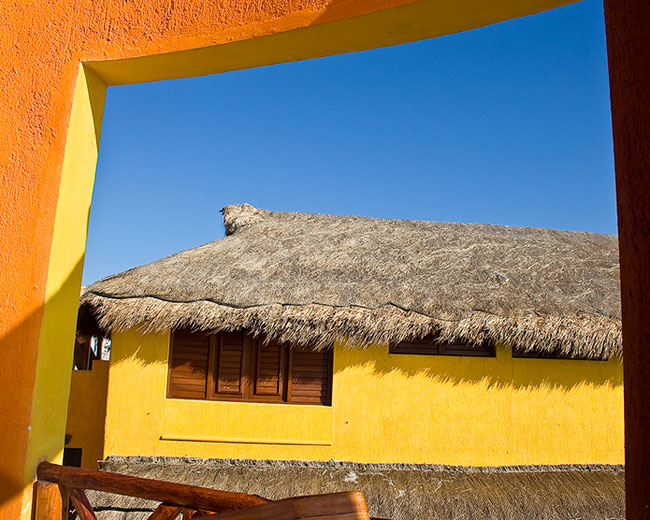
You get the gist…but here’s the thing – the only “standard” print size that really fits our native camera aspect ratio is the 4×6″ print.  What if we want an 8×10″ print?  Well, cropping is required then.  This means losing some of your image.  So, this also means that you need to think about this during image composition in camera – if you like it – and want to print it – remember to frame things so that the crop won’t lose key elements of the picture.  Here’s a perfect example:

isla_original

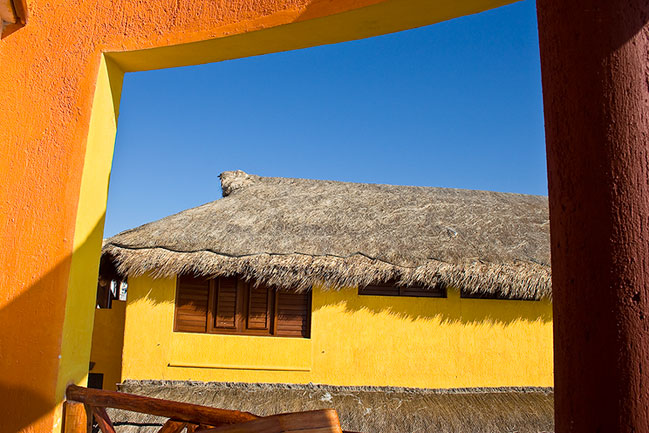
I took the above shot on a trip down in Isla Mujeres.  I absolutely love this shot.  The problem is that my proportions are lost when I crop to print an 8×10.  Take a look at the 8×10 crop:

isla_crop

It still looks pretty good, and I love the colors still, but some of the impact has been lost by cropping out the frame on both the left and the right.  See how the brown “framing element” has been lost?  I could have cropped less on that side and more on the orange side (even though the orange side is still cropped to a degree), but hopefully you’ll see the difference easily enough because it’s really the orange, yellow and blue that I think are the fundamental colors that hold my eye for this shot.  Suffice to say, I still loved it enough to print and frame an 8×10…but that’s not the point here.

The point is to try and remember to frame your composition in camera with “the crop factor” in mind.   By taking these measures into consideration, you can really have many more printable memories.  So, when you go out shooting this weekend, keep the crop factor in mind.  Happy shooting, enjoy the weekend, and we’ll see you back here on Monday!

CB Equals PLM

newpodcast1

As previous posts have indicated, the time has been approaching where the podcast will be moving from being hosted here at CB over to Personal Life Media.  After some of the initial duplicating of audio posts from here over to PLM, the feed is nw prepped and ready for migration.  I’ll still have original copies of all podcasts, both video and audio here, but as we move forward, future audio podcasts will all be hosted by the folks over at PLM.  I’m looking forward to the partnership, and hopefully it will result in better quality both in podcasts and in blog posts for the listening and reading audience.

As the tentative schedule yesterday indicated, some initial podcasts (14 total) will be repeats, but starting next week, all-new content will be posted over at the new site.  You can bookmark it directly via your web browser or pick it up in iTunes at the new addresses below:

Via the web:  http://personallifemedia.com/podcasts/516-learning-digital-photography

Via iTunes: http://feeds.feedburner.com/Learning-Digital-Photography

I will continue to post content here on a regular basis, to inclue photos, articles, photographer interviews, product reviews, contests and all the content you have enjoyed for the past two years.   The days that podcasts come out though, the blog here will become the repository for show notes, so there will be some minor adjustments as I massage the schedule to accommodate those ends.  It looks like the podcast date will also shift once again to Monday for publication.  I think this makes 4 of the 5 days of the week where I have tried publishing, so we’ll see how it goes…  If things need to change again, I’ll be sure to keep everyone up to speed here on the blog.

So, that makes two maintenance and housekeeping posts in one week, but now that things are “official”, figured I’d better let everyone know to update their feeds accordingly – if you like the blog posts, then don’t change a thing.  If you like the podcasts, then update your feeds.  If you like both, then just change a little bit.  Regardless of whether it’s the blog, the podcast or both though – never forget to go out shooting!  (That’s what I’m doing tomorrow), so thanks to everyone for all the support and we’ll see you back here again tomorrow!

Just When You Get Caught Up…

Life throws more at you!  Today, I got word from the good folks over at Personal Life Media, that the web page is now set up and ready for porting the pre-existing podcasts from CB over for their hosting.  Unfortunately, they can only take the audio, so video will have to remain here.  It also means a naming convention change, so here’s the shows by blog post title that will be ported over, their existing Track # and their Future track #:

  • Noise Lighting and Links, Oh My!, #49  – will become Episode #1
  • Monday Morning Quarterback, #54 – will become #2
  • New Podcast is Up, #55 – will become Episode #3
  • Don’t Fear the Forums, #56 – Will become Episode #4
  • Nitty Gritty Details, #57 – Will become Episode #5
  • Photowalks and Software Cycles, #58 – will become Episode #6
  • Creative versus Communicative Process, #59 – will become Episode #7
  • Money, Socializing and Freebies, #60 – will become Episode #8
  • Cool Christmas Cards and other Candy, #61 – will become Episode#9
  • Food for Thought, #62 – will become Episode #10
  • The Final Broadcast of 2008, #63 – will become Episode #11
  • The Show Must Go On, #64 – will become Episode #12
  • The Meat is in the Maintenance, #65 – will become Episode #13
  • Three Competing Interests, #66 – will become Episode #14

I am in the process of porting the audio files, blog post materials, and links over to the new interface, so it may not show up completely yet. You know what they say about an ounce of prevention though…  I’ll probably also make the above bullet points a dedicated reference page to refer to here on the blog for those that may want to see how the migration goes.

When things go live, I will make sure to cross-post here with the new URL, iTunes, and RSS feeds.  Rest assured though, fellow photogs, CB will not be let go though as I will continue to make my regular posts here including photos, articles, text interviews, and other photo goodness.  Thanks to all for your patience, and if you want to get a sneak peak of the new look of the show, you can peer through the fence here

While it may seem like there is a lot of work involved in this proces (and there is), in the long run it will be well worth it for everyone because the resulting show will have much better audio quality, and we’ll gain access to a wider distribution, which means sponsors, contests, and really cool product reviews.  I may as well go ahead and spill the beans in the form of a teaser – so look for some upcoming professionals to give some insights on Lensbaby and the Composer!  This also means discounts on purchases, and free give-aways too, so listeners can enjoy discounts, insights, and feedback from working professionals, enthusiasts, and many across the industry.

Three Competing Interests

Episode #66 of the Canon Blogger Podcast Series (CBPS) is up and ready for download.  In this weeks’ show:

  • The three competing interests of quality, quickness, and cost.
  • Is grey market gear a worthwhile alternative for decreasing overhead
  • Blog and Podcast notes, including an update on the Think Tank Photo Streetwalker Contest
  • Listener questions, and the Photo Tip of the week, covering dark prints and the DOF preview button.

On the blog front, for those of you who had been suffering through the feed breakdown – I figured out the source of the problems, and was able to reconcile the feed XML file against iTunes.  So, the history of shows is up again back through May of 2008.  As I go through more Archives of both audio and video podcasts more should come back to life as time permits.  If anyone would like to hear a specific subject addressed in future podcasts, please feel free to share your thoughts with me in the comments section or via email.

Another little tidbit – the graphic for the “Archives” of all blog posts and for the “About” page has been changed too, so be sure to stop over there and see the new layout!  Lots of fun stuff from over the weekend to share!  The final bit of news is that a fellow NAPP’er will be in town this week and we’ll be getting together for a mini photowalk here in downtown Denver.  So, if anyone is in the area and would like to join us – drop me a note and I’ll get you the details.  Hope everyone else had a fun weekend.  Happy shooting and we’ll see you back here again tomorrow.

[display_podcast]