No blog Thursday – smelling the flowers (and shooting the moon!)

Sorry all – after my Jalbum tutorial hit on Wednesday, I spent the better part of my afternoon and evening talking with some of their folks – and they want me to do a few more videos for them. I excitedly started talking logistics, and details before putting together a few short versions for use on the website. At 11:30, I realized – egad – I’ve not done my Thursday Thoughts yet!

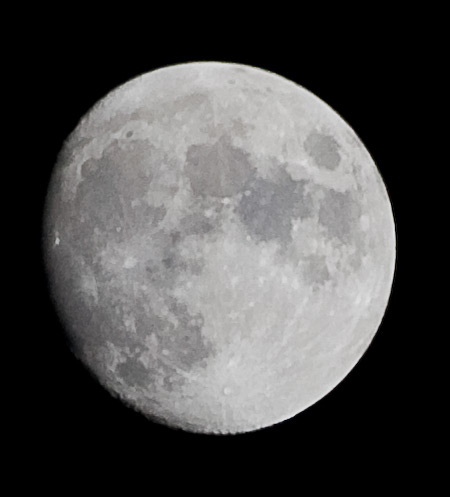
So…rather than try to cobble something together at the last minute, I’ll make this a no blog Thursday, and suggest that if you are still up, go outside and look at that moon! Man it’s gorgeous!

moon.jpg

Wednesday’s Webinar

Okay, it’s not really a webinar, it’s a tutorial, but since I usually publish the tuts on Tuesdays, I had to come up with a clever name for the post title, and webinar was the best I could think of…it’s corny, but what the heck.

This week, the final installment of creating web galleries using different applications. Previously, I had looked at how to create web galleries using both Photoshop and Lightroom, and discussed some of the basics involved there, as well as some of the pros and cons of each. In this third and final segment, I look at an open-sourced option called Jalbum. This actually turned out to be a really cool application with some features built in that just made me say “Now hey, that’s cool!” For starters, you can add a comments section for your photos – great if you want to get a dialog going. You can also include a shopping cart and a link to a paypal site for people to not only check off what they want to purchase, but also complete the transaction. Very slick and clever implementation here. I wish the folks at Adobe had thought to incorporate this sort of feature in Lightroom – I can’t imagine a professional photographer not wanting to sell their work, so am wondering why Adobe seems to have missed the boat on this one. Perhaps when LR 2.0 comes out of beta, this will be an incorporated feature. (Is anyone at Adobe watching?)

After watching the video, you should bounce back here to the blog, so please feel free to share your comments on the video. Did you like it? Was there anything I missed that you would like to see? Too much material, not enough? Did I talk too fast? Let me know if you have software or applications you would like to see featured as I can usually find a trial version or something to go over some of the basics. Comments section or email, as always are encouraged. We’ve also only got two weeks left in the camera quantity poll, so don’t forget to vote!

Anyway, enough teasing and hinting of what’s to come…I bid you adieu and happy shooting until next week as I give you the full tutorial on creating web galleries with JAlbum! (don’t forget to watch those apertures…)

View Jalbum tutorial online (flash-based)

Photo Tuesday (to take your mind off taxes)

Since I devoted Monday’s post to the Photography and Photoshop Blogroll report for Jason D. Moore, my other announcement got shifted back a day, so this week things will be a tad more compressed. I’ll try not to bore you with excessive links and heavy-handed material where you have to read a lot. That means – it’s Photo Tuesday! (The tutorial will be released Wednesday…since there’s no “Wednesday Web Gems” for the theme.) Besides, since it is a blog that I am pretty much writing single-handedly, I can change things up if I want, right? 🙂

So…for Photo Tuesday I thought I’d announce that I have a new gallery of photos put together on my dedicated photo site. The site portal is here: www.jasons-photography.com and the latest gallery addition is here. Please take a moment to stop over and then share your thoughts with me here (or via email) on the shots. Too many? Not enough? Layout? Treatment? Etc.? I’ve collected these images over the past 3-4 years and finally have enough (I think) for a dedicated gallery of wildlife. As a teaser, here’s a few thumbnails…all taken from my Canon XT and processed through Adobe Lightroom 2.0 (Beta)

_mg_1413.jpg

_mg_9028.jpg

_mg_9331.jpg

As a final reminder, it is tax day here in the U.S., so if you haven’t done your taxes yet, today’s your last chance to get them in legally.  If you’re a last minute kind of person, this is pretty much it!  Well, that’s it for Tuesday – happy shooting and watch those apertures! 😉

Sunday/Monday Round-Up

p_and_p_weekly.jpg

A fellow blogger and photographer, Jason D. Moore, is out on a project this week and asked for some help in writing his weekly P&P (Photoshop & Photography) blogroll which comes out every Monday. With so many interesting and inspirational blogs and resources out there, I could hardly say no, so, this Monday I am happy to fill in for Jason in that regard. Andrew Smith is covering the first half (and is already finished, thereby indicating my slacker status), so be sure to stop over there to see what his half of the round-up includes. Since this took a little time to put together, I obviously had this done before Monday morning, so decided to post here on Sunday to catch the end of the week-end crowd. So, without further ado, on behalf of Jason (and Andrew), here is…

Jason Moore’s Weekly P&P #72:

· Photo Two-Twenty Kinda interesting blurred and shallow focus captures form a track meet. If you’re into abstract works, this is definitely one you should stop on over to see.

· PHOTOBLOG by Jim Larimer has been quiet for the last week or two, but nonetheless, his posts from the last week of March had some very powerful imagery. Worth a stop over just for the creative appeal he has.

· Photoshop Insider – Scott Kelby – Off in Dubai with his brother and good buddy Jeff Revell of PhotoWalk Pro notoriety (see below)

· Photoshop Killer Tips Pretty self explanatory from the title, Matt K. one of the Photoshop Guys gives a tip a day and worth checking out if you want to learn how to commit type, stop an action, clean up your palettes, and decrease file size.

· Photoshop Quicktips Looks like Justin has decided to focus his work efforts elsewhere as this has not seen much activity in a while, but his personal site (http://justinseeley.com) has been pretty regularly active with his sharing of content in the way of thoughts, reviews, and such. May want to update your links to his work accordingly.

· PhotoWalkPro : Jeff Revell joined his good buddy Scott Kelby and Scott’s brother in Dubai for a shoot. Posting some really cool images thus far, so will be one to keep an eye on! (Besides, he’s a devotee of photo walks, which I personally think is one of the best ways to learn, so definitely give the site a visit…

· Richard Vanek – Black and White Photography A quiet week for Richard as he’s been down and out with a bug of some kind. If you’ve never been here before, he’s got some great B&W shots – plus a dry sense of humor (but that’s a good thing!)

· Samuel Barr Photography A small prayer for Sam as he is out from Thursday on bereavement. Judging from past images and diversity fo subject matter, one to keep on your radar though…I love his work he posted Thursday as he made the announcement. Very powerful image!

· SDuffy Photography This weak Shawn shares info on mounting your pictures, some Flickr photo faves, and his own news reports on his “Friday Link Love”. Found a few myself to check out, so stop on over!

· Strobist An authority on lighting, David Hobby this week includes sticks and paint cans for stands, Honl Speed Grids, Reynolds Wrap backgrounds, and much more!

· Terry White’s Tech Blog Terry White’s coverage this week includes a great report on Elinchrom’s wireless peripherals for shooting tethered. Well worth reading!

· The Digital Story Derrick Story’s blog is a new one on me, and I wish I’d known about this sooner. This week’s news includes unlocking raw on P&S cameras and a Stephen Johnson interview via podcast.

· The Global Photographer Andy Biggs was out last week in Botswana and South Africa, so not much recent activity, but bookmark because on his return there should be some spectacular imagery there!

· Visual Realia Okay, yeah, this is Andrew’s so he gets a plug regardless, but Man Alive, he’s got some great floral shots! Great stuff here Andrew! I like how Andrew includes a short poem associated with each image too. Nice touch…

· Watch This Space Like bikes? Then be sure to stop over here as Stephen Waterfall shares his images from Forest City Velodrome where he went last weekend to shoot the race.

· What the Duck I’ve been including WTD comics on the blog for a while – great to keep levity when all around you things are falling to pieces. Always remember to laugh!

· Weekly Photography Tips Scott does a review of Matt K.’s book “Layers” from PSUTV. I’ve always liked Matt’s style, but Scott’s review makes me want to buy a couple copies of this. A good review too.

· What the Heck Journal Martin Andreasen has some interesting photos on his daily photo blog. If you need some creative inspiration or ideas, this is a great place to visit! You can see why he’s got the blog titled this way, and it definitely makes you stop and think…

Another weekend shot to….heck

First it’s the teeth, then it’s the toes – anyway, another weekend of hopefully getting out and shooting for a change of pace (I really do prefer to be out taking pictures, rather than in PS or LR editing them, or even be inside on a computer, but being in the IT industry as a profession, well, that’s the fallout…anyway I digress).  As it is, I am stuck inside again, so after a day of actually walking around on my feet, I am trying to post with one leg sticking out to the side (left) and leaning back to write.  Needless to say, it’ll be a short post.  As a kind of wrap-up of the various projects I have in the works, here’s a week in review:

  1. Work is almost finished on the web gallery articles.  I have one more video tutorial to record on JAlbum, and two articles to share with the readership.
  2. My magazine cutting frenzy continues as I shred through stacks of almost two years of photo magazines.  The binder is getting thicker and the magazine stack is getting smaller!
  3. I’ve launched a beta for a new idea on a sub-domain for Canon Blogger, The Online Photograph Test (or TOP Test), which has already seen a few corrections and improvements, so thanks to those that wrote in and emailed…keep ’em comin’!

In other news around the photo world:

  1. Adobe launched their new “TV” service…it’s really a flash-based online multimedia portal to all types of content, naturally with much of it focusing on Adobe products.  Seems like a cool enough idea, and probably intended to compete with YouTube, but on with a more professional and polished approach.  We’ll see if it catches on – my guess is yes with the poster boys talking it up all over the web.
  2. Adobe makes the weekly news twice as they re-released Camera Raw 4.4 that were previously pulled.pulled, have since been re-released by Adobe.   This link is for the Windows version of CS3, LR and Mac versions are also available from the download site – just use Google as needed to find the version you are looking for.
  3. In case you missed it earlier this week, Donny did his last episode (my guess is “of the season” in another hysterical segment of You Suck at Photoshop -careful with kids around…’nuff said.  Well, it ‘s been followed up by a “honorarium” of sorts where you can vote for the DIY’er in both Photoshop and comedy categories.  Kinda funny, but not the same as Donny – so go watcfh, then vote to bring Donny out of hiding!
  4. What The Duck makes it’s Friday appearance below, which means my leg is getting numb and the hour is getting late, so it’s time to bid a hasty adieu!  Good night, have a great weekend, happy shooting, and watch those apertures!

What The Duck - Friday, April 11th

How well do you score?

First off, let me state that I am aware I missed a post and did not really give much advance warning.  Now that it’s done, and at least ready to see a beta response, I guess I can announce it here.  Well, before I make any announcements, let me back up a little bit.  Since inception about 6 months ago, I have endeavored to put forth meaningful and thoughtful comments and ideas on this blog – mostly about photography.  Sometimes I have presented things from as professional a perspective as I can muster, and at other times, I have been admittedly personal in my expressions.  Either way, it’s probably fair to say that I have been putting a lot of time, thought, and energies into posting articles, content, and interesting materials for all to enjoy.  This got me thinking about the constantly changing nature of blogs.  Something new each and every day – the time and energies to putting new and fresh content out on such a regular basis can be overwhelming, to say the least.

So, with that little nugget, I was thinking – what if I were to put together something more constant, but still with the ability to change and improve?  Not articles mind you (and my set of web gallery articles is still progressing – almost there, I promise!)…but an online, interactive approach to sharing and offering resources to help people learn more about photography.  Now that would be cool, right?  Well, here it is!  It’s the brand, new, just been born, never-been seen before:

The Online Photography Test

That’s right – I’ve been putting some time into setting up a site that can give people a place to go and see how they are doing with their photography.  Right now, it’s in a beta form, with only 20 questions, but I am hoping to add more with time, and also to add various types of tests.  Eventually, I see the site as having a set of metrics where people can go to see where they’ve improved, what they need to work on, and where they are pretty solid in their knowledge base.  Naturally I am starting with the basics and intermediate material here, with more advanced stuff to come later.  There will hopefully also be a comment section eventually, where people can submit ideas for new questions, and discuss the material or see some dialog there within the photographic community.  That clearly is “just a dream” right now, but should be fairly easy to implement if there is sufficient interest.

So, without further ado:  stop over at the beta test site and take what I am affectionately calling the OPT Test.  Take the test and see how you score!  Did you do well?  Any material you would like to see added?  Dropped?  Changed?  What do you think of the wording and format?  Since comments aren’t enabled there – please come on back here to CB and share your thoughts on the newest and latest addition to the CB set of resources.  I’ll put forwarding on at the final site once things are more cleaned up and there are various versions for people to explore.  So, take the test, and see how well you score!  Happy shooting and see you back here again tomorrow (watch those apertures!

Photoshop Reloaded – Web Galleries with a twist!

A couple weeks ago I did a tutorial about how to create web galleries using Photoshop. As one of the steps, I advised to sort through your images first and pick out the ones you want to put in your web gallery into a dedicated folder to make the process easer once you start in Photoshop – well, that advice was a little short-sighted.

I got my most recent issue of Photoshop User (from the great folks over at NAPP), and read through an almost identical tutorial, with one notable exception – they used Bridge! That’s right, you can use the companion software to Photoshop, Bridge, to select your photos rather than sorting them before hand. Well, hey that’s cool, right? Saves you a step. Well, it could – depending on whether you have any sort of file management in place. See, in photography (and with most disciplines that use a lot of digital files), there’s an idea called digital asset management (or DAM), that gives you guidelines on how to save, store, archive, and design an effective means of managing your digital imagery. If used properly, any image you want is only moments away. It involves a lot of pre-planning, effort, and discipline to implement and maintain. So, this week I re-did the Photoshop Web Galleries tutorial with that in mind.

You get a peel into some of the basics of how I implement a DAM system that works for me, and an explanation as to why using the Bridge method for selecting your photos for a web gallery is better than the first method I used. *cough/duplicates/cough* Having said that, there are still a few nuances that Lightroom has where Photoshop lacks a little in this regard, but, if you have PS, you can streamline things a little more by incorporating Bridge.

So, without further ado, check out this week’s episode, which I am admittedly naming for perhaps a little visibility:


Monday Madness: Some news and Making Money ideas for Small Timers

Hello again all, and first off, let me apologize for not making my typical Friday appearance, some stuff came up here that called me away from the blog on short notice. I’m back today though, and I’ll give a Friday Funny at the end, courtesy of WTD, but for the time being, I have a few exciting things to share:

  1. I am almost done with my photo gallery articles! – I will likely have another podcast or two on using other apps like Jalbum, but would like to finish out the written version first before devoting time to that. More to come this week on that subject.
  2. As my photo friends return from PSW chock full of their own tips and excitement at the show, I saw two of them throw a few trackback links to some stuff from here at CB, so thanks and shout outs to Mark and Jason!
  3. As if I don’t have enough things to do on my plate, I also started yet another project that I had been meaning to pick up. I am ditching all my photo magazines! I have been a regular subscriber to Popular Photography, Shutterbug, Rangefinder, PC Photo, and Photoshop Insider for some time now, and they are now all going in the garbage can. Read on for more info on that!

Continue reading “Monday Madness: Some news and Making Money ideas for Small Timers”

All over the map…

Well, I know I am all over the map here, with a couple different tangents going on. I had started things last week with the theme of how to create web galleries using different software platforms, and looking at some written materials for publication. When the Photoshop World keynote and Adobe Labs announced Lightroom 2.0, I felt compelled to download that and give it a quick run through. On noticing that the “dual monitors” isn’t exactly what I had hoped, thought to share my own first look of that as nothing else really showcased how it has to be configured.

Well, today I finally bit the bullet (again) and got Quicktime Pro installed on the macbook. I had done so on my Windows desktop so I could save video files as source files for viewing while off line. Since they did not have a camera and were another OS though, I couldn’t take advantage of the Quicktime Recorder feature…actuallly it’s called Quicktime Broadcaster.

As all that was going on, I had also been doing some test prints through my own R18000, a local print shop (Sam’s Club) and an online printer. To really get a broad range of print types, I chose the metallic inks from Mpix and the results just blew me away. I think I will end up framing this one as it really did turn out better than I had thought. I know, the Photoshop guys talk up Mpix a lot, and I had already known about (and used) them, but these metallic inks are just amazing. Great prices, great results, and speedy delivery…it’s like Newegg is the place for computers, B&H is the place for cameras, NAPP is the place for photography training, and Mpix is now the place for online printing! Gotta love people who know how to do a job and do it really well! Thanks Mpix!

I went ahead and recorded a short quicktime recording to illustrate the Mpix results. It’s kind of hard to tell in this video, and it was really a half-baked idea, but figured why not….it also shows the “real” me which I’ve not done yet. Enjoy! 🙂

Lightroom 2.0 Beta – First look at the dual monitor! (A preview video)

lrsplash.jpg

Just before I hit the sack last night, I saw that Adobe went and released Lightroom 2.0 in its beta form. I’ve already downloaded it and checked out some of the key changes. Until this release, I had used a trial version on my one desktop, and decided I’d tr it for 30 more days just a week or so ago on this main one. Well, right after recording a tutorial on creating web galleries in LR 1.x Adobe goes and does this! I shoulda known better.

The NAPP staff was clearly in on the development as they’ve got a page already set up with a first look on a lot of the key items. Great info and the features are definitely the ones I’d been waiting for – guess it’s time to buy! In my earnest to see everything I noticed though, that Matt K. does not show the dual monitor display on his first look. Was rather disappointed, so….in the interests of showing to others what I just saw, I did a little brief first look of my own. The resolution is super huge (1024×768), and it does look a little “off”. The reason here is because my one monitor is a 19″ and my other one is a 15″. So, on Windows it looks a little funny. But, it does get the gist across for those interested in seeing what’s there for the latest version. Check it out in the Quicktime download attached to this post.

As for the nuts and bolts of changes, I’ll leave those details to the pros over at NAPP and other blogging venues. Some of the more salient and interesting ones I saw today are here:

Only a few wishes…I didn’t immediately see any support for tethered shooting…but I guess that’s could go on a wish request since it’s still in beta. Also, it looks like the second monitor support means just 5 view options: loupe/grid/live loupe/locked loupe/compare/ and survey. I was hoping the 2nd monitor would be customizable with the LR panels (like Photoshop), but I’ve not figured out how to do that yet. If anyone knows whether that is something I am missing, or if it’s not been added…let me know.

Anyway, that’s the big news today – LR 2.0 beta was publicly released during the keynote at Photoshop World! With Photoshop Express, and tons of other R&D stuff coming out of Adobe – it’s a good time to be a fan! SO, without further ado, here’s my first look at LR 2.0 dual monitor setup options! Quicktime only version today (renders faster than the flash version and has wider viewing from those that visit the blog).