Wednesday Web Gems

Getting back to the basics, my original plan was to feature some unique links I’ve found from around the web on Wednesday, so the theme would revolve around “Wednesday Web Gems”. That theme returns today…here’s what’s goin’ on:

  • 1001 Noisy Cameras does a price check for the Canon bodies at various online retailers – very good info!
  • Canon themselves announced that they have surpassed the 40K mark for EF lenses. Interestingly, the first 30K took about 19 years, but the last 10K only took 2 years…says something about digital photography, eh?
  • My favorite Lighting resource, David Hobby’s Strobist site did a feature on how to sync a Canon G9 at 1/2500th of a second. Very much for the lighting enthusiast, but since it’s Canon, it fits my theme for the day, thanks David!

I’d do more, but it’s rather late and the pillow is loudly calling my name.  Happy shooting, watch those apertures, and we’ll see you tomorrow!

Calendar Templates, Part II

This week I wrap up the tutorial started last week on creating a Calendar Template using Photoshop. One of the things I found most useful was performing the screen captures of each month prior to beginning the place functions inside Photoshop. As you can see in the tutorial, the results came out really nicely.

This whole project started from wanting to make a single-page calendar and in looking at the design offerings on Mpix, thought “Hey! I could make that!” The second half of the genesis came courtesy of Matt Kloskowski over fro the Photoshop Guys where he did a tutorial a while back on making a desktop calendar for a single month. So…I put the two ideas together and this is the end result of that effort. I figured it may also have some interest for other photographers in making calendars incorporating either their own prints or those of their clients. Clearly, this is a “down and dirty” version, but if anyone is interested, I do have a pretty high resolution sized template that I would be willing to share on request.

In other news, I’d like to give some shout outs to Brian over at Professional Snapshots, who just last Friday celebrated the birth of his new daughter Isabelle! Congrats to Brian, even though this means he has pretty much lost the ability to sleep through a night for at least the next 18-24 months! Yeah, this may be your fourth, but I’ve heard the stories from siblings and neighbors! Enjoy!

Also, don’t forget to stop over at Jason D. Moore’s weekly summary of all things photography! I always head there to make sure I’m not missing anything interesting.

Last, but not least, the tutorial links: Flash first and QT second…

Calendar Templates, Part II

PlayPlay

PlayPlay

It’s not Monday – it’s “Moo”nday!

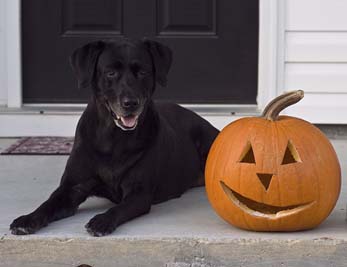
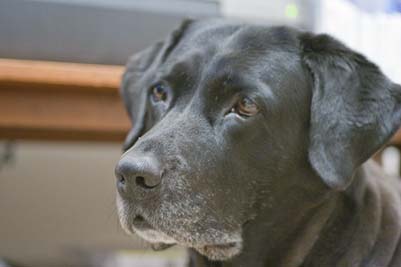
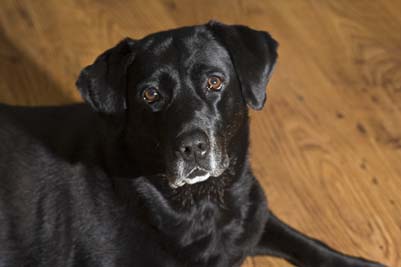
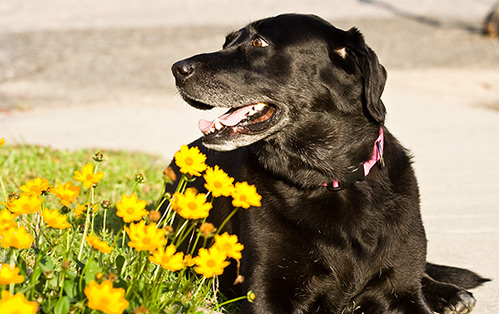
I got called out on a computer task today, so got home late to a limping Labrador. My poor little pup (she’s 8 years now, but I got her at 8 weeks, so you know what I mean) was limping rather heavily and favoring one paw – she has such a forlorn look in her eyes I almost get the sense that she is crying (is it possible for dogs to cry?). Needless to say, my mind has been on some other things today. If she’s not doing better tomorrow, it’s off to the vet I go. I think she might have walked through some glass inadvertently when my wife took her for her afternoon walk while I was out.

Another fun day in the life, eh? Anyway, in light of the events of the day, I feel compelled to make a declaration that this a “Moo”nday, not a Monday (her name is Maggie, so we affectionately have called her many derivations of that, the most common of which is “Moo”). So, pardon the non-photo themed day, but I would like to share a few posts of her in kind of a tribute to the best friend I’ve ever had:

It looks like the tutorial might be pushed back a day or two. In the meantime, what does everyone think of the new Lightbox plugin I have in place for WordPress?  (Hint:  Click on an image in the post…)  Until next time:  happy shooting and watch those apertures!! 🙂

Workflow – ACR vs DNG which way to go?

Recently two of the blogs that I read brought some meaningful insight on individual work flow perspectives. The first was Scott Kelby’s Photoshop Insider, where he had a few people criticize his critique of camera raw in Photoshop CS3, Lightroom, and Bridge. It was a pretty good and informative post, but a select few saw that as an opportunity to say that he was not giving Apple’s Aperture a fair shake. He actually replied to the comments (which he normally doesn’t do), and with quite an effective argument. This was quite the departure from his normal style, where he has just a few things to say and they are punctuated by pictures, as he likes the visual aids. The ultimate point though, was that Scott is very much a fan of the Adobe Camera Raw in his work flow and post processing of prints.

The other was Mike Johnston’s The Online Photographer. TOP is a great blog if you like to read, but is not very often written with the visual learner or “reader” in mind. The post that struck me was Mike’s Friday post, where he espouses “What to Buy” and his thoughts on the DNG format. While quite interesting, it’s not exactly in keeping with my thoughts on post processing.

Since I am more of an ACR guy than a DNG guy, it’s really going to be beside the point to discuss my feelings on work flow and post processing. Instead I am goig to take a different tack here and say that work flow is really up o whatever works best for the individual. I know some people that go with open sourced options like GIMP, and that is equally viable if the results are acceptable to the photographer. It’s ultimately a matter of this – opinion!

All of this brings me to my final point, and that is really about the nature of blogging itself. Blogging, as much as we like to think otherwise at times, is just our personal opinions. I think sometimes we get wrapped up in promoting certain ends, and I am equally guilty of that here at CB – I promote my own photography, ideals that I believe in, and software and hardware that I use. Nevertheless, it is, after all, just my opinion.

So, partly in response to those that started giving Scott K. a hard time, and in defense of Mike’s DNG work flow with the Pentax – lest we begin to take ourselves or others begin to take us too seriously, we are all just promoting our own opinions on subjects related to photography. It’s definitely useful though as different thoughts and opinions and ideas are what inspires each and every one of us to new levels of creativity and original thoughts. So, my hats off to all the blogging world, but this weekend, most especially to Scott K. and Mike J. for being on the leading edge of the topical content for photography.

In closing, I’d like to open the comment section up for others to share their thoughts and opinions on work flow, and blogging in general if you like. What work flow style do you prefer? Do you act on the recommendations of fellow bloggers, fellow photographers, or on other resources? Don’t forget to get out and shoot too though, so happy shooting and watch those apertures!

In the spirit of keeping things light-heartedly, and as a “make-up” for the short post yesterday, here’s the weekly best from What the Duck!

What the DUck - Friday, April 25th

Finally Friday (again)

Well, it’s been a log week folks,and since I’ve put a bit of time into various projects this week, I am feeling somewhat sleep-deprived, so not much will happen today, except to say that my Friday post will be delayed for another 12 hours or so.  Tomorrow is the anniversary (made it 5 years and she still loves me!), and we’ll be doing some stuff with our neighbors.  So…I should have some time tomorrow morning to share some Friday fun with you (only on Saturday).  Just to give you a hint, the theme is “Friday Freebies!  So, if you want to save some money, or are just interested in seeing economical alternatives, then make sure to tune in for a Saturday morning post with the freebie fun!

About 5 days left to chime in on the camera quantity poll, so don’t forget to vote.  I’d also be interested in seeing how people have been doing with the Online Photography Test   Care to share your scores, ideas, and suggestions for improving and/or expanding on this?  E-mail me or post to the blog.  So, until tomorrow – if you’re going out, be sure to take your cameras.  Happy shooting and watch those apertures! 🙂

A marriage made in Heaven – FTP and Raw

Yes, that’s right, I am taking a pretty drastic departure from the alliterative titles for posts, but today the two topical subjects are so widely divergent, the title seemed rather amusing. As most of my readership knows, I have been working for some time no on a variety of articles discussing how to create and publish your photos in an online web gallery. For those of you that missed the first few articles, check out the first two articles here and here. Well, today is the unveiling of the 3rd chapter – FTP software. I give a short comparative explanation of a few interface options for both Mac and Windows. That article will be downloadable at the end of the post.

For the other half of the post today, I’d actually like to give some kudos to Scott Kelby over on his blog Photoshop Insider, where he gives an excellent summary of the differences between how Adobe Camera Raw (ACR) functions in Photoshop versus Bridge and versus Lightroom. I know quite a few people (myself included at least initially when LR first came out) had some trouble grasping the differences between each of these uses, and Scott really gives an good post on clarifying this. Plus, it’s Scott Kelby, so there’s always some humor thrown in for good measure! Check it out when you have a minute.

We’re probably not going to get the needed count of 100 votes in the poll for this cycle, but if you haven’t yet, register your category today (see right hand panel for options). I’ll hopefully have a more thought-provoking poll available in May. I’m sure there’s more news to report, but what with getting the photo site (www.jasons-photography.com) more inline and presentable, as well as getting some actual business cards made up and starting to advertise and promote things, I’ve not read much on the web lately. For a good web resource on many of the latest happenings, stop over at Jason D. Moore’s site. He gives an excellent wrap-up every Monday, and has links to a lot of the more popular blogs and photo outlets on the net. He’s linked on the side panel too as I am a member of his blogroll (I actually had the honor of helping out and sitting in on a weekly P&P a week or so ago… *waves to Jason in case he’s reading*…)

Finally today, an amusing shot of the dog from messing around with ambient light earlier today on our afternoon walk (and I am starting to include larger sized images to share so if you click on the pic, be prepared for a pretty large image (1023×646):

maggie.jpg

So, with an article, a web link and a potd, I bid all the reading and viewing audience a good evening and wish you happy shooting tomorrow. Remember to watch those apertures! 😉

Additions to the TOP Test!

It’s kind of a no blog Wednesday for me here at CB, but I’ve made a few additions to the TOP Test today!  Now at 23 questions, it requires more right answers to get a 90% or better.  Do you remember your score from last time?  Stop in again and see if you can improve!  Do you remember the questions from last time?  See if you can tell which ones are new!  Share your thoughts, scores, and ideas for new questions here in the comments or via email.

Feel free to add the page to your browsers or link to your blog:  http://toptest.canonblogger.com

Some more are on the way, and I’ve also got another article on the Web Gallery setup that may be of interest that I’ll put out tomorrow:  FTP software.  Last but not least, don’t forget the poll going on how many cameras you own featured here on the blog.  It ends on the 30th, so as they say in politics:  Let your voice be heard!  Until tomorrow then, happy shooting and watch those apertures!

Creating templates

Hey all, today is tutorial Tuesday, and I share a technique I used recently in creating a calendar template to import client photos in. I could only get about half way through the tutorial before I had to stop (I am trying to keep video tutorials at or under 5 minutes), so this will be part 1 of a two part series. Today I show you how I created the graphics with some guides, and keeping things all manageable on just a couple levels. As usual, the tutorial is linked in both Flash (web based) and QuickTime (iPod/iTunes friendly) formats at the end of the post.

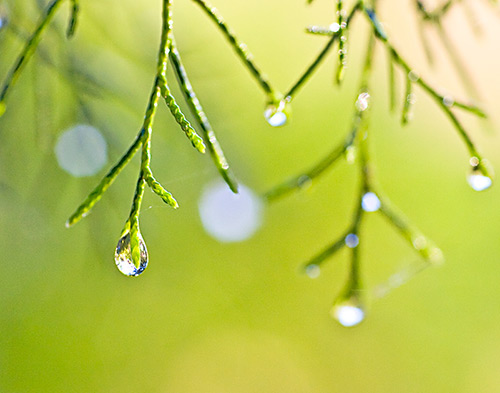
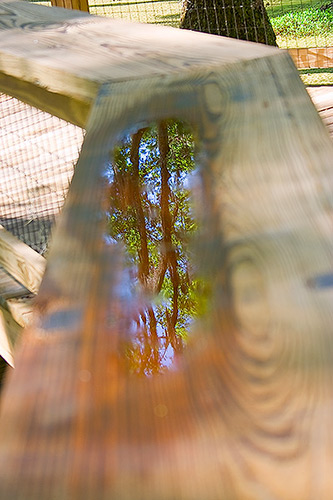
Additionally, I’ve got a few rather unique shots (I think anyway) from my outing to Magnolia Gardens this weekend. There was a heavy thunderstorm the previous day, so lots of opportunities for some macro and water works. Here’s two I thought that the viewing audience might enjoy:

dewdrops21.jpg

reflectoin.jpg
That’s about it for today…a few photos and a tutorial for your viewing pleasure. A multimedia blowout this week thus far, with an article yesterday, photos and videos today, and who knows what tomorrow has in store…more articles, and maybe….an audio podcast *gasp!* (Likely not with the latter though – so no promises!) Until then, happy shooting and watch those apertures! 🙂

CB Episode 038: Calendar Template

PlayPlay

PlayPlay

Meaningful Monday Materials

Yeah yeah, I know, sometimes the alliteration gets old, but it really is a disease for someone who enjoys to write! Anyway, resuming the content on how to create web galleries, I thought that today would be a good day to share the next chapter draft with the reading/listening/viewing audience.

This go around, it’s Chapter 3 which talks about some of the basic coding concepts. If you are going to be customizing your web galleries from software like Lightroom or Photoshop, some basics of coding concepts are helpful to get the end results you need. Thus, I’ve put together a very basic, but detailed article that talks about the most basic of coding, being HTML and CSS. I also include some useful resources for those interested. Anyway, not much else to report today. For some news and events from around the web, stop over to Jason D’ Moore’s site for his Monday P&P Blogroll. (Thanks for the linkback Jason, and helping out last week was a lot of fun, let me know if you ever need any assistance – it really kept me on my proverbial toes!) 🙂

Happy shooting all, and watch those apertures! Here’s the link to the PDF article:  Coding Basics.pdf

Friday Night Lighting…(and a funny)

Normally Frida posts are filled with humor, funny and generally stuff that is trivia to help keep us all grounded in reality and realize that there is more to life with photography. I am starting to get a little of a backlog with the projects I’ve been working on though, so I am goig to lighten the load by one project here today – and that is a DIY lighting project.

Before I continue, the DIY lighting concept is not something that comes easily to me, as I fully admit that I am no lighting pro. If you want pro advice, the best place to go is to Strobist where David Hobby hosts an excellent lighting blog that has become pretty much the place to go for lighting tutorials. What I have learned from that site would take days to rattle off here. So, rather than regale you with all of that, I’ll just say that Strobist has given me new insight into uses for everyday objects.

Here’s the lighting project – a while back David talked on his blog about using household items to create lighting peripherals such as reflectors, bounce lights, light stands, and has been a common theme for quite a while. So, the inspiration for this came from what to use to make your own DIY snoot. A snoot is a device that focuses the light from your flash (which you know of course to take off the camera if you want really good light).

Well, at work I noticed one day that a commercial industrial sized roll of TP had been used and the cardboard roller that it was on was just sitting on top of the paper towel dispenser. I picked it up, looked it over and it seemed to be close to the size of my 550EX flash. I took it home and tried it out – bingo! The only problem was, it really wasn’t long enough. Well, no biggie, I just waited another few weeks and sure enough, another TP roller appeared on top of the towel dispenser. I snaked that one away, and brought them home. A few pieces of scotch tape to attach the two devices together and I was ready for my test shot:
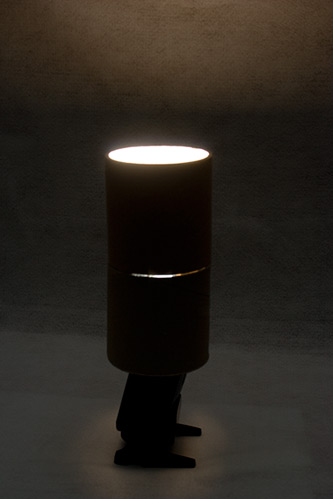
snoot1.jpg

Notice the light leaking through the side though? Well, I decided good old duct tape might be able to fix that. So, a few tears and strips later, and I got this shot:
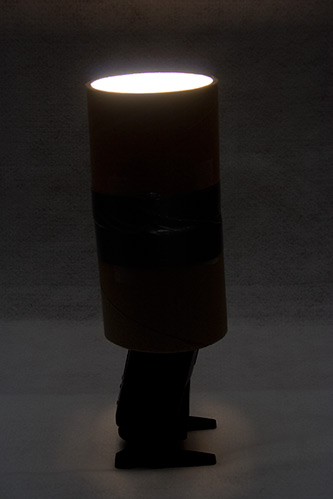
snoot2.jpg

Looking a lot better now, but now I am noticing a little light seeping through the back end still – any ideas how to eliminate that, or is that there in most snoots? Not sure, but this cost me a grand total of probably 05 ¢ of tape. So, I played around with the distance, as David suggests over at the Strobist site, and I finally am happy to announce that this snoot works best at a distance of about 4′ from the subject, and (surprise surprise) at about a 45 degree angle to the subject. I was hamming it up for the camera just to give a little variety while I figured this out, and actually came out of the lighting test with a self-portrait I am not too ashamed of. It’s end-of-week scruff, so that will be gone come Monday, but I thought the lighting effect of a snoot (concentrated light) is pretty useful.
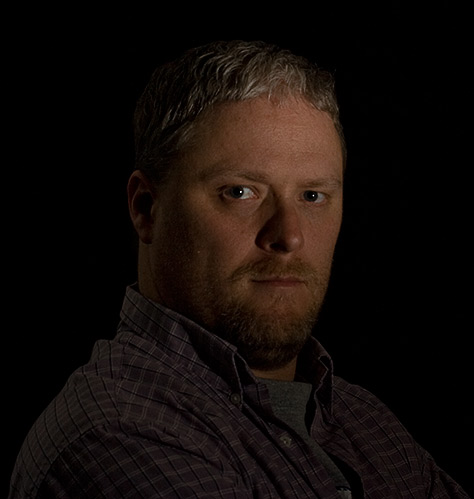
me.jpg

So, there it is – the Friday Night Light experiment. I know it’s late, but better late than never right? Anyone else have any DIY lighting experiments they want to share? If so, all are welcome to join in the comments area. Otherwise, have a great weekend, happy shooting, and watch those apertures! (mine was a little soft – but I think that may have been oof, not dof softness)…

Oh yeah, I almost forgot, Fridays always feature a WTD cartoon, so here’s my fave of the week:

What The Duck, Monday April 14th