Missed Mondays

Egads, I am such a slacker – never posted yesterday. I was still feeling the effects of a rather tedious weekend spent on some home renovations and Super Bowl side effects. Suffice to say, I hit the sack at 8pm – a first for me in quite a while. However, I do have some tidbits to share – both Scott Kelby and David Hobby from Photoshop Insider and Strobist fame respectively give mention to Joe McNally’s recent book – The Moment it Clicks. I usually avoid promotional recommendations, but with the excerpts that I’ve read and the buzz about it, I may as well pull the trigger.

In other news, PMA is wrapped up and the blogs will surely light up with their recollections of the gear and trade show information they came away with from the event. Tomorrow I will endeavor to have a round-up of the web resources that cover the gamut. Today is tutorial Tuesday and I hope to have that up in time, but fair warning – it will be out fairly late tonight if I can make it.  Finally, thanks to the friendly folks at feedburner, I’ve added an email subscription link to the sidebar so you can add your email address to be notified every time I make a post.  The default code does not seem to like my custom stuff so things aren’t as pretty as I’d like, but if I waited on that kinda of minutia, I’d not even have a blog running yet!  Happy shooting all, and as always, watch those apertures! 😉
Printing your pictures online

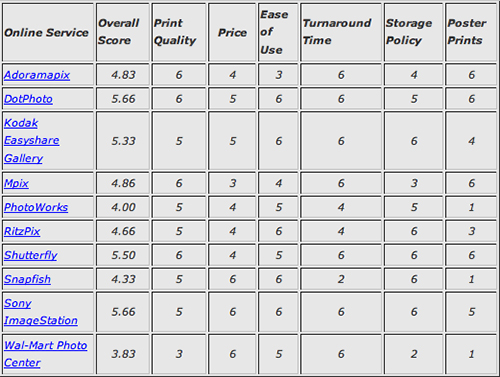
I know it’s unusual for me to make posts on the weekends, but I felt this subject warranted an extra post.  One of the things that’s always a hassle to deal with is taking your prints from not only the camera to the computer, but then from the computer to the printer.  Often times we are limited by the quality of our desktop printers.  To combat that, we turn to local printing outlets.  Even more so, in this day of technology, online printing has become much more consumer-oriented, with a lot of the mystique and confusion, (i.o.w. – hassle), alleviated.  Since this subject is certainly not a new one, rather than re-visit it completely, it always helps to refer to the works of others.  Why re-invent the wheel if it already works?  To that end – recently one of the online forms that I participate in raised a question of which online printers give the best results.  For about a year now, I’ve relied on a rating done by the folks over at Popular Photography.  I referred to it in the forums, and decided it would be a good idea to share that here.

onlineprinters.jpg

With those results from a little over a year ago, perhaps it is time to re-visit the subject once again.  If you would like to see another evaluation of online printers, feel free to give the folks at PopPhoto your thoughts.  I believe they have a contact email address on their website.  For the time being though, I would venture to guess that the results of the above have likely not changed all that much.   Tune in tomorrow for a wrap-up of the PMA show around the web.   Now, on to more important things – GO GIANTS!  🙂  For those attending parties, remember to party smartly – don’t drink and drive!

Selective Coloring: Method #1

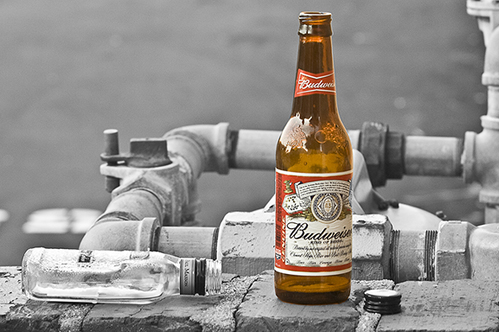
The task of selecting a single object in an image to highlight by means of leaving that color intact while altering the surrounding elements is nothing new to photography…and there are several ways to do this, with varying levels of success and usability for each. The tutorial for this week looks at the simplest of ways, by putting that object on its own layer. The nice thing here is that the technique is portable to multiple versions of Photoshop. Having recently upgraded myself to CS3 Extended, I am trying to keep tutorials cross-functional across multiple versions for usability. Enjoy, and see you next week, for the second method. Don’t forget to vote in the polls!

bw_beer.jpg

Browser Version